

Choosing the best moba gaming mouse comes down to thumb button accessibility, sensor accuracy, and overall shell balance. Fast click actuation and dependable tracking matter far more in lane skirmishes than pure ultra-lightweight construction.
Titles like Dota 2 and League of Legends require frequent camera pans combined with active item and spell execution. Having between 5 and 12 accessible side inputs allows players to offload secondary actions from the keyboard to the mouse hand.

Pros
- High-precision HERO sensor up to 25,600 DPI
- Eleven fully programmable buttons
- Adjustable balance with five removable weights
- Dual-mode hyper-fast scroll wheel
- Tensioned mechanical switches for crisp clicks
Cons
- Tethered wired design restricts cable-free movement
- Full RGB customization requires Logitech Gaming Software
Pros
- 15 programmable buttons for extensive macro assignments
- High sensor range up to 26,000 DPI
- Cordless 2.4GHz wireless connectivity
- Ergonomic shape designed to reduce grip fatigue
- Multiple onboard lighting modes and DPI presets
Cons
- Deep button remapping requires proprietary software installation
- Relatively heavy build at approximately 148 grams

Pros
- 19 programmable buttons for complex macros
- Modular weight tuning with eight removable weights
- Five onboard memory profiles for custom layouts
- Wide DPI adjustment range up to 12400
Cons
- Software download required for macro and lighting customization
Quick Comparison of Featured MOBA Mice
| Model | Connection | Max DPI | Programmable Buttons | Weight Tuning |
|---|---|---|---|---|
| Logitech G502 Hero Wired Gaming Mouse – Black | Wired USB | 25,600 | 11 | Five 3.6g weights |
| Redragon M811 PRO Wireless RGB Gaming Mouse 26K | 2.4GHz Wireless | 26,000 | 15 | No |
| Redragon Gaming Mouse, MMO Mouse Gaming UP 12400 | Wired USB | 12,400 | 19 | Eight 2.4g weights |
1. Logitech G502 Hero Wired Gaming Mouse – Black
The Logitech G502 Hero Wired Gaming Mouse – Black features the proprietary HERO 25K optical sensor, which provides tracking up to 25,600 DPI without hardware smoothing or acceleration. This stability ensures precise cursor placement during chaotic team fights where target misclicks can cost an objective.
It provides 11 programmable buttons, including two index-finger edge buttons and a thumb-accessible sniper switch. Mechanical spring button tensioning underneath the primary switches provides a crisp, tactile rebound suitable for rapid skill-shot casting. A dual-mode scroll wheel allows standard ratcheted scrolling or free-spinning navigation.
Logitech includes five removable 3.6-gram weights, allowing users to tune the center of gravity to match their grip style. While its ergonomic shape favors palm and claw grips, the relatively hefty baseline mass may feel cumbersome for players who prefer sub-60-gram competitive pointers. More general options can be reviewed in our guide to the best gaming mice.
2. Redragon M811 PRO Wireless RGB Gaming Mouse 26K
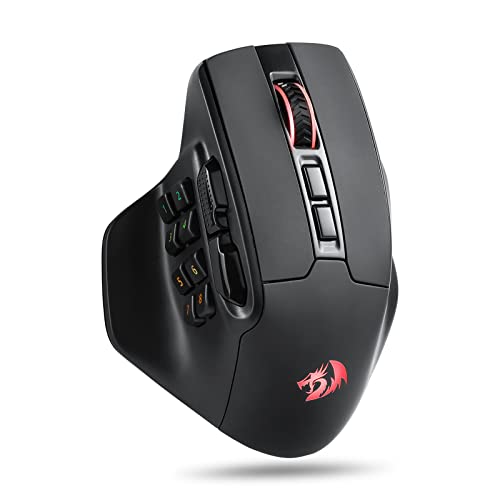
The Redragon M811 PRO Wireless RGB Gaming Mouse 26K delivers cable-free movement via a 2.4GHz low-latency wireless connection. Untethered tracking removes cable drag across mouse pads, allowing cleaner sweeps during rapid camera relocation across sprawling match maps.
This model stands out by integrating 15 programmable inputs, featuring an ergonomic cluster of side buttons organized to keep active item slots and ability toggles within thumb reach. Dedicated software handles key remapping, macros, and configuration across five adjustable DPI stages ranging up to 26,000 DPI.
The wider right-side contour offers a natural resting platform for ring and pinky fingers, reducing strain during extended ranked sessions. However, configuring the multi-button side cluster requires an adjustment period to avoid accidental clicks when gripping firmly to lift the pointer.
3. Redragon Gaming Mouse, MMO Mouse Gaming UP 12400
The Redragon Gaming Mouse, MMO Mouse Gaming UP 12400 targets players who want complete hotkey integration on their primary hand. It packs 19 macro-programmable buttons, including a full 12-button numerical thumb grid built directly into the side shell.
Equipped with an optical sensor supporting up to 12,400 DPI, 40G acceleration, and a 1,000Hz polling rate, the mouse maintains clean tracking across medium-sensitivity gaming surfaces. Five onboard memory profiles let players swap bindings between different MOBA champion loadouts or switch directly to desktop profiles with a button press.
An eight-piece weight cartridge contains 2.4-gram metal slugs, enabling users to calibrate overall resistance. The dense 12-button side panel requires precise thumb articulation, which can feel cramped for users with large hands during fast-paced skirmishes. Pairing your setup with tactile hardware from our mechanical keyboard switches guide creates a balanced input workflow.
How to Choose a MOBA Gaming Mouse
Unlike first-person shooter pointers where minimum weight is the main design priority, MOBA peripherals require a balance between agility and button utility. Identifying how many in-game functions you intend to bind directly to your hand determines the ideal chassis style.
Button Layout and Spacing
Standard two-button thumb layouts often force players to retain complex hotkeys across their keyboard hand. A layout offering between 4 and 12 thumb buttons allows critical item slots, teleport scrolls, and ward placements to trigger instantly without shifting your fingers off the primary ability keys.
Sensor Reliability vs DPI Ceilings
High maximum DPI ratings exceeding 20,000 are standard across modern sensors, but actual in-game sensitivity rarely exceeds 1,600 to 3,200 DPI for MOBA screens. Focus on sensors that operate without jitter, smoothing, or hardware acceleration so your cursor reliably lands on enemy hitboxes every time.
Frequently Asked Questions
Is a heavy or light mouse better for MOBA titles?
Medium-weight designs between 85 and 120 grams remain popular in strategy games because the added inertia prevents cursor overshooting when clicking small minions. However, players who use low DPI settings and sweep across large monitor areas often benefit from lighter builds to reduce wrist fatigue.
Can I use an MMO mouse for MOBA games?
Yes, many MOBA players prefer 12-button MMO mice because the side grid can map full item inventories, active trinkets, and team pings. The main drawback is the time required to build muscle memory for individual buttons within dense key clusters.
Final Recommendation
For balanced ergonomic control and premium switch tensioning, the Logitech G502 Hero Wired Gaming Mouse – Black is the most versatile hybrid choice. Players who prefer cordless freedom with a dedicated side cluster should look at the Redragon M811 PRO Wireless RGB Gaming Mouse 26K. If your playstyle relies on binding every item and command to your thumb, the 19-button Redragon Gaming Mouse, MMO Mouse Gaming UP 12400 delivers complete macro capability.



Write Your Review
No reviews yet. Be the first to share your experience!