

Finding the best mmo gaming mouse for small hands requires balancing extensive macro access with reachable thumb buttons. Many multi-button designs feature bulky shells that force unnatural grip stretching and cause fatigue during extended raids.
If you want to read more about general pointers across all sizes, check our guide on the best MMO gaming mouse. For general desktop pointer options, browse our overview of the best gaming mice in 2026.
Top MMO Mice for Small Hands at a Glance
Pros
- Dedicated left-handed ergonomic contouring
- 12 programmable thumb buttons for complex hotkeys
- Multi-directional tilt-click scroll wheel
- Configurable 8,200 DPI 4G laser sensor
- Onboard 32-bit ARM processor handles inputs
Cons
- Restricted solely to left-handed grip orientations

Pros
- 18 programmable buttons including 12-key side grid
- Pixart PAW3327 sensor with up to 12400 DPI
- Includes eight-piece modular weight tuning set
- Five onboard memory profiles for rapid switching
Cons
- Macro remapping software is incompatible with macOS
- Lacks wireless connectivity options
Pros
- 15 programmable buttons for extensive macro assignments
- High sensor range up to 26,000 DPI
- Cordless 2.4GHz wireless connectivity
- Ergonomic shape designed to reduce grip fatigue
- Multiple onboard lighting modes and DPI presets
Cons
- Deep button remapping requires proprietary software installation
- Relatively heavy build at approximately 148 grams

Pros
- 19 programmable buttons for complex macros
- Modular weight tuning with eight removable weights
- Five onboard memory profiles for custom layouts
- Wide DPI adjustment range up to 12400
Cons
- Software download required for macro and lighting customization

Pros
- 12 dedicated programmable side buttons
- Dual 2.4GHz wireless and USB-C wired modes
- Pixart 3335 sensor with adjustable 16000 DPI
- Up to 80 hours of battery in Eco mode
- Full wireless configuration through dedicated software
Cons
- Battery life drops to 45 hours with RGB enabled
- Key remapping requires proprietary driver software

Pros
- 15 programmable buttons for complex keybinds
- Dedicated eight-button MMO side panel
- Ergonomic grip shape for extended sessions
- Five onboard DPI switching levels
- Customizable dynamic RGB lighting modes
Cons
- Tethered wired design limits placement flexibility
- Advanced keybinds require dedicated software setup

Pros
- Up to 532 hours of Bluetooth battery life
- High-precision 26,000 DPI Marksman sensor
- Ten programmable buttons for custom keybinds
- Comfortable asymmetric shape for larger hands
- Versatile 2.4GHz and Bluetooth dual-mode wireless
Cons
- Asymmetric shape restricted to right-handed users
- Bulky profile unsuitable for smaller hands or fingertip grips

Pros
- 17 fully programmable macro buttons
- Repositionable 12-button side slider system
- Accurate 18,000 DPI PixArt optical sensor
- Durable 50-million-click Omron switches
- Contoured ergonomic shape with a finger rest
Cons
- Tethered wired-only connection
- Right-hand ergonomic design limits ambidextrous use

Pros
- Interchangeable side plates for multiple game layouts
- Flexible HyperSpeed, Bluetooth, and wired connectivity
- High-resolution 50,000 DPI optical sensor
- Up to 280 hours of battery life over Bluetooth
- Versatile multi-mode tilt scroll wheel
Cons
- Full software customization is not supported on macOS
- Wireless charging docks and accessories sold separately
Key Ergonomic Factors for Smaller Hands
Small hands typically struggle with fixed 12-button side grids where the front row sits too far forward. Models featuring sliding button racks or alternative cluster layouts reduce unnecessary thumb extension and improve overall handling comfort.
Chassis weight and width also determine how quickly hand strain develops during repetitive rotational movement. Pairing your mouse with a supportive desk setup, such as one of the best gaming chairs in 2026, helps maintain proper forearm alignment.
Detailed Reviews of 9 Multi-Button Mice
Corsair Scimitar RGB Elite Wired MMO MOBA PC
The Corsair Scimitar RGB Elite Wired MMO MOBA PC is uniquely tailored for shorter finger reaches due to its patented Key Slider system. This mechanism allows you to slide the entire 12-button side panel forward or backward by up to eight millimeters.
The mouse houses a custom PixArt PMW3391 optical sensor reaching 18,000 DPI with single-step micro adjustments. The 50-million-click Omron mechanical switches ensure consistent tactile feedback, though the overall chassis remains slightly wide for pure fingertip grips.
Razer Naga V3 Pro Wireless MMO Gaming Mouse
The Razer Naga V3 Pro Wireless MMO Gaming Mouse incorporates three interchangeable magnetic side plates offering 12, 6, or 2 buttons. Players with smaller palms can drop down to the 6-button layout to prevent misclicks during hectic raid mechanics.
Hardware features include a Razer Focus Pro 50K optical sensor and optical switches rated for 100 million clicks. You get HyperSpeed 2.4GHz wireless alongside Bluetooth connectivity, though the premium feature set commands a significantly higher price bracket.
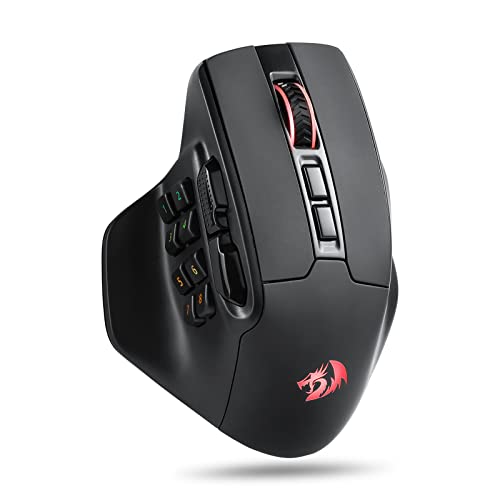
Redragon M811 PRO Wireless RGB Gaming Mouse 26K
The Redragon M811 PRO Wireless RGB Gaming Mouse 26K diverges from the crowded grid layout by grouping its side keys into a 2 plus 8 configuration. This segmented spacing helps shorter thumbs differentiate inputs without sliding across an intimidating wall of buttons.
Equipped with a 26,000 DPI sensor and low-latency 2.4GHz wireless, it presents an adaptable interface for desktop setups. The accompanying driver software manages lighting and macros, though the software interface feels less polished than mainstream competitor suites.
Redragon M811 Wired RGB MMO Gaming Mouse 10000 DPI
The Redragon M811 Wired RGB MMO Gaming Mouse 10000 DPI carries the same ergonomic 10-button side arrangement as its wireless sibling in a tethered format. It sports a native 10,000 DPI sensor capable of scaling up to 12,400 DPI through software tuning.
With fifteen total programmable buttons, it supplies sufficient inputs for complex macro assignments. The primary compromise is the tethered braided cord, which may produce slight drag unless paired with a dedicated mouse bungee on compact desks.
Redragon M908 Wired MMO RGB Gaming Mouse 12400 DPI
The Redragon M908 Wired MMO RGB Gaming Mouse 12400 DPI brings a traditional 12-button thumb matrix down to a remarkably accessible budget tier. It features a PixArt PAW3327 sensor, durable Teflon feet, and an eight-piece weight adjustment cartridge.
Removing the interior weights helps small-handed users maneuver the mouse without accumulating wrist strain over time. The dense button cluster requires precise thumb placement, meaning claw-grip users with short thumbs might struggle to hit numbers one through three.
Redragon Gaming Mouse, MMO Mouse Gaming UP 12400
The Redragon Gaming Mouse, MMO Mouse Gaming UP 12400 provides nineteen programmable buttons, including a standard twelve-key side matrix. It supports custom weight distribution via an included eight-piece tuning tray positioned inside the underside bay.
Up to five onboard memory profiles allow quick profile toggling between diverse character classes or productivity software. Its contoured right-side finger rest helps support your ring finger, although the wide body demands a full palm grip style.
Redragon M913 Wireless RGB MMO Gaming Mouse 16000
The Redragon M913 Wireless RGB MMO Gaming Mouse 16000 utilizes an optical PixArt 3335 sensor paired with dual-mode 2.4GHz wireless and USB-C connectivity. Its battery delivers up to 80 hours in eco mode when internal RGB lighting remains deactivated.
Its side button array offers rapid key actuation for casting rotations and defensive cooldowns in roleplaying games. The broad physical shell feels sturdy, but players with very compact hand spans may find the thumb rest slightly excessive.
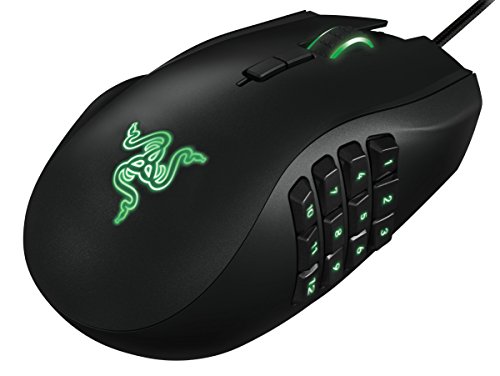
Razer RZ01-01050100-R3M1 Naga Left-Handed
The Razer RZ01-01050100-R3M1 Naga Left-Handed remains a specialized solution for southpaw gamers needing a dedicated twelve-button thumb cluster. It features an 8,200 DPI 4G laser sensor alongside a tilt-click scroll wheel for extra input options.
The curved outer shell assists left-handed users in maintaining a comfortable palm grip throughout long sessions. However, its older laser sensor technology tracks less reliably on irregular desk surfaces compared to contemporary modern optical sensors.
Corsair IRONCLAW Wireless SE Gaming Mouse – Black
The Corsair IRONCLAW Wireless SE Gaming Mouse – Black includes ten programmable buttons and a Corsair Marksman 26,000 DPI optical sensor. It supports dual connectivity via sub-1ms wireless and Bluetooth, backed by up to 532 hours of battery reserve.
Buyers should exercise caution because Corsair explicitly designed this specific chassis for larger hands and palm grips. Small-handed users will find reaching the forward side buttons challenging, making it suitable only if you employ an aggressive forward claw grip.
Key Specifications Comparison
| Model | Connection | Max DPI | Side Buttons | Hand Orientation |
|---|---|---|---|---|
| Corsair Scimitar RGB Elite | Wired USB | 18,000 | 12 (Adjustable Slider) | Right |
| Razer Naga V3 Pro | Wireless / USB-C | 50,000 | 12, 6, or 2 (Swappable) | Right |
| Redragon M811 PRO | Wireless 2.4GHz | 26,000 | 10 (2 + 8 Layout) | Right |
| Redragon M811 Wired | Wired USB | 10,000 | 10 (2 + 8 Layout) | Right |
| Redragon M908 | Wired USB | 12,400 | 12 | Right |
| Redragon M901K UP 12400 | Wired USB | 12,400 | 12 | Right |
| Redragon M913 | Wireless / USB-C | 16,000 | 12 | Right |
| Razer Naga Left-Handed | Wired USB | 8,200 | 12 | Left |
| Corsair IRONCLAW SE | Wireless / Bluetooth | 26,000 | Side cluster | Right (Large hands) |
Complementary Gaming Hardware
A capable mouse represents only one part of a responsive gaming battle station. If you need quiet keystrokes alongside your macro keys, explore the best silent gaming keyboards for shared rooms.
Understanding switch mechanisms is equally crucial when organizing complex skill rotations. Read our comprehensive guide on mechanical keyboard switches explained or inspect the best gaming keyboards in 2026 to complement your desktop.
Frequently Asked Questions
Can small hands comfortably reach all 12 thumb buttons?
Reaching every key depends on the shell dimensions and the thumb rest placement. Models with sliding panels or modular plates allow you to shift the buttons back toward your palm, significantly reducing thumb strain.
Should small-handed gamers use a claw or palm grip on MMO mice?
Claw grip allows shorter fingers to retain control over a broader mouse frame. A palm grip provides wrist rest support, but it can push small fingers too far forward on wide chassis profiles.
Final Recommendation
For players needing an authentic 12-button grid tailored to smaller fingers, the Corsair Scimitar RGB Elite Wired MMO MOBA PC is the safest choice thanks to its adjustable slider. Those seeking wireless versatility and swappable layouts will benefit most from the Razer Naga V3 Pro Wireless MMO Gaming Mouse.
Budget-minded gamers should evaluate the Redragon M811 PRO Wireless RGB Gaming Mouse 26K, which simplifies thumb actuation through its split button configuration. Avoid oversized frames like the IRONCLAW unless your grip style naturally compensates for substantial shell width.






Write Your Review
No reviews yet. Be the first to share your experience!