

The best gaming mouse under $25 dollers depends mainly on connection type, mouse weight, hand fit, and programmable controls. This specification-based comparison covers wired, wireless, lightweight, ergonomic, and multi-button options for PC gaming and everyday work.
These models are selected against the requested budget category, but prices and availability can change. Check the current listing before buying, especially if staying below a strict spending limit matters.
- Best for programmable controls: Redragon M602 Gaming Mouse, with nine programmable buttons and adjustable DPI up to 7200.
- Best for lightweight FPS play: SteelSeries Esports Mini FPS Gaming Mouse, weighing 61g and using an 18K CPI TrueMove Pro sensor.
- Best lightweight honeycomb wired model: TMKB Falcon M1SE White Gaming Mouse, Wired, with a 75g shell, 12800 DPI, and a 1000Hz polling rate.
- Best for flexible connectivity: Redragon M725 Honeycomb Shell Gaming Mouse, which supports wired, Bluetooth, and 2.4GHz connections.
- Best for a protected right-handed design: ASUS TUF Gaming M3 Gen II Wired USB Gaming Mouse, with a 59g body, IP56 resistance, and six programmable buttons.

Pros
- Up to 7200 adjustable DPI sensitivity
- Nine programmable buttons for custom macros
- Ergonomic body with dedicated finger rests
- Seven selectable RGB lighting presets
- Broad compatibility with Windows and Mac platforms
Cons
- Full customization requires downloading separate software

Pros
- Lightweight 61g frame for fast handling
- Durable optical magnetic switches rated for 100M clicks
- High-precision 18,000 CPI TrueMove Pro sensor
- Supports claw, palm, and fingertip grip styles
- Five programmable buttons for custom bindings
Cons
- Asymmetric shape is unsuitable for left-handed users
- Wired design lacks cordless flexibility

Pros
- Ultralight 75g honeycomb construction
- Wide DPI range up to 12,800
- Six fully programmable buttons
- Flexible drag-reducing paracord cable
- Customizable software with profile layers
Cons
- Wired design limits portability
- Honeycomb design is susceptible to dust accumulation

Pros
- Ultra-lightweight 49-gram honeycomb chassis
- Versatile 2.4GHz, Bluetooth, and USB-C connections
- Five programmable macro-capable buttons
- Five onboard DPI preset stages
- Comfortable symmetrical grip design
Cons
- Requires dedicated software to unlock full 8000 DPI

Pros
- Up to 12800 DPI across six adjustable levels
- Responsive tracking with up to 1000Hz polling rate
- Breathable honeycomb shell reduces hand fatigue
- Programmable macros and 14 distinct RGB lighting modes
- Plug-and-play USB connectivity across multiple operating systems
Cons
- Gaming mode configuration requires separate macro software setup
- Wired USB connection restricts movement freedom
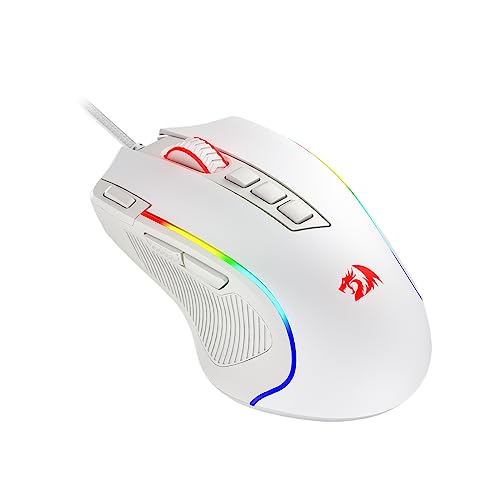
Pros
- 11 fully programmable buttons for macros and bindings
- Dedicated rapid fire and side macro keys
- Customizable sensor sensitivity up to 8000 DPI
- Textured rubber side grip enhances claw grip control
- Five dynamic RGB backlight modes
Cons
- Maximum 8000 DPI requires dedicated software configuration
- Wired design limits placement flexibility compared to wireless
- Ergonomic contouring caters primarily to right-handed claw grips

Pros
- Lightweight 59-gram construction
- IP56-rated dust and water resistance
- Smooth PTFE mouse feet
- On-the-fly DPI switching up to 8,000 DPI
- Six programmable buttons
Cons
- Right-handed ergonomic design excludes left-handed users
- Wired-only USB configuration

Pros
- Versatile 2.4GHz, Bluetooth, and USB-C connectivity
- Fast 1000Hz polling rate for responsive tracking
- Built-in 500mAh rechargeable battery with auto-sleep
- Ergonomic contoured design for right-handed grips
- Customizable RGB backlighting with programmable side buttons
Cons
- Asymmetric shape is unsuitable for left-handed users
- Conflicting maximum DPI ratings across product documentation
How These Budget Gaming Mice Differ
| Model | Connection | Advertised sensor range | Weight | Programmable controls |
|---|---|---|---|---|
| Redragon M602 Gaming Mouse | Wired USB | Up to 7200 DPI | Not specified | 9 buttons |
| SteelSeries Esports Mini FPS Gaming Mouse | Wired USB | Up to 18K CPI | 61g | 5 buttons |
| TMKB Falcon M1SE White Gaming Mouse, Wired | Wired USB | 200 to 12800 DPI | 75g | 6 buttons |
| Redragon M725 Honeycomb Shell Gaming Mouse | Wired, Bluetooth, and 2.4GHz | Up to 8000 DPI | 49g | 5 buttons |
| SOLAKAKA SM900 Gaming Mouse Wired | Wired USB | Up to 12800 DPI | Not specified | Side buttons and software remapping |
| Redragon M612 Wired RGB Optical Gaming Mouse 8000 | Wired USB | 500 to 8000 DPI | Not specified | 11 buttons |
| ASUS TUF Gaming M3 Gen II Wired USB Gaming Mouse | Wired USB | Up to 8000 DPI | 59g | 6 buttons |
| GAMCATZ Bluetooth Wireless Gaming Mouse,12500 DPI | Wired, Bluetooth, and 2.4GHz | 800 to 12000 DPI | Not specified | Programmable side buttons |
What to Look For in the Best Gaming Mouse Under $25 Dollers
Choose Wired or Wireless First
Wired models such as the Redragon M602, SteelSeries Prime Mini, TMKB Falcon, SOLAKAKA SM900, Redragon M612, and ASUS TUF M3 Gen II need an available USB connection. They avoid charging and pairing, but cable routing can affect low-sensitivity aim and desk organization.
The Redragon M725 and GAMCATZ mouse offer wired, Bluetooth, and 2.4GHz modes. Bluetooth is convenient for general work, while the supplied specifications position 2.4GHz as the gaming-focused wireless option. Confirm that the required receiver, Bluetooth support, and operating system are available on the target device.
Match Weight and Shape to Your Grip
Lightweight models can be easier to reposition during broad, low-sensitivity movements, but weight alone does not determine comfort. The SteelSeries model is a mini right-handed mouse, the ASUS model is a 59g right-handed design, and the Redragon M725 uses a 49g symmetrical honeycomb shell.
For more grip-specific guidance, see our comparison of gaming mice for fingertip grip or review the options in our guide to ergonomic gaming mice for palm grip.
Do Not Choose Only by Maximum DPI
Every model listed offers a high advertised DPI ceiling, but most players use a lower setting. Adjustable DPI is useful when switching between games, desktop work, and different sensitivity preferences, while sensor tracking specifications and physical control matter more than the largest number.
Check Software and Operating System Needs
Programmable buttons, macros, DPI profiles, and RGB controls generally require the manufacturer’s software. The Redragon, TMKB, and SOLAKAKA listings specifically reference downloadable or dedicated software, so check the current vendor support page before relying on advanced functions with macOS or another non-Windows system.
Which Budget Gaming Mouse Should You Buy?
Choose the SteelSeries Esports Mini FPS Gaming Mouse or ASUS TUF Gaming M3 Gen II if low weight and a focused right-handed FPS shape matter most. The TMKB Falcon is a reasonable wired alternative when you want a honeycomb shell, configurable lighting, and a listed 1000Hz polling option.
Choose the Redragon M602 or M612 if programmable buttons and macros matter more than minimum weight. The Redragon M725 or GAMCATZ model is better suited to multi-device setups, while the SOLAKAKA SM900 offers extensive profile and lighting customization without wireless connectivity.
For more models across the category, visit the SkumGaming gaming mice section. Whichever model you select, verify the current listing, connection requirements, software support, and hand-fit details before purchase.





Write Your Review
No reviews yet. Be the first to share your experience!