

Finding a reliable pointer on a strict budget requires balancing sensor tracking, physical shape, and durable buttons. Gamers searching for the best gaming mouse under $30 euros do not have to settle for sluggish office peripherals, as entry-level components now provide stable polling rates and precise tracking.
Your ideal choice depends on the specific genres you play most frequently. Fast-paced first-person shooters benefit from lightweight shells and low-friction feet, while massively multiplayer online titles demand extensive macro clusters and adjustable weighting sets.
Quick Comparison: Entry-Level Gaming Mice
Below is a summary of the featured models based on documented specifications, physical button counts, and target genres. We analyzed manufacturer data to identify where each model excels and where budget constraints create practical trade-offs.

Pros
- Adjustable eight-piece weight tuning set
- Nine programmable buttons with macro support
- Five onboard memory profiles
- Durable Omron micro switches and Teflon feet
Cons
- Official operating system support limited to Windows
- Lacks wireless connectivity options

Pros
- Tri-mode 2.4GHz, Bluetooth 5.3, and wired USB-C connectivity
- Lightweight 67-gram build reduces wrist fatigue
- Sensor supports up to 12,000 DPI and 1000Hz polling
- Dedicated rapid-fire button for quick in-game actions
- Can store and switch between four paired devices
Cons
- Configuration software is unavailable when using Bluetooth
- Driver programming features only support Windows systems

Pros
- Lightweight 69g frame
- Optical magnetic switches rated for 100 million clicks
- High-accuracy 18,000 CPI TrueMove Pro sensor
- Comfortable right-handed shape for various grip styles
- Cross-platform compatibility for PC and Mac
Cons
- Right-handed shape excludes left-handed users
- Tethered wired cable lacks wireless portability

Pros
- Ultralight 55-gram build for dynamic maneuvering
- High-sensitivity 16,000 DPI optical sensor
- Durable switches rated for 60 million clicks
- Versatile symmetrical shape fits multiple grip styles
- Six fully programmable buttons
Cons
- Tethered wired cable lacks wireless convenience

Pros
- 19 programmable buttons for complex macros
- Modular weight tuning with eight removable weights
- Five onboard memory profiles for custom layouts
- Wide DPI adjustment range up to 12400
Cons
- Software download required for macro and lighting customization
Detailed Reviews of Budget Gaming Mice
SteelSeries Esports FPS Gaming Mouse
The SteelSeries Esports FPS Gaming Mouse brings tournament-focused design down to entry-level pricing. Weighing approximately 69 grams, it houses a TrueMove Pro sensor capable of 18,000 CPI, 450 IPS tracking speeds, and 50G acceleration ratings.
This model features optical magnetic switches rated for 100 million clicks, designed to eliminate mechanical contact debounce delay. Its right-handed ergonomic profile suits palm, claw, and fingertip grips, making it an excellent match for competitive tactical shooters. If you want further tournament-grade options, examine our esports gaming mouse guide.
However, the mouse limits versatility by offering only five programmable buttons. Players who require numerous side keys for keybinds or complex production macros will find the input layout overly restrictive.
Corsair M55 Wired Lightweight FPS Gaming Mouse
For players focused purely on rapid flicks and effortless glide, the Corsair M55 Wired Lightweight FPS Gaming Mouse stands out with its featherweight 55-gram chassis. It incorporates an optical sensor tracking up to 16,000 DPI with on-the-fly adjustment options.
Corsair integrates mechanical switches rated for 60 million actuations alongside tri-hex textured side grips for firm handling during intense rounds. The symmetrical shell accommodates multiple hand sizes, serving as a dependable option for reflex-intensive games as detailed in our budget FPS gaming mouse comparison.
The trade-off lies in software dependence and feature scope. With only six programmable inputs and a minimalist build, it provides fewer hardware adjustments than heavier multipurpose mice.
Aula SC620 Wireless Gaming Mouse
The Aula SC620 Wireless Gaming Mouse is designed for gamers seeking cordless freedom without breaking the bank. It offers tri-mode connectivity spanning 2.4GHz wireless, Bluetooth 5.3, and standard USB-C wired operation, pairing with up to four distinct systems.
Under the hood, the SC620 delivers up to 12,000 DPI across six preset tiers alongside a 1000Hz polling rate. At 67 grams, its lightweight perforated casing keeps wrist fatigue low while offering seven programmable inputs, including an assigned rapid-fire button for automated bursts.
Keep in mind that macro customization and full driver support require Windows software over wired or 2.4GHz connections. Bluetooth mode disables configuration features, which limits customization flexibility on mobile or secondary devices.
Redragon M801 Gaming Mouse
The Redragon M801 Gaming Mouse focuses on physical customization and hardware tuning. It features an Avago optical sensor supporting up to 16,000 DPI, 30G acceleration, and Omron micro switches for dependable tactile actuation.
Users receive nine programmable inputs, five internal memory profiles, and a dedicated triple-click fire button. A standout feature is the eight-piece weight tuning cartridge, which lets users calibrate physical resistance and overall balance to suit individual palm movements.
Because of its substantial form factor and weight carriage, the M801 is noticeably heavier than modern ultralight alternatives. Gamers who prefer ultra-fast, low-inertia mouse movements may find the bulk fatiguing over extended sessions.
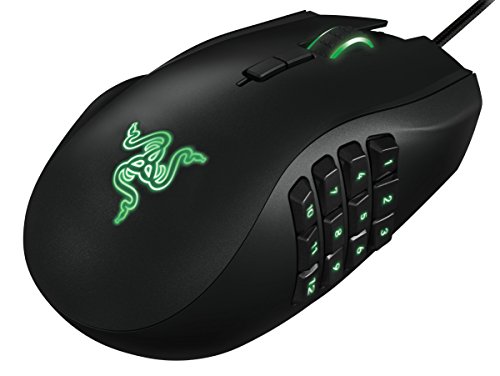
Redragon Gaming Mouse, MMO Mouse Gaming UP 12400
Gamers tackling complex online titles will appreciate the Redragon Gaming Mouse, MMO Mouse Gaming UP 12400. Outfitted with an extensive 12-button thumb grid, it supplies 19 total programmable inputs alongside five onboard memory slots.
The sensor scales up to 12,400 DPI with 40G acceleration and variable polling rates from 125Hz to 1000Hz. Like its sister model, it includes eight 2.4-gram balancing weights to fine-tune physical center-of-gravity. You can explore broader price tiers in our under $50 gaming mouse breakdown.
The main limitation is specialized ergonomics. The wide contour and crowded thumb cluster make precise flick-aiming awkward in competitive shooters, restricting its utility mostly to role-playing and strategy genres.
Key Factors When Choosing a Budget Gaming Mouse
When shopping within a tight spending limit, marketing terms can distract from genuine functional hardware. Focus on these measurable specifications to ensure long-term satisfaction across your preferred titles.
Sensor Accuracy and Polling Rate
Maximum DPI numbers often reach well beyond practical necessity, as most players operate between 400 and 1600 DPI. Instead, focus on tracking speed (IPS), acceleration limits, and a consistent 1000Hz polling rate to avoid spin-outs during quick gestures.
Mouse Weight and Chassis Ergonomics
Weight preference depends strictly on game mechanics. Modern tactical shooters favor sub-70g shells like the Corsair M55 and SteelSeries Prime for quick target re-acquisition. In contrast, heavier shells with weight tuning sets offer deliberate, stable control for strategy and role-playing setups.
Button Layout and Software Compatibility
Assess how many secondary commands your games require. Basic five-button layouts keep weight minimal and prevent accidental misclicks, whereas 9-button or 19-button configurations allow complete offloading of keyboard keybinds to the thumb grid.
Frequently Asked Questions
Can a budget gaming mouse perform well in competitive shooters?
Yes. Models utilizing gaming-grade optical sensors, high IPS tracking ratings, and 1000Hz polling rates provide latency and tracking accuracy identical to premium units, provided you select an ergonomic shape that suits your grip style.
Is wireless connectivity viable at this budget level?
Entry-level 2.4GHz wireless hardware has improved significantly. Devices like the Aula SC620 provide low-latency wireless connections for gaming, though companion software configuration is often restricted to wired or dongle connections.





Write Your Review
No reviews yet. Be the first to share your experience!