

Choosing the best gaming mouse for esports depends primarily on weight, sensor tracking, and physical shape. Fast-paced titles demand minimal inertia and low click latency, while tactical shooters reward consistent tracking and stable hand placement.
Modern competitive models range from ultralight 50-gram wireless designs to heavier wired layouts loaded with macro keys. Pair your peripheral with a stable surface or clean desk setup, such as the arrangements detailed in our guide to the best gaming desks for dual monitors, to ensure uninhibited mouse movement.
Top Competitive Mice and Essentials

Pros
- Broad XXL surface fits keyboard and mouse
- Micro-woven cloth optimized for various mouse sensors
- Non-slip rubber base stays firmly in place
- Low-profile design minimizes edge elevation
Cons
- Large footprint requires substantial desk space
- Thin 0.08-inch profile provides minimal wrist cushioning

Pros
- 11 programmable buttons for comprehensive macro control
- Dual-mode HyperScroll tilt wheel enhances versatility
- High-resolution 26K DPI optical sensor
- Responsive optical switches rated for 70 million clicks
- 11 independently customizable RGB lighting zones
Cons
- Tethered wired cable restricts cable-free mobility
- Ergonomic thumb rest form factor excludes left-handed users

Pros
- 55-gram ultra-lightweight chassis
- Up to 8000 Hz wireless polling rate
- Focus Pro 35K sensor tracks on glass
- Gen-3 optical switches rated for 90 million clicks
- Up to 95 hours of advertised battery life

Pros
- Ultra-lightweight 54 g construction
- Up to 8000 Hz wireless polling rate
- Focus Pro 35K Gen-2 optical sensor
- Optical switches rated for 90 million clicks
- Up to 95 hours of battery life
Cons
- Requires Razer Synapse software for complete optimization
- Requires manual Windows pointer adjustments for optimal accuracy
Pros
- Ultralight 54-gram balanced design
- Accurate 35,000 DPI sensor tracks on glass
- Up to 95 hours of battery life
- Durable 90-million click optical switches
- Reliable low-latency 2.4 GHz wireless connection
Cons
- Capped at 1000 Hz wireless polling rate
- Requires Razer Synapse software for complete customization

Pros
- Ultra-lightweight 54-gram balanced design
- Focus Pro 35K Gen-2 optical sensor
- Wireless polling rates up to 8000 Hz
- Fast Gen-3 optical switches rated for 90M clicks
- Up to 95 hours of battery life

Pros
- High-precision HERO sensor up to 25,600 DPI
- Eleven fully programmable buttons
- Adjustable balance with five removable weights
- Dual-mode hyper-fast scroll wheel
- Tensioned mechanical switches for crisp clicks
Cons
- Tethered wired design restricts cable-free movement
- Full RGB customization requires Logitech Gaming Software

Pros
- Eleven fully programmable buttons with rapid-fire key
- Five quick-switch onboard DPI levels
- Textured rubber side grip for secure handling
- Fingerprint-resistant frosted matte finish
- Five selectable dynamic RGB backlight modes
Cons
- Full 8000 DPI adjustments require software installation
- Tethered wired cable limits placement flexibility
- Right-hand asymmetric shape unsuitable for left-handed users

Pros
- Ergonomic right-handed shape for comfortable handling
- On-the-fly DPI sensitivity adjustment buttons
- Five fully programmable buttons via Razer Synapse
- Ridged rubber scroll wheel provides tactile grip
- Reliable high-precision 6,400 DPI optical tracking
Cons
- Tethered wired cable limits placement flexibility
- Mechanical switch lifespan limited to 10 million clicks
- Button remapping depends on Razer Synapse software

Pros
- Ultra-lightweight 50g design
- True 8000 Hz wireless polling rate
- Up to 180 hours battery life at 1000 Hz
- Optical switches rated for 100 million clicks
- Accurate sensor tracking up to 930 IPS
Cons
- Battery life drops significantly at 8000 Hz polling
- Advanced settings require Razer Synapse 4 software
Individual Mouse Breakdown and Technical Analysis
Razer Viper V4 Pro Wireless Esports
The Razer Viper V4 Pro Wireless Esports represents the cutting edge of competitive hardware, weighing just 50 grams. It incorporates the Focus Pro 50K Gen-3 optical sensor with 930 IPS speed and up to 90 G acceleration, offering rapid target acquisition.
Its optical scroll wheel and Gen-4 optical switches prevent mechanical debounce delays while delivering a 100-million-click rating. The wireless transceiver supports a true 8000 Hz polling rate, though battery life drops to roughly 45 hours at this speed compared to 180 hours at 1000 Hz.
Razer Viper V3 Pro Series (Sentinels, White, and Black)
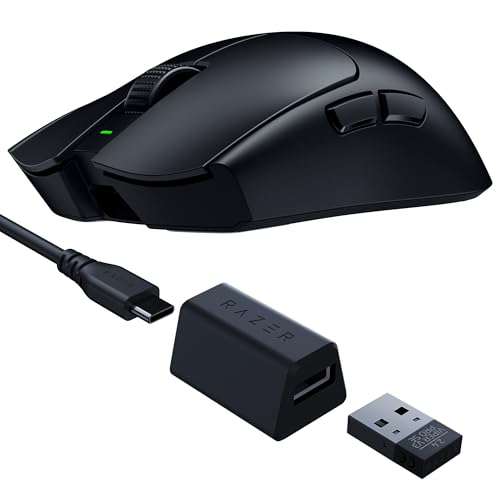
Available in several visual trims including the Razer Viper V3 Pro 8khz Wireless Esports, the Razer Viper V3 Pro Wireless Esports Gaming Mouse in white, and the standard black Razer Viper V3 Pro Wireless Esports Gaming Mouse, this platform sets a high competitive benchmark. Weighing between 54 and 55 grams, it incorporates the Focus Pro 35K optical sensor with 1-DPI incremental steps.
The chassis supports HyperPolling up to 8000 Hz and relies on Gen-3 optical mouse switches rated for 90 million clicks. With up to 95 hours of standard battery life, it delivers tournament reliability, although achieving 8000 Hz tracking requires substantial host system processing power.
Razer Viper V3 Pro SE Wireless Gaming Mouse
The Razer Viper V3 Pro SE Wireless Gaming Mouse keeps the 54-gram balanced frame and 35K optical sensor while swapping the high-polling wireless receiver for a standard 1000 Hz USB-A dongle. It retains Gen-3 switches and provides up to 95 hours of continuous gameplay.
This variant includes a smooth-touch exterior intended to balance grip retention with low skin friction. It serves competitive players who want premium sensor tracking without paying extra for extreme 8000 Hz polling infrastructure.
Razer Basilisk V3 Customizable RGB Wired Ergonomic
For players needing extensive macros, the Razer Basilisk V3 Customizable RGB Wired Ergonomic offers 11 programmable inputs and a molded thumb rest. The Focus+ 26K DPI optical sensor and Gen-2 optical switches deliver precise responsiveness without double-clicking.
A dual-mode HyperScroll tilt wheel toggles between tactile notches and free-spinning operation. While well suited for titles requiring multiple keybinds, its ergonomic shape and heavier frame make fast wrist-flick targeting more fatiguing.
Logitech G502 Hero Wired Gaming Mouse – Black
The Logitech G502 Hero Wired Gaming Mouse – Black combines the Hero 25K optical sensor with mechanical switch spring tensioning. It features 11 programmable buttons, a dual-mode scroll wheel, and five removable 3.6-gram weights for physical balancing.
The mechanical switches and substantial shell appeal to palm-grip users and MOBA competitors who rely on tactile actuation. However, the higher base weight acts as a clear disadvantage in fast first-person shooters compared to modern ultralight shells.
Razer DeathAdder Essential Ergonomic Wired
The Razer DeathAdder Essential Ergonomic Wired delivers an iconic right-handed ergonomic contour on an accessible budget. It includes five programmable buttons, mechanical switches rated for 10 million clicks, and a 6,400 DPI optical sensor.
Its lower maximum tracking resolution and basic rubber cable represent clear compromises compared to premium flagships. Even so, the proven ergonomic shell provides reliable palm and claw support for entry-level competitive play.
Redragon M612 Wired RGB Optical Gaming Mouse 8000
The Redragon M612 Wired RGB Optical Gaming Mouse 8000 is an entry-level wired mouse featuring an 8000 DPI sensor and 11 programmable buttons. It includes a dedicated rapid-fire side button and a textured left rubber grip for friction control.
It provides five onboard DPI profiles adjustable via companion software, accommodating budget-conscious setups. The heavier shell construction and standard optical sensor do not match the raw tracking acceleration of dedicated esports flagships.
SteelSeries QcK XXL Gaming Mouse Pad – Black
A competitive mouse requires a uniform tracking surface, which makes the SteelSeries QcK XXL Gaming Mouse Pad – Black an integral companion. Measuring 35 by 16 inches with an ultra-durable micro-woven cloth surface, it spans across keyboard and mouse space.
Its high thread count ensures consistent sensor tracking for both high and low sensitivity aiming profiles. The non-slip rubber base keeps the mat securely anchored during sudden, aggressive arm sweeps.
Competitive Mouse Specification Comparison
| Model | Sensor | Max DPI | Weight | Connectivity |
|---|---|---|---|---|
| Razer Viper V4 Pro | Focus Pro 50K Gen-3 | 50,000 | 50g | Wireless (8000 Hz) |
| Razer Viper V3 Pro | Focus Pro 35K Gen-2 | 35,000 | 54-55g | Wireless (8000 Hz) |
| Razer Viper V3 Pro SE | Focus Pro 35K Gen-2 | 35,000 | 54g | Wireless (1000 Hz) |
| Razer Basilisk V3 | Focus+ 26K | 26,000 | Not specified | Wired |
| Logitech G502 Hero | HERO 25K | 25,600 | Adjustable | Wired |
| Razer DeathAdder Essential | Optical Sensor | 6,400 | Not specified | Wired |
| Redragon M612 | Optical Sensor | 8,000 | Not specified | Wired |
Key Factors When Choosing an Esports Mouse
Esports peripherals prioritize quick handling and reliable registration over cosmetic extras. Evaluating the following specifications will guide your selection toward the right hardware for your target games.
Chassis Weight and Maneuverability
Chassis weight directly affects stopping power and fine aiming adjustments. Ultralight designs between 50 and 55 grams minimize muscle fatigue during large arm movements common in low-sensitivity tactical shooters. Heavier mice offer extra stability for wrist aimers but require more effort during rapid directional changes.
Optical Switches vs. Mechanical Switches
Optical switches utilize infrared light beams to register clicks, bypassing mechanical metal contacts entirely. This approach eliminates artificial debounce delay and prevents hardware double-clicking over long-term use. Mechanical switches provide distinct tactile feedback, though they can wear out faster under heavy daily competitive practice.
Polling Rate and System Requirements
Standard competitive mice report at 1000 Hz, sending location data every millisecond. Advanced models push to 8000 Hz, shortening reporting intervals to 0.125 milliseconds. Operating at 8000 Hz increases system CPU demands and shortens wireless battery runtimes, so verify your PC hardware before enabling high polling rates.
Frequently Asked Questions
Does an 8000 Hz polling rate make a noticeable difference?
An 8000 Hz polling rate provides smoother cursor trajectories and fractional latency gains on monitors running at 240 Hz or higher. However, older processor architectures can experience frame drops in select game engines due to the high volume of incoming USB data packets.
Why are competitive esports mice moving away from RGB lighting?
Omitting RGB LEDs saves critical weight inside the chassis and substantially extends wireless battery runtimes. Dedicated competitive hardware prioritizes internal battery efficiency and structural rigidity over decorative lighting zones.




Write Your Review
No reviews yet. Be the first to share your experience!