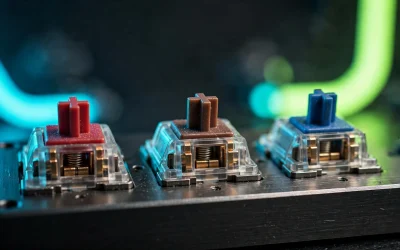
Choosing a gaming keyboard requires looking past flashy marketing to evaluate actual switch latency, hardware construction, and everyday typing comfort. Competitive players often require rapid actuation, whereas everyday typists usually prioritize acoustic dampening, reliable wireless connectivity, and tactile key travel.
To help you find the right hardware, we evaluated the top models using verified specifications, hardware capabilities, and verified component designs. Whether you want magnetic switches for competitive shooters or quiet linear switches for shared office spaces, here are the top options ranked.

Pros
- Adjustable actuation points from 0.5 to 3.8 mm
- 1000 Hz polling rate over 2.4 GHz wireless
- Sturdy full aluminum double-gasket construction
- Web-based switch configuration and key remapping
- Multi-device pairing via Bluetooth 5.2
Cons
- Only compatible with Gateron double-rail magnetic switches
- PBT keycaps do not feature shine-through lettering

Pros
- Tri-mode wireless and wired connection options
- Hot-swappable switch sockets
- Space-saving 60% compact layout
- Includes coiled aviator USB-C cable
- Multi-device pairing across Windows, macOS, and Android
Cons
- Lacks dedicated arrow keys and number pad
- Function and navigation actions require secondary key combinations

Pros
- High 4000 Hz wireless polling rate
- Hot-swappable switch sockets for easy customization
- Integrated OLED screen and multifunctional dial
- Sound-dampening gasket mount with pre-lubricated stabilizers
- Tri-device Bluetooth 5.1 pairing
Cons
- Compact 75% form factor lacks a number pad
- Relatively heavy weight at nearly 3.5 pounds

Pros
- Quiet pre-lubed Silent K Pro Red switches
- Pairs with up to three Bluetooth devices
- High 1000 Hz polling rate over USB-C
- Native Mac layout with bundled Windows keycaps
- Space-saving 84-key compact footprint
Cons
- Limited to single-color white LED backlighting
- 1000 Hz polling rate requires wired mode
Quick Comparison of Specifications
| Keyboard Model | Form Factor | Switch Architecture | Polling Rate | Connectivity |
|---|---|---|---|---|
| Keychron Q1 HE | 75% (82 Keys) | Gateron Magnetic Hall Effect | 1000 Hz | 2.4 GHz, Bluetooth 5.2, Type-C |
| Razer BlackWidow V4 Pro 75% | 75% (81 Keys) | Razer Orange Tactile Gen-3 | 4000 Hz Wireless | 2.4 GHz, Bluetooth 5.1, Type-C |
| RK ROYAL KLUDGE RK61 | 60% (61 Keys) | Hot-Swappable Brown Tactile | 1000 Hz Wired | 2.4 GHz, Bluetooth, Type-C |
| Keychron K2 75% Layout | 75% (84 Keys) | Silent K Pro Red Linear | 1000 Hz Wired | Bluetooth 5.1, Type-C |
1. Keychron Q1 HE Wireless Custom Magnetic Keyboard – Best Overall Performance
The Keychron Q1 HE leads our ranking by pairing a CNC aluminum chassis with Gateron 2.0 dual-rail magnetic Hall Effect switches. These switches allow fine-grained actuation tuning between 0.5 mm and 3.8 mm, providing distinct movement advantages in fast-paced competitive titles.
Players can configure multiple actions to individual keys depending on travel depth, enabling walk and sprint commands on a single keystroke. The keyboard operates over low-latency 2.4 GHz wireless at 1000 Hz, while also including Bluetooth 5.2 for pairing across multiple desktop systems.
A double-gasket mounting structure combined with double-shot PBT keycaps ensures acoustic resonance stays controlled during extended typing sessions. Keep in mind that the magnetic PCB requires Gateron magnetic switches, preventing the installation of traditional three-pin mechanical switches.
2. Razer BlackWidow V4 Pro 75% Wireless – Best High-Polling Wireless Board
The Razer BlackWidow V4 Pro 75% targets high-tier competitive gaming with native 4000 Hz HyperSpeed wireless polling rates. This accelerated polling frequency cuts transmission latency significantly when paired with high-refresh monitors and low-latency gaming mice.
Razer equips this keyboard with hot-swappable sockets, a gasket-mounted FR4 plate, and pre-lubricated stabilizers to reduce internal plate rattles. An integrated OLED screen and physical Command Dial allow users to view live computer telemetry or adjust lighting without switching applications.
If you enjoy tactile feedback, you can explore our breakdown on mechanical keyboard switches explained to see how tactile bumps differ from linear designs. Note that advanced OLED functions and customized dial shortcuts require the Razer Synapse background utility actively running on Windows.
3. RK ROYAL KLUDGE RK61 60% Wireless Mechanical – Best Compact Budget Pick
The RK ROYAL KLUDGE RK61 remains a strong choice for budget shoppers building out a clean, minimalist desktop configuration. Its compact 60 percent layout eliminates unnecessary perimeter keys, allowing broad mouse sweeps that benefit low-sensitivity first-person shooter players.
The keyboard incorporates hot-swappable switch sockets alongside standard tactile brown switches, giving owners room to upgrade switches later on. It connects over 2.4 GHz wireless, Bluetooth, or the included custom double-sleeved coiled cable with metal aviator connectors.
Because directional arrows and navigation keys share secondary function layers, productivity workflows require adjusting to dual-key commands. If you are constructing your gaming desk on a strict budget, our budget battlestation guide provides additional component recommendations.
4. Keychron K2 75% Layout Bluetooth – Best Silent Keystroke Design
The Keychron K2 75% addresses noise concerns by utilizing factory-lubricated Silent K Pro Red linear mechanical switches. Internal switch dampeners absorb bottom-out impacts, reducing typing clatter without introducing significant key stem resistance during high-speed typing runs.
This layout retains dedicated navigation buttons and function rows, delivering productivity utility in a frame substantially narrower than full-size peripherals. Readers seeking low-noise setups can consult our dedicated review of the best silent gaming keyboards for more acoustic comparisons.
The board includes dedicated Mac layout options alongside replacement Windows keycaps, switching easily between operating systems via hardware toggles. However, wireless connectivity relies exclusively on Bluetooth 5.1, meaning competitive gaming sessions are best played over its 1000 Hz wired mode.
How to Select the Right Gaming Keyboard
Switch mechanics dictate how quickly keystrokes register and how your fingers feel after hours of intense play. Traditional linear switches travel smoothly without tactile resistance, while tactile switches provide a physical click bump at the actuation threshold.
Hall Effect magnetic switches bypass physical contact leaves entirely by reading electromagnetic field distance beneath every individual keycap. This architectural design enables rapid trigger features, allowing switches to reset instantaneously the millisecond upward finger movement begins.
Desk dimensions also determine which layout makes practical sense for your physical battlestation environment. Compact 60 percent frames maximize mousepad clearance, whereas 75 percent designs preserve essential arrow keys without consuming excessive desk space.
Frequently Asked Questions
Are magnetic Hall Effect switches better than mechanical switches for gaming?
Magnetic switches allow users to adjust actuation points down to shallow thresholds, yielding measurable input response benefits in competitive games. Furthermore, rapid trigger capabilities remove static reset travel requirements, allowing players to counter-strafe faster than traditional mechanical leaves permit.
Does a 4000 Hz polling rate make a noticeable difference?
Higher polling rates reduce transmission delay from one millisecond down to a quarter millisecond between key presses. While professional esports competitors with high-refresh monitors benefit from this consistency, everyday casual gamers rarely notice significant performance gains over standard 1000 Hz connections.