

For a wireless FPS mouse, start with shape, weight, and connection rather than maximum DPI. The Razer Viper V3 Pro is the strongest fit for players who prioritize low weight, wireless polling options, and a focused esports design.
The other wireless options suit different priorities: the Basilisk V3 Pro adds many controls, the Redragon M913 offers MMO-style side buttons, and Logitech’s PRO X3 SUPERSTRIKE advertises advanced click customization. The M330 is a quiet general-purpose mouse, not a dedicated FPS model.

Pros
- Ergonomic right-handed shape for comfortable handling
- On-the-fly DPI sensitivity adjustment buttons
- Five fully programmable buttons via Razer Synapse
- Ridged rubber scroll wheel provides tactile grip
- Reliable high-precision 6,400 DPI optical tracking
Cons
- Tethered wired cable limits placement flexibility
- Mechanical switch lifespan limited to 10 million clicks
- Button remapping depends on Razer Synapse software

Pros
- TrueMove Air 18,000 CPI optical sensor
- Nine programmable buttons for custom keybinds
- Lightweight 85g ergonomic chassis
- Dust and water resistant IP54 switches
- Customizable PrismSync RGB lighting
Cons
- Wired design restricts cable-free mobility
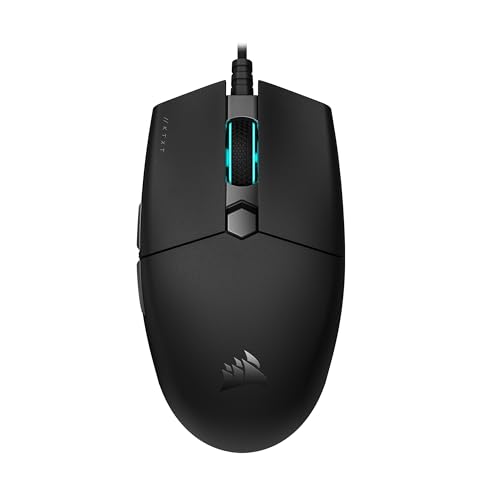
Pros
- Lightweight 73-gram chassis for rapid handling
- Spring-loaded Quickstrike buttons with zero click gap
- 18,000 DPI PixArt sensor with 1 DPI step adjustments
- Flexible drag-reducing paracord cable
- Broad compatibility across PC, Mac, and consoles

Pros
- Ultra-lightweight 54-gram balanced design
- Focus Pro 35K Gen-2 optical sensor
- Wireless polling rates up to 8000 Hz
- Fast Gen-3 optical switches rated for 90M clicks
- Up to 95 hours of battery life

Pros
- Lightweight 69g frame
- Optical magnetic switches rated for 100 million clicks
- High-accuracy 18,000 CPI TrueMove Pro sensor
- Comfortable right-handed shape for various grip styles
- Cross-platform compatibility for PC and Mac
Cons
- Right-handed shape excludes left-handed users
- Tethered wired cable lacks wireless portability

Pros
- Tracks smoothly on glass and varied surfaces
- Up to 140 hours of wireless battery life
- Versatile free-spin and tactile scroll wheel modes
- Durable optical switches eliminate mechanical double-click faults
- 13 assignable inputs for complex macro bindings
Cons
- 8000 Hz polling requires accessories sold separately
- Advanced settings depend on Razer Synapse configuration

Pros
- 12 dedicated programmable side buttons
- Dual 2.4GHz wireless and USB-C wired modes
- Pixart 3335 sensor with adjustable 16000 DPI
- Up to 80 hours of battery in Eco mode
- Full wireless configuration through dedicated software
Cons
- Battery life drops to 45 hours with RGB enabled
- Key remapping requires proprietary driver software

Pros
- Up to 8 kHz wireless polling rate via LIGHTSPEED
- HERO 2 sensor offering up to 48,000 DPI
- Adjustable actuation and reset points with inductive triggers
- Rated for up to 135 hours of battery life
- Compatible with POWERPLAY wireless charging accessories
Cons
- Advanced features and 8 kHz polling require G HUB software
- POWERPLAY wireless charging pad is sold separately

Pros
- Substantially reduces click sounds for quiet environments
- Contoured body suited for comfortable right-handed use
- Long battery life up to 18 months
- Simple plug-and-play USB-A wireless pairing
- Compatible across multiple major desktop operating systems
Cons
- Asymmetrical shape is incompatible with left-handed use
- Requires a USB-A port with no Bluetooth option

Pros
- 11 programmable buttons for comprehensive macro control
- Dual-mode HyperScroll tilt wheel enhances versatility
- High-resolution 26K DPI optical sensor
- Responsive optical switches rated for 70 million clicks
- 11 independently customizable RGB lighting zones
Cons
- Tethered wired cable restricts cable-free mobility
- Ergonomic thumb rest form factor excludes left-handed users
Wireless FPS Mouse Picks by Play Style
Razer Viper V3 Pro: For Lightweight Competitive Play
At 54 grams, the Viper V3 Pro is the lightest documented option in this group. Its Focus Pro 35K Gen-2 sensor and HyperSpeed wireless target precise tracking and responsive play.
It supports polling up to 8,000 Hz and advertises up to 95 hours of battery life. Those features suit players seeking a light, streamlined mouse, though the highest polling rate requires compatible setup support and may not matter to every player.
Pros: 54-gram design, high-polling wireless option, and stated battery life up to 95 hours.
Cons: Its focused design offers fewer extra controls than the Basilisk or M913. The supplied specifications do not state its number of buttons.
Who should skip it: Players who want numerous programmable controls or a thumb-rest shape should compare the Basilisk V3 Pro instead.
Razer Basilisk V3 Pro 35K: For Extra Controls and Flexible Scrolling
The Basilisk V3 Pro combines HyperSpeed wireless with a Focus Pro 35K Gen-2 sensor and 13 customizable controls. Its multifunction trigger and configurable scroll wheel suit players who want shortcuts alongside FPS gameplay.
Razer advertises up to 140 hours of battery life. Reaching a true 8,000 Hz polling rate requires a separately sold Mouse Dock Pro or HyperPolling Wireless Dongle, so factor that accessory requirement into your setup.
Pros: Many programmable controls, configurable scroll behavior, and stated battery life up to 140 hours.
Cons: Its feature-rich control layout may be unnecessary for players who want a simple FPS-focused mouse. The 8,000 Hz option requires an additional accessory.
Who should skip it: Players prioritizing the lightest documented design or a minimal button layout may prefer the Viper V3 Pro.
Logitech G PRO X3 SUPERSTRIKE: For Adjustable Click Behavior
Logitech’s PRO X3 SUPERSTRIKE uses a Haptic Inductive Trigger system rather than standard switches. Its advertised 10 actuation and five reset points provide configurable click behavior for players interested in tuning their inputs.
The HERO 2 sensor is specified up to 48,000 DPI, with LIGHTSPEED wireless polling up to 8 kHz and battery life up to 135 hours. Advanced features require Logitech G HUB, and the POWERPLAY mouse pad is sold separately.
Pros: Configurable actuation and reset points, high stated sensor resolution, and up to 135 hours of battery life.
Cons: Its specialized click system and software requirements add complexity. The supplied information does not specify its weight, so direct weight comparisons are limited.
Who should skip it: Players who prefer conventional switches, do not want to use G HUB, or need a documented lightweight option should compare alternatives.
Redragon M913: For Wireless Play with MMO-Style Controls
The M913 supports 2.4 GHz wireless and USB-C wired modes, with 12 side buttons and 16 customizable buttons overall. Its Pixart 3335 sensor and selectable DPI levels suit players who also use extensive keybindings.
Redragon specifies up to 45 hours with backlighting on or 80 hours in Eco mode. This button-heavy layout can serve varied games, but the many side controls may be distracting for a player seeking a simple FPS mouse.
Pros: Wireless and wired modes, extensive remapping, and stated battery life figures for two lighting conditions.
Cons: Its MMO-oriented button array is less focused than a conventional FPS layout. The supplied specifications do not give its weight or wireless polling rate.
Who should skip it: Players who want a lightweight, uncomplicated esports-style shape should consider the Viper V3 Pro.
Logitech M330 Silent Plus: For Quiet General Computing
The M330 is a right-handed 2.4 GHz wireless mouse with a USB-A receiver and quiet-click design. Its stated 18-month battery life and broad operating-system support make it more appropriate for everyday computer use than competitive FPS play.
The supplied specifications do not identify a gaming sensor, DPI range, or high polling rate. It may suit casual use and quieter environments, but those omissions make it difficult to recommend for precision-focused FPS gaming.
Pros: Quiet clicks, USB-A receiver, and stated compatibility with Windows, macOS, ChromeOS, and Linux.
Cons: Its specifications do not establish gaming-focused sensor performance or competitive wireless features.
Who should skip it: FPS players seeking documented gaming tracking features should choose a dedicated gaming mouse instead.
How to Choose a Wireless Mouse for FPS
Prioritize Shape and Weight
A mouse should fit your grip and movement habits before you focus on its highest DPI number. The Viper V3 Pro has a documented 54-gram weight, while the other wireless picks lack weight figures in the supplied specifications, limiting direct comparisons.
Understand Sensor Resolution and Polling
DPI or CPI describes sensitivity settings, not a guarantee of better aim. Choose a usable sensitivity range and prioritize documented tracking features; the Viper’s and Basilisk’s 35K sensors and Logitech’s 48,000-DPI HERO 2 are advertised specifications, not independent performance results.
Polling rates describe how often a mouse reports position to the computer. The Viper and Logitech list rates up to 8,000 Hz, while the Basilisk needs a separate accessory for that rate; the provided data does not state a rate for the M913 or M330.
Check Connection, Software, and Battery Needs
Confirm your computer has an appropriate port for the included receiver and check whether configuration software is available for your operating system. Logitech specifies a USB-A receiver for the M330, while the Logitech gaming mouse requires G HUB for advanced features.
Battery-life figures are manufacturer specifications and may depend on settings and usage. Consider whether rechargeable operation, lighting, or an optional accessory fits your setup, and verify included items before buying.
Other Products in the Source List
Several supplied products are wired rather than wireless, including the DeathAdder Essential, SteelSeries Rival 5, Corsair KATAR PRO XT, SteelSeries Prime, and wired Basilisk V3. They are not included as wireless recommendations because their listed connection is wired.
For related setup ideas, see our guides to a gaming keyboard and mouse for PC and games that suit mouse controls.
Which Wireless FPS Mouse Should You Choose?
Choose the Razer Viper V3 Pro if low documented weight and a focused esports feature set lead your priorities. Pick the Basilisk V3 Pro for extra controls, or the Logitech PRO X3 SUPERSTRIKE if configurable click behavior is appealing and G HUB fits your setup.
The Redragon M913 makes more sense when side-button customization and wired backup matter more than a minimal layout. Treat the M330 as a quiet general-use option, not a primary competitive FPS recommendation.


Write Your Review
No reviews yet. Be the first to share your experience!