

The Logitech Lift is the most specialized choice here: its vertical shape is designed for small-to-medium right hands. For a conventional shape, consider the Logitech Signature M550 Small or M650 Small; the compact M196 is a simpler travel option.
These recommendations focus on documented size guidance, shape, connectivity, controls, and battery claims. The listed models are wireless productivity mice, not dedicated esports designs, and the provided specifications do not identify gaming sensor performance or polling rates.
Top Products

Pros
- Ergonomic 57-degree angle supports natural wrist posture
- Dual Bluetooth and Logi Bolt wireless connectivity
- Quiet switches reduce clicking noise
- Smooth and seamless SmartWheel scrolling
- Wide compatibility across major operating systems
Cons
- Right-hand orientation only
- Unsuitable for large hand sizes

Pros
- Dual Bluetooth and Logi Bolt wireless connectivity
- SilentTouch technology dampens click noise
- SmartWheel enables precise and fast scrolling
- Up to 24-month battery life on one AA battery
- Ergonomic contoured profile with rubber side grips
Cons
- Not suited for larger hand sizes
- Relies on disposable AA batteries rather than internal recharging

Pros
- Dongle-free Bluetooth connectivity frees up device ports
- Compact ambidextrous shape fits easily into travel bags
- Long 12-month battery life with included AA battery
- Compatible across multiple major operating systems
Cons
- Requires a Bluetooth-capable host device
- No optional 2.4 GHz wireless receiver included

Pros
- 57-degree vertical angle promotes natural wrist posture
- Dual connectivity via Bluetooth Low Energy or Logi Bolt
- SmartWheel provides smooth and precise scrolling
- Whisper-quiet clicks minimize workspace distractions
- Long battery life rated up to two years
Cons
- Designed exclusively for right-handed users
- Not optimized for larger hand sizes
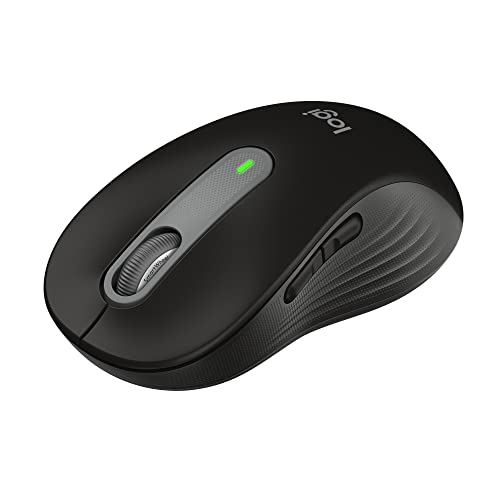
Pros
- Dual connectivity via Bluetooth and Logi Bolt USB
- SilentTouch mechanism drastically reduces clicking noise
- Long 24-month battery life on one AA battery
- Adaptive SmartWheel handles detailed and fast scrolling
- Customizable side shortcuts through Logi Options+
Cons
- Form factor is limited to small and medium hands
- Uses a replaceable AA battery instead of USB-C charging
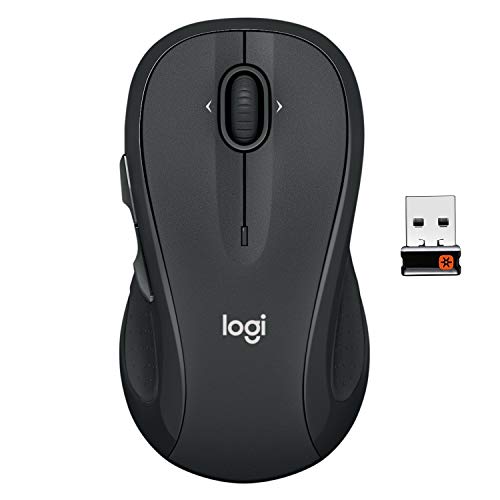
Pros
- Up to two-year battery life
- Ergonomic contoured shape with rubber side grips
- Logitech Unifying receiver pairs multiple compatible devices
- Built-in battery status indicator light and power switch
Cons
- Side-to-side scrolling requires dedicated Logitech software
- Side buttons primarily favor right-handed users

Pros
- Ergonomic vertical design reduces wrist strain
- Three adjustable DPI sensitivity settings
- Built-in next and previous navigation buttons
- Automatic sleep mode preserves battery life
- Internal storage slot for USB receiver
Cons
- No Bluetooth connectivity supported
- Requires two AAA batteries not included
- Audible click sounds cannot be silenced
Pros
- Dual Bluetooth and Logi Bolt wireless connectivity
- Quiet click design reduces ambient noise
- Adaptive SmartWheel for fast or precise scrolling
- Up to two years of battery life on one AA
- Ergonomic shape with textured rubber side grips
Cons
- Software customization is limited to Windows and macOS
- Powered by replaceable AA battery instead of USB rechargeability
How to Choose a Mouse for Small Hands
Start with the shape and hand orientation rather than extra buttons. Logitech identifies the Lift and the small M550 and M650 versions for small-to-medium hands; the M196 is compact and ambidextrous, while the M510 and M650 L are described as full-size or large.
Next, check how the mouse connects to your computer. Bluetooth avoids a receiver and occupied USB port, while Logitech Bolt and the Anker USB receiver require a compatible port or adapter. Confirm operating-system support and receiver requirements before choosing.
For gaming, the supplied specifications do not list polling rate, sensor model, or gaming-focused performance claims for these options. They can suit everyday PC use and casual play, but readers prioritizing competitive gaming should compare those details in a dedicated gaming mouse guide.
Recommended Mice and Their Trade-Offs
Logitech Lift: An Upright Shape for Right-Handers
The Lift is specified for small-to-medium right hands and uses a 57-degree vertical design. Its thumb rest, customizable buttons, quiet clicks, and SmartWheel make it a distinctive option for desk work when a conventional mouse shape is not preferred.
Pros: Small-to-medium right-hand fit; vertical posture; Bluetooth Low Energy or Logi Bolt connectivity; up to two years of battery life. Cons: The upright shape is not ambidextrous, and the supplied specifications do not describe gaming sensor performance. Who should skip it: Left-handed users and people seeking a conventional, gaming-focused shape.
Logitech Signature M550 Small: Conventional Shape with SmartWheel
The small M550 is explicitly intended for small-to-medium hands. Its contoured body, rubber side grips, and SmartWheel support general computer use, while Bluetooth Low Energy and Logi Bolt offer two connection choices across several major operating systems.
Pros: Small-to-medium fit; switchable precise or fast scrolling; Bluetooth or Bolt receiver; advertised battery life up to 24 months on one AA battery. Cons: No customizable side-button claim is supplied for this model, and gaming performance specifications are absent. Who should skip it: Players who need documented gaming sensor or polling specifications.
Logitech Signature M650 Small: Customizable Side Buttons
The small M650 combines a shape intended for small-to-medium hands with a SmartWheel and customizable side buttons. Logitech Options+ on Windows or macOS is required to configure those buttons, so this choice is useful for shortcut-heavy work as well as everyday navigation.
Pros: Small-hand sizing; Bluetooth Low Energy or Logi Bolt; quiet clicks; up to 24 months from one AA battery. Cons: Side-button customization depends on Options+ for Windows or macOS, and gaming-focused performance details are not provided. Who should skip it: Anyone who does not want software-dependent button customization or needs a dedicated gaming mouse.
Logitech M196: Compact Bluetooth for Travel
The M196 has a compact, ambidextrous shape and pairs directly over Bluetooth, so it does not require a USB receiver. Its lightweight travel design and stated compatibility with Apple, Windows, and Chromebook devices make it a straightforward option for laptops and tablets.
Pros: Compact and ambidextrous; Bluetooth connection without a dongle; one AA battery is included, with up to 12 months of advertised battery life. Cons: It has fewer documented productivity controls than the M550 or M650, and no gaming performance specifications are listed. Who should skip it: Users seeking side buttons, advanced scrolling, or gaming-specific features.
Anker 2.4G Wireless Ergonomic Mouse: Vertical Alternative with USB Receiver
The Anker is a right-hand vertical mouse with 800, 1,200, and 1,600 DPI settings, plus next and previous buttons. It connects through a 2.4 GHz USB receiver, not Bluetooth, and its listed dimensions are 120 × 62.8 × 74.8 mm, so check desk space and hand fit before buying.
Pros: Adjustable listed DPI levels; vertical right-hand design; receiver stored in the mouse; 18-month warranty stated in the supplied product information. Cons: Two AAA batteries are not included, key clicks are audible, and a USB receiver is required. Who should skip it: Left-handed users or people whose devices lack a suitable USB port and adapter.
Logitech M510: Full-Size Option, Not a Small-Hand Pick
The M510 has a contoured body, broad palm area, rubber grips, and a 2.4 GHz Unifying receiver. Back and forward buttons and side-to-side scrolling may help with general desktop navigation, but its full-size description makes it a less certain fit for smaller hands.
Pros: Broad palm support; additional navigation controls; receiver-based wireless connection; advertised battery life up to two years. Cons: It is described as full-size rather than small-hand-specific, and some button functions require Logitech software. Who should skip it: Buyers who need a confirmed compact fit or prefer Bluetooth.
Which Mouse Fits Your Setup?
- Choose the Lift if you want a vertical mouse expressly suited to small-to-medium right hands.
- Choose the M550 Small for a conventional small-hand shape and SmartWheel scrolling.
- Choose the M650 Small if customizable side buttons are useful and you can configure them with Options+.
- Choose the M196 for compact, ambidextrous Bluetooth use while traveling.
- Consider the Anker if you want a vertical right-hand mouse with listed DPI settings and can use its USB receiver.
- Approach the M510 cautiously if small fit is essential, since it is identified as full-size.
Grip style also affects comfort and control. For more guidance, see our articles on mouse shape for gaming and mouse grip styles. If your priority is gaming rather than general computer use, compare options in our Gaming Mice category.
Frequently Asked Questions
Are these mice suitable for PC gaming?
They can handle everyday cursor control and casual play, but the supplied data does not establish competitive gaming performance. It does not provide polling rates or sensor models for these mice, so compare those specifications if precise, low-latency play is your priority.
Which options work without a USB receiver?
The M196 connects by Bluetooth without a dongle. The Lift, M550, and M650 also support Bluetooth Low Energy, while offering Logi Bolt as an alternative. The Anker and M510 rely on USB receiver connections according to the supplied information.
Final Recommendation
For a small right hand and a preference for a vertical design, the Lift is the clearest match. The M550 Small is a sensible conventional alternative, while the M650 Small adds configurable side buttons. Pick the M196 for compact Bluetooth travel use, and choose the Anker only if its right-hand shape and USB receiver suit your setup.



Write Your Review
No reviews yet. Be the first to share your experience!