

For video editing, prioritize comfortable handling, useful scrolling, and controls you can map to frequent commands. The Logitech Signature M650 L is the most editing-focused option here, with a SmartWheel and customizable side buttons. Choose the Anker for its vertical shape or the G305 for a compact, high-sensitivity mouse.
This comparison evaluates the supplied specifications for general editing workflows, not measured editing performance. A mouse can help with timeline navigation and pointer control, but the best fit depends on hand comfort, software shortcuts, and whether you prefer wireless receiver or Bluetooth connections.
Top Mouse Picks for Video Editing

Pros
- Fast 1 ms wireless report rate
- Long-lasting battery life from single AA cell
- Precise 12,000 DPI HERO optical sensor
- Integrated internal storage for USB nano receiver
Cons
- Requires replaceable AA batteries instead of internal recharging
- Accessing extended Endurance mode requires Logitech G HUB software

Pros
- Ergonomic vertical design reduces wrist strain
- Three adjustable DPI sensitivity settings
- Built-in next and previous navigation buttons
- Automatic sleep mode preserves battery life
- Internal storage slot for USB receiver
Cons
- No Bluetooth connectivity supported
- Requires two AAA batteries not included
- Audible click sounds cannot be silenced
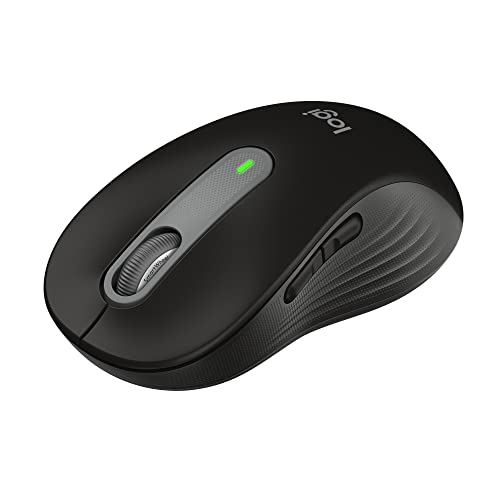
Pros
- Dual Bluetooth and Logi Bolt wireless connectivity
- Quiet click design reduces ambient noise
- Adaptive SmartWheel for fast or precise scrolling
- Up to two years of battery life on one AA
- Ergonomic shape with textured rubber side grips
Cons
- Software customization is limited to Windows and macOS
- Powered by replaceable AA battery instead of USB rechargeability
How These Mice Fit Editing Workflows
Logitech Signature M650 L: Best for Scrolling and Shortcuts
The M650 L combines a SmartWheel, which switches between line-by-line precision and faster scrolling, with side buttons customizable through Logitech Options+ on Windows and macOS. Those controls can suit editors who move through long documents or want to assign supported shortcuts, although the supplied details do not specify video-editing app profiles.
Its large-size shape, thumb area, and rubber side grips are intended for comfort during extended use. It connects through Bluetooth Low Energy or a Logi Bolt USB receiver, and Logitech lists compatibility with Windows, macOS, Linux, ChromeOS, iPadOS, and Android. The included AA battery is specified for up to 24 months of use.
Pros: Two scrolling modes, customizable side buttons, quiet-click technology, and broad stated platform compatibility. Cons: The large-size body may not suit smaller hands, and the supplied information does not identify a DPI range or dedicated editing controls. Who should skip it: Editors who need a vertical grip or want a documented high-DPI sensor specification.
Anker 2.4G Wireless Ergonomic Mouse: Best for a Vertical Shape
This right-hand vertical mouse is designed around a neutral handshake position, which may appeal to users seeking an alternative to a conventional flat mouse shape. Its optical tracking offers 800, 1,200, and 1,600 DPI settings, while next and previous buttons provide browser navigation rather than documented editing-app shortcuts.
Connection is through a 2.4 GHz USB receiver, not Bluetooth, so the editing computer needs a compatible USB port or adapter. The mouse uses two AAA batteries, which are not included, and enters a power-saving mode after eight minutes of inactivity. Its vertical form is right-handed, so left-handed editors should choose another option.
Pros: Vertical ergonomic design, three stated DPI settings, and a compact receiver stored in the mouse. Cons: Receiver-only wireless, no included AAA batteries, and no stated custom shortcut software. Who should skip it: Left-handed users or editors who need Bluetooth or programmable editing commands.
Logitech G305 Lightspeed Wireless Gaming Mouse: Best for High Sensor Sensitivity
The G305 has a HERO optical sensor with sensitivity up to 12,000 DPI and a stated 400 IPS precision figure. Its LIGHTSPEED wireless connection uses a USB receiver and has a listed 1 ms report rate. These are gaming-oriented specifications that can provide adjustable pointer sensitivity, but they do not by themselves establish improved editing accuracy.
At 3.4 ounces, the mouse is specified as lightweight and has storage for its nano receiver. Logitech lists up to 250 hours of continuous gameplay from one AA battery, with an Endurance mode available through G HUB. That battery claim describes gameplay, not a guaranteed editing runtime, and the supplied details do not list Bluetooth connectivity.
Pros: High maximum DPI, a lightweight design, receiver storage, and a stated low-latency wireless report rate. Cons: The USB receiver is required, the advertised battery figure is for gameplay, and no editing-specific shortcut support is specified. Who should skip it: Editors who prioritize a scroll wheel with documented mode switching, Bluetooth, or an ergonomic vertical shape.
What to Consider When Choosing a Video Editing Mouse
Scrolling and Shortcut Controls
Frequent timeline navigation makes scroll behavior and reachable controls worth considering. The M650 L has a wheel with precision and fast-scroll modes, plus side buttons that can be customized in Logitech Options+. Check whether your editing application supports the actions you want to assign before relying on them.
Shape, Handedness, and Comfort
Shape is a personal fit decision, not a performance guarantee. The Anker is explicitly right-handed and vertical, while the M650 L is a large-size model with a thumb area and rubber grips. Consider your hand size and preferred grip, and remember that the G305 is described as compact rather than as an ergonomic model.
Connection and Computer Compatibility
Confirm that your computer can use the required connection. The M650 L supports Bluetooth Low Energy or a Logi Bolt receiver, while both the Anker and G305 rely on USB receivers. If your computer lacks a suitable USB port, check whether an adapter is available and compatible before choosing a receiver-based mouse.
DPI and Pointer Control
DPI describes sensor sensitivity settings, not editing quality or guaranteed cursor accuracy. The Anker lists three settings up to 1,600 DPI, and the G305 lists sensitivity up to 12,000 DPI. The M650 L’s DPI range is not specified in the supplied data, so compare using only the features documented for each model.
Frequently Asked Questions
Is a gaming mouse suitable for video editing?
It can be. The G305 offers adjustable sensitivity up to 12,000 DPI, but the supplied information does not document dedicated editing shortcuts. Consider its receiver requirement and gaming-focused specifications alongside the scrolling and comfort features you use most.
Which option supports Bluetooth?
The Logitech Signature M650 L supports Bluetooth Low Energy and Logi Bolt receiver connectivity. The Anker and G305 specifications describe USB receiver connections, not Bluetooth.
Final Recommendation
Choose the Logitech Signature M650 L if scroll modes, customizable side buttons, and Bluetooth are priorities. Consider the Anker if you specifically want a right-handed vertical mouse and accept receiver-only connectivity. The Logitech G305 suits editors who value high adjustable sensor sensitivity and a lightweight, compact design, but its gaming features are not a substitute for editing-specific controls.
For further ergonomic context, see our guides to mouse shape and mouse grip styles. Browse more options in the Gaming Mice category.



Write Your Review
No reviews yet. Be the first to share your experience!