

The best mouse for large hands should fit your grip first, then match your preferred connection and workload. These five options include right-handed ergonomic designs, a mouse explicitly sized for larger hands, and versatile gaming models with programmable controls.
This comparison is based on the specifications provided, not independent performance measurements. Check the shape and supported connection carefully, especially if you need a particular grip or operating system.
- For a palm grip and wireless gaming: Corsair IRONCLAW Wireless SE, designed for larger right hands.
- For an explicitly large-hand fit on a budget: Redragon Large Wireless Gaming Mouse for Big, with Bluetooth, 2.4GHz, and wired modes.
- For programmable controls and wired use: Logitech G502 Hero or Razer Basilisk V3.
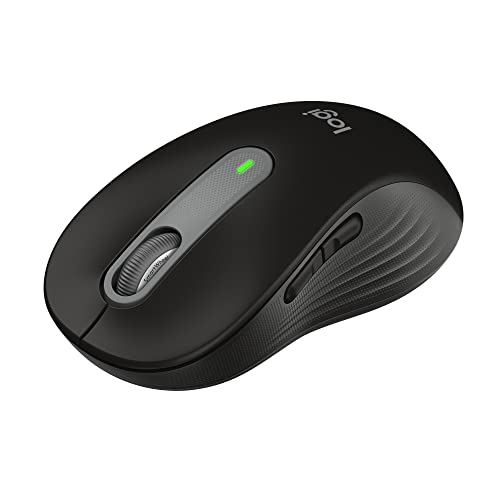
- For office work and quieter clicks: Logitech Signature M650 L, a full-size wireless mouse with SmartWheel scrolling.
Top Mouse Picks for Large Hands

Pros
- High-precision HERO sensor up to 25,600 DPI
- Eleven fully programmable buttons
- Adjustable balance with five removable weights
- Dual-mode hyper-fast scroll wheel
- Tensioned mechanical switches for crisp clicks
Cons
- Tethered wired design restricts cable-free movement
- Full RGB customization requires Logitech Gaming Software

Pros
- Versatile Bluetooth, 2.4GHz, and USB-C wired connectivity
- Ergonomic contoured shape with dual finger rests
- Rechargeable 1000mAh battery with charge-and-play capability
- Adjustable polling rate up to 1000Hz
- Stores USB receiver inside the mouse body
Cons
- Software configuration requires Windows and wired or 2.4GHz mode
- Bulky ergonomic dimensions are unsuitable for small hands

Pros
- 11 programmable buttons for comprehensive macro control
- Dual-mode HyperScroll tilt wheel enhances versatility
- High-resolution 26K DPI optical sensor
- Responsive optical switches rated for 70 million clicks
- 11 independently customizable RGB lighting zones
Cons
- Tethered wired cable restricts cable-free mobility
- Ergonomic thumb rest form factor excludes left-handed users

Pros
- Up to 532 hours of Bluetooth battery life
- High-precision 26,000 DPI Marksman sensor
- Ten programmable buttons for custom keybinds
- Comfortable asymmetric shape for larger hands
- Versatile 2.4GHz and Bluetooth dual-mode wireless
Cons
- Asymmetric shape restricted to right-handed users
- Bulky profile unsuitable for smaller hands or fingertip grips
Pros
- Dual Bluetooth and Logi Bolt wireless connectivity
- Quiet click design reduces ambient noise
- Adaptive SmartWheel for fast or precise scrolling
- Up to two years of battery life on one AA
- Ergonomic shape with textured rubber side grips
Cons
- Software customization is limited to Windows and macOS
- Powered by replaceable AA battery instead of USB rechargeability
Logitech G502 Hero Wired Gaming Mouse: Best for Customizable Controls
The G502 Hero combines 11 programmable buttons with an adjustable weight system, letting players tailor controls and balance. Its wired connection avoids battery management, while the HERO sensor is specified up to 25,600 DPI.
Pros: Numerous programmable inputs, adjustable weights, and a dual-mode scroll wheel offer flexibility for games and general PC tasks. Cons: It is wired, and the supplied specifications do not give dimensions or confirm a large-hand-specific shape. Who should skip it: Choose another option if wireless use or verified sizing for larger hands is essential.
Learn how mouse shape affects gaming comfort before choosing a control-heavy design.
Redragon Large Wireless Gaming Mouse for Big: Best for Connection Flexibility
Redragon describes this full-size model as suited to medium and larger hands, with a contoured body, finger rests, and rubber side grips. It supports Bluetooth, a 2.4GHz USB receiver, and wired use, and its rechargeable 1,000mAh battery can be used while charging.
Pros: Three connection modes suit users switching among devices, and the listed sensor settings include up to 12,800 DPI through the driver. Cons: The driver supports only Windows and works with 2.4GHz wireless or wired mode, so some customization may be unavailable on other systems. Who should skip it: Avoid it if you need full software customization over Bluetooth or a stated polling-rate measurement independent of the listing.
The product information lists compatibility with Windows, iOS, Android, Linux, and Chrome OS, but driver support is narrower. Confirm which features you need on your specific device before choosing a connection mode.
Razer Basilisk V3: Best for Wired Gaming Features
The Basilisk V3 has an ergonomic shape with a thumb rest, 11 programmable buttons, and a scroll wheel that switches between tactile and free-spinning modes. Its Focus+ optical sensor is specified at 26,000 DPI, and Razer Synapse provides configuration options for PC users.
Pros: The thumb rest, extensive controls, and switchable scroll behavior support varied gaming and productivity tasks. Cons: It is wired, and the supplied information does not provide dimensions or specifically establish fit for large hands. Who should skip it: Consider a different model if you need wireless connectivity or a shape explicitly sized for larger hands.
Corsair IRONCLAW Wireless SE: Best for Large-Handed Palm Grip
Corsair specifically describes the IRONCLAW Wireless SE as an asymmetric mouse for larger right hands and palm grip. It has 10 programmable buttons, a 26,000-DPI MARKSMAN sensor, and wireless battery-life figures of up to 285 hours over 2.4GHz or 532 hours over Bluetooth.
Pros: Its stated fit focus makes it a direct candidate for right-handed palm-grip users, while wireless modes and programmable buttons suit gaming setups. Cons: The asymmetric shape is not presented as ambidextrous, and battery figures are manufacturer specifications rather than independently verified results. Who should skip it: Left-handed users and players who prefer a compact, symmetrical shape should look elsewhere.
Logitech Signature M650 L: Best for Work and Everyday Scrolling
The Signature M650 L is a large-sized wireless mouse aimed at everyday computing rather than gaming-focused control. Its SmartWheel switches between precise line-by-line scrolling and faster scrolling, while Bluetooth Low Energy and the Logi Bolt USB receiver offer two connection choices.
Pros: The contoured shape, thumb area, rubber side grips, customizable side buttons, and quiet-click feature support office and general use. Cons: It has fewer listed controls than the gaming models, and its AA battery life is a manufacturer-stated estimate of up to 24 months. Who should skip it: Choose a gaming-oriented mouse if you need a high-DPI sensor or numerous programmable buttons.
How to Choose a Mouse for Large Hands
Prioritize Shape and Grip
Large hands do not all need the same shape. The Corsair is explicitly aimed at larger right hands using a palm grip, while Redragon describes its model as full-size and suitable for medium to larger hands.
The Logitech G502, Razer Basilisk V3, and M650 L offer contoured or ergonomic features, but their supplied specifications do not establish exact dimensions or a specific large-hand fit. Compare the shape against your grip and, where possible, check the manufacturer’s sizing information before buying.
For more help distinguishing palm, claw, and fingertip preferences, see our guide to mouse grips for gaming.
Choose Wired or Wireless Based on Your Setup
The G502 Hero and Basilisk V3 are wired. Redragon offers wired, Bluetooth, and 2.4GHz options, while Corsair supports 2.4GHz and Bluetooth; the M650 L uses Bluetooth Low Energy or a Logi Bolt receiver.
Check receiver requirements and software support as well as the connection itself. Redragon’s programmable-button driver is limited to Windows and wired or 2.4GHz operation, whereas Logitech lists Options+ customization for the M650 L on Windows and macOS.
Match Controls and Features to the Workload
For games that benefit from mapped actions, the G502 and Basilisk V3 each list 11 programmable buttons; Corsair lists 10. The M650 L focuses on everyday navigation, and Redragon combines programmable controls with multiple connection modes.
DPI figures describe selectable sensor sensitivity, not a guarantee of better aim or a measure of overall mouse quality. Choose the controls and scroll behavior you will use, rather than treating the highest DPI figure as the deciding factor.
Frequently Asked Questions
Which mouse here is specifically designed for large hands?
The Corsair IRONCLAW Wireless SE is described for larger right hands and palm grip. Redragon also identifies its full-size model as suitable for medium to larger hands.
Is a high DPI setting necessary for a large-hand mouse?
No. DPI is a sensitivity setting, while physical fit depends on the mouse shape and how you hold it. Select sensitivity based on your control preferences and setup.
Which option makes the most sense for non-gaming work?
The Logitech Signature M650 L emphasizes quiet clicks, customizable side buttons, and flexible scrolling, making it the work-focused choice in this group. The G502 and Basilisk V3 offer more gaming-oriented programmable controls.
Final Recommendation
Choose the Corsair IRONCLAW Wireless SE if you are right-handed, use a palm grip, and want a model explicitly designed for larger hands. Redragon is the flexible-connectivity alternative with a stated medium-to-large fit, while the Logitech G502 Hero and Razer Basilisk V3 suit wired gaming setups that prioritize programmable controls.
For quieter everyday work, consider the Logitech Signature M650 L. Explore more options in the Gaming Mice category, and compare mouse rests for gaming if desk comfort is also part of your setup.



Write Your Review
No reviews yet. Be the first to share your experience!