

For the most MMO-focused controls, consider a mouse with a full side-button grid, such as the Razer Naga V2 HyperSpeed or Redragon M908. If you want interchangeable button layouts, the Razer Naga V3 Pro offers more flexibility, while the SteelSeries Rival 5 suits players who prefer fewer side controls.
This comparison is based on the supplied specifications, not independent performance measurements. Check the number and placement of programmable buttons, connection type, software support, and stated battery life against your own games and setup.

Pros
- TrueMove Air 18,000 CPI optical sensor
- Nine programmable buttons for custom keybinds
- Lightweight 85g ergonomic chassis
- Dust and water resistant IP54 switches
- Customizable PrismSync RGB lighting
Cons
- Wired design restricts cable-free mobility

Pros
- 18 programmable buttons including 12-key side grid
- Pixart PAW3327 sensor with up to 12400 DPI
- Includes eight-piece modular weight tuning set
- Five onboard memory profiles for rapid switching
Cons
- Macro remapping software is incompatible with macOS
- Lacks wireless connectivity options

Pros
- 19 programmable buttons for comprehensive macro control
- Dual 2.4 GHz wireless and Bluetooth connectivity
- Up to 400 hours of battery life
- Focus Pro 30K sensor tracks on glass
- Dual-mode tactile and free-spin scroll wheel
Cons
- Requires replaceable batteries instead of onboard USB recharging
- Advanced tuning requires the Razer Synapse desktop software

Pros
- Interchangeable side plates for multiple game layouts
- Flexible HyperSpeed, Bluetooth, and wired connectivity
- High-resolution 50,000 DPI optical sensor
- Up to 280 hours of battery life over Bluetooth
- Versatile multi-mode tilt scroll wheel
Cons
- Full software customization is not supported on macOS
- Wireless charging docks and accessories sold separately

Pros
- 15 programmable buttons for complex keybinds
- Dedicated eight-button MMO side panel
- Ergonomic grip shape for extended sessions
- Five onboard DPI switching levels
- Customizable dynamic RGB lighting modes
Cons
- Tethered wired design limits placement flexibility
- Advanced keybinds require dedicated software setup

Pros
- 19 programmable buttons for complex macros
- Modular weight tuning with eight removable weights
- Five onboard memory profiles for custom layouts
- Wide DPI adjustment range up to 12400
Cons
- Software download required for macro and lighting customization

Pros
- 12 dedicated programmable side buttons
- Dual 2.4GHz wireless and USB-C wired modes
- Pixart 3335 sensor with adjustable 16000 DPI
- Up to 80 hours of battery in Eco mode
- Full wireless configuration through dedicated software
Cons
- Battery life drops to 45 hours with RGB enabled
- Key remapping requires proprietary driver software

Pros
- 16 programmable buttons for complex keybinds
- High-accuracy 33,000 DPI optical sensor
- Versatile Slipstream wireless, Bluetooth, and wired connections
- Native Elgato Stream Deck software integration
- Low-latency 1,000Hz polling rate support
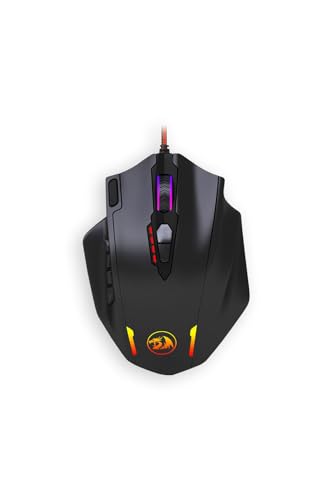
Pros
- Eighteen programmable buttons for extensive macro assignments
- Adjustable polling rate up to 1000 Hz
- Included weight tuning cartridge
- Optical sensor adjustable up to 12400 DPI
- Five physical onboard DPI preset levels
Cons
- Fine DPI tuning requires software configuration
- One physical button cannot be programmed

Pros
- Fast 1 ms wireless report rate
- Long-lasting battery life from single AA cell
- Precise 12,000 DPI HERO optical sensor
- Integrated internal storage for USB nano receiver
Cons
- Requires replaceable AA batteries instead of internal recharging
- Accessing extended Endurance mode requires Logitech G HUB software
How to Choose an MMO Gaming Mouse
Start with button layout, not the highest advertised DPI. A 12-button thumb grid can put many abilities within reach, but a simpler layout may feel more manageable for mixed genres or everyday use.
- Button count and layout: Compare how many buttons are programmable and whether the side panel suits your preferred grip and command load.
- Connection: Wired models avoid battery management. Wireless options here use different combinations of 2.4 GHz, Bluetooth, and wired connectivity, so check which modes matter to you.
- Software and profiles: Several models support remapping and macros. Confirm that the required software works with your operating system and that the advertised profiles meet your needs.
- Shape and weight: The Rival 5 is specified at 85 grams, while Redragon models include removable weights. Other listed models do not provide weight figures in the supplied data.
- Sensor claims: DPI describes sensitivity settings, not a direct measure of overall accuracy. Treat sensor figures as manufacturer specifications rather than independently measured results.
Recommended MMO Gaming Mice
SteelSeries Rival 5: A More Streamlined Multi-Genre Pick
The Rival 5 has nine programmable buttons, including five quick-action side buttons, and a TrueMove Air optical sensor rated at 18,000 CPI. Its 85-gram stated weight may appeal to players who want a lighter mouse for several fast-paced genres.
Pros: Its nine-button layout is less crowded than a 12-button MMO grid, and the listed sensor and weight specifications are clearly stated. Cons: It provides fewer programmable controls than the dedicated MMO options here.
Who should skip it: Players who need a large bank of thumb buttons for frequent ability and macro assignments should compare the higher-button-count models.
Choose the right games for a gaming mouse alongside a layout that matches how many commands you actually use.
SteelSeries Rival 5 Gaming Mouse with PrismSync
Redragon M908 Wired: Extensive Controls and Adjustable Weight
The wired M908 lists 18 programmable buttons, including 12 side buttons, five memory profiles, and an included set of eight removable weights. Its stated DPI range reaches 12,400, with software adjustment available for finer changes.
Pros: The side grid, profiles, and weight set offer substantial customization for MMO keybinds. Cons: It is wired, and the numerous controls may be unnecessary for players who use only a few mapped commands.
Who should skip it: Choose another model if you want wireless play or prefer a simpler thumb area.
Redragon M908 Wired MMO RGB Gaming Mouse 12400 DPI
Razer Naga V2 HyperSpeed: Wireless MMO Controls
This Naga provides 19 programmable buttons, a Focus Pro 30K optical sensor, and both 2.4 GHz HyperSpeed wireless and Bluetooth. Razer specifies up to 250 hours over 2.4 GHz or 400 hours over Bluetooth, with battery life dependent on connection mode.
Pros: It combines a high button count with two wireless connection options and a scroll wheel offering tactile and free-spin modes. Cons: It requires battery management, and the supplied information does not specify a wired operating mode.
Who should skip it: Players who want a wired-only mouse or interchangeable side-button layouts should consider alternatives.
Razer Naga V2 HyperSpeed Wireless MMO
Razer Naga V3 Pro: Swappable Side Plates for Different Games
The Naga V3 Pro includes three magnetic side plates with 12-, 6-, or 2-button layouts, plus additional edge and ring-finger buttons. It supports HyperSpeed wireless, Bluetooth, and USB-C wired mode, with stated battery life varying by connection.
Pros: Swappable layouts let one mouse adapt to MMO, MOBA, and lower-button-count play. It also offers extensive remapping and macro options through Razer Synapse on Windows.
Cons: Its many configuration options may be more than a single-genre player needs, and full customization is specified for Windows; macOS supports core functions and onboard settings.
Who should skip it: Skip this model if you want a straightforward fixed layout or do not need its multiple connection modes.
Razer Naga V3 Pro Wireless MMO Gaming Mouse
Redragon M811: Wired MMO Layout with 15 Programmable Buttons
The wired M811 lists 15 programmable buttons, including eight MMO side buttons, and five DPI levels. Its software supports button assignments, media controls, DPI settings, and lighting customization.
Pros: It offers more side controls than a general-purpose mouse while stopping short of a 12-button thumb grid. Cons: It is wired, and the product information does not state a weight or wireless option.
Who should skip it: Players who need a full 12-button side panel or wireless connectivity should look elsewhere.
Redragon M811 Wired RGB MMO Gaming Mouse 10000 DPI
Redragon M901K: High Button Count and Weight Tuning
This wired Redragon lists 19 programmable buttons, including 12 side buttons, five memory profiles, and eight removable weights. Its software supports DPI adjustment across a stated 100 to 12,400 range and polling-rate settings up to 1,000 Hz.
Pros: The side grid, onboard profiles, and adjustable weight provide several ways to tailor the mouse for different games. Cons: It uses a cable, and the large number of controls may not suit players seeking a minimal layout.
Who should skip it: Consider a wireless model if avoiding a cable is a priority.
Redragon Gaming Mouse, MMO Mouse Gaming UP 12400
Redragon M913: Wireless or USB-C Wired Operation
The M913 supports 2.4 GHz wireless and USB-C wired use, with 12 side buttons and a Pixart 3335 sensor. Redragon states up to 45 hours with lighting on or 80 hours in Eco mode; these are manufacturer figures, not independent measurements.
Pros: The dual connection modes let players choose wireless use or a cable, and its side-button grid suits MMO keybinds. Cons: Its 16,000 DPI maximum is a sensitivity specification, not proof of superior real-world accuracy.
Who should skip it: Players wanting Bluetooth or more than 12 side buttons should compare other options.
Redragon M913 Wireless RGB MMO Gaming Mouse 16000
Corsair Scimitar Elite Wireless SE: Wireless MMO and Stream Deck Controls
The Corsair Scimitar Elite Wireless SE offers 16 programmable buttons, a stated 33,000 DPI MARKSMAN S sensor, and Elgato Stream Deck integration. It supports SLIPSTREAM wireless, Bluetooth, and USB connection, with 1,000 Hz polling specified for SLIPSTREAM.
Pros: Its programmable controls and Stream Deck integrations may suit players who also stream or want productivity shortcuts. Cons: The extra software ecosystem may be unnecessary for MMO play alone, and battery-life figures are not included in the supplied specifications.
Who should skip it: Skip it if you want stated battery-life guidance or do not need Stream Deck functions.
Corsair Scimitar Elite Wireless SE MMO MOBA PC
Redragon M908 Impact: Wired 12-Button Side Grid
This M908 Impact listing specifies 18 customizable buttons, including 12 side buttons, adjustable DPI from 100 to 12,400 through software, and polling rates up to 1,000 Hz. It connects by cable, and its supplied specifications identify optical tracking.
Pros: Its programmable thumb grid and adjustable settings suit players who want many commands available without switching to wireless. Cons: It is wired, and the supplied listing does not specify sensor model, weight, or included profile count.
Who should skip it: Choose another option if wireless operation or detailed sensor information is essential to your decision.
Redragon M908 12400 DPI Impact MMO Gaming Mouse w
Logitech G305: Simple Wireless Option for Lighter MMO Keybind Needs
The G305 is a compact wireless gaming mouse with six programmable buttons, a HERO sensor rated up to 12,000 DPI, and LIGHTSPEED 2.4 GHz connectivity. Logitech states up to 250 hours of gameplay from one AA battery, with an endurance mode available through G HUB.
Pros: Its low button count and wireless design suit players who favor a simple layout, and the receiver stores inside the mouse. Cons: Six programmable buttons provide far fewer MMO commands than the dedicated thumb-grid models.
Who should skip it: Players who rely on numerous mapped abilities should choose a mouse with more programmable controls.



Write Your Review
No reviews yet. Be the first to share your experience!