

The best gaming mouse right handed depends first on whether you prefer a conventional ergonomic shape or a vertical handshake-style grip. For a lightweight, explicitly right-handed wired option, consider the ASUS TUF Gaming M3 Gen II; for extensive controls, compare the Razer Basilisk V3 and Corsair IRONCLAW Wireless SE.
This guide compares listed specifications and intended uses, not independent performance measurements. Check each model’s shape, connection type, software requirements, and button layout against your games and computer before choosing.
Quick Picks for Right-Handed Gaming
- Lightweight, conventional right-handed shape: ASUS TUF Gaming M3 Gen II, with a stated 59-gram weight, wired USB connection, and six programmable buttons.
- Programmable controls and thumb support: Razer Basilisk V3, with 11 programmable buttons, a thumb rest, and a wired connection.
- Large-hand palm grip and wireless use: Corsair IRONCLAW Wireless SE, whose asymmetric shape is specified for larger right hands and whose connections include 2.4GHz and Bluetooth.
- Vertical grip and multi-device flexibility: TKMARS Wireless Ergonomic Vertical Gaming Mouse, with Bluetooth, 2.4GHz, USB-C cable connectivity, and 12 programmable buttons.

Pros
- High 24,000 DPI sensor with 1000Hz polling rate
- Dual-mode 2.4GHz wireless and wired operation
- Symmetrical design fits left- and right-handed users
- Eight programmable buttons with macro support
- Continuous play-and-charge functionality
Cons
- Lacks Bluetooth connectivity
- Sleep mode cannot be completely disabled

Pros
- Up to 7200 adjustable DPI
- Nine programmable buttons with macro editing
- Ergonomic contouring with finger rest design
- Customizable seven-mode RGB backlighting
Cons
- Full macro customization requires separate software download
- Tethered wired connection limits freedom of movement
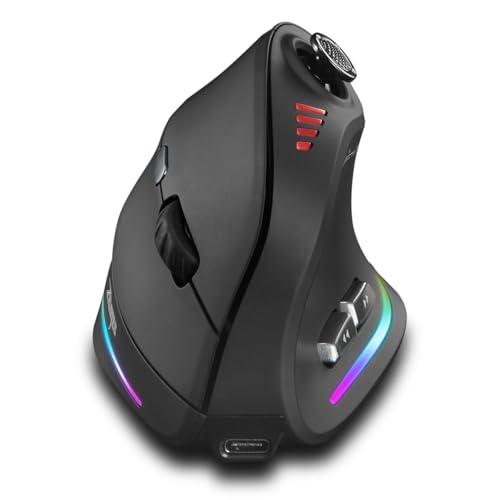
Pros
- Ergonomic vertical grip reduces wrist fatigue
- Integrated 5-way joystick for directional control
- Flexible Bluetooth, 2.4G, and wired connectivity
- High sensitivity reaching up to 24000 DPI
- Twelve customizable buttons for extensive macros
Cons
- Heavier build at approximately 0.66 pounds

Pros
- Lightweight 59-gram construction
- IP56-rated dust and water resistance
- Smooth PTFE mouse feet
- On-the-fly DPI switching up to 8,000 DPI
- Six programmable buttons
Cons
- Right-handed ergonomic design excludes left-handed users
- Wired-only USB configuration
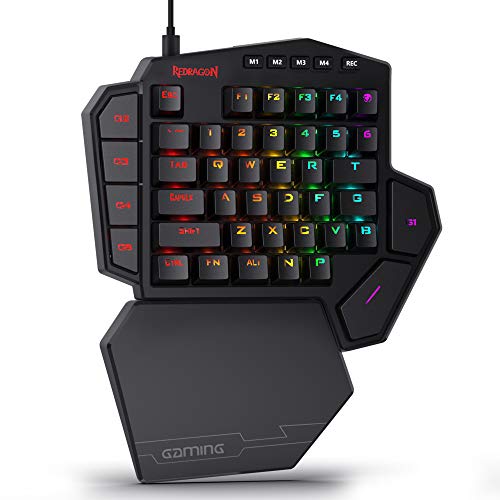
Pros
- Hot-swappable sockets compatible with 3-pin and 5-pin switches
- Dedicated USB pass-through port for peripherals
- Seven onboard macro keys across four switchable profiles
- Detachable magnetic wrist rest offers ergonomic flexibility
- Compact footprint expands desk space for mouse mobility
Cons
- Cannot replace a standard keyboard for regular typing
- Wired-only design restricts cable routing options

Pros
- 11 programmable buttons for comprehensive macro control
- Dual-mode HyperScroll tilt wheel enhances versatility
- High-resolution 26K DPI optical sensor
- Responsive optical switches rated for 70 million clicks
- 11 independently customizable RGB lighting zones
Cons
- Tethered wired cable restricts cable-free mobility
- Ergonomic thumb rest form factor excludes left-handed users

Pros
- Fast 1 ms wireless report rate
- Long-lasting battery life from single AA cell
- Precise 12,000 DPI HERO optical sensor
- Integrated internal storage for USB nano receiver
Cons
- Requires replaceable AA batteries instead of internal recharging
- Accessing extended Endurance mode requires Logitech G HUB software

Pros
- Up to 532 hours of Bluetooth battery life
- High-precision 26,000 DPI Marksman sensor
- Ten programmable buttons for custom keybinds
- Comfortable asymmetric shape for larger hands
- Versatile 2.4GHz and Bluetooth dual-mode wireless
Cons
- Asymmetric shape restricted to right-handed users
- Bulky profile unsuitable for smaller hands or fingertip grips

Pros
- Ergonomic vertical design reduces wrist strain
- Three adjustable DPI sensitivity settings
- Built-in next and previous navigation buttons
- Automatic sleep mode preserves battery life
- Internal storage slot for USB receiver
Cons
- No Bluetooth connectivity supported
- Requires two AAA batteries not included
- Audible click sounds cannot be silenced

Pros
- Ergonomic vertical shape reduces wrist strain
- Versatile tri-mode wireless and wired connectivity
- Five-direction thumb rocker expands input options
- Onboard memory stores button assignments across PCs
- Twelve fully programmable macro buttons
Cons
- Right-handed design excludes left-handed users
- Software installation may trigger OS security warnings
How to Choose a Right-Handed Gaming Mouse
Start with shape and grip
A right-handed ergonomic shell can support a preferred hand position, but shape alone does not establish a comfortable fit for every hand. Conventional shapes, such as the ASUS and Razer models, differ from vertical designs that encourage a handshake-style hold.
For larger hands and a palm grip, the Corsair model is specifically described as an asymmetric fit. If wrist comfort is a priority, consider a vertical option, but treat comfort and pain-relief claims as manufacturer descriptions, not a guaranteed outcome.
For more context on shape and grip, see our guides to gaming mouse form and mouse grip styles.
Choose wired or wireless connectivity
Wired models avoid battery management and connect directly by USB, while wireless models provide more freedom from a cable. Wireless methods vary: the Acer uses 2.4GHz and wired modes, the Logitech uses LIGHTSPEED, and the TKMARS supports Bluetooth, 2.4GHz, and a USB-C cable.
Do not assume every wireless mouse supports Bluetooth. The Acer explicitly does not, and the Anker uses a 2.4GHz USB receiver rather than Bluetooth. Confirm that your computer has the required port or supports the connection method you plan to use.
Prioritize useful controls over maximum DPI
DPI describes sensitivity settings, not a guarantee of better aim or overall performance. The listed options range from 8,000 DPI on the ASUS to 26,000 DPI on the Razer and Corsair; choose a model whose adjustment range and software suit your preferences.
Programmable buttons can help with macros, shortcuts, and game commands, particularly in titles with many abilities. Consider whether you can reach the buttons comfortably and whether configuration software is acceptable for your computer.
Recommended Right-Handed Gaming Mice
ASUS TUF Gaming M3 Gen II: Lightweight wired pick
The ASUS TUF Gaming M3 Gen II is explicitly shaped for right-handed gamers and weighs 59 grams according to its specifications. Its wired USB connection and four selectable sensitivity levels suit players who want a straightforward, no-battery setup.
Pros: Stated 59-gram weight, six programmable buttons, 8,000 DPI optical sensor, and IP56 dust and water resistance. PTFE feet are specified for smooth gliding.
Cons: It is wired, and the listed DPI ceiling is lower than several alternatives here. Who should skip it: Players who require wireless connectivity, Bluetooth, or a higher advertised DPI range.
Razer Basilisk V3: Programmable controls and thumb rest
The Razer Basilisk V3 combines an ergonomic shape with a thumb rest, 11 programmable buttons, and a wired connection. Its 26,000 DPI Focus Plus optical sensor and tilt scroll wheel offer a broad set of adjustable controls for games and general computer use.
Pros: Many programmable inputs, a configurable scroll wheel, 11 RGB lighting zones, and optical switches with a stated 70-million-click lifespan. Razer Synapse supports further configuration.
Cons: The model is wired and depends on software for some customization; the supplied data does not state its weight. Who should skip it: Wireless seekers or players who prefer a minimal button layout.
Corsair IRONCLAW Wireless SE: Larger hands and palm grip
The Corsair IRONCLAW Wireless SE is designed for larger hands and right-handed palm-grip users. It lists a 26,000 DPI sensor, 10 programmable buttons, 2.4GHz and Bluetooth connectivity, and battery-life claims that vary by connection mode.
Pros: Right-handed asymmetric shape, multiple wireless connection options, programmable controls, and iCUE customization. Its advertised battery life is up to 285 hours over 2.4GHz or 532 hours over Bluetooth.
Cons: Its shape is specifically aimed at larger hands, so it may not suit smaller hands or other grip preferences. Who should skip it: Users seeking a compact, lightweight, or wired-only mouse.
Logitech G305 Lightspeed: Compact wireless gaming
The Logitech G305 uses LIGHTSPEED wireless with a stated 1-millisecond report rate and a HERO sensor rated up to 12,000 DPI. Its compact design weighs 3.4 ounces and runs on one AA battery, with a receiver stored in the mouse.
Pros: Wireless connectivity, onboard receiver storage, and manufacturer-stated battery life of up to 250 hours of continuous gameplay. Logitech G HUB offers an Endurance mode with a longer stated battery-life estimate.
Cons: It uses a replaceable AA battery rather than a rechargeable battery, and the supplied data does not identify it as an explicitly right-handed shape. Who should skip it: Buyers who require a rechargeable mouse or a specified right-handed ergonomic shell.
TKMARS Wireless Ergonomic Vertical Gaming Mouse: Vertical multi-device option
The TKMARS vertical mouse pairs a handshake-style shape with 12 programmable buttons and a five-way thumb joystick. Its listed connection options are Bluetooth 5.0, 2.4GHz wireless, and a USB-C cable, with a rechargeable 800mAh battery.
Pros: Multiple connection methods, a high advertised DPI ceiling of 24,000, and extensive controls for games with many commands. The manufacturer also specifies a Teflon base and an LED DPI indicator.
Cons: A vertical joystick layout is a distinct alternative to a conventional gaming mouse, and the supplied information does not give battery runtime. Who should skip it: Players who want a familiar low-profile shape or verified runtime figures.
Acer Dual-Mode: Rechargeable wired or 2.4GHz use
The Acer Dual-Mode 2.4GHz Wireless & Wired Computer has a symmetrical shape specified for left- and right-handed users. It offers eight programmable buttons, up to 24,000 DPI, a 1,000Hz polling rate, and a 650mAh rechargeable battery with up to 40 hours of stated playtime.
Pros: Wired and 2.4GHz modes, onboard DPI adjustment across six levels, and play-while-charging support. The receiver is stored under the back cover, according to the listing.
Cons: Despite its wireless modes, it does not support Bluetooth, and its symmetrical shell is not an exclusively right-handed design. Who should skip it: Bluetooth users or players who want a contoured right-hand-only shape.
Redragon M602: Wired programmable controls
The Redragon M602 is a wired ergonomic mouse with nine programmable buttons and adjustable sensitivity up to 7,200 DPI. Its software supports button remapping, macros, speed adjustments, and lighting changes, making it a flexible option for gaming and everyday computer tasks.
Pros: Nine programmable buttons, configurable RGB effects, and software-based macro editing. The manufacturer describes its shape as ergonomic with dedicated finger positions.
Cons: It is wired, and the supplied details do not specify a right-handed-only shape, weight, or polling rate. Who should skip it: Buyers who need wireless operation or documented lightweight specifications.
Attoe Gaming Mouse with 5 D Rocker: Vertical controls and tri-mode connection
The Attoe Gaming Mouse with 5 D Rocker uses a vertical shape and a thumb-operated rocker with five directional inputs. It lists 12 programmable buttons, up to 24,000 DPI, and Bluetooth, 2.4GHz, and USB-C wired connection modes.
Pros: Tri-mode connectivity, adjustable DPI presets, and a rocker intended to provide directional commands. The listing says programmed button settings are saved in the mouse.
Cons: Its vertical shape and rocker may require adjustment for players accustomed to a conventional mouse; the supplied data does not state battery runtime. Who should skip it: Buyers who want a conventional shell or documented endurance figures.
Anker 2.4G Wireless Ergonomic Mouse: Basic vertical comfort option
The Anker 2.4G Wireless Ergonomic Mouse is a vertical model with a USB receiver and optical tracking at 800, 1,200, or 1,600 DPI. Its next and previous buttons support browsing, while its feature set is more focused on everyday use than extensive gaming customization.
Pros: A handshake-style grip, simple receiver-based wireless connection, and dedicated navigation buttons. The package uses two AAA batteries, which are not included.
Cons: The maximum listed sensitivity is 1,600 DPI, it has no stated programmable gaming controls, and it does not use Bluetooth. Who should skip it: Competitive players seeking high DPI, macros, or gaming-focused customization.
Redragon K585: A keypad, not a gaming mouse
The Redragon K585 Wired One-Handed RGB Gaming Keypad is included in the supplied product set, but it is a 42-key keypad, not a mouse. Its macro keys, replaceable switches, and detachable wrist rest may complement a mouse for games that benefit from extra left-hand controls.
Pros: Seven onboard macro keys, four profiles, a USB pass-through, and support for compatible three-pin or five-pin switches. Cons: It cannot replace a mouse or provide cursor tracking. Who should skip it: Anyone shopping specifically for a right-handed gaming mouse.
Final Recommendation
Choose the ASUS TUF Gaming M3 Gen II if you want a lightweight, wired mouse with an explicitly right-handed shell. The Razer Basilisk V3 suits players who value a thumb rest and extensive programmable controls, while the Corsair IRONCLAW Wireless SE is the more relevant fit for larger hands and palm grip.
For a vertical grip, compare the TKMARS and Attoe layouts, then confirm that their shapes and connection modes suit your setup. If a rechargeable wireless mouse without Bluetooth is acceptable, the Acer offers wired and 2.4GHz operation; the Logitech is an alternative for users comfortable with an AA battery.
Explore more options in our Gaming Mice category, or read about mouse rests for gaming if desk support is also part of your setup.



Write Your Review
No reviews yet. Be the first to share your experience!