

The Razer Viper V3 Pro Wireless is the clearest fit for competitive players seeking a 55 g mouse with wireless connectivity and up to 8,000 Hz polling. For a lower-cost, compact wireless option, consider the Razer Orochi V2, while the Redragon M725 offers three connection modes and a stated 49 g weight. The other picks prioritize comfort, extra controls, or advanced features over minimum weight.
This guide compares listed specifications and intended uses, not independently measured performance. Weight figures are not always directly comparable: the Orochi V2 weight excludes its battery, and the supplied data does not give weights for several other models.

Pros
- Ergonomic right-handed shape for comfortable handling
- On-the-fly DPI sensitivity adjustment buttons
- Five fully programmable buttons via Razer Synapse
- Ridged rubber scroll wheel provides tactile grip
- Reliable high-precision 6,400 DPI optical tracking
Cons
- Tethered wired cable limits placement flexibility
- Mechanical switch lifespan limited to 10 million clicks
- Button remapping depends on Razer Synapse software

Pros
- Ultra-lightweight 49-gram honeycomb chassis
- Versatile 2.4GHz, Bluetooth, and USB-C connections
- Five programmable macro-capable buttons
- Five onboard DPI preset stages
- Comfortable symmetrical grip design
Cons
- Requires dedicated software to unlock full 8000 DPI

Pros
- High-precision HERO 25K optical sensor
- Low-latency LIGHTSPEED wireless connectivity
- Ergonomic body with rubber side grips
- Includes removable 10g tuning weight
- Crisp metal-spring primary button tensioning
Cons
- POWERPLAY wireless charging system sold separately
- Battery life limited to 35 hours with default lighting

Pros
- 18 programmable buttons including 12-key side grid
- Pixart PAW3327 sensor with up to 12400 DPI
- Includes eight-piece modular weight tuning set
- Five onboard memory profiles for rapid switching
Cons
- Macro remapping software is incompatible with macOS
- Lacks wireless connectivity options
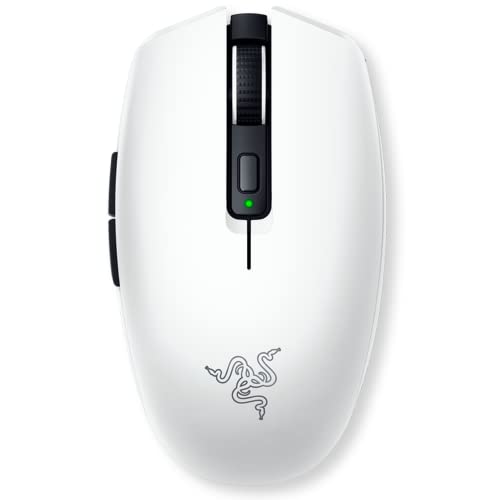
Pros
- Dual HyperSpeed wireless and Bluetooth connectivity options
- Extensive battery life of up to 950 hours
- Lightweight sub-60g base frame for fast handling
- Hybrid slot accommodates AA or AAA batteries
- Durable mechanical switches rated for 60 million clicks
Cons
- Advertised sub-60g weight excludes the required battery
- Requires replaceable batteries instead of integrated USB recharging

Pros
- High-precision HERO sensor up to 25,600 DPI
- Eleven fully programmable buttons
- Adjustable balance with five removable weights
- Dual-mode hyper-fast scroll wheel
- Tensioned mechanical switches for crisp clicks
Cons
- Tethered wired design restricts cable-free movement
- Full RGB customization requires Logitech Gaming Software

Pros
- 19 programmable buttons for comprehensive macro control
- Dual 2.4 GHz wireless and Bluetooth connectivity
- Up to 400 hours of battery life
- Focus Pro 30K sensor tracks on glass
- Dual-mode tactile and free-spin scroll wheel
Cons
- Requires replaceable batteries instead of onboard USB recharging
- Advanced tuning requires the Razer Synapse desktop software

Pros
- Up to 8 kHz wireless polling rate
- High-precision 44,000 DPI HERO 2 sensor
- Customizable trigger actuation and reset levels
- Rated for 60 to 90 hours battery life
- Extra-large low-friction UHMWPE feet
Cons
- Advanced features require Logitech G HUB software
- POWERPLAY wireless charging mat sold separately

Pros
- Ultralight 55-gram chassis reduces wrist fatigue
- Durable mechanical switches rated for 80 million clicks
- Symmetrical design supports versatile grip styles
- Six programmable buttons configurable through software
- 12K DPI optical sensor delivers responsive tracking
Cons
- Tethered wired design limits cable-free desk movement
- Advanced lighting and macro customization requires proprietary software

Pros
- 55-gram ultra-lightweight chassis
- Up to 8000 Hz wireless polling rate
- Focus Pro 35K sensor tracks on glass
- Gen-3 optical switches rated for 90 million clicks
- Up to 95 hours of advertised battery life
How to Choose a Lightweight Gaming Mouse
Start with the weight figure, but check what it includes. A lower listed weight can make quick repositioning easier, while shape and grip remain personal fit considerations. If you use a wireless mouse, account for its battery; the Orochi V2 is listed as under 60 g excluding the battery.
Next, decide whether you need a cable-free setup, multiple connection modes, or extra programmable buttons. A high DPI ceiling is a sensitivity option, not proof of better aim. Polling rate, software needs, and battery claims also vary between models, so compare the specific features that suit your setup.
Recommended Mice by Use
Razer Viper V3 Pro Wireless: Lightweight Competitive Play
The Viper V3 Pro is listed at 55 g and supports Razer HyperSpeed wireless, with up to 8,000 Hz polling and up to 95 hours of battery life. Its Focus Pro 35K Gen-2 sensor and third-generation optical switches are specified for high-resolution tracking and a 90-million-click lifecycle. These features make it the most esports-focused option in this group.
Pros: Low stated weight, wireless connection, high polling-rate capability, and detailed sensor specifications. Cons: Its advanced features may be unnecessary for everyday use, and the supplied information does not state its exact compatibility requirements beyond software guidance for Razer Synapse.
Who should skip it: Buyers who prefer a wired mouse, need extensive MMO controls, or do not need its competitive-focused features.
Explore games that make use of a gaming mouse if you are matching a new pointer to your preferred genres.
Redragon M725: Three Connection Modes in a 49 g Design
The M725 is listed at 49 g and connects by USB-C wired, Bluetooth, or 2.4 GHz wireless. Its symmetrical shape, five programmable buttons, and five configurable profiles suit users who switch between gaming and general computer tasks. The stated DPI presets range from 400 to 4,000 by default, with a sensor ceiling of 8,000 DPI.
Pros: Three connection options, low stated weight, and configurable controls. Cons: Its honeycomb shell may not suit users who prefer a solid exterior, and the supplied specifications do not state battery life or the wireless polling rate.
Who should skip it: Buyers who want published battery-life details or prefer a conventional, closed shell.
Razer Orochi V2: Compact Wireless Use and Travel
The Orochi V2 offers Bluetooth and Razer HyperSpeed wireless, with a listed weight under 60 g excluding its battery. Its hybrid battery slot accepts one AA or AAA battery, letting buyers choose between battery formats and weight balance. Razer lists up to 950 hours over Bluetooth and up to 425 hours over HyperSpeed, though actual runtime depends on use.
Pros: Two wireless modes, a compact portable design, and a choice of AA or AAA battery. Cons: The weight excludes the battery, and this model does not offer a wired connection in the supplied feature list.
Who should skip it: Players who require a wired mode or want a weight figure that includes the installed battery.
GLORIOUS Model O Eternal: Lightweight Wired Symmetry
The wired Model O Eternal is listed at 55 g and uses a symmetrical honeycomb shell. It has six remappable buttons, dual-zone RGB lighting, and a 12K DPI optical sensor. Its cable avoids wireless charging or battery management, while Glorious CORE software supports button and lighting customization.
Pros: Low stated weight, symmetrical design, and six configurable buttons. Cons: It is wired, and the open honeycomb shell may not be a preferred surface for every user. Customization features require the named software.
Who should skip it: Anyone who prioritizes wireless movement or wants a solid-shell design.
Logitech G703 Lightspeed: Wireless Comfort and Optional Charging
The G703 weighs 95 g and uses Logitech Lightspeed wireless. Its HERO 25K sensor is specified for up to 25,600 DPI, and Logitech lists up to 35 hours of battery life with default LIGHTSYNC RGB lighting. The ergonomic design, rubber side grips, six programmable buttons, and optional 10 g weight make it a comfort-and-control choice rather than an ultralight model.
Pros: Wireless operation, programmable controls, and compatibility with Logitech POWERPLAY charging. Cons: At 95 g, it is heavier than the explicitly lightweight options here. POWERPLAY is sold separately, and adding the optional weight increases its weight further.
Who should skip it: Players whose main priority is minimizing mouse weight.
Logitech G PRO X2 SUPERSTRIKE: Advanced Wireless Click Controls
The PRO X2 SUPERSTRIKE pairs Lightspeed wireless with the HERO 2 sensor, up to 8,000 Hz polling, and a listed battery range of 60 to 90 hours. Its haptic inductive trigger system offers 10 actuation levels and five rapid-trigger reset levels. Logitech lists PC and Mac compatibility, while advanced features require G HUB software.
Pros: Fine-grained click customization, high polling-rate support, and stated PC and Mac compatibility. Cons: The supplied specifications do not give its weight, so its fit for a weight-first shortlist cannot be verified. POWERPLAY 2 is enabled, but the charging system is sold separately.
Who should skip it: Buyers who need a confirmed low weight or do not want to rely on software for advanced features.
Razer DeathAdder Essential: Wired Ergonomic Controls
The DeathAdder Essential is a wired ergonomic mouse with a 6,400 DPI optical sensor, five programmable buttons, and mechanical switches rated for up to 10 million clicks. Its dedicated DPI buttons can be reprogrammed, while Razer Synapse supports button remapping and macros. The supplied information does not specify its weight, so it is better considered for its shape and controls than a verified lightweight build.
Pros: Wired simplicity, programmable buttons, and a tactile ridged scroll wheel. Cons: Its weight is not provided, and its sensor DPI ceiling is lower than several other picks listed here.
Who should skip it: Shoppers who require a documented weight or wireless operation.
Logitech G502 Hero: Extra Buttons and Adjustable Weight
The wired G502 Hero has 11 programmable buttons, a dual-mode scroll wheel, and a HERO sensor specified for up to 25,600 DPI. Its five removable 3.6 g weights allow balance adjustments, which run counter to a strict minimum-weight goal. It is a better match for users who value control options and customization over an ultralight build.
Pros: Numerous programmable controls, adjustable weight, and a dual-mode scroll wheel. Cons: The supplied data gives no base weight, and adding weights increases it. It is wired rather than wireless.
Who should skip it: Players seeking a documented ultralight mouse with no added weight options.
Redragon M908: MMO Controls Over Low Weight
The wired M908 prioritizes extensive controls: its feature list specifies 18 programmable buttons, five memory profiles, and an eight-piece 2.4 g weight set. Its optical sensor is identified as a Pixart PAW3327, with a stated 1,000 Hz polling rate and software-adjustable DPI up to 12,400. These features suit MMO key binding, but the included weights and lack of a listed base weight make it difficult to assess as a lightweight choice.
Pros: Many programmable buttons, onboard profiles, and adjustable weights. Cons: It is wired, its listed features emphasize MMO controls rather than low weight, and its stated compatibility distinguishes programmable use on Windows from normal use on Mac.
Who should skip it: Players who want a simple, lightweight mouse without a large button layout or tuning weights.
Razer Naga V2 HyperSpeed: MMO Shortcuts and Wireless Battery Life
The Naga V2 HyperSpeed provides 19 programmable buttons, a Focus Pro 30K optical sensor, and Razer HyperScroll. It supports 2.4 GHz HyperSpeed and Bluetooth, with stated battery life of up to 250 hours over HyperSpeed or 400 hours over Bluetooth. That combination is aimed at MMO players who want many commands available on the mouse, not readers selecting by minimum weight.
Pros: Extensive programmable controls, two wireless modes, and long advertised battery-life figures. Cons: Its weight is not specified in the supplied data, and the button-heavy design is more specialized than a basic gaming mouse.
Who should skip it: Players seeking a confirmed lightweight design or a minimal button layout.
Quick Comparison
| Mouse | Listed weight | Connection | Best fit |
|---|---|---|---|
| Razer Viper V3 Pro Wireless | 55 g | Wireless | Competitive play |
| Redragon M725 | 49 g | USB-C wired, Bluetooth, 2.4 GHz | Multimode use |
| Razer Orochi V2 | Under 60 g, excluding battery | Bluetooth, 2.4 GHz | Compact wireless use |
| GLORIOUS Model O Eternal | 55 g | Wired | Lightweight wired use |
| Logitech G703 Lightspeed | 95 g | Wireless | Ergonomic comfort and controls |
| Logitech G PRO X2 SUPERSTRIKE | Not specified | Wireless | Customizable click features |
| Razer DeathAdder Essential | Not specified | Wired | Ergonomic wired use |
| Logitech G502 Hero | Not specified | Wired | Programmable controls |
| Redragon M908 | Not specified | Wired | MMO commands |
| Razer Naga V2 HyperSpeed | Not specified | 2.4 GHz, Bluetooth | Wireless MMO controls |
Frequently Asked Questions
What weight counts as lightweight for a gaming mouse?
There is no single cutoff in the supplied product information. Compare stated weights and check whether batteries or optional weights are included before treating two figures as equivalent.
Is a higher DPI sensor automatically better?
No. DPI describes a sensitivity range, not overall accuracy or suitability. Choose a mouse based on its shape, controls, connection, and the sensitivity options you actually intend to use.
Should I choose wireless or wired?
Wired models avoid battery management, while wireless models provide more freedom from a cable and may offer multiple connection modes. Check the specific mouse for battery details, supported connections, and any software needed for customization.
Final Recommendation
Choose the Razer Viper V3 Pro Wireless if you want a 55 g competitive-focused wireless mouse with a stated 8,000 Hz polling option. The Redragon M725 is a strong fit when low listed weight and three connection modes matter, while the Orochi V2 suits compact wireless use if you account for its battery weight. For wired symmetry, consider the GLORIOUS Model O Eternal. Choose the G703, G502, M908, or Naga V2 only when their comfort, button layouts, or other features matter more than a confirmed low weight.




Write Your Review
No reviews yet. Be the first to share your experience!