

The Redragon K556 PRO is the clearest fit here for wireless gaming with a full numeric keypad: it has 104 keys and supports 2.4 GHz, Bluetooth, and USB-C connections. For quieter typing and switching between computers, the full-size Logitech MX Mechanical is a better match, while the Redragon S101M-KS bundles a wireless keyboard and mouse.
These recommendations are based on the supplied specifications, not comparative performance measurements. Check the connection mode and layout carefully: some boards save desk space by using a compact layout, and wireless connection details can affect how they suit a gaming PC.
Recommended Wireless Full-Size Keyboards

Pros
- IP32 water resistance guards against liquid spills
- Whisper-quiet switches rated for 20 million presses
- Included magnetic wrist rest for palm support
- Dedicated on-the-fly multimedia controls
- Broad compatibility with PC and major consoles

Pros
- Gasket mount with five sound-dampening layers
- Hot-swappable PCB compatible with 3-pin and 5-pin switches
- Durable double-shot PBT keycaps in MDA profile
- Dedicated CNC aluminum volume control knob
- Pre-lubed linear cream switches
Cons
- Wired-only design lacks wireless connectivity
- Compact 96% layout clusters keys closer together

Pros
- Dedicated one-touch lighting toggle button
- 19-key anti-ghosting for essential gaming inputs
- Full 104-key layout with multimedia shortcuts
- Plug-and-play setup across PC and consoles
- Adjustable backlighting brightness and breathing modes
Cons
- Simulates mechanical feel rather than true mechanical switches
- Anti-ghosting is limited to 19 keys

Pros
- Tri-mode connectivity via Bluetooth, 2.4GHz, and USB-C
- Single 2-in-1 USB receiver operates both peripherals
- Ten dedicated multimedia keys for direct playback control
- Mouse supports up to 1000Hz polling rate
- Keyboard battery rated up to 300 hours without RGB
Cons
- Configuration software is limited to Windows systems
- Mouse sensor tops out at 4800 DPI

Pros
- Complete 3-in-1 desktop gaming accessory bundle
- Reinforced steel plate ensures keyboard rigidity
- Ergonomic memory foam faux-leather wrist rest included
- Adjustable optical mouse sensitivity up to 7200 DPI
Cons
- Uses mechanical-feel membrane switches instead of authentic mechanical
- Anti-ghosting is restricted to 26 specific keys

Pros
- Durable wear-resistant PBT keycaps
- Sturdy aluminum-magnesium alloy top plate
- Tactile mechanical switches for responsive feedback
- Convenient FN-layer media and lighting controls
Cons
- Lighting limited to single-color white LEDs
- Key rollover capped at six simultaneous inputs

Pros
- Ergonomic split design with built-in wrist rest
- Full-size layout includes dedicated numeric keypad
- RGB backlighting with five adjustable brightness levels
- Bundled USB-C adapter offers flexible device connection
- Plug-and-play setup without requiring separate drivers
Cons
- Incompatible with gaming consoles such as PS5 or Xbox
- Shortcut functionality may vary between operating systems
- Tethered wired design lacks wireless connectivity
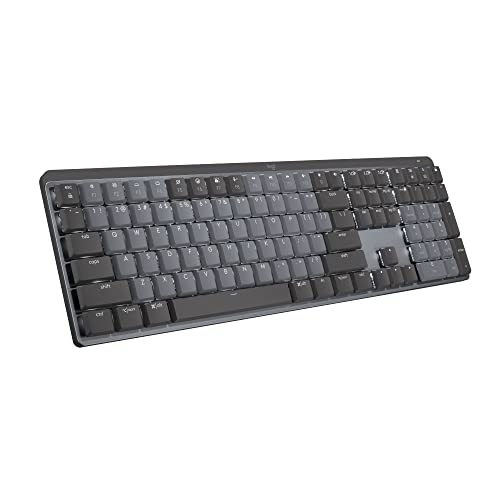
Pros
- Low-profile quiet tactile mechanical switches
- Multi-device pairing across up to three devices
- Smart backlighting with automatic proximity detection
- Includes Logi Bolt receiver and Bluetooth support
- Up to 10 months battery life without backlighting
Cons
- Battery life drops significantly with backlighting enabled
- Full-size footprint takes up substantial desk space

Pros
- Tri-mode wireless and USB-C connectivity
- Hot-swappable sockets compatible with 3-pin and 5-pin switches
- Durable brushed aluminum frame construction
- Pre-installed quiet linear switches minimize typing noise
- Companion software supports macro programming and RGB customization

Pros
- Versatile Bluetooth, 2.4GHz, and USB-C connectivity
- Convenient built-in smart display and multi-function knob
- Hot-swappable PCB compatible with 3-pin and 5-pin switches
- Extensive multi-layer sound dampening reduces typing noise
- Durable wear-resistant double-shot PBT keycaps
Cons
- Three-pound total weight limits travel portability
- Full-sized footprint requires substantial desktop space
How the Options Differ
Full-size usually means a layout with a dedicated number pad, but the listed products do not all have the same layout. The Logitech MX Mechanical is explicitly described as full-size, and the Redragon K556 PRO has 104 keys. The S98 is a 98-key, 96% board that retains a number pad in a more compact arrangement.
Wireless also means different things across this group. The K556 PRO and S101M-KS offer tri-mode connections, including 2.4 GHz and Bluetooth, while the MX Mechanical connects over Bluetooth Low Energy or its included Logi Bolt receiver. The S98 adds USB-C wired mode alongside Bluetooth and 2.4 GHz.
Product Reviews
Redragon K556 PRO Wireless RGB Mechanical: Best Match for Wireless Mechanical Gaming
The K556 PRO combines a 104-key layout, quiet linear switches, and three connection modes: USB-C, Bluetooth, and 2.4 GHz. Its brushed aluminum frame, hot-swappable 3-pin or 5-pin switch sockets, and onboard RGB modes give it flexibility for gaming and later customization.
Choose it if you want a conventional full-size layout and the option to use a wireless receiver or cable. The supplied details do not specify battery life, and the keyboard’s companion software is needed for custom lighting effects and macros.
Pros: 104 keys, tri-mode connectivity, hot-swappable switches, aluminum construction, and 20 preset lighting modes.
Cons: Battery runtime is not specified, and advanced RGB customization and macros require companion software.
Who should skip it: Skip it if you need a published battery-life estimate or prefer a low-profile keyboard.
Logitech MX Mechanical Wireless Illuminated: Best for Quiet Typing and Multiple Devices
This full-size board uses low-profile tactile quiet mechanical switches and pairs with up to three devices over Bluetooth Low Energy or the included Logi Bolt receiver. Smart backlighting responds to nearby hands and ambient lighting, while USB-C charging is specified for up to 15 days with backlighting enabled or up to 10 months with it off.
The MX Mechanical suits people who move between computers and want a quieter typing style alongside gaming. Its Logi Options+ software supports function-key customization and other workflow features. The supplied information does not identify a dedicated gaming-focused 2.4 GHz mode, so competitive players should consider whether its stated connection options meet their needs.
Pros: Full-size layout, low-profile tactile switches, pairing with up to three devices, smart backlighting, and stated battery-life estimates.
Cons: Its low-profile design and multi-device productivity features may not suit users seeking a conventional, gaming-focused mechanical board.
Who should skip it: Skip it if you specifically want a 2.4 GHz gaming connection or hot-swappable switches.
Redragon S101M-KS Gaming Keyboard and Mouse: Best Wireless Bundle
This combo includes a tri-mode wireless keyboard and mouse, with wired, Bluetooth, and 2.4 GHz options. One shared 2.4 GHz receiver controls both devices. The keyboard has 10 independent multimedia keys, 12 combination multimedia keys, RGB lighting, and a stated runtime of up to 300 hours with RGB off.
The included mouse has five selectable DPI levels from 800 to 4,800, and its software supports remapping and other customization. This can make the set useful for someone outfitting a PC with both peripherals at once. However, the supplied specifications do not confirm the keyboard’s key count or explicitly state that it has a number pad, so verify its layout before choosing it as a full-size option.
Pros: Keyboard and mouse share tri-mode connectivity, the receiver serves both devices, and the set includes multimedia controls and a stated keyboard runtime with lighting off.
Cons: Full-size layout and number-pad inclusion are not specified; the stated 300-hour runtime applies with RGB off.
Who should skip it: Skip it if a confirmed dedicated number pad or a standalone mechanical keyboard is essential.
RK ROYAL KLUDGE S98 Wireless Mechanical Keyboard: Best Compact Layout with a Number Pad
The S98 uses a 96% layout with 98 keys, retaining the number pad while taking a more compact approach than a conventional full-size board. It supports Bluetooth 5.0, 2.4 GHz, and USB-C wired mode, and its screen can show information such as connection mode and battery status.
Hot-swappable 3-pin and 5-pin switches, double-shot PBT keycaps, a knob, and multiple dampening layers provide customization and control options. Its layout may suit a desk where space matters, but it is not a standard 104-key full-size design. Battery runtime is not stated in the supplied specifications.
Pros: 98-key layout with number pad, tri-mode connectivity, hot-swappable switches, PBT keycaps, display, and control knob.
Cons: The compact 96% arrangement differs from a standard full-size layout, and battery life is not specified.
Who should skip it: Skip it if you require a conventional 104-key layout or need a stated wireless runtime.
What to Consider Before Choosing
Confirm the Layout
If you use a number pad for spreadsheets, work, or shortcuts, check that the product explicitly includes one. The K556 PRO’s 104-key specification and the S98’s 98-key description with number pad are clear. The S101M-KS details do not confirm a number pad, while the MX Mechanical is described as full-size.
Choose the Connection for Your Setup
A 2.4 GHz receiver can keep a desk free of a cable during use, Bluetooth can help with supported devices, and a wired option avoids relying on a wireless connection. The K556 PRO and S101M-KS specify all three modes; the MX Mechanical lists Bluetooth Low Energy and Logi Bolt; the S98 lists Bluetooth 5.0, 2.4 GHz, and USB-C wired mode.
Confirm that your computer has a compatible port or supports the required wireless connection. The supplied details do not provide wireless latency measurements, so they do not establish which model performs best in a particular game.
Account for Switch Feel and Customization
The K556 PRO uses quiet linear switches, while the MX Mechanical has low-profile tactile quiet switches. The S98 includes pre-lubed switches and hot-swap support, and the K556 PRO also supports switch replacement without soldering. These descriptions indicate different switch styles and customization choices, not independently measured noise or gaming performance.
Check Battery and Software Details
Battery information varies: Logitech provides usage estimates for the MX Mechanical, and Redragon states up to 300 hours for the S101M-KS with RGB off. Runtime is not supplied for the K556 PRO or S98. Redragon’s K556 PRO software adds custom lighting and macros, while the S101M-KS software supports keyboard and mouse customization.
For other setup decisions, see our guides to gaming keyboards for StarCraft 2 and keyboard and mouse combinations for gaming PCs.
Frequently Asked Questions
Which option has a standard 104-key layout?
The Redragon K556 PRO is specified as a 104-key keyboard. The S98 has 98 keys in a 96% layout with a number pad, while the S101M-KS key count is not provided in the supplied details.
Which keyboard lists the longest battery runtime?
The supplied data gives the Logitech MX Mechanical estimates of up to 15 days with backlighting enabled or up to 10 months with it off. The S101M-KS keyboard is listed for up to 300 hours with RGB off. These figures use different conditions, so they are not direct like-for-like comparisons.
Is a 96% keyboard the same as a full-size keyboard?
No. A 96% board such as the S98 retains a number pad in a more compact arrangement, while a standard full-size board typically uses a more conventional layout. Check the key arrangement if you rely on specific navigation keys or spacing.


Write Your Review
No reviews yet. Be the first to share your experience!