

For a genuinely wireless TKL gaming keyboard, start with the Logitech G PRO X TKL Lightspeed Wireless if you want a mechanical board with LIGHTSPEED, Bluetooth, and USB connection options. The Redragon S101M-KS and CHONCHOW G112 are wireless keyboard-and-mouse bundles, while several other products here are wired models rather than wireless recommendations.
This specification-based comparison separates wireless choices from wired alternatives, which can still suit players who prioritize switch features, compact layouts, or spill resistance. Check connection type and software needs against your PC setup before deciding.
Top Gaming Keyboard Wireless TKL Picks

Pros
- Space-saving tenkeyless design frees mouse room
- Tactile, audible GX Blue clicky mechanical switches
- Detachable 1.8-meter cable ensures easy transport
- Onboard memory stores static LIGHTSYNC profiles
- Three-step tilt adjustment provides stable ergonomics
Cons
- Key and lighting programming requires Logitech G HUB
- Macro assignments are restricted to F1 through F12
- Equipped with an older Micro USB connection

Pros
- Tri-mode connectivity via Bluetooth, 2.4GHz, and USB-C
- Single 2-in-1 USB receiver operates both peripherals
- Ten dedicated multimedia keys for direct playback control
- Mouse supports up to 1000Hz polling rate
- Keyboard battery rated up to 300 hours without RGB
Cons
- Configuration software is limited to Windows systems
- Mouse sensor tops out at 4800 DPI
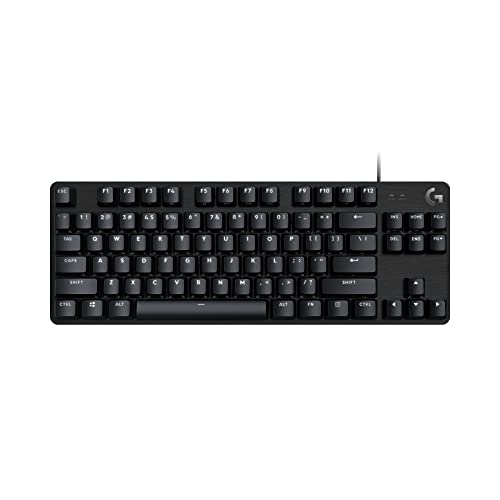
Pros
- Sturdy aluminum-magnesium alloy top plate
- Durable wear-resistant PBT keycaps
- Space-saving tenkeyless layout
- Integrated FN media and lock shortcuts
- Tactile switches provide clear physical feedback
Cons
- Single-color white LED backlighting without RGB
- Rollover limited to 6 keys instead of full NKRO
- Fixed wired connection lacks a detachable cable

Pros
- Magnetic Hall-Effect analog switches
- Rapid Trigger for near-instant resets
- Customizable per-key actuation points
- On-the-fly travel adjustments via FN keys
- Compact tenkeyless form factor
Cons
- Advanced features require Logitech G HUB software
- Wired-only connection limits placement flexibility

Pros
- Compact tenkeyless form factor
- 300ml spill-resistant protection
- Dedicated media and brightness controls
- Quiet membrane key operation
- Responsive 1,000Hz polling rate
Cons
- Membrane switches instead of mechanical switches
- Limited to 12-key rollover rather than full rollover
- Zone-based lighting instead of per-key RGB

Pros
- Space-saving tenkeyless design
- IP32 spill and dust resistance
- Quiet keystrokes for shared spaces
- Dedicated media buttons and volume roller
- Wide PC and console compatibility
Cons
- Non-mechanical switches lack distinct mechanical tactile response
- RGB illumination is limited to 8 zones instead of per-key

Pros
- Customizable 0.1 to 4.0 mm magnetic actuation points
- Fast 8000Hz polling rate for minimal latency
- Snap Tap and Rapid Trigger improve movement controls
- Durable doubleshot PBT keycaps resist fading
- Web-based configuration avoids mandatory software installations
Cons
- Tenkeyless layout lacks a dedicated number pad
- Wired-only configuration without wireless support
Pros
- Low-latency LIGHTSPEED wireless, Bluetooth, and USB connectivity
- Smooth GX Red linear mechanical switches
- Durable dual-shot PBT keycaps
- Space-saving tenkeyless form factor
- Dedicated media buttons with an analog volume roller
Cons
- Lacks a dedicated numeric keypad for productivity tasks

Pros
- Magnetic Hall-Effect switches with light 35g actuation
- Rapid Trigger allows instant key reactivation
- Onboard FN shortcuts for actuation adjustments without software
- Deep key customization across layers via KEYCONTROL
- Dynamic LIGHTSYNC RGB backlighting
Cons
- Advanced feature access requires Logitech G HUB software
- Wired-only design limits cable-free desk setups

Pros
- Space-saving 87-key tenkeyless keyboard layout
- Rechargeable batteries in both keyboard and mouse
- Simple plug-and-play 2.4GHz wireless connection
- Adjustable backlighting modes and brightness levels
- Cross-platform support including major gaming consoles
Cons
- Requires a USB-A port with no Bluetooth connectivity
- Platform compatibility for advanced functions varies by device
How These TKL Keyboards Differ
Tenkeyless means a compact layout without the number pad, freeing desk space for mouse movement. It does not mean wireless: the Logitech G PRO, G413 TKL SE, PRO X TKL Rapid, SteelSeries Apex 3 TKL, Corsair K55 CORE TKL, and Razer Huntsman V3 HE listed here are wired.
Logitech G PRO X TKL Lightspeed Wireless
The Logitech G PRO X TKL Lightspeed Wireless is the clearest fit for a PC gamer who wants a wireless mechanical TKL. Its listed options include LIGHTSPEED wireless, Bluetooth, and USB, while GX Red Linear switches and dual-shot PBT keycaps suit users who prefer linear mechanical input.
Pros: Multiple connection options, media controls, a volume roller, RGB lighting, and a tournament-oriented compact layout. Cons: The supplied information does not specify battery life, and advanced wireless convenience may be unnecessary for a fixed desk setup.
Who should skip it: Skip this model if you specifically want clicky or tactile switches, or if you require a documented battery runtime before buying.
Redragon S101M-KS Gaming Keyboard and Mouse
The Redragon S101M-KS is a wireless keyboard-and-mouse set with wired, Bluetooth, and 2.4 GHz modes. The shared 2.4 GHz receiver connects both devices, and the keyboard lists up to 300 hours with RGB off, a battery indicator, multimedia keys, and splash resistance.
Pros: A bundled mouse, three connection modes, adjustable RGB, and a stated keyboard runtime with lighting disabled. Cons: The 300-hour figure applies with RGB off, and the product is a combo rather than a standalone keyboard.
Who should skip it: Skip it if you already own a mouse, want a specified mechanical switch type, or need a keyboard-only purchase.
CHONCHOW Gaming Wireless TKL Keyboard Mouse Rechargeable
This rechargeable 87-key combo uses a 2.4 GHz USB-A receiver and includes a keyboard with a 2,500 mAh battery plus a rechargeable mouse. Its backlight offers breathing, static, and off modes, making it a basic wireless option for buyers who want both input devices together.
Pros: Compact 87-key layout, rechargeable keyboard and mouse, adjustable backlight, and plug-and-play operation are listed. Cons: Only 2.4 GHz wireless is specified, and the data does not give a keyboard battery runtime or mechanical switch details.
Who should skip it: Skip it if Bluetooth or multi-device pairing matters, or if you need documented battery-life figures and switch specifications.
Wired TKL Alternatives, Not Wireless Picks
The following models can still be relevant when a cable is acceptable. Their features address different priorities, but none should be mistaken for a wireless keyboard based on the supplied product details.
Logitech G PRO Mechanical TKL Tenkeyless
This wired model has GX Blue click switches, a detachable 1.8-meter Micro USB cable, onboard lighting patterns, and three-step angle adjustment. Its audible, tactile switches suit players who like distinct feedback, while onboard lighting can help where G HUB installation is restricted.
Pros: Detachable cable, compact tournament-friendly layout, clicky mechanical switches, and lighting patterns saved to onboard memory. Cons: It is wired, and programming F-keys or lighting requires Logitech G HUB; tournament rules may prohibit macros.
Who should skip it: Skip it if wireless operation or quiet keystrokes are priorities.
Logitech G413 TKL SE Mechanical Gaming Keyboard
The G413 TKL SE is a wired mechanical board with tactile switches, PBT keycaps, white backlighting, and six-key rollover anti-ghosting. Its aluminum-magnesium top case and FN media controls make it a straightforward choice for players who value a durable-feeling frame and basic gaming functions over wireless connectivity.
Pros: PBT caps, tactile switches, a sturdy metal-alloy top case, and listed anti-ghosting support. Cons: It is corded, uses white rather than RGB lighting, and its supplied specifications do not identify a wireless mode.
Who should skip it: Skip it if wireless use, RGB effects, or a specified high rollover count is essential.
Logitech G PRO X TKL Rapid Tenkeyless
Both listed color versions are wired keyboards with Hall-effect magnetic switches, Rapid Trigger, 35-gram actuation force, and adjustable actuation settings through G HUB. These features are aimed at players who want configurable key response for competitive games, especially fast directional inputs.
Pros: Hall-effect input, Rapid Trigger, adjustable actuation, onboard FN adjustments, and per-key customization features. Cons: It is wired, and advanced customization requires G HUB; the listed specifications do not include wireless connectivity.
Who should skip it: Skip either color version if wireless freedom is a requirement or the advanced magnetic-switch controls are not useful to your games.
SteelSeries Apex 3 TKL RGB Gaming Keyboard
The wired Apex 3 TKL uses quiet gaming switches, eight-zone RGB, dedicated media controls, and an IP32 water and dust resistance rating. It suits shared rooms or players who prefer quieter-feeling membrane-style input, with compatibility listed for Windows, Mac, Xbox Series consoles, PS4, and PS5.
Pros: Quiet switches, dedicated volume and media controls, RGB zones, and stated IP32 protection. Cons: It is wired, and the provided details do not establish mechanical switches or wireless support.
Who should skip it: Skip it if you want mechanical switches or need a wireless keyboard for a cable-free setup.
Corsair K55 CORE TKL RGB Gaming Keyboard
This wired TKL uses quiet membrane keys, eight-zone RGB, spill resistance rated for up to 300 mL, and four dedicated media buttons. Its listed 12-key rollover and 1,000 Hz polling make it a practical choice for buyers who want a compact layout and spill-conscious features without mechanical switches.
Pros: Quiet membrane input, media controls, stated spill resistance, and listed 12-key rollover with 1,000 Hz polling. Cons: It is wired and membrane-based, so it does not meet a preference for wireless or mechanical input.
Who should skip it: Skip it if your essential requirement is a wireless connection or mechanical switches.
Razer Huntsman V3 HE Magnetic TKL 8KHz Wired
The Razer Huntsman V3 HE is a wired Hall-effect keyboard with Rapid Trigger, adjustable 0.1 to 4.0 mm actuation, and 8,000 Hz HyperPolling. Its PBT keycaps, detachable USB-C cable, and onboard storage for up to six profiles suit competitive players seeking extensive input customization, not wireless use.
Pros: Magnetic switches, adjustable actuation, Rapid Trigger, high polling specification, and profile storage. Cons: It is explicitly wired, and the advanced features are most relevant to players who will configure them for competitive games.
Who should skip it: Skip it if you need wireless connectivity or prefer a simpler keyboard without configurable magnetic input features.
Buying Guide: Choosing a Wireless TKL Keyboard
Confirm the connection you need
For wireless use, the Logitech offers LIGHTSPEED, Bluetooth, and USB options, the Redragon lists wired, Bluetooth, and 2.4 GHz modes, and CHONCHOW specifies 2.4 GHz USB-A. Check your PC’s available ports and whether you prefer a receiver, Bluetooth, or a cable option.
Choose a switch feel and feature set
Switch types differ across these models: the Logitech wireless pick uses GX Red Linear switches, the wired G PRO has clicky GX Blue switches, and the Rapid models use Hall-effect magnetic switches. The Redragon and CHONCHOW data does not specify mechanical switch types, so do not assume their key feel matches the mechanical options.
Consider battery and software details
Only the Redragon listing provides a keyboard runtime figure, and it is conditional on RGB being off. Battery life for the Logitech wireless model and CHONCHOW is not specified in the supplied details, while Logitech G HUB is needed for certain programmable features on several Logitech models.
Decide whether a bundled mouse helps
The Redragon and CHONCHOW products include mice, which may suit a new PC setup but add little value if you already have a preferred mouse. The Logitech wireless keyboard is a standalone option with listed media controls and multiple connection modes.
Frequently Asked Questions
Which keyboard here is a wireless mechanical TKL?
The Logitech G PRO X TKL Lightspeed Wireless is the listed wireless mechanical TKL, with GX Red Linear switches and LIGHTSPEED, Bluetooth, and USB options. Redragon also lists wireless modes, but its supplied details do not specify a mechanical switch type.
Are all the keyboards in this roundup wireless?
No. The Logitech G PRO, G413 TKL SE, both G PRO X TKL Rapid versions, SteelSeries Apex 3 TKL, Corsair K55 CORE TKL, and Razer Huntsman V3 HE are wired models according to the supplied information.
What does TKL mean for desk setup?
TKL means tenkeyless, a keyboard layout without the number pad. That compact form can leave more space for mouse movement, but it does not indicate whether the keyboard connects wirelessly.
Final Recommendation
Choose the Logitech G PRO X TKL Lightspeed Wireless for a standalone wireless mechanical keyboard with multiple connection options. Consider the Redragon if you want a wireless combo and its stated RGB-off runtime is relevant, or CHONCHOW for a simpler rechargeable 2.4 GHz set; choose a wired alternative only when its particular switches or features outweigh cable-free operation.
For related setup advice, see our guides to gaming keyboards for StarCraft 2 and keyboard-and-mouse options for gaming PCs.




Write Your Review
No reviews yet. Be the first to share your experience!