

For the closest match to a tablet cover, start with a Microsoft keyboard explicitly listed for your Surface Pro generation. Third-party Bluetooth models may add backlighting or a pen holder, but check their exact fit and connection requirements before choosing.
This roundup compares the supplied product specifications and listing details, not independently measured performance. Several listings provide limited information, so confirm the supported Surface model, attachment method, keyboard layout, and return terms before ordering.
Top Keyboards for Surface Pro




How to Choose a Surface Pro Keyboard
Compatibility matters more than lighting or color. Surface Pro keyboards can be generation-specific, and a product title that names several models is not a guarantee that every listed feature works with yours. Match the keyboard listing to your device’s exact generation and screen size.
Next, choose between a keyboard that attaches magnetically and a Bluetooth model. Magnetic attachment can suit a cover-style setup, while Bluetooth models offer wireless pairing. The supplied details do not consistently confirm connection behavior, charging method, or included accessories, so verify those points with the seller.
A built-in trackpad can reduce the need for a separate mouse during mobile work. Backlighting may help when working in dim surroundings, but the listings do not establish brightness levels, battery life, key travel, or gaming response. Treat those as unanswered questions rather than assumed advantages.
Recommended Surface Pro Keyboards
Microsoft Surface Pro Keyboard for Surface Pro
This Microsoft keyboard is listed for Surface Pro Copilot+ (11th Edition), Pro 9, and Pro 8. Its Alcantara covering and pen storage suit buyers who want a matching keyboard accessory and a place to keep a compatible pen.
Pros: Microsoft branding, Alcantara material, and stated compatibility with three Surface Pro generations. Cons: The supplied details do not specify layout, trackpad features, or whether a pen is included. Who should skip it: Owners of other Surface generations, unless they confirm compatibility first.
Compare keyboards for gaming and typing if you need a separate full-size desktop setup rather than a portable Surface cover.
Wireless Finest Microsoft Surface Pro Keyboard
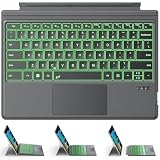
WirelessFinest lists this Bluetooth keyboard for Surface Pro 3, 4, 5, 6, 7, and 7+. The advertised rechargeable battery, magnetic attachment, trackpad, and seven-color backlight target users seeking an all-in-one detachable accessory.
Pros: The listing specifies Bluetooth, a rechargeable battery, a trackpad, and backlighting. Cons: Compatibility is stated for older generations, not newer Surface Pro models, and battery runtime is unspecified. Who should skip it: Owners of Pro 8 or later devices unless the seller confirms fit.
Microsoft Surface Slim Pen (2nd Edition) and Pro Keyboard
This bundle pairs Microsoft’s Pro Keyboard with a Surface Slim Pen (2nd Edition), and is listed for Surface Pro (11th Edition), Pro 9, and Pro 8. It is a convenient option for buyers who need both a keyboard and pen.
Pros: The supplied product name identifies both the keyboard and second-generation Slim Pen, with compatibility specified for three models. Cons: The listing details do not describe keyboard material, trackpad, or charging arrangements. Who should skip it: Buyers who already own a compatible pen or need a keyboard for another generation.
Microsoft Surface Pro Keyboard for Surface Pro 12-inch
This keyboard is identified for the Surface Pro 12-inch device and has an Alcantara covering. Its model-specific naming makes checking device fit especially important, while the slate finish offers an alternative to the platinum option.
Pros: Microsoft accessory, Alcantara material, and a stated 12-inch device target. Cons: The supplied information does not name compatible generations or confirm trackpad and pen-storage details. Who should skip it: Anyone with a different Surface Pro size or generation until compatibility is verified.
XICVORAX Surface Pro Keyboard
XICVORAX lists a Bluetooth keyboard for Surface Pro 11, 10, 9, 8, and X, with a 13-inch designation. Advertised features include a detachable magnetic design, seven-color backlighting, a pen holder, and a multi-touch trackpad.
Pros: The listing names several generations and specifies a trackpad, backlight, and pen holder. Cons: The supplied information does not confirm battery runtime, charging connector, or whether every feature works across all listed models. Who should skip it: Owners of models outside the stated list or anyone who requires a confirmed connection method beyond Bluetooth.
BEESUFAR Surface Pro Keyboard, Black
BEESUFAR lists this Bluetooth keyboard for Surface Pro 13, 11, 10, 9, 8, and X. The product title specifies seven-color backlighting, a multi-touch trackpad, USB-C rechargeable keyboard, and a pen holder that does not charge the pen.
Pros: The listing clearly distinguishes its USB-C-rechargeable keyboard from its non-charging pen holder. Cons: Battery runtime and detailed generation-by-generation compatibility are not supplied. Who should skip it: Buyers who expect the pen holder to charge a pen or need independently confirmed compatibility.
BEESUFAR Surface Pro Keyboard, Blue
This blue version lists the same broad Surface Pro 13, 11, 10, 9, 8, and X compatibility as the black model. Its stated features include Bluetooth, seven-color backlighting, a multi-touch trackpad, USB-C keyboard charging, and a non-charging pen holder.
Pros: It offers the same listed feature set as the black variant for readers who prefer blue. Cons: The supplied data does not specify battery life or clarify fit across device revisions. Who should skip it: Anyone choosing by color alone without confirming that the keyboard matches their Surface Pro.
Microsoft Type Cover for Surface Pro
This is a renewed Microsoft Type Cover, listed in black. A renewed item may appeal to shoppers considering a Microsoft-branded cover, but the supplied details do not identify its compatible Surface generations or condition specifics.
Pros: Microsoft branding and a Type Cover form factor. Cons: It is identified as renewed, and compatibility, included accessories, and condition details are not provided here. Who should skip it: Buyers who need a new accessory or cannot confirm the exact Type Cover generation for their device.
Dexnor for Microsoft Surface Pro 12th
Dexnor describes this as a 13-inch case keyboard for Surface Pro 12th Edition, 11, 10, and 9. Its magnetic detachable case, floating cantilever stand, trackpad, dual Bluetooth, backlighting, and pen holder suit buyers wanting more than a keyboard cover.
Pros: The listing combines a protective case, stand, trackpad, backlight, and dual Bluetooth. Cons: It is a bulkier case-style approach than a keyboard-only accessory, and the supplied details do not explain battery runtime or dual-connection behavior. Who should skip it: Readers seeking the simplest, lightest keyboard attachment or compatibility with an unlisted generation.
Arteck Microsoft Surface Pro Keyboard Type Cover
Arteck lists this ultra-slim Bluetooth Type Cover for the latest 13-inch Surface Pro, with a built-in touchpad and rechargeable battery. It may suit someone prioritizing wireless operation and a pointing surface in a portable keyboard.
Pros: Bluetooth, a built-in touchpad, and a rechargeable battery are stated in the listing. Cons: “Latest” does not identify specific generations, and battery runtime or charging details are not supplied. Who should skip it: Buyers who need confirmed compatibility with a particular Surface Pro model before purchase.
Are These Keyboards Suitable for Gaming?
These products are primarily portable Surface accessories, not documented gaming keyboards. The supplied specifications do not establish gaming-focused features such as switch type, polling rate, or latency, so do not assume that backlighting means faster input.
For a separate desktop gaming setup, explore our guides to gaming keyboard and mouse combinations and compact 60% gaming keyboards.


Write Your Review
No reviews yet. Be the first to share your experience!