

The best gaming keyboard under $100 depends on what you value most: compact mouse space, wireless flexibility, a numpad, or dedicated controls. Based on the listed specifications, the GravaStar suits compact wireless setups, while the Razer BlackWidow V4 X offers linear switches and dedicated macro keys.
For full-size functionality, compare the AULA F108 PRO with the Logitech G316 X 98. The Logitech G PRO X 60% and Razer BlackWidow V4 TKL Wireless are smaller alternatives, but their compact layouts require comfort with fewer dedicated keys.
This is a specification-based comparison, not a report of independent performance measurements. Features, software support, and wireless behavior can vary by setup, so check the exact model and connection requirements before choosing.

Pros
- Versatile tri-mode wireless and wired connectivity
- Gasket-mounted design with five layers of sound foam
- Smooth, responsive 40gf linear mechanical switches
- Compact 75% footprint optimizes desk space
- Built-in 4000mAh rechargeable battery
Cons
- Lacks a dedicated numeric keypad
- Transparent exoskeleton styling may not suit understated desks

Pros
- Fast 1.2mm linear Yellow switches with sound dampeners
- Six dedicated programmable macro keys
- Multi-function roller and dedicated media controls
- Per-key customizable Razer Chroma RGB lighting
- Built-in acoustic foam and lubricated stabilizers
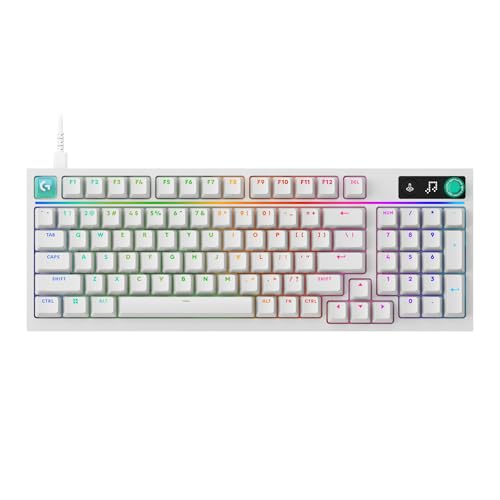
Pros
- Rapid 8 kHz report rate
- Hot-swappable PCB with durable PBT keycaps
- Gasket-mounted structure with internal sound dampening
- On-board LED dot-matrix display and multi-function dial
- Efficient 98 percent layout retains full number pad
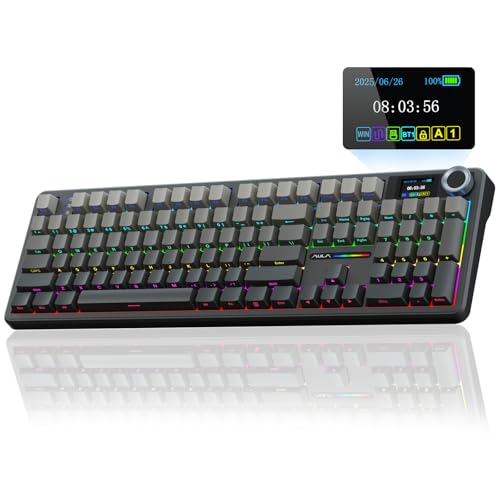
Pros
- Full-size layout with dedicated number pad
- Hot-swappable 3-pin and 5-pin switch support
- Three connection modes across multiple platforms
- Large 8000mAh battery capacity
- Built-in display and multifunction control knob
Cons
- Screen customization requires Windows software and wired mode
- Macro and RGB software supports Windows in wired mode
- Linux may have abnormal F-zone functionality with incompatible drivers

Pros
- Compact 60% footprint frees up mouse space
- Responsive GX tactile optical switches
- Low-latency LIGHTSPEED wireless and Bluetooth support
- Multi-layer key customization via KEYCONTROL
- Includes protective carrying case for travel
Cons
- Lacks dedicated arrow keys and navigation cluster
- Requires learning secondary function layers for commands

Pros
- Fast 8 kHz report rate for low latency
- Compact 98 percent layout includes number pad
- Hot-swappable switches with durable PBT keycaps
- Sound-dampened gasket-mounted construction
- Convenient on-board dot-matrix screen and control dial
Cons
- Enabling 8 kHz polling rate requires G HUB software
- Full macro and lighting customization requires software configuration

Pros
- Hot-swappable PCB supports 3-pin and 5-pin switches
- Dual-mode 2.4 GHz wireless and multi-device Bluetooth
- Internal foam and tape dampening reduce typing hollows
- Dedicated programmable roller and media control buttons
- Long advertised battery life up to 980 hours
Cons
- Tenkeyless layout omits a dedicated number pad
How to Choose a Gaming Keyboard Under $100
Start with layout. A 75% or 60% keyboard saves desk space, while a 98% or full-size layout retains a numpad for spreadsheets, shortcuts, and other tasks.
Next, consider how you will connect. Wired USB-C is available on several picks; Bluetooth and 2.4GHz wireless are specified on select models. Wireless options can suit multi-device setups, but check the included receiver, operating-system support, and any software-dependent features.
Switch feel is another practical distinction. Linear switches move without a tactile bump, while the Logitech G PRO X 60% listing specifies tactile optical switches. The Razer BlackWidow V4 TKL Wireless uses orange switches, but the supplied details do not specify their precise feel.
Finally, weigh customization against convenience. Hot-swappable sockets allow switch replacement without soldering, while macro keys, media controls, displays, and software can add useful functions. Consider whether those features matter more than a simpler layout or connection.
Recommended Keyboards by Setup
GravaStar Mercury K1 Lite: Compact Wireless Flexibility
The GravaStar Mercury K1 Lite is an 80-key, 75% keyboard measuring 13.50 by 6.14 inches and weighing 1.87 lb. Its wired, Bluetooth, and 2.4GHz modes offer flexibility for Windows and macOS devices.
Its linear switches are specified at 40gf actuation, 2 mm pre-travel, and 3.6 mm total travel. A 4,000mAh battery, gasket mount, five-layer dampening, and 13 lighting modes round out the feature set.
Pros: Compact layout leaves more room for mouse movement, three connection modes support varied setups, and the listed switch specifications make the feel easier to assess.
Cons: The 75% layout omits a dedicated number pad, and the transparent styling may not suit every desk. Battery runtime and wireless latency are not specified.
Who should skip it: Skip this model if you need a numpad or prefer a conventional opaque keyboard design.
Razer BlackWidow V4 X: Linear Switches and Macro Keys
The BlackWidow V4 X uses yellow linear switches with a stated 1.2 mm actuation point and 45 g operating force. Six dedicated macro keys, a multifunction roller, and secondary media keys provide direct controls.
Per-key Chroma RGB supports customizable effects, while doubleshot ABS keycaps and under-board foam are among its documented construction features. The supplied details describe this as a wired mechanical keyboard, so it suits users who do not require wireless connectivity.
Pros: Fast-actuating linear switches, six programmable macro keys, and dedicated media controls suit players who want commands within easy reach.
Cons: Wireless connectivity and hot-swappable switches are not listed. ABS keycaps may also be less appealing to buyers specifically seeking PBT keycaps.
Who should skip it: Skip it if you want a wireless keyboard, switch sockets for later customization, or a compact footprint.
Logitech G316 X 98: Compact Full-Size Functionality
The Logitech G316 X 98 keeps a numpad in a space-saving 98% layout. Its listed features include hot-swappable linear switches, double-shot PBT keycaps, a gasket-mounted structure, and sound-dampening layers.
An 8 kHz report rate is advertised, alongside a dial and LED dot-matrix display for report rate, volume, brightness, and media controls. G HUB is required for features such as lighting customization, macros, and key assignments.
Pros: Retains the numpad without a traditional full-size footprint, and combines PBT caps with hot-swappable switches. Built-in controls offer convenient adjustments.
Cons: The 8 kHz figure is an advertised specification, not an independently established advantage in every game. G HUB is needed for deeper customization.
Who should skip it: Skip it if you want wireless operation or a smaller 60% or 75% layout.
AULA F108 PRO: Full-Size Wireless and Customization
The AULA F108 PRO offers a 104-key full-size layout, Bluetooth 5.0, 2.4GHz wireless, and USB-C wired connectivity. It supports Windows, macOS, iOS, and Android, and can save connections for up to five devices.
Its hot-swap base accepts three-pin or five-pin switches, and the keyboard includes PBT keycaps, an 8,000mAh battery, a display, and a multifunction knob. The manufacturer specifies a 1,000Hz polling rate in wired and 2.4GHz modes.
Pros: Full-size keys, multiple connection options, switch replacement, and broad listed device compatibility make it versatile for gaming and general work.
Cons: Its full-size footprint takes more desk space than compact alternatives. Screen image and GIF setup, along with macros and other driver features, require Windows software in wired mode.
Who should skip it: Skip it if desk space is limited or you want to configure every feature without Windows software.
Logitech G PRO X 60%: A Small Wireless Board
The Logitech G PRO X 60% is designed for compact setups and includes LIGHTSPEED wireless, Bluetooth, and optional USB connectivity. Its listed optical switches are tactile, and the package includes a carrying case and wireless adapter.
KEYCONTROL supports customizable assignments and five layers, while LIGHTSYNC RGB and game mode controls are available through G HUB. The product description also references a TKL layout, but its model name and supplied details identify it as 60%, so verify the layout shown for the exact listing before purchase.
Pros: Multiple connection options, tactile optical switches, customizable layers, and a carrying case suit portable gaming setups.
Cons: A 60% layout lacks dedicated function and navigation rows, and requires comfort with secondary key commands. The supplied description does not specify battery runtime.
Who should skip it: Skip it if you depend on a numpad, dedicated arrow keys, or a conventional full-size layout.
Logitech G316 X 98, Black: A Second Color Option
The black G316 X 98 listing describes the same core specifications as the white version: 98% layout, hot-swappable linear switches, PBT keycaps, an 8 kHz report rate, and G HUB support.
Choose between these listings based on preferred color and the exact product configuration shown by the retailer. The supplied data does not establish a performance difference between the two color variants.
Pros: Offers the same documented compact full-size features, including a numpad, display, dial, and replaceable switches.
Cons: The listed feature set largely duplicates the white variant, so it does not present a distinct specification-based reason to choose it. G HUB is needed for advanced customization.
Who should skip it: Skip this listing if you prefer the white version or want wireless connectivity.
Razer BlackWidow V4 TKL Wireless: Hot-Swappable and Wireless
This tenkeyless Razer connects through 2.4GHz HyperSpeed wireless or Bluetooth, with support for switching among three Bluetooth devices. Its socketed PCB accepts three-pin or five-pin switches, allowing replacement without soldering.
A multifunction roller, three remappable control buttons, and Chroma RGB add convenience and customization. The listed orange switches are preloaded, but the supplied information does not state their actuation force or precise tactile characteristics.
Pros: Wireless modes, hot-swap compatibility, remappable controls, and sound-dampening construction suit buyers seeking a customizable TKL keyboard.
Cons: It omits the numpad, and the advertised battery life is not independently established here. Exact switch feel is not detailed in the supplied specifications.
Who should skip it: Skip it if you need full-size keys or want clearly specified switch actuation and tactile details.
Which Keyboard Should You Choose?
Choose the GravaStar Mercury K1 Lite for a compact 75% wireless board with documented linear switch measurements. The BlackWidow V4 X fits players who prefer dedicated macros and linear switches in a wired setup.
For a numpad in a smaller footprint, compare either G316 X 98 listing. Pick the AULA F108 PRO for a full-size layout, multi-device connections, and extensive switch customization, provided its software requirements suit your setup.
The Logitech G PRO X 60% is the compact option for players comfortable with a reduced layout, while the Razer BlackWidow V4 TKL Wireless adds wireless connectivity and hot-swappable switches. For more layout comparisons, see our guides to 60% gaming keyboards, keyboards for gaming and typing, and gaming keyboards.




Write Your Review
No reviews yet. Be the first to share your experience!