

The best gaming keyboard with RGB depends on whether you prioritize switch feel, compact desk space, wireless freedom, or a complete peripheral bundle. For a dedicated keyboard with per-key lighting and clicky hybrid switches, consider the SteelSeries Apex 5. The GravaStar Mercury K1 Lite is a compact wireless mechanical option, while the SteelSeries Apex 3 favors quiet typing and spill resistance.
This comparison is based on the supplied specifications, not independent performance measurements. Lighting descriptions vary: some models offer per-key RGB, while others provide zone-based or rainbow backlighting, so check the lighting type as well as the connection and layout.
RGB Gaming Keyboards Compared

Pros
- IP32 water resistance guards against liquid spills
- Whisper-quiet switches rated for 20 million presses
- Included magnetic wrist rest for palm support
- Dedicated on-the-fly multimedia controls
- Broad compatibility with PC and major consoles
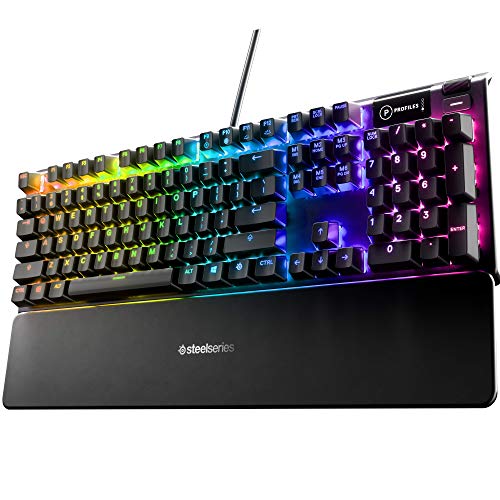
Pros
- Tactile hybrid switches rated for 20 million clicks
- Built-in customizable OLED smart display
- Durable aircraft-grade aluminum alloy frame
- Dynamic per-key RGB backlighting with reactive effects
- Detachable magnetic wrist rest included

Pros
- Dedicated one-touch lighting toggle button
- 19-key anti-ghosting for essential gaming inputs
- Full 104-key layout with multimedia shortcuts
- Plug-and-play setup across PC and consoles
- Adjustable backlighting brightness and breathing modes
Cons
- Simulates mechanical feel rather than true mechanical switches
- Anti-ghosting is limited to 19 keys
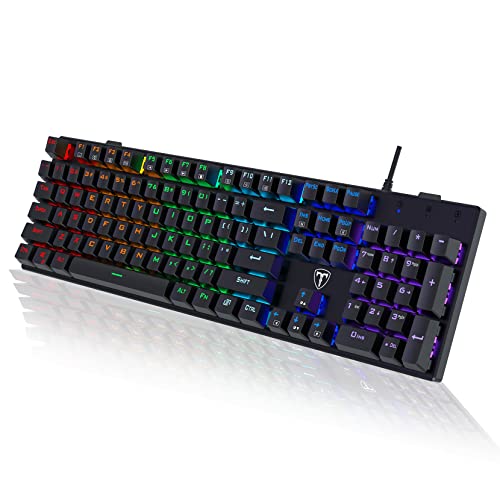
Pros
- Tactile blue switches provide clear actuation feedback
- Full anti-ghosting supports rapid simultaneous keypresses
- Spill-resistant design with integrated liquid drainage holes
- Convenient 12 multimedia shortcuts and Windows lock
- Double-shot ABS keycaps resist legend wear
Cons
- Audible clicky switches may disturb quiet shared spaces
- Preset rainbow backlighting lacks individual per-key RGB customization

Pros
- Up to 10000 DPI mouse with 1000Hz polling rate
- Dedicated software for macros and lighting customization
- 25-key anti-ghosting for essential gaming inputs
- Integrated 12 multimedia function shortcut keys
Cons
- Anti-ghosting is restricted to 25 designated keys
- Maximum DPI and macro customization requires software installation

Pros
- Five dedicated macro keys for rapid command input
- Quiet membrane switches suitable for shared workspaces
- Adjustable mouse sensitivity from 800 to 7200 DPI
- Integrated wrist rest helps reduce typing fatigue
- Onboard memory retains lighting and DPI profiles
Cons
- Uses membrane keys rather than mechanical switches
- Wired design restricts flexible cable-free placement
- Full software customization limited to Windows systems

Pros
- Tri-mode connectivity via Bluetooth, 2.4GHz, and USB-C
- Single 2-in-1 USB receiver operates both peripherals
- Ten dedicated multimedia keys for direct playback control
- Mouse supports up to 1000Hz polling rate
- Keyboard battery rated up to 300 hours without RGB
Cons
- Configuration software is limited to Windows systems
- Mouse sensor tops out at 4800 DPI

Pros
- Versatile tri-mode wireless and wired connectivity
- Gasket-mounted design with five layers of sound foam
- Smooth, responsive 40gf linear mechanical switches
- Compact 75% footprint optimizes desk space
- Built-in 4000mAh rechargeable battery
Cons
- Lacks a dedicated numeric keypad
- Transparent exoskeleton styling may not suit understated desks

Pros
- Durable metal panel with integrated ergonomic wrist rest
- Whisper-quiet switches suitable for shared environments
- IP32 spill resistance with built-in drainage holes
- 25-key anti-ghosting support for gaming inputs
- Customizable backlighting with automatic sleep mode
Cons
- Multimedia shortcut keys do not work on Mac systems
- Uses membrane volcano switches instead of mechanical switches

Pros
- Complete 3-in-1 desktop gaming accessory bundle
- Reinforced steel plate ensures keyboard rigidity
- Ergonomic memory foam faux-leather wrist rest included
- Adjustable optical mouse sensitivity up to 7200 DPI
Cons
- Uses mechanical-feel membrane switches instead of authentic mechanical
- Anti-ghosting is restricted to 26 specific keys
Recommended RGB Keyboards by Use
SteelSeries Apex 3: Quiet typing and spill resistance
The Apex 3 pairs 10-zone RGB lighting with quiet switches rated for 20 million keypresses, an IP32 water-resistance claim, and a magnetic wrist rest. Dedicated media controls add convenient access to volume and settings. Its listed compatibility includes Windows, Mac OS X, Xbox Series S and X, PS4, and PS5.
Pros: Quiet switches, wrist support, media controls, and broad stated platform compatibility. Cons: Its lighting is specified by zone rather than per key, and the product data does not identify a wireless connection. Who should skip it: Skip it if you specifically want per-key lighting or mechanical switches.
See our keyboard guide for StarCraft II for more game-focused selection considerations.
SteelSeries Apex 5: Per-key lighting and clicky hybrid switches
The Apex 5 combines per-key RGB with hybrid blue switches described as tactile and clicky, plus an OLED display for supported game information, GIFs, and Discord messages. Its aluminum-alloy frame and magnetic wrist rest suit a full-size desk setup. The specified switch lifespan is 20 million keypresses.
Pros: Per-key illumination, an OLED display, and a wrist rest are useful features for a feature-rich wired setup. Cons: Clicky feedback may be distracting in shared rooms, and the product information does not specify platform compatibility. Who should skip it: Skip it if you need quiet keys, wireless connectivity, or confirmed console support.
GravaStar Mercury K1 Lite: Compact wireless mechanical design
This 75% keyboard has 80 keys, tri-mode wired, Bluetooth, and 2.4 GHz connectivity, and a rechargeable 4,000 mAh battery. Its linear switches are specified at 40 gf actuation, 2 mm pre-travel, and 3.6 mm total travel. The compact layout can leave more room for mouse movement, while its 13 RGB modes and transparent chassis emphasize visible lighting.
Pros: Three connection modes, compact dimensions, linear switches, and customizable lighting suit multi-device desks and space-conscious gaming setups. Cons: It has 80 keys rather than a full-size layout, and compatibility is specified for Windows and macOS only. Who should skip it: Skip it if you need a number pad or stated Xbox and PlayStation compatibility.
RisoPhy Mechanical Gaming Keyboard: Full-size clicky keys
RisoPhy offers a 104-key layout with blue switches, rainbow backlighting, 100% anti-ghosting, and 12 multimedia combinations. Its full layout includes a number pad, while the clicky switch design is intended for users who prefer audible, tactile feedback. The listing states compatibility with Windows, Mac OS, and Xbox.
Pros: Full-size keys, anti-ghosting, adjustable lighting, and multimedia shortcuts support gaming and general desktop use. Cons: Blue switches are clicky, and the lighting is described as rainbow backlighting rather than per-key RGB. Who should skip it: Skip it if you need quiet operation or a compact layout.
TECKNET Wired Gaming Keyboard: Quiet operation with a wrist rest
The TECKNET keyboard combines 15-zone rainbow illumination, 25 anti-ghost keys, 12 multimedia keys, and an integrated wrist rest. Its quiet switches and IP32 spill-resistance rating make it worth considering for shared rooms or everyday PC use. The listing also specifies a metal base and an automatic backlight sleep feature after inactivity.
Pros: Quiet switches, wrist support, spill resistance, and multiple lighting modes. Cons: The multimedia keys are specified as incompatible with Mac, and the product data does not establish console compatibility. Who should skip it: Skip it if you use a Mac and rely on dedicated multimedia keys, or want per-key lighting.
Redragon S101-3 PRO: Wired keyboard and mouse bundle
This bundle includes a full-size membrane keyboard and mouse, with six keyboard lighting modes and five dedicated macro keys. The keyboard is described as quiet and anti-ghosting, and its wrist rest may appeal to people who want a bundled desktop setup. Listed compatibility is Windows 10 and 11.
Pros: A mouse, wrist rest, customizable lighting, and macro keys come together in one wired set. Cons: It uses membrane keys, and stated compatibility is limited to Windows 10 and 11. Who should skip it: Skip it if you want a standalone mechanical keyboard or use macOS or a console.
Redragon S107: Keyboard and adjustable-DPI mouse bundle
The S107 pairs a keyboard with six RGB lighting modes and 25-key anti-ghosting with a mouse whose DPI can be adjusted up to 5,000 using its button or up to 10,000 through software. The listing also describes programmable controls and 12 multimedia keys. It is specified for PC and laptop use.
Pros: The included mouse has configurable sensitivity, and the keyboard provides multiple lighting modes and anti-ghosting. Cons: The highest stated mouse DPI requires software, and compatibility details are less specific than for some standalone keyboards. Who should skip it: Skip it if you want a keyboard-only purchase or need confirmed console or Mac support.
Redragon S101M-KS: Wireless keyboard and mouse combo
This combo supports wired, Bluetooth, and 2.4 GHz modes, with one 2.4 GHz receiver shared by the keyboard and mouse. The keyboard has eight backlight patterns, multimedia controls, and a stated battery life of up to 300 hours with RGB off. The accompanying mouse offers five DPI settings from 800 to 4,800.
Pros: Multiple connection choices, a shared receiver, and an included mouse suit users who want fewer cables and bundled peripherals. Cons: The battery-life figure is specified with lighting off, and the listing names Windows and PC use rather than console support. Who should skip it: Skip it if you prefer a standalone keyboard or need confirmed console compatibility.
For more bundled-peripheral options, compare this guide with our gaming keyboard and mouse recommendations.
RedThunder K10: Full-size wired bundle with wrist rest
The K10 package includes a full-size keyboard, mouse, and memory-foam wrist rest. Its keyboard has 26 anti-ghosting keys, while the mouse is specified with a 7,200 DPI sensor. The listing describes RGB lighting across the keyboard and mouse, making this a practical option for someone assembling a basic wired setup.
Pros: Full-size layout, wrist rest, mouse, and anti-ghosting are bundled together. Cons: The keyboard is described as having a mechanical feel, not as a mechanical-switch model, and platform compatibility is not specified in the supplied details. Who should skip it: Skip it if you need confirmed Mac or console support, wireless use, or a true mechanical keyboard.
Redragon K521 Upgrade: Basic backlighting at a low-cost tier
The K521 is a wired, full-size keyboard with 104 keys, rainbow LED backlighting, 19-key anti-ghosting, and 12 multimedia combinations. It is described as having a mechanical feel, which does not establish that it uses mechanical switches. The listing states plug-and-play compatibility with Windows, macOS, PS4, PS5, and Xbox.
Pros: A full-size layout, one-touch lighting control, and broad stated compatibility make it a straightforward option for basic gaming and typing. Cons: Its lighting is rainbow rather than customizable per-key RGB, and its switches are described only as mechanical-feeling. Who should skip it: Skip it if you require confirmed mechanical switches or fully customizable per-key lighting.
How to Choose an RGB Gaming Keyboard
Choose lighting by type, not just by label
Per-key RGB allows individual key illumination, as specified for the Apex 5. Zone-based lighting divides the board into sections, while rainbow backlighting describes fixed multicolor illumination. If customized effects are important, confirm the product’s listed lighting controls instead of assuming every RGB label means per-key customization.
Match switch feel and sound to your room
Clicky blue switches suit people who prefer audible feedback, but can be distracting in shared spaces. Quiet membrane or quiet-switch models may be more considerate for late sessions. Mechanical-feeling wording does not confirm a mechanical switch, so check the specific switch description when that distinction matters.
Pick a layout that fits your games and desk
A full-size board keeps the number pad and function keys, while the Mercury K1 Lite’s 75% layout uses 80 keys to save desk space. Consider whether you regularly use a number pad, dedicated media keys, or extra room for mouse movement before choosing a layout.
Check connection and platform details
Wired models avoid charging but need a cable connection. Tri-mode models add Bluetooth and 2.4 GHz options, though wireless features and compatibility differ by product. Confirm the exact operating system or console support in the listing, especially when a keyboard’s product data does not state it.
Decide whether a bundle is useful
Keyboard-and-mouse bundles can cover basic setup needs, but their keyboard layouts, switch types, and customization options vary. Choose a bundle if its included mouse and features match your needs. If keyboard feel or per-key lighting is the priority, a standalone model may be easier to assess.
Which RGB Gaming Keyboard Should You Choose?
Choose the SteelSeries Apex 5 for per-key RGB and clicky hybrid switches, or the GravaStar Mercury K1 Lite if compact layout and tri-mode wireless connectivity matter more. The Apex 3 is a better fit for quiet typing and spill resistance, while the RisoPhy offers a full-size clicky layout. For a bundled setup, compare the Redragon combos by connectivity and included features, then confirm platform support before buying.


Write Your Review
No reviews yet. Be the first to share your experience!