

For adjustable actuation and Rapid Trigger, the Razer Huntsman V3 Pro models stand out on paper. For a smaller, simpler linear-switch board, consider the Razer Huntsman Mini; Logitech’s PRO X 60 adds wireless connectivity and tactile or linear optical switch options.
These keyboards differ in switch behavior, layout, and connection options, so there is no single fit for every player. This comparison uses the supplied specifications, not independent performance measurements.

Pros
- Gen-2 analog switches with Rapid Trigger support
- True 8000 Hz polling rate minimizes latency
- Adjustable actuation from 0.1 to 4.0 mm
- Onboard settings adjustment via LED indicator
- Durable textured doubleshot PBT keycaps
Cons
- Full-size footprint requires substantial desk space
- Heavier 3.68-pound chassis limits portability
Pros
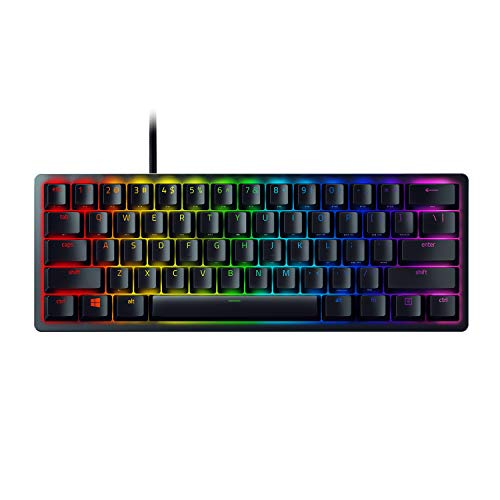
- Fast 1.0 mm linear optical actuation
- Durable, oil-resistant doubleshot PBT keycaps
- Rigid matte aluminum top frame
- Ultra-compact footprint frees up desk space
- Individually customizable per-key RGB lighting
Cons
- Lacks dedicated arrow and navigation keys
- Snap Tap features require Razer Synapse 4 software

Pros
- Fast 1.0 mm linear optical actuation
- Space-saving 60% compact layout
- Textured doubleshot PBT keycaps resist oil
- Matte aluminum top frame for structural rigidity
- Per-key Razer Chroma RGB backlighting

Pros
- Compact 60% footprint frees up mouse space
- Responsive GX tactile optical switches
- Low-latency LIGHTSPEED wireless and Bluetooth support
- Multi-layer key customization via KEYCONTROL
- Includes protective carrying case for travel
Cons
- Lacks dedicated arrow keys and navigation cluster
- Requires learning secondary function layers for commands

Pros
- Pre-lubed ROG RX Red optical switches
- IP57 dust and water resistance rating
- Integrated acoustic sound-dampening foam
- Multi-function dial and media controls
- Dedicated streaming and Game Bar hotkeys

Pros
- Adjustable actuation points with Rapid Trigger support
- High-speed 8000 Hz HyperPolling rate
- Durable doubleshot PBT keycaps
- Software-free onboard adjustment via visual LED indicator
- Detachable magnetic firm leatherette wrist rest
Cons
- Tenkeyless layout lacks a dedicated numeric keypad
- Relatively heavy desktop footprint at over 3.1 pounds
How to Choose an Optical-Switch Gaming Keyboard
Start with switch behavior. Linear switches move without a tactile bump, while the Logitech listing offers tactile or linear GX optical switches, giving buyers a choice in key feel.
Next, decide whether adjustable actuation matters. The Huntsman V3 Pro keyboards specify a 0.1–4.0 mm range and Rapid Trigger; the other listings do not provide equivalent actuation adjustments.
Layout affects desk space and access to dedicated keys. The Razer Mini and Logitech are 60% models, while the Razer TKL is a tenkeyless option; the ASUS listing describes a full-size-style set of function-row hotkeys.
Connection needs also matter. Logitech specifies LIGHTSPEED wireless, Bluetooth, and optional USB connectivity; the supplied details for the Razer and ASUS models do not specify wireless support.
Recommended Optical-Switch Keyboards
Razer Huntsman V3 Pro 8KHz Esports: Adjustable Analog Controls
Its Gen-2 analog optical switches offer adjustable actuation from 0.1 to 4.0 mm, Rapid Trigger, and a stated 100-million-keystroke lifespan. The advertised 8,000 Hz polling rate and onboard adjustments target players who want fine-grained control.
Snap Tap, a multifunction dial, dedicated controls, PBT keycaps, and a magnetic wrist rest add practical features. Its high polling specification and extensive controls may be unnecessary for casual play, and the supplied details do not specify its connection interface.
Pros: Adjustable actuation, Rapid Trigger, onboard settings, and a stated 100-million-keystroke lifespan. Cons: Advanced features may be more than many users need; interface details are not provided. Who should skip it: Buyers seeking a basic, lower-cost keyboard or a clearly documented wireless connection.
See keyboard options for StarCraft II if you are comparing layouts for strategy games.
Razer Huntsman V3 Pro TKL 8KHz Esports: Compact Competitive Layout
This tenkeyless model shares the listed Gen-2 analog optical switch range, Rapid Trigger, 8,000 Hz polling, and onboard adjustment approach of the larger V3 Pro. It suits players who want those controls in a TKL layout.
The dial, dedicated controls, PBT keycaps, foam layer, and magnetic wrist rest support a feature-rich setup. The available specifications do not establish how much polling or actuation adjustments change real-game outcomes.
Pros: Adjustable analog actuation, Rapid Trigger, TKL layout, and onboard controls. Cons: Its specialist features may be excessive for ordinary typing or casual gaming, and connection details are not supplied. Who should skip it: Anyone who wants a full-size layout or does not need adjustable actuation.
Razer Huntsman Mini 60% Gaming Keyboard: Straightforward Linear Optical Switches
The black Huntsman Mini listing specifies linear optical switches with 1.0 mm actuation and an advertised 15–30% shorter actuation distance than other linear switches. Its 60% layout saves desk space, while PBT keycaps and an aluminum top frame add durable materials.
Chroma lighting and programmable macros add customization, and Snap Tap can be enabled through Razer Synapse 4. This compact layout omits dedicated keys compared with larger boards, and Snap Tap requires software to toggle.
Pros: Compact 60% form, linear optical switches, PBT keycaps, and programmable macros. Cons: Dedicated navigation and function keys are not part of the stated layout; Snap Tap needs Synapse 4. Who should skip it: Users who rely on a full-size keyboard or prefer tactile switches.
The white Huntsman Mini listing offers the same stated linear optical switch and 60% layout approach, with an aluminum frame, Chroma lighting, and PBT keycaps. Its supplied feature list does not mention Snap Tap, so do not assume that feature from the black listing.
Pros: Compact layout, linear optical switches, aluminum top frame, and PBT keycaps. Cons: The supplied details do not list Snap Tap or provide adjustable actuation specifications. Who should skip it: Buyers who need clearly specified Rapid Trigger or a full-size layout.
Logitech G PRO X 60% Wireless Gaming Keyboard: Wireless and Switch-Feel Options
The listing offers GX optical switches in tactile or linear versions, plus LIGHTSPEED wireless with a stated 1 ms response rate, Bluetooth, and optional USB connectivity. KEYCONTROL supports five layers, and the package includes a carrying case.
This is a sensible match for players who want a portable 60% board and multiple connection choices. The listing also calls it mechanical, so confirm the exact switch variant and connection arrangement before purchase if those distinctions are essential.
Pros: Tactile or linear optical options, multiple connection modes, customizable layers, and a carrying case. Cons: A 60% layout reduces dedicated keys, and the product description uses both mechanical and optical terminology. Who should skip it: Buyers who want adjustable analog actuation or a larger keyboard.
ASUS ROG Strix Scope II Gaming Keyboard: Optical Switches With Acoustic Features
ROG RX linear optical switches are pre-lubed and designed for consistent, wobble-free keystrokes, with near-zero debounce delay stated by ASUS. Integrated sound-dampening foam targets pinging and echoes, while a multifunction button and knob handle media and lighting.
Its F1–F5 recording and Xbox Game Bar hotkeys may suit streaming or capture workflows. The listing does not specify adjustable actuation, Rapid Trigger, or a polling rate, so it is less clearly suited to buyers prioritizing those controls.
Pros: Linear optical switches, sound-dampening foam, media controls, and stated IP57 water and dust resistance. Cons: Adjustable actuation and Rapid Trigger are not specified. Who should skip it: Players seeking those particular competitive switch features or a compact 60% board.
Which Optical Keyboard Fits Your Setup?
Choose a Huntsman V3 Pro if adjustable analog actuation and Rapid Trigger are your priorities. Pick the TKL version when you prefer a tenkeyless layout; consider the other version if its listed layout and included wrist rest suit your desk.
For a compact linear board, the Razer Huntsman Mini is a direct option, while Logitech’s PRO X 60 makes more sense when wireless modes or tactile switches matter. The ASUS is a better fit for buyers interested in linear switches, controls, and sound-dampening features.
For more layout comparisons, browse our guides to 60% gaming keyboards, keyboards for gaming and typing, and compact keyboards.



Write Your Review
No reviews yet. Be the first to share your experience!