

The Logitech G PRO Mechanical TKL Tenkeyless is the clearest fit for competitive players who want conventional clicky switches in a compact layout. For a full-size board with more features, consider the Razer BlackWidow V4; for lower-cost options, compare the RisoPhy and CACKBIRD models.
This specification-based comparison focuses on switch feel, layout, connectivity, and useful gaming features. Clicky switches make audible noise, so they may not suit shared rooms, voice calls, or quiet workspaces.
Top Gaming Keyboards With Clicky Switches
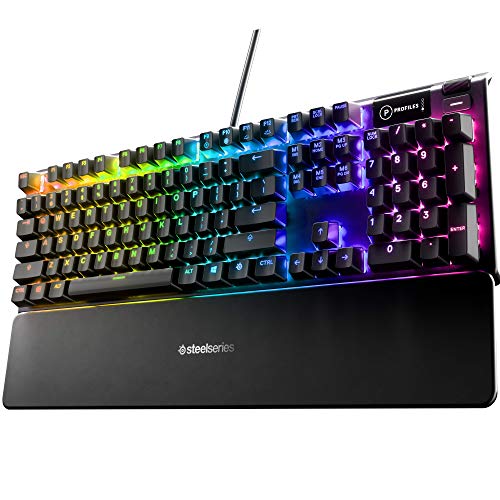
Pros
- Tactile hybrid switches rated for 20 million clicks
- Built-in customizable OLED smart display
- Durable aircraft-grade aluminum alloy frame
- Dynamic per-key RGB backlighting with reactive effects
- Detachable magnetic wrist rest included

Pros
- Space-saving tenkeyless design frees mouse room
- Tactile, audible GX Blue clicky mechanical switches
- Detachable 1.8-meter cable ensures easy transport
- Onboard memory stores static LIGHTSYNC profiles
- Three-step tilt adjustment provides stable ergonomics
Cons
- Key and lighting programming requires Logitech G HUB
- Macro assignments are restricted to F1 through F12
- Equipped with an older Micro USB connection
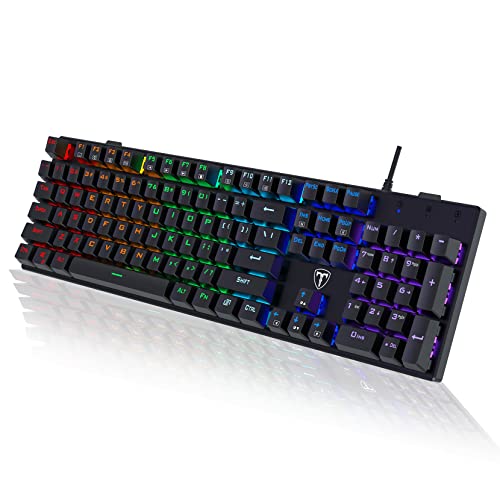
Pros
- Tactile blue switches provide clear actuation feedback
- Full anti-ghosting supports rapid simultaneous keypresses
- Spill-resistant design with integrated liquid drainage holes
- Convenient 12 multimedia shortcuts and Windows lock
- Double-shot ABS keycaps resist legend wear
Cons
- Audible clicky switches may disturb quiet shared spaces
- Preset rainbow backlighting lacks individual per-key RGB customization

Pros
- Hall Effect switches with adjustable actuation
- Fast 8000Hz polling rate
- Compact 68-key layout preserves arrow keys
- Detachable wired USB connection
- South-facing RGB with web-based configuration
Cons
- Web configuration driver does not support macOS
- Wired-only connection with no wireless functionality

Pros
- Durable wear-resistant PBT keycaps
- Sturdy aluminum-magnesium alloy top plate
- Tactile mechanical switches for responsive feedback
- Convenient FN-layer media and lighting controls
Cons
- Lighting limited to single-color white LEDs
- Key rollover capped at six simultaneous inputs

Pros
- Tactile Razer Green switches with 50g actuation
- Six dedicated programmable macro keys
- Detachable magnetic plush leatherette wrist rest
- Durable doubleshot ABS keycaps
- Per-key RGB lighting with dual-side underglow
Cons
- Clicky switches can be loud in quiet settings
- Large footprint requires substantial desk space
- ABS keycap construction instead of PBT
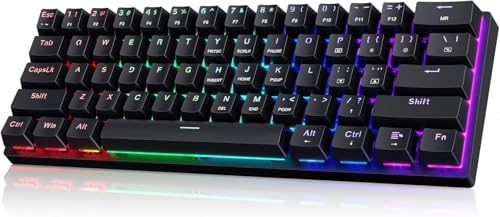
Pros
- Compact 61-key layout maximizes desk space
- Tactile and clicky mechanical switch feedback
- Detachable USB-C cable simplifies transport
- Full-key anti-ghosting prevents input conflicts
- Double-shot keycaps provide clear legend backlighting
Cons
- Lacks dedicated arrow and navigation keys
- Fixed rainbow lighting lacks full RGB customization

Pros
- Hot-swappable linear red switches
- Full-key anti-ghosting support
- Software macro editing and remapping
- Includes four spare replacement switches
- Twelve quick-access multimedia shortcuts
Cons
- Backlight LED colors cannot be changed
- Wired-only design without wireless functionality

Pros
- Versatile tri-mode wireless and wired connectivity
- Hot-swappable PCB supports 3-pin and 5-pin switches
- Large 8000mAh rechargeable internal battery
- Gasket mount with five-layer acoustic dampening
- Durable double-shot PBT keycaps
Cons
- Heavy build at over 3.3 pounds
- Driver software required for advanced macros and rhythm lighting
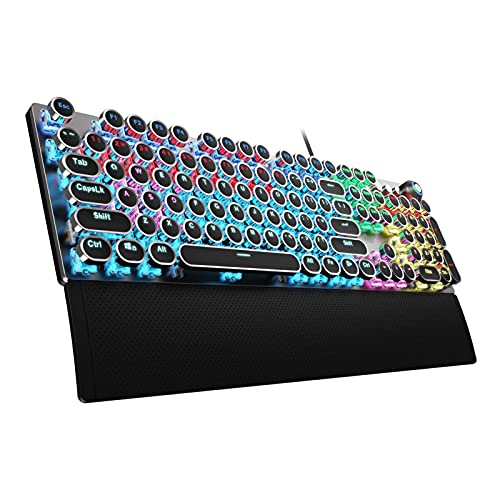
Pros
- Tactile clicky blue mechanical switches
- Dedicated knob for media and lighting controls
- Full 104-key anti-ghosting support
- Sturdy aluminum alloy top plate
- Included magnetic wrist rest
Cons
- Clicky switches produce loud audible noise
- Round keycap profile requires an adjustment period
- Wired-only connection with no wireless functionality
How to Choose a Clicky Gaming Keyboard
First, confirm the switch type. GX Blue, Razer Green, and the listed Blue-switch boards are clicky; the Apex 5 uses hybrid blue switches. The Logitech G413 SE is described as tactile, but its supplied specifications do not identify it as clicky.
Layout matters just as much. Tenkeyless and 60% boards free desk space for mouse movement, while full-size models retain a number pad. Compact layouts may move navigation or function commands to Fn combinations, which can take adjustment.
Consider sound and software needs before choosing. Clicky switches are audible by design, and some customization, macros, or lighting controls depend on software. Check the product details for your operating system and preferred settings before buying.
Recommended Models and Their Trade-Offs
Logitech G PRO Mechanical TKL Tenkeyless: Compact Esports-Oriented Pick
The Logitech G PRO Mechanical TKL Tenkeyless pairs GX Blue click switches with a tenkeyless layout and detachable Micro USB cable. Its smaller footprint leaves more room for mouse movement, and onboard lighting patterns can help when tournament systems restrict software installation.
Pros: Documented GX Blue click feedback, compact design, detachable cable, three angle settings, and onboard lighting patterns. Cons: No number pad, and F-key programming requires Logitech G HUB. Who should skip it: Users who need a number pad or want a quiet keyboard.
Logitech G PRO Mechanical TKL Tenkeyless
Razer BlackWidow V4 Mechanical Gaming Keyboard: Feature-Rich Clicky Option
Razer’s Green switches are specified with a 1.9 mm actuation point and 50 g actuation force. The full-size board adds six programmable macro keys, per-key RGB, underglow, and a magnetic wrist rest, making it suitable for players who want dedicated controls.
Pros: Clearly specified clicky switches, six macro keys, doubleshot ABS keycaps, and included cushioned wrist rest. Cons: Its feature set may be unnecessary for simple setups, and macro programming depends on customization. Who should skip it: Compact-layout shoppers or anyone avoiding audible switches.
Razer BlackWidow V4 Mechanical Gaming Keyboard
SteelSeries USB Apex 5 Hybrid Mechanical: Clicky-Style Hybrid
The Apex 5 uses hybrid blue switches combining a tactile click with a membrane component, rather than being presented as a conventional fully mechanical blue-switch board. It has per-key RGB, an OLED display, an aluminum-alloy frame, and a magnetic wrist rest.
Pros: Clicky-style tactile feedback, OLED display, per-key lighting, wrist rest, and a stated 20-million-keypress switch rating. Cons: The hybrid switch design differs from standard mechanical clicky switches. Who should skip it: Buyers specifically seeking conventional mechanical blue switches.
SteelSeries USB Apex 5 Hybrid Mechanical
RisoPhy Mechanical Gaming Keyboard: Full-Size Blue-Switch Value Pick
This wired 104-key keyboard uses Blue switches and includes anti-ghosting, a Windows lock shortcut, multimedia combinations, and rainbow backlighting. Its number pad and broad stated compatibility make it a practical choice for mixed gaming and general computer use.
Pros: Full-size layout, clicky Blue switches, spill-resistant design with drain holes, and stated compatibility with Windows, Mac OS, and Xbox. Cons: It occupies more desk space than compact boards, and lighting is rainbow rather than per-key RGB. Who should skip it: Players who prioritize a small footprint or need documented adjustable actuation.
RisoPhy Mechanical Gaming Keyboard
60% Wired Mechanical Gaming Keyboard with Blue: Small Desk Pick
This 61-key CACKBIRD board combines Blue switches, a detachable Type-C cable, and a compact footprint. It is aimed at FPS players who want more mouse room, but directional-key access uses an Fn combination, so check that workflow suits you.
Pros: Compact 60% layout, clicky Blue switches, anti-ghosting, and plug-and-play compatibility listed for several operating systems. Cons: It lacks dedicated arrow keys in its 61-key layout, and the supplied details do not specify adjustable actuation. Who should skip it: Users who regularly rely on dedicated navigation keys.
60% Wired Mechanical Gaming Keyboard with Blue
AULA F2088 Typewriter Style Mechanical: Full-Size Retro Design
The AULA F2088 has a 104-key layout, Blue switches, round typewriter-style keycaps, dedicated media controls, and a lighting knob. Its wrist rest and anti-ghosting features support longer typing and gaming sessions, while the unusual keycap shape is a personal preference.
Pros: Clicky Blue switches, full-size layout, media controls, customizable lighting effects, and stated PC, Mac, and Linux compatibility. Cons: The round retro keycaps may not suit every user, and the board is wired. Who should skip it: Shoppers wanting a conventional low-profile design or wireless connection.
AULA F2088 Typewriter Style Mechanical
Models That Are Not Conventional Clicky-Switch Picks
Several listed keyboards may suit gaming, but their documented switch types do not make them direct clicky-switch alternatives. Consider these only if their different switch feel or features matter more than an audible click.
AULA WIN68 HE Mechanical Gaming Keyboard 60%: Adjustable Magnetic Switches
The WIN68 HE uses Hall effect magnetic switches with adjustable actuation and advertised 8,000 Hz polling. Those specifications target configurable rapid inputs, not traditional clicky-switch feedback; its 60% layout retains arrow keys but uses Fn combinations for other commands.
Pros: Adjustable actuation, compact layout with arrow keys, detachable cable, and customizable settings through a Windows-compatible web driver. Cons: It is not specified as clicky, and the driver does not support Mac. Who should skip it: Buyers seeking audible Blue-style switches or Mac-based software customization.
AULA WIN68 HE Mechanical Gaming Keyboard 60%
Logitech G413 SE Full-Size Mechanical: Tactile, Not Confirmed Clicky
The G413 SE is a full-size wired keyboard with tactile mechanical switches, PBT keycaps, white backlighting, and six-key rollover anti-ghosting. Its switch type is not identified as clicky in the supplied specifications, so it is a better fit for shoppers open to tactile feedback.
Pros: Full-size layout, PBT keycaps, aluminum-alloy top case, and FN media controls. Cons: Clicky switch behavior is not documented, and the listed anti-ghosting specification is six-key rollover rather than full-key rollover. Who should skip it: Anyone requiring confirmed Blue, Green, or GX Blue click switches.
Logitech G413 SE Full-Size Mechanical
Redragon Mechanical Gaming Keyboard Wired: Linear Red Switches
This Redragon model uses hot-swappable linear Red switches, which are described as smoother and easier to press than clicky switches. It offers full-key anti-ghosting, macro editing, and backlighting, making it relevant only if you prefer a quieter linear feel.
Pros: Hot-swappable Red switches, full-key anti-ghosting, macro editing, and double-shot PBT keycaps. Cons: Linear Red switches are not clicky, and the lighting color cannot be changed. Who should skip it: Shoppers whose main requirement is audible, tactile click feedback.
Redragon Mechanical Gaming Keyboard Wired
AULA F99 Wireless Mechanical Keyboard, Tri-Mode: Linear and Wireless
The F99 combines Bluetooth, 2.4 GHz wireless, and USB wired connections with pre-lubed linear switches. Its hot-swap support, 96% layout, and number pad suit customization and multi-device use, but the included switches are not clicky.
Pros: Three connection modes, hot-swappable switches, PBT keycaps, and a compact layout retaining the number area. Cons: It ships with linear switches, and wireless operation may not suit users who specifically want a wired clicky board. Who should skip it: Buyers seeking clicky feedback without replacing switches.
AULA F99 Wireless Mechanical Keyboard,Tri-Mode
Which Clicky Keyboard Should You Choose?
Choose the Logitech G PRO for a compact tournament-oriented layout with GX Blue clicks, or the Razer BlackWidow V4 for full-size controls and Green switches. The RisoPhy, CACKBIRD, and AULA F2088 provide documented Blue-switch alternatives with different layouts and features.
Pick the SteelSeries Apex 5 only if its hybrid blue design meets your preference; it is not the same switch category as conventional mechanical Blue switches. If you want adjustable magnetic actuation, consider the AULA WIN68 HE instead, understanding that it does not provide the traditional clicky feel.
For broader setup planning, see our guides to gaming keyboards for StarCraft 2 and keyboard and mouse combinations for PC gaming.



Write Your Review
No reviews yet. Be the first to share your experience!