

The best desktop for gaming among these options depends primarily on your target resolution and graphics requirements. The Alienware Aurora with RTX 5080 offers the strongest documented GPU specification, while the Olialia system provides a more affordable route to 1080p and 1440p gaming.
For a balanced mainstream build, the CyberPowerPC combines a 14th-generation Intel Core i5 processor, DDR5 memory, and an RTX 5060. Buyers who need more memory for streaming, multitasking, or creative software should consider the 32GB systems from iBUYPOWER, KOTIN, or Alienware.

Pros
- Intel Core i5-14400F 10-core processor
- Dedicated NVIDIA GeForce RTX 5060 8GB graphics
- Fast 1TB PCIe 4.0 NVMe SSD
- Modern DDR5 RAM on B760 platform
- Built-in WiFi 6 and Bluetooth 5.3
Cons
- No documented USB-C ports
- Six of eight USB ports are USB 2.0

Pros
- Dedicated NVIDIA RTX 3060 Ti graphics
- Six-core AMD Ryzen 5 5500 processor
- Six pre-installed RGB case fans
- Dual-chamber panoramic glass design
Cons
- Limited 512GB internal storage capacity
- Uses previous-generation CPU architecture

Pros
- Convertible design switches between satellite and soundbar setups
- Simple plug-and-play installation with no drivers required
- Touch control makes switching lighting modes effortless
- Dedicated knob provides smooth volume and power control
- Generous cable lengths accommodate wider desk layouts
Cons
- Requires both USB power and 3.5mm audio cables
- Lacks Bluetooth or other wireless connectivity options
- Modest 10W total output limits volume in larger spaces
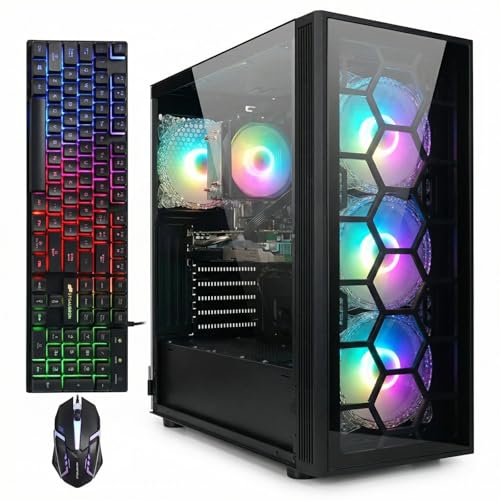
Pros
- Capable 8-core AMD Ryzen 7 5700X processor
- Generous 1TB solid-state drive
- Modern Wi-Fi 6 and Bluetooth 5.2 wireless
- Includes matching RGB gaming keyboard and mouse
- Four pre-installed RGB fans for system airflow
Cons
- Graphics card limited to 6GB of VRAM
- Platform utilizes older DDR4 instead of DDR5

Pros
- AMD Ryzen 9 7900X processor
- NVIDIA GeForce RTX 5070 12GB graphics
- 32GB DDR5 dual-channel memory
- Fast 1TB NVMe solid-state storage
- Includes gaming keyboard and mouse
Cons
- Uses older 802.11ac Wi-Fi standard
- Memory speed is limited to 4800MHz
- Heavy 36-pound desktop chassis

Pros
- AMD Ryzen 7 8700F and RTX 5060 Ti configuration
- High-speed 32GB DDR5 RAM and 1TB Gen4 SSD
- Three M.2 slots and four DDR5 slots for upgrades
- Modern wireless connectivity with WiFi 7 and Bluetooth
- Integrated digital temperature display on the CPU cooler
Cons
- Graphics card limited to 8GB of VRAM
- Older VGA and DVI monitors require adapters
- Motherboard video ports provide no display

Pros
- NVIDIA GeForce RTX 5080 graphics hardware
- Multi-core Intel Core Ultra 9 285 processor
- 240mm heat exchanger thermal management support
- Customizable multi-zone AlienFX lighting
- One year of included onsite hardware support
Cons
- Heavy 33.89-pound chassis restricts easy movement
- Large physical footprint requires significant desktop clearance

Pros
- Generous 1TB solid-state storage capacity
- Integrated Wi-Fi 6 and Bluetooth 5.0 support
- Comes with six pre-installed RGB cooling fans
- Includes bundled RGB keyboard and mouse accessories
Cons
- Features an older AMD Radeon RX 580 graphics architecture
- Specific Intel Core i7 processor generation is not documented

Pros
- AMD Ryzen 5 8400F platform with DDR5 memory support
- Fast 1TB NVMe solid-state storage drive
- Includes bundled RGB mouse and keyboard
- Six USB 3.1 ports for peripheral connectivity
- Clean Windows 11 installation without pre-installed bloatware
Cons
- Single-channel 1x16GB memory layout out of the box
- RTX 3050 6GB offers limited high-end graphics performance
- Equipped with older 802.11ac Wi-Fi instead of Wi-Fi 6

Pros
- Intel Core Ultra 7 265F multi-core processor
- NVIDIA GeForce RTX 5060 Ti dedicated graphics
- Alienware Command Center performance and lighting controls
- Customizable AlienFX chassis and stadium illumination
- Includes one year of Dell onsite service
How These Gaming Desktops Differ
| Desktop | Processor | Graphics | Memory and storage | Best suited to |
|---|---|---|---|---|
| CyberPowerPC Gaming PC, Intel Core i5-14400F | Intel Core i5-14400F, 10 cores | GeForce RTX 5060, 8GB | 16GB DDR5, 1TB PCIe 4.0 NVMe SSD | Mainstream gaming and general use |
| Olialia Gaming PC Prebuilt, RTX 3060 Ti | AMD Ryzen 5 5500, 6 cores and 12 threads | GeForce RTX 3060 Ti | 16GB RAM, 512GB SSD | Budget-conscious 1080p or 1440p gaming |
| STGAubron Gaming PC Desktop, R7 5700X, RTX 3050 | AMD Ryzen 7 5700X, up to 4.6GHz | GeForce RTX 3050, 6GB | 16GB DDR4, 1TB SSD | Gaming, study, office work, and streaming |
| iBUYPOWER Element Gaming PC Desktop Computer AMD | AMD Ryzen 9 7900X | GeForce RTX 5070, 12GB | 32GB DDR5, 1TB NVMe SSD | High-end gaming and demanding multitasking |
| KOTIN Gaming PC Desktop Ryzen 7 8700F | AMD Ryzen 7 8700F | GeForce RTX 5060 Ti, 8GB | 32GB DDR5, 1TB Gen4 NVMe SSD | 1440p gaming, streaming, and upgrades |
| Alienware Gaming Desktop, RTX 5060 Ti | Intel Core Ultra 7 265F | GeForce RTX 5060 Ti | Not specified | Gaming with Dell onsite service |
| Alienware Aurora Gaming Desktop, RTX 5080 | Intel Core Ultra 9 285 | GeForce RTX 5080 | Not specified | High-end gaming, creation, and livestreaming |
| iBUYPOWER Element SE Gaming PC Desktop Computer | AMD Ryzen 5 8400F | GeForce RTX 3050, 6GB | 16GB DDR5, 1TB NVMe SSD | Entry-level gaming with newer DDR5 memory |
| STGAubron Gaming PC Desktop, Core i7, RX 580 8G, 16G | Intel Core i7, up to 3.9GHz | Radeon RX 580, 8GB | 16GB RAM, 1TB SSD | Lower-cost gaming and everyday tasks |
Best Overall Balance: CyberPowerPC Gaming PC, Intel Core i5-14400F
The CyberPowerPC Gaming PC, Intel Core i5-14400F is a sensible middle-ground choice for buyers who want current platform features without moving to a high-end desktop. Its 10-core processor, 16GB of DDR5 memory, 1TB PCIe 4.0 NVMe SSD, and GeForce RTX 5060 8GB cover mainstream gaming and everyday multitasking.
Wi-Fi 6, Bluetooth 5.3, multiple USB-A ports, HDMI, and two DisplayPort outputs simplify connection to common peripherals and displays. The main limitation is the 16GB memory capacity, which is adequate for many games but leaves less headroom than the 32GB alternatives for heavy multitasking or content creation.
Best Lower-Cost Gaming Option: Olialia Gaming PC Prebuilt, RTX 3060 Ti
The Olialia Gaming PC Prebuilt, RTX 3060 Ti pairs a six-core Ryzen 5 5500 with 16GB of memory, a 512GB SSD, and an RTX 3060 Ti. The supplied specification positions it for 1080p gaming and 1440p play with supported upscaling features, making it suitable for buyers prioritizing graphics hardware over newer platform components.
Its compact dual-chamber case, six adjustable RGB fans, and ventilated panels are useful for buyers who want visible components and an airflow-focused layout. The 512GB SSD is the clearest constraint because several large modern games can consume much of that capacity, so storage expansion may become necessary.
Best High-End Choice: Alienware Aurora Gaming Desktop, RTX 5080
The Alienware Aurora Gaming Desktop, RTX 5080 is the strongest graphics-focused option in this selection. Its GeForce RTX 5080 and Intel Core Ultra 9 285 are suited to demanding gaming, livestreaming, creation workloads, and users planning to connect a high-resolution or high-refresh display.
Alienware Command Center provides software controls for performance modes and lighting, while the listed 240mm heat exchanger is available with the optional liquid-cooling configuration. Buyers should verify the exact cooling configuration and memory or storage details before ordering because those specifications are not fully provided here.
Best for 32GB DDR5 and Upgrade Potential: KOTIN Gaming PC Desktop Ryzen 7 8700F
The KOTIN Gaming PC Desktop Ryzen 7 8700F offers 32GB of DDR5 memory, a 1TB Gen4 NVMe SSD, and a GeForce RTX 5060 Ti 8GB. That combination suits buyers who play at 1080p or 1440p while keeping several browser tabs, launchers, streaming applications, or creative tools open.
Four DDR5 DIMM slots, three M.2 SSD slots, and a 650W 80 PLUS Gold power supply provide documented expansion points. Wi-Fi 7 is also included, although wireless performance still depends on the compatible network equipment and local conditions. The monitor must be connected to the graphics card ports rather than the motherboard outputs.
Other Desktops Worth Considering
iBUYPOWER Element Gaming PC Desktop Computer AMD
This iBUYPOWER model combines a Ryzen 9 7900X, RTX 5070 with 12GB of graphics memory, 32GB of DDR5 memory, and a 1TB NVMe SSD. It is a strong fit for users who need more CPU capacity for multitasking, streaming, or workstation-style applications alongside gaming. The supplied data does not specify the motherboard, power supply, or detailed upgrade layout, so those details should be confirmed before purchase.
Alienware Gaming Desktop, RTX 5060 Ti
The Alienware Gaming Desktop, RTX 5060 Ti uses an Intel Core Ultra 7 265F and an RTX 5060 Ti. It may suit buyers who prefer Alienware’s chassis, lighting controls, and Dell’s listed one-year onsite service, but the supplied specifications do not include memory, storage, power supply, or detailed expansion information.
STGAubron Gaming PC Desktop, R7 5700X, RTX 3050
The STGAubron Gaming PC Desktop, R7 5700X, RTX 3050 combines an eight-core Ryzen 7 5700X, 16GB of DDR4 memory, a 1TB SSD, and Wi-Fi 6. It is suitable for general home, school, office, and gaming use, but its RTX 3050 6GB is a more limited graphics choice than the RTX 3060 Ti, RTX 5060, and RTX 5060 Ti systems above.
iBUYPOWER Element SE Gaming PC Desktop Computer
This Element SE uses a Ryzen 5 8400F, RTX 3050 6GB, 16GB of DDR5 memory, and a 1TB NVMe SSD. The newer DDR5 platform and included Wi-Fi make it a reasonable entry point, although the RTX 3050 places it below the stronger graphics options for demanding games.
STGAubron Gaming PC Desktop, Core i7, RX 580 8G, 16G
The STGAubron Gaming PC Desktop, Core i7, RX 580 8G, 16G is the most basic gaming configuration listed here, with an Intel Core i7, 16GB of memory, a 1TB SSD, and an older Radeon RX 580. Its HDMI, DisplayPort, and DVI outputs may help with older monitor setups, but buyers should verify the exact processor generation and monitor connection requirements before ordering.
What to Check Before Buying a Gaming Desktop
Match the GPU to the Display
The graphics card usually has the greatest influence on game rendering performance. RTX 3050 and RX 580 systems are more appropriate for buyers focused on entry-level gaming, while the RTX 3060 Ti, RTX 5060, RTX 5060 Ti, RTX 5070, and RTX 5080 systems offer progressively stronger graphics specifications.
Do not choose a desktop solely from the monitor’s refresh-rate label. A high-refresh display can show smoother motion when the computer produces enough frames, but the supplied product data does not establish gaming frame rates for any of these systems.
Consider Memory and Storage Capacity
Sixteen gigabytes of memory remains a common configuration in this group, while the KOTIN and iBUYPOWER Ryzen 9 systems provide 32GB. Choose 32GB if you regularly stream, edit media, run many applications, or want more multitasking headroom without immediately upgrading.
A 1TB SSD is more flexible than a 512GB drive for a larger game library. Storage capacity does not determine graphics performance, but it affects how often you need to uninstall games or add another drive.
Verify Ports, Cooling, and Upgrade Details
Connect the monitor to the dedicated graphics card outputs, not the motherboard video ports, when the desktop has a discrete GPU. This requirement is explicitly noted for the KOTIN system and is a useful installation check for any prebuilt computer.
Before purchase, confirm the power supply, motherboard model, available drive bays, and cooling configuration when those details matter to your upgrade plan. These specifications are not fully stated for every product, so they should not be assumed from the processor or graphics card name alone.
Frequently Asked Questions
Which is the best desktop for gaming in this selection?
For the highest documented graphics capability, the Alienware Aurora with RTX 5080 is the leading choice. For a more balanced mainstream configuration, the CyberPowerPC with Core i5-14400F and RTX 5060 is easier to justify, while the KOTIN offers 32GB DDR5 and documented storage expansion options.
Is 16GB of RAM enough for a gaming desktop?
Sixteen gigabytes is a practical starting point for gaming and ordinary desktop use, but 32GB gives more room for streaming, browser tabs, launchers, and creative applications. The right choice depends on the rest of your workload, not only the game itself.
Should you choose an RTX 3050, RTX 5060, or RTX 5070 desktop?
Choose between them according to your display resolution, graphics settings, and budget. The RTX 3050 models are the more entry-level choices, the RTX 5060 targets mainstream gaming, and the RTX 5070 model is better suited to buyers seeking stronger graphics capability and 12GB of listed video memory.
Final Recommendation
The best desktop for gaming is the CyberPowerPC Gaming PC, Intel Core i5-14400F for a balanced specification set, the Olialia system for a lower-cost RTX 3060 Ti configuration, and the KOTIN for 32GB DDR5 with documented upgrade support. Select the iBUYPOWER Ryzen 9 or Alienware RTX 5080 when demanding gaming, streaming, or creation workloads justify a higher-end platform. The STGAubron and iBUYPOWER RTX 3050 systems make more sense when entry-level graphics performance and general-purpose use take priority.
These recommendations are based on the supplied specifications rather than independent benchmark testing. For display planning, compare the chosen desktop with guides to 4K gaming monitors under $500 and budget 1080p gaming monitors.





Write Your Review
No reviews yet. Be the first to share your experience!