

Building an all-white gaming rig requires balancing aesthetics against practical interior clearance, motherboard compatibility, and intake airflow. Today’s panoramic and dual-chamber cases prioritize clear views of interior components, but their cooling performance depends heavily on fan configurations and radiator support.
While many enthusiasts assemble custom systems piece by piece, others compare their component budgets directly against the best prebuilt gaming PCs before committing to a full DIY assembly. For those proceeding with a custom enclosure, this specification-based analysis breaks down 4 popular white mid-tower options.

Pros
- Pre-installed 360mm reverse-blade and 120mm aRGB fans
- Compatible with major rear-connecting motherboard designs
- Panoramic three-piece glass panel layout
- Standard PWM and aRGB connectivity for simple control
Cons
- Wide 11.3-inch footprint demands extra desk space
- Weighs 21 pounds before hardware installation
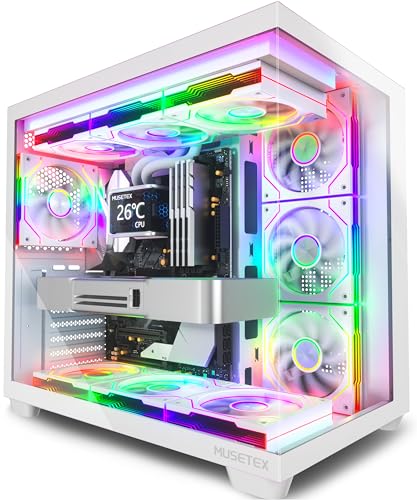
Pros
- Seven pre-installed PWM ARGB fans included
- Panoramic 270-degree dual tempered glass panels
- Supports large graphics cards up to 410mm
- Front panel includes a dedicated USB Type-C port
- Accommodates up to 360mm top-mounted liquid radiators
Cons
- CPU cooler height is limited to 160mm
- Dual glass panels prevent direct front-to-back intake

Pros
- Supports motherboards from Mini-ITX up to EATX
- Includes three pre-installed RS120-R ARGB fans
- Panoramic tempered glass design showcases internal components
- Accommodates up to ten 120mm cooling fans
- Removable glass panels allow easy hardware access
Cons
- Only three fans included for ten available fan mounts
- Relatively heavy empty chassis weight at nearly 20 pounds
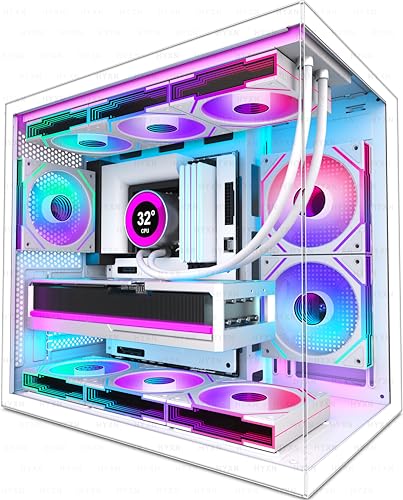
Pros
- Six pre-installed PWM ARGB fans
- Dual-chamber layout optimizes cable management
- Clearance for graphics cards up to 400mm
- Front I/O includes USB Type-C 3.2
- Compatible with back-connect motherboards
Cons
- Storage limited to one HDD and two SSDs
- Front panel retains a legacy USB 2.0 port
Quick Comparison of Documented Specifications
Comparing physical dimensions, pre-installed fan packages, and motherboard standards helps clarify which chassis fits your target hardware configuration without extra hardware costs.
| Model | Form Factor | GPU Max Length | Included Fans | Back-Connect Support |
|---|---|---|---|---|
| HYTE Y50 RGB | ATX Dual Chamber | Not specified | 4 (1x 120mm + 1x 360mm reverse unibody) | Yes (BTF, Stealth, Project Zero) |
| MUSETEX Y6 | ATX Mid Tower | 410 mm | 7 (6x reverse, 1x forward) | No |
| CORSAIR 3500X RS ARGB | E-ATX to Mini-ITX | Not specified | 3 (3x RS120-R) | Not specified |
| HYXN H3 | ATX Dual Cavity | 400 mm | 6 (5x reverse, 1x forward) | Yes |
The Best White PC Cases for Gaming Examined
HYTE Y50 RGB Essential Aesthetic Gaming PC Case
The HYTE Y50 RGB Essential Aesthetic Gaming PC Case is designed around a three-piece panoramic glass enclosure that provides an unobstructed view from multiple angles. It integrates a dual-chamber configuration engineered specifically to accommodate rear-connect motherboards, including ASUS BTF, MSI Project Zero, and Gigabyte Stealth formats. This routing clears visible wiring from the primary chamber entirely.
Included cooling hardware consists of one standard 120mm aRGB fan paired with an integrated 360mm unibody reverse-blade intake unit. Full-size horizontal expansion slots allow users to seat standard add-in graphics cards without strictly requiring vertical riser brackets. Builders planning very large custom liquid loops should note that the specialized frame geometry limits mounting options compared to conventional open-frame towers.
MUSETEX Y6 PC Case
Featuring an expansive 270-degree dual tempered glass layout, the MUSETEX Y6 PC Case, Pre-Installed 7 Infinity emphasizes lighting coverage and pre-installed cooling hardware out of the box. The chassis comes equipped with seven 120mm infinity mirror PWM ARGB fans, arranged with six reverse-blade units across the side and floor to maintain clean visual presentation while drawing in ambient air.
Component clearance is generous, supporting graphics cards up to 410mm long, power supplies up to 230mm, and top-mounted liquid radiators up to 360mm. The maximum CPU air cooler height is constrained to 160mm, meaning certain oversized dual-tower air heatsinks may experience side glass panel interference. The front I/O panel includes a dedicated modern Type-C port alongside standard USB connections.
CORSAIR 3500X RS ARGB Panoramic Mid-Tower PC Case
The CORSAIR 3500X RS ARGB Panoramic Mid-Tower PC Case pairs a wrap-around tempered glass aesthetic with broad mainboard compatibility ranging from compact Mini-ITX boards up to large E-ATX formats. Both the front and side glass panels are removable without tools, simplifying component swaps and interior maintenance during complex builds.
Corsair bundles three RS120-R ARGB fans that connect directly to standard 5V motherboard headers, avoiding the requirement for proprietary hub hardware. The frame supports up to 10 total 120mm fans across side, roof, and lower mounts to counteract the absence of a traditional front mesh intake. Builders with high-thermal components will need to purchase additional auxiliary exhaust fans to populate the full capacity.
HYXN H3 HYXN ATX PC Case
The HYXN H3 HYXN ATX PC Case utilizes an A/B partition dual-cavity design measuring 420 by 285 by 370 millimeters. This structure isolates the primary processing hardware from the storage drives and power supply to improve thermal isolation and streamline cable management. It also supports modern back-mounted motherboard connectors for hidden wiring paths.
Included with the chassis are six infinity mirror PWM ARGB fans, configured with five reverse-flow intake fans and one standard rear exhaust fan. Interior clearances accommodate 400mm GPUs, 200mm power supplies, and 360mm radiators. The front panel features a Type-C 3.2 port alongside conventional USB ports, though users must verify dual-fan configurations carefully when opting for non-standard Micro-ATX arrangements.
Key Factors When Choosing a White Gaming Case
Before purchasing an enclosure, consider how your internal component dimensions, thermal requirements, and motherboard selection interact with modern panoramic designs.
- Fan Configurations and Reverse Blades: Glass-front cases cannot draw air directly through the front. Look for packages with reverse-pitch intake fans along the side or bottom, which present seamless hub faces to the viewing window while pulling fresh air into the chamber.
- Back-Connect Motherboard Support: Standards such as ASUS BTF, MSI Project Zero, and Gigabyte Stealth place power and data headers on the rear of the PCB. Ensure the case tray specifically documents cutouts for these ports if you plan to use this standard.
- Component Clearances: Verify that maximum GPU length accommodates modern triple-fan graphics cards, and ensure CPU cooler height allowances match your selected air heatsink.
- Front Panel I/O: Ensure the top or front I/O matches your peripheral needs, particularly with regard to high-speed Type-C ports and matching motherboard front-panel headers.
Frequently Asked Questions
Do panoramic glass cases suffer from poor airflow?
Panoramic cases lack front mesh panels, but modern dual-chamber layouts compensate by pulling cool air through perforated side panels and floor vents. When paired with high-static-pressure fans, these pathways deliver adequate airflow for high-end gaming components.
What is the benefit of reverse blade fans in a white chassis?
Standard intake fans expose their support brackets and wiring stickers to the interior of the case. Reverse-blade fans draw air from the back toward the front, keeping the decorative motor hub and lighting clean and fully visible through the glass panels.
Final Selection Guidance
For builders intending to construct a completely wire-free interior using back-connect mainboards, the HYTE Y50 RGB and HYXN H3 offer documented compatibility alongside panoramic perspectives. If maximizing out-of-the-box fan count and long GPU space is your primary goal without buying extra cooling kits, the MUSETEX Y6 delivers seven pre-installed infinity mirror fans. For builders who prefer wide motherboard standard support extending to E-ATX, the Corsair 3500X RS ARGB provides a flexible foundation.




Write Your Review
No reviews yet. Be the first to share your experience!