

Choosing an entry-level display no longer requires settling for a sluggish 60Hz panel with dull colors. Modern high-refresh displays under modest budgets deliver fluid motion and low latency for competitive esports and casual gaming alike. When planning your setup, reviewing how to build the ultimate battlestation on a budget helps balance monitor spending against core system components.
Top 10 Budget 1080p Gaming Monitors

Pros
- High 180Hz refresh rate across all inputs
- Extensive connectivity with four total display ports
- Immersive 1500R curved screen design
- Full 100% sRGB color gamut coverage
- Built-in stereo speakers save desk space
Cons
- Advertised 1ms response relies on blur reduction
- Peak 180Hz refresh rate requires an overclocked setting

Pros
- Smooth 144Hz refresh rate with AMD FreeSync
- Color-accurate IPS panel with wide viewing angles
- Dual HDMI ports for multi-device setups
- TÜV Rheinland certified blue light reduction
- Slim bezels suitable for multi-monitor arrangements
Cons
- Ergonomic adjustments limited to tilt only

Pros
- Fluid 240Hz refresh rate for competitive play
- Fast IPS panel with 99% sRGB coverage
- AMD FreeSync Premium and HDMI VRR support
- DisplayPort 1.4 and dual HDMI connectivity
- TÜV Rheinland 3-star eye comfort certification
Cons
- Stand adjustment is limited to tilt only
- Limited to 1080p Full HD resolution

Pros
- Fluid 160Hz refresh rate on both video ports
- High 3000:1 contrast ratio provides deep black levels
- Immersive 1500R curvature on a compact display
- FreeSync compatibility helps eliminate screen tearing
- VESA 75x75mm mount support for alternative stands
Cons
- Stand only supports tilt adjustments
- No built-in speakers included
- Peak brightness is limited to 300 nits

Pros
- High 180Hz refresh rate on both video inputs
- Deep 4000:1 static contrast ratio
- AMD FreeSync adaptive sync support
- Standard VESA 75x75mm mount compatible
- HDMI cable included in the box
Cons
- No integrated speakers
- Limited 80 percent DCI-P3 color coverage

Pros
- High 240Hz refresh rate for fluid motion
- Fast IPS panel with wide viewing angles
- AMD FreeSync Premium and HDMI VRR support
- Dual HDMI and DisplayPort connectivity options
Cons
- 1080p resolution provides lower pixel density at 27 inches
- Stand adjustment is limited to tilt only

Pros
- Fast refresh rate reaching up to 144Hz
- Includes DisplayPort and HDMI connection options
- Thin bezels ideal for dual-display setups
- Built-in speakers preserve physical desk space
- Blue-Light Shift feature for eye comfort
Cons
- Compact 22-inch screen limits total viewing real estate
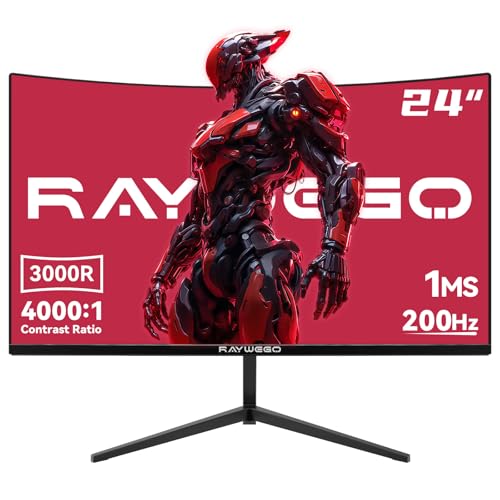
Pros
- Smooth 200Hz refresh rate with FreeSync
- Deep 4000:1 static contrast ratio
- DisplayPort and HDMI connectivity
- VESA 75x75 mount compatibility
Cons
- No built-in speakers
- Stand lacks height and swivel adjustments

Pros
- Smooth 144Hz refresh rate with FreeSync support
- IPS panel with wide 178-degree viewing angles
- TÜV Rheinland certified eye protection features
- Standard VESA 100x100mm mount compatibility
- Supports both modern HDMI and legacy VGA connections
Cons
- Stand is limited to tilt adjustments only
Key Specifications and Trade-Offs
Selecting the right monitor requires matching panel technology to the types of games you play most frequently. IPS panels provide accurate colors and wide viewing angles, making them ideal for mixed desktop workloads and competitive shooters where color consistency matters across the screen. VA panels offer superior static contrast ratios around 3000:1 or 4000:1, which produce deeper blacks for immersive single-player games in dark rooms, though they can introduce minor dark-level smearing during fast camera pans.
Dell 24 240Hz Gaming Monitor – SE2426HG
This 23.8-inch display combines a 240Hz refresh rate with a Fast IPS panel, making it a standout choice for high-frame-rate competitive titles like Counter-Strike 2 or Valorant. The screen features AMD FreeSync Premium and HDMI VRR support, along with dual HDMI ports and a DisplayPort 1.4 input. The stand only supports basic tilt adjustment, so an aftermarket monitor arm is required if you need ergonomic height modification.
LG 24G411A-B 24-inch Ultragear Full HD
LG provides a well-balanced IPS panel featuring a native 120Hz refresh rate that overclocks to 144Hz for smoother tracking. It features both NVIDIA G-Sync Compatible certification and AMD FreeSync alongside 99 percent sRGB color gamut coverage. While it advertises HDR10 decoding, entry-level edge-lit backlights lack the local dimming required to show true high dynamic range highlights.
New! Sceptre Curved 27-inch Prime Gaming Monitor
Sceptre pairs a large 27-inch display with a 1500R curve and a fast 180Hz refresh rate across both HDMI and DisplayPort inputs. The generous port selection includes two HDMI ports and two DisplayPort connections, which simplifies switching between a gaming PC and consoles. At 27 inches, 1080p resolution delivers lower pixel density than 24-inch alternatives, making fine text slightly softer during productivity tasks.
Dell 24 Monitor – SE2426H
The SE2426H targets general gaming and daily desktop use with a 144Hz IPS panel and TÜV Rheinland eye comfort certification. It relies entirely on dual HDMI ports for video input rather than DisplayPort, which makes it straightforward for office workstations and game consoles. Fast-paced PC gamers wanting DisplayPort-exclusive adaptive sync features on older graphics cards should verify their available video outputs first.
SANSUI 24 Inch 180Hz Gaming Computer Monitor
This 24-inch flat panel offers a fluid 180Hz refresh rate backed by an impressive 4000:1 static contrast ratio. It provides both HDMI 2.0 and DisplayPort 1.4 connections, plus useful gaming assist overlays such as on-screen crosshairs and timers. The built-in audio is limited to a 3.5mm passthrough jack, so external speakers or dedicated headphones remain necessary for sound.
Raywego 24 Inch Curved Gaming Monitor
Pushing refresh limits in the entry bracket, this monitor offers up to 200Hz on a curved VA panel with a 4000:1 contrast ratio. The heightened refresh rate reduces input lag and motion blur during high-speed racing and shooting titles. Raywego provides a DisplayPort cable in the box, though users relying strictly on built-in audio will need their own external speakers.
msi PRO MP243L E14 24-inch IPS 1920 x 1080 (FHD)
MSI delivers a hybrid office and gaming display with a 144Hz IPS panel, wide 178-degree viewing angles, and a solid 1500:1 contrast ratio. It stands out by featuring both modern HDMI 2.0 and a legacy VGA connector, allowing seamless integration with older secondary desktop towers. If you are comparing panel sizes and resolutions for mixed productivity setups, reading our comparison of the best 1440p gaming monitors illustrates the extra desktop real estate higher resolutions offer.
How to Choose a Budget 1080p Gaming Display
Panel size directly influences visual sharpness when choosing a 1080p display. A 24-inch screen delivers roughly 92 pixels per inch, which offers crisp in-game text and clean object edges at typical desk distances. Stretching that same Full HD resolution across a 27-inch panel like the Dell 27 240Hz Gaming Monitor – SE2726HG lowers pixel density, prioritizing peripheral visibility over absolute image sharpness. Those who prefer wider fields of view without vertical height changes can also explore the best ultrawide monitors to see how extra horizontal screen space functions.
Refresh rates between 144Hz and 240Hz provide a major perceptual leap over legacy 60Hz screens by rendering rapid motions with exceptional smoothness. However, hitting those upper frame rates requires matching graphics processing power, especially in graphics-heavy action games. Ensuring your graphics card supports FreeSync or G-Sync keeps frame output synchronised with the panel, which eliminates jarring screen tearing even when framerates fluctuate during intense combat.
Frequently Asked Questions
Is 1080p resolution still good for gaming in 2026?
Full HD 1080p remains widely popular because modern entry-level and mid-range graphics cards can consistently push high frame rates at this resolution. It delivers fluid responsiveness without demanding expensive internal PC upgrades, making it an excellent choice for fast multiplayer titles.
Should I choose an IPS or a VA monitor for budget gaming?
Choose an IPS panel if you prioritize wide viewing angles, consistent colors, and fast pixel response for competitive shooter titles. Select a VA panel if you prefer rich contrast and deep blacks for story-driven cinematic games played in dark settings.
Do entry-level gaming monitors have good built-in speakers?
Most budget monitors either omit integrated speakers entirely or include low-wattage units intended only for basic notification sounds. For immersive in-game spatial audio and clear voice chat, using a dedicated headset or external speakers provides vastly superior sound reproduction.







Write Your Review
No reviews yet. Be the first to share your experience!