

The best apps for gaming pc setups are usually companion tools that control audio, lighting, button assignments, equalization, and device firmware. The products below pair those software features with compatible gaming hardware, while the MSI desktop provides a suitable Windows 11 base for installing them.
This is specification-based research rather than hands-on software testing. App features, operating-system behavior, wireless performance, and game compatibility can change, so confirm current requirements before installing or buying.
- Best complete gaming PC foundation: msi Codex Z2 Gaming Desktop, AMD R7-8700F, with Windows 11 Home, an eight-core Ryzen 7 8700F, RTX 5070 graphics, 32GB DDR5, and a 2TB SSD.
- Best headset software flexibility: Turtle Beach Swarm II, supplied with the Turtle Beach Stealth 500 Wireless Amplified, which supports four EQ modes and an advanced 10-band EQ.
- Best headset customization platform: Logitech G HUB and G App, available for the Logitech G Astro A50 Multi-Platform.
- Best mouse configuration software: Razer Synapse, paired with the Razer Basilisk V3 X HyperSpeed Customizable or the wired DeathAdder Essential.
- Best audio preset range: SteelSeries Sonar on PC, paired with either Arctis Nova 7 Gen 2 model, with more than 200 stated game-specific presets.

Turtle Beach Stealth 500 Wireless Headset

MSI Codex Z2 Gaming Desktop, RTX 5070

Logitech G522 LIGHTSPEED Wireless Headset

Logitech G Astro A50 Wireless Gaming Headset

Razer Basilisk V3 X HyperSpeed Wireless Mouse
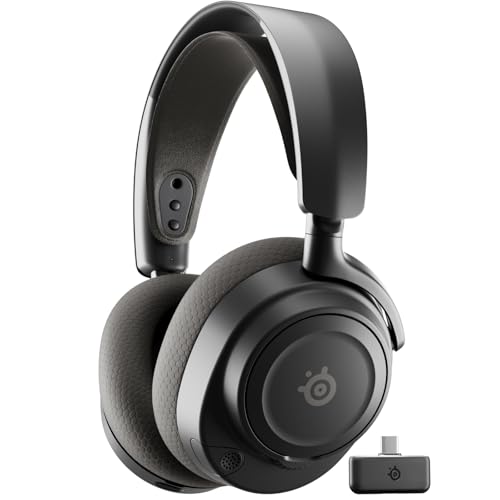
SteelSeries Arctis Nova 7 Wireless Gen 2

Turtle Beach Stealth 500 Wireless Headset

Razer DeathAdder Essential Wired Gaming Mouse
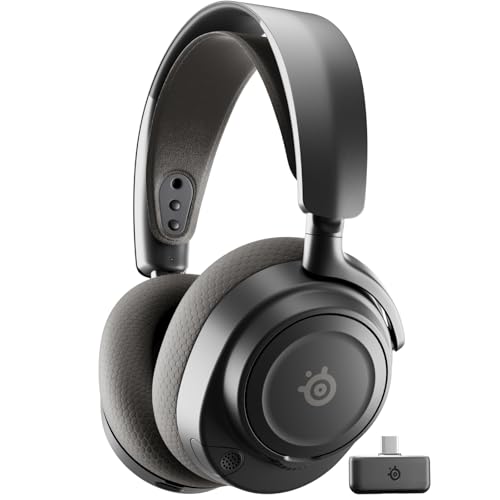
SteelSeries Arctis Nova 7P Wireless Gen 2

STGAubron Gaming PC Core i7 RX 580 1TB SSD
As an Amazon Associate we earn from qualifying purchases. Product prices and availability are accurate as of the date/time indicated.
How The Best Apps For Gaming Pc Setups Differ
There is no single best app for every gaming PC. Audio applications focus on EQ and chat mixing, mouse software handles sensitivity and remapping, while desktop utilities may control lighting or system settings.
| Software or companion app | Compatible listed hardware | Documented use | Important limitation |
|---|---|---|---|
| MSI Center | msi Codex Z2 Gaming Desktop, AMD R7-8700F | RGB customization through the desktop’s stated software support | The supplied data does not specify every available module or control |
| Turtle Beach Swarm II | Stealth 500 Wireless Amplified and Stealth 500 Wireless Multiplatform | Advanced 10-band EQ, EQ modes, and headset adjustment | Software features may vary by operating system and connected model |
| Logitech G HUB and G App | Astro A50 Multi-Platform and G522 Lightspeed | EQ, microphone controls, stream output mixing, voice settings, and lighting controls where supported | Some controls depend on the exact headset and connection mode |
| Razer Synapse | Basilisk V3 X HyperSpeed and DeathAdder Essential | Button remapping, macros, sensitivity settings, and mouse configuration | Advanced configuration requires installing Razer software on the PC |
| SteelSeries Sonar | Arctis Nova 7 Wireless Gen 2 and Arctis Nova 7P Wireless Gen 2 | Game-specific audio presets and PC voice processing | The supplied data specifically identifies Sonar AI enhancement on PC, not every platform |
How To Choose The Best Apps For Gaming Pc Use
Start With The Hardware Ecosystem
Choose software that matches the devices you actually own. MSI Center is relevant to the listed MSI desktop, Swarm II to the Turtle Beach headsets, G HUB to Logitech devices, and Synapse to Razer mice.
Check Connection And Platform Requirements
Wireless headsets may use different receivers, Bluetooth modes, or platform-specific variants. Confirm whether your PC has the required USB-A or USB-C connection, and do not assume that a console-focused model exposes every PC software feature.
Prioritize The Control You Will Use
Parametric EQ and stream mixing matter most to creators and users who tune audio frequently. Players who want fewer setup steps may prefer the wired DeathAdder Essential or a headset with straightforward EQ presets.
Keep Firmware And Background Utilities Manageable
Companion apps can add useful controls, but multiple vendor utilities may create duplicated startup processes and overlapping RGB settings. Install only the software required for your chosen device, then review startup behavior and permissions in Windows.
For a broader setup, pair these software-focused recommendations with a suitable hot-swappable mechanical keyboard guide or compare audio alternatives through the site’s 2.1 PC speaker recommendations.
FAQs About The Best Apps For Gaming Pc
What Are The Best Apps For Gaming Pc Audio?
That depends on the headset. Turtle Beach Swarm II offers EQ controls, Logitech G HUB adds detailed headset and microphone settings, and SteelSeries Sonar provides game-specific presets on PC.
Do Gaming Mice Need An App?
They can work without one, but Razer Synapse is needed for the listed remapping, macro, and sensitivity customization features. A wired connection does not remove the need for software if you want to change programmable controls.
Which Listed PC Is Better For Multiple Gaming Apps?
The MSI Codex Z2 has the more capable documented core hardware, with a Ryzen 7 8700F, RTX 5070, 32GB DDR5, and 2TB SSD. The STGAubron system is a simpler option, but its exact processor generation and upgrade details are not specified.
Final Recommendation
The best apps for gaming pc setups should follow your hardware and workload, not the other way around. Choose the MSI desktop for a stronger documented base, Swarm II for accessible headset EQ, G HUB for Logitech audio control, Sonar for many PC audio presets, and Synapse for configurable Razer mice.
For a simpler setup, the DeathAdder Essential avoids wireless charging while retaining software remapping, and the Turtle Beach Stealth 500 models provide practical wireless audio controls. Check platform, USB, and software requirements before purchase, especially when choosing between standard, Xbox-focused, and PlayStation-focused headset variants.





Write Your Review
No reviews yet. Be the first to share your experience!