

The RK ROYAL KLUDGE R98 Pro is the strongest fit here for a budget-conscious buyer seeking a conventional mechanical keyboard with a number pad. For competitive play, the AULA WIN68 HE offers adjustable magnetic switches and a high advertised polling rate, while the Kisnt KN85 adds wireless connectivity. Several other picks are membrane or mechanical-feeling keyboards, not conventional mechanical models, so check the switch type before choosing.
This comparison uses the supplied specifications, not independent performance measurements. Features such as polling rate, latency, switch feel, and compatibility are manufacturer-stated details, not results verified by this site.
- Best balanced mechanical option: RK ROYAL KLUDGE R98 Pro, with a 98-key layout, hot-swap support, and a volume knob.
- Best for adjustable competitive inputs: AULA WIN68 HE, a compact wired Hall Effect model with adjustable actuation.
- Best wireless flexibility: Kisnt KN85, with Bluetooth, 2.4GHz, and USB-C connection options.
- Best low-cost full-size alternative: Redragon K521, but its product information describes mechanical-feeling keys rather than mechanical switches.
- Best compact conventional mechanical option: Razer Reclusa X Mini, with hot-swap sockets and a 65% layout.

Pros
- IP32 water resistance guards against liquid spills
- Whisper-quiet switches rated for 20 million presses
- Included magnetic wrist rest for palm support
- Dedicated on-the-fly multimedia controls
- Broad compatibility with PC and major consoles

Pros
- Gasket mount with five sound-dampening layers
- Hot-swappable PCB compatible with 3-pin and 5-pin switches
- Durable double-shot PBT keycaps in MDA profile
- Dedicated CNC aluminum volume control knob
- Pre-lubed linear cream switches
Cons
- Wired-only design lacks wireless connectivity
- Compact 96% layout clusters keys closer together
Pros
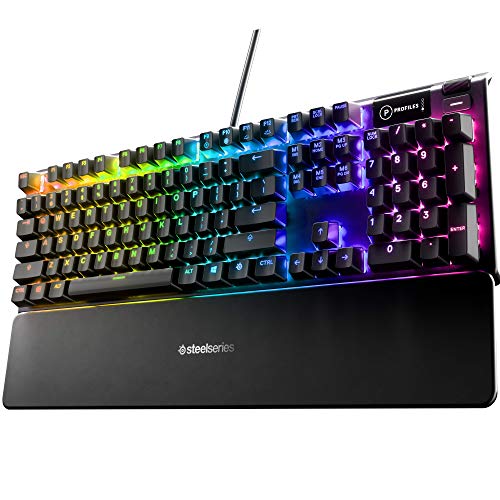
- Tactile hybrid switches rated for 20 million clicks
- Built-in customizable OLED smart display
- Durable aircraft-grade aluminum alloy frame
- Dynamic per-key RGB backlighting with reactive effects
- Detachable magnetic wrist rest included

Pros
- Dedicated one-touch lighting toggle button
- 19-key anti-ghosting for essential gaming inputs
- Full 104-key layout with multimedia shortcuts
- Plug-and-play setup across PC and consoles
- Adjustable backlighting brightness and breathing modes
Cons
- Simulates mechanical feel rather than true mechanical switches
- Anti-ghosting is limited to 19 keys


Pros
- Space-saving 68-key layout with dedicated arrows
- Detachable Type-C cable for easy travel
- Quiet membrane operation suitable for shared rooms
- 26-key anti-ghosting for accurate key registration
Cons
- Uses membrane switches instead of authentic mechanical switches
- No integrated number pad for data entry

Pros
- Hall Effect switches with adjustable actuation
- Fast 8000Hz polling rate
- Compact 68-key layout preserves arrow keys
- Detachable wired USB connection
- South-facing RGB with web-based configuration
Cons
- Web configuration driver does not support macOS
- Wired-only connection with no wireless functionality

Pros
- Hot-swap PCB supports 3-pin and 5-pin switches
- Integrated dual-layer silicone dampening for cleaner sound
- South-facing RGB improves aftermarket keycap clearance
- Compact 65% layout preserves dedicated arrow keys
- Detachable USB-C cable simplifies travel and replacement
Cons
- Wired-only operation with no wireless connectivity support
- Uses ABS keycaps rather than denser PBT plastic
- Compact layout lacks dedicated function and numpad keys

Pros
- Durable wear-resistant PBT keycaps
- Sturdy aluminum-magnesium alloy top plate
- Tactile mechanical switches for responsive feedback
- Convenient FN-layer media and lighting controls
Cons
- Lighting limited to single-color white LEDs
- Key rollover capped at six simultaneous inputs

Pros
- Fast 1.2mm linear Yellow switches with sound dampeners
- Six dedicated programmable macro keys
- Multi-function roller and dedicated media controls
- Per-key customizable Razer Chroma RGB lighting
- Built-in acoustic foam and lubricated stabilizers
How to Choose a Budget Gaming Keyboard
Confirm the switch type
A mechanical keyboard uses individual mechanical switches. The Redragon K521 and GEODMAER 65% are described as mechanical-feeling membrane keyboards, and the SteelSeries Apex 3 uses quiet gaming switches rather than a stated mechanical switch design.
The Apex 5 is explicitly a hybrid design, while the other conventional mechanical options list linear, tactile, or magnetic switches. If switch replacement matters, check for hot-swap support: it is specified for the RK R98 Pro, Kisnt KN85, and Razer Reclusa X Mini.
Choose a layout for your games and desk
Full-size and near-full-size boards preserve number pads for data entry and shortcuts. The R98 Pro keeps a number pad in a 98-key layout, while the Logitech G413 SE is full size. Compact 75%, 65%, and 60% designs free desk space, but may require function-layer shortcuts and omit the number pad.
Match connection and software to your setup
Most choices here are wired. The Kisnt KN85 is the only listed tri-mode model, connecting through USB-C, 2.4GHz wireless, or Bluetooth. Its stated software remapping and macro support works on Windows in wired or 2.4GHz mode, so Mac users should not assume those configuration features are available.
Compatibility varies by model. The supplied details list Windows and Mac support for the R98 Pro, while the AULA web driver supports Windows only. Console support is stated for the Apex 3 and Redragon K521, but verify the connection and functions you need for your specific console.
Recommended Keyboards
RK ROYAL KLUDGE R98 Pro Wired Mechanical Keyboard
The R98 Pro combines a 98-key layout with a number pad, arrow keys, a detachable volume knob, and hot-swap sockets for 3-pin or 5-pin switches. Its pre-lubed linear switches, gasket mount, and stated sound-dampening layers make it a versatile choice for gaming and everyday typing without giving up number entry.
Pros: Space-saving layout retains the number pad; hot-swappable switches; PBT keycaps; RGB and online configuration support for Windows and Mac.
Cons: It is wired, and the supplied specifications do not state a polling rate or console compatibility. Its linear switch feel may not suit buyers who prefer tactile or clicky feedback.
Who should skip it: Skip this model if you need wireless play, a console-specific compatibility guarantee, or a compact layout without a number pad.
AULA WIN68 HE Mechanical Gaming Keyboard 60%
This wired 68-key Hall Effect keyboard is aimed at players who want configurable actuation. AULA lists adjustable actuation from 0.02mm to 3.44mm, an 8,000Hz polling rate, and 0.3ms latency; these are advertised specifications, not independently established results.
Pros: Compact design; per-key actuation adjustment; detachable USB cable; RGB lighting and configurable gaming functions through its Windows web driver.
Cons: It is wired, and the configuration driver does not support Mac. Its compact layout relies on Fn combinations for commands, and the performance figures are manufacturer claims.
Who should skip it: Skip it if you need a number pad, wireless connection, or driver-based configuration on macOS.
Kisnt KN85 Wireless Mechanical Keyboard
The KN85 offers an 85-key, 75% layout and three connection methods: USB-C, 2.4GHz, and Bluetooth 5.0. Its hot-swappable linear switches and stated multi-device support suit people moving between a gaming PC and other devices, though the layout omits a number pad.
Pros: Tri-mode connectivity; hot-swap support for 3-pin and 5-pin switches; compact layout retains arrow and function keys; wired use is possible while charging.
Cons: The Windows-only driver works in wired or 2.4GHz mode, and animated lighting uses more battery according to the product information. The supplied details do not specify console compatibility.
Who should skip it: Skip it if you need a dedicated number pad, Mac software customization, or a wired-only keyboard with no battery to manage.
Razer Reclusa X Mini 65% Hot-Swappable Mechanical
This compact wired mechanical model includes hot-swap sockets compatible with 3-pin and 5-pin switches, tactile Orange switches, per-key RGB, and a detachable USB-C connection. Its 65% layout retains essential keys while prioritizing mouse space; listed gaming features include 1,000Hz polling, N-key rollover, and anti-ghosting.
Pros: Hot-swappable switches; compact footprint; tactile switch design; per-key lighting and stated rollover support.
Cons: It is wired and lacks a number pad. Advanced features named in the listing may matter mainly to players who will configure and use them.
Who should skip it: Skip it if you prefer a full-size layout, wireless operation, or linear switches.
SteelSeries Apex 5 Hybrid Mechanical
The Apex 5 uses hybrid blue switches designed to combine tactile clicks with a membrane component. It also has per-key RGB, an OLED display, a metal-alloy frame, and a magnetic wrist rest, making it a feature-rich wired option for users who want clicky feedback and on-keyboard information.
Pros: Per-key lighting; programmable OLED display; included wrist rest; stated switch lifespan of 20 million keypresses.
Cons: This is a hybrid design, not a standard fully mechanical switch implementation. Clicky feedback may be distracting in quiet shared spaces, and the supplied details do not state layout or platform compatibility.
Who should skip it: Skip it if you specifically want conventional mechanical switches, a quiet board, or confirmed compatibility details for a particular system.
Logitech G413 SE Full-Size Mechanical
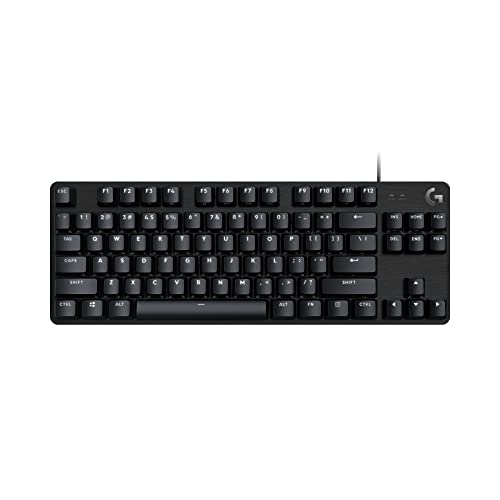
The G413 SE is a full-size wired mechanical keyboard with tactile switches, PBT keycaps, white backlighting, and a metal-alloy top case. Its 6-key rollover anti-ghosting and function-key media controls suit players who want a straightforward full-size layout rather than wireless features or per-key RGB.
Pros: Full-size layout; tactile mechanical switches; PBT keycaps; stated anti-ghosting support and sturdy metal-alloy top case.
Cons: Lighting is white rather than RGB, and the supplied specifications do not list hot-swap support or wireless connectivity. The stated rollover is 6-key, not N-key rollover.
Who should skip it: Skip it if you want per-key RGB, switch swapping, wireless use, or a compact layout.
SteelSeries Apex 3 Gaming Keyboard – Black
The Apex 3 is a quiet, membrane-style gaming alternative rather than a conventional mechanical keyboard. Its listed features include 10-zone RGB, a magnetic wrist rest, dedicated media controls, IP32 water resistance, and compatibility with Windows, Mac, and several PlayStation and Xbox consoles.
Pros: Quiet switches; included wrist rest; dedicated media controls; stated IP32 water resistance and broad platform compatibility.
Cons: It does not provide the conventional mechanical switch design sought by many buyers using this search. Its lighting is divided into zones rather than specified as per-key RGB.
Who should skip it: Skip it if mechanical switches and hot-swapping are essential, or if you want per-key lighting customization.
Redragon K521 Upgrade Rainbow LED Gaming Keyboard
The K521 is a full-size, wired keyboard with 104 keys, 19-key anti-ghosting, multimedia combinations, and adjustable rainbow lighting. Its listing describes a mechanical-feeling design, so consider it a budget membrane alternative rather than assuming it has individual mechanical switches.
Pros: Full-size layout; plug-and-play operation; stated Windows, Mac, PlayStation, and Xbox compatibility; lighting controls and multimedia shortcuts.
Cons: The key mechanism is described as mechanical-feeling, not as a conventional mechanical switch. The lighting is rainbow-style rather than specified as individually customizable RGB.
Who should skip it: Skip it if you require true mechanical switches, hot-swap support, or independently configurable per-key RGB.
GEODMAER 65% Gaming Keyboard
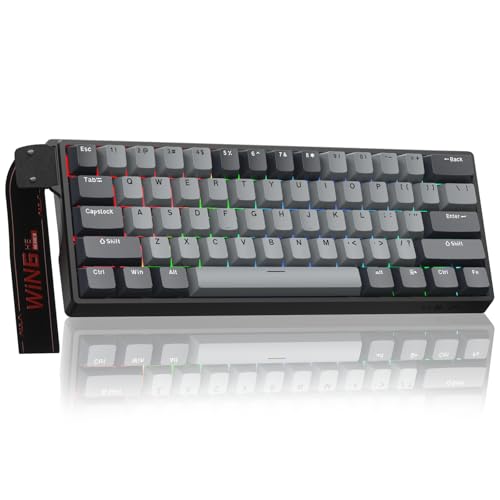
This compact wired model is described as a quiet membrane keyboard with mechanical-feeling keys, not as a conventional mechanical keyboard. Its 68-key layout includes separate arrow keys, a detachable Type-C cable, backlighting, and 26-key no-conflict support, according to the supplied specifications.
Pros: Space-saving layout; detachable cable; stated anti-ghosting support; backlighting and multimedia shortcuts.
Cons: Membrane switches do not offer the mechanical switch construction the target keyword implies. The compact layout has no number pad, and compatibility details specifically identify Windows rather than a broad console list.
Who should skip it: Skip it if you want mechanical switches, hot-swap options, or a dedicated number pad.
Razer BlackWidow V4 X Mechanical Gaming Keyboard
The BlackWidow V4 X is a full-size mechanical board with linear Yellow switches, six programmable macro keys, a media roller, and per-key Chroma RGB. These features suit players who value dedicated commands and media controls, but the supplied specifications do not list hot-swap support or wireless connectivity.
Pros: Linear mechanical switches; six macro keys; per-key RGB; dedicated media controls and stated sound-dampening features.
Cons: It has a full-size footprint and does not list hot-swappable switches. Buyers prioritizing a compact or wireless keyboard should consider another option.
Who should skip it: Skip it if your priority is the smallest possible desk footprint, wireless play, or switch customization through hot-swap sockets.



Write Your Review
No reviews yet. Be the first to share your experience!