

The best 60 percent keyboard for competitive play is not automatically the right pick for every desk. Choose magnetic switches for adjustable actuation, a wireless model for multi-device flexibility, or a conventional mechanical keyboard for straightforward typing.
This specification-based comparison covers compact wired and wireless models, with trade-offs in layout, controls, software, and switch behavior. A 60% layout typically removes dedicated function and navigation rows, so check how arrow keys and secondary commands work before buying.
- For adjustable magnetic actuation: AULA WIN60 HE PRO, with advertised rapid trigger and up to 8000Hz polling.
- For a compact layout with arrow keys: AULA WIN68 HE, which lists 68 keys and retained arrow keys.
- For wireless flexibility: DIERYA DK63, with Bluetooth, 2.4GHz, and wired USB connections.
- For optical switches and software layers: Logitech G PRO X 60, available in listed linear and tactile configurations.
- For a simple budget-conscious wired setup: CACKBIRD’s blue-switch model, with plug-and-play compatibility listed for several operating systems.
Pros
- Hall Effect switches with adjustable actuation
- Rapid Trigger mode down to 0.02mm
- High 8000Hz polling rate
- No-install web-based driver
- Compact footprint maximizes mouse space
Cons
- Compact 60% layout omits dedicated navigation keys
- Wired-only design lacks wireless connectivity

Pros
- Hall Effect switches with adjustable actuation
- Fast 8000Hz polling rate
- Compact 68-key layout preserves arrow keys
- Detachable wired USB connection
- South-facing RGB with web-based configuration
Cons
- Web configuration driver does not support macOS
- Wired-only connection with no wireless functionality

Pros
- Compact 60% layout retains dedicated arrow keys
- Flexible 2.4GHz, Bluetooth 5.0, and wired connections
- Light and quiet 45g linear red switches
- Large 3000mAh rechargeable battery capacity
- Customizable 16.8-million-color RGB backlighting
Cons
- Battery life drops significantly with full RGB enabled
- Compact layout requires FN key combos for standard functions
Pros
- Compact 61-key layout maximizes desk space
- Tactile and clicky mechanical switch feedback
- Detachable USB-C cable simplifies transport
- Full-key anti-ghosting prevents input conflicts
- Double-shot keycaps provide clear legend backlighting
Cons
- Lacks dedicated arrow and navigation keys
- Fixed rainbow lighting lacks full RGB customization
Pros
- Fast 1.0 mm linear optical actuation
- Durable, oil-resistant doubleshot PBT keycaps
- Rigid matte aluminum top frame
- Ultra-compact footprint frees up desk space
- Individually customizable per-key RGB lighting
Cons
- Lacks dedicated arrow and navigation keys
- Snap Tap features require Razer Synapse 4 software

Pros
- Space-saving 60% form factor
- Fast GX linear optical switches
- Reliable LIGHTSPEED wireless and Bluetooth connectivity
- Convenient onboard volume roller and media controls
- Includes durable travel carrying case
Cons
- Lacks dedicated arrow and function keys
- Requires multi-layer shortcuts for standard navigation tasks

Pros
- Compact 60% footprint frees up mouse space
- Responsive GX tactile optical switches
- Low-latency LIGHTSPEED wireless and Bluetooth support
- Multi-layer key customization via KEYCONTROL
- Includes protective carrying case for travel
Cons
- Lacks dedicated arrow keys and navigation cluster
- Requires learning secondary function layers for commands

Pros
- Up to 8000 Hz polling rate
- Rapid trigger with 0.02mm step distance
- Hall Effect magnetic switches avoid mechanical wear
- Browser-based configuration requires no local software installation
- Compact 60 percent layout saves desk space
Cons
- Compact 60 percent layout lacks dedicated arrow and navigation keys
- Restricted to a wired connection

Pros
- Hot-swappable linear red mechanical switches
- Open-source VIA key remapping and macro support
- Integrated multi-layer sound-dampening fillings
- Durable Cherry profile PBT pudding keycaps
- Broad compatibility with PC and major consoles
Cons
- Key remapping requires a wired connection to configure
- Compact 60% layout lacks dedicated arrow and function keys

Pros
- Compact layout retains dedicated arrow keys
- Smooth linear red mechanical switches
- Full anti-ghosting across all keys
- Detachable cable simplifies transport
- Dual adjustable kickstands for ergonomics
Cons
- Single-color blue lighting without RGB customization
- Lacks wireless connectivity options
How to Choose the Best 60 Percent Keyboard
Check the layout before choosing switches
Compact keyboards save desk space, but function keys and navigation commands commonly move to Fn combinations. Some models in this group retain arrow keys, while others require a function-layer shortcut, so compare the exact layout against your games and daily applications.
Match switch behavior to your work
Hall Effect models offer adjustable actuation and rapid-trigger features in their supplied specifications, useful to players who want to tune key response. Optical switches, linear red switches, and clicky blue switches feel and sound different; choose according to preference rather than assuming one type suits everyone.
Consider connection and software requirements
Wired models avoid wireless pairing and battery upkeep, while the DIERYA DK63 supports Bluetooth, 2.4GHz, and wired USB. Check software support carefully: the WIN68 HE driver is specified for Windows, while Womier lists VIA remapping in wired mode.
Product Reviews
AULA WIN60 HE PRO 60% Mechanical Gaming Keyboard
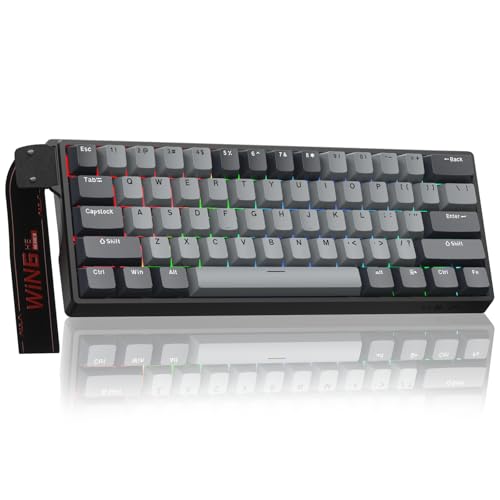
The WIN60 HE PRO combines Hall Effect magnetic switches, adjustable rapid-trigger functionality, and polling rates up to 8000Hz. Its web-based driver is described as supporting remapping, macros, and RGB customization, making it a specification-focused option for players who want configurable key response.
Pros: Magnetic switches, advertised 0.02mm rapid-trigger step, and web-based customization. Cons: Wired connection only, and its 60% layout does not list dedicated arrow keys. Who should skip it: Users who need wireless operation or prefer a conventional tactile switch feel.
Its listed driver and feature claims should be treated as manufacturer specifications, not independently measured performance. The model is a reasonable fit for PC gamers prioritizing configurable actuation over a larger key layout.
AULA WIN60 HE PRO 60% Mechanical Gaming Keyboard
AULA WIN68 HE Mechanical Gaming Keyboard 60%
The WIN68 HE is a wired magnetic-switch keyboard with 68 keys, retained arrow keys, adjustable actuation from 0.02mm to 3.44mm, and an advertised 8000Hz polling rate. Its additional keys may reduce reliance on Fn shortcuts compared with a 61-key layout.
Pros: Adjustable actuation, arrow keys, detachable USB cable, and listed rapid-trigger customization. Cons: The driver is specified for Windows and does not support Mac. Who should skip it: Mac users seeking software-based remapping or anyone who needs wireless connectivity.
Its advertised response figures are product claims, not comparative measurements. Consider it when arrow-key access matters and a wired Windows setup fits your desk.
AULA WIN68 HE Mechanical Gaming Keyboard 60%
DIERYA DK63 60% Wireless Mechanical
The DK63 has 63 keys, including directional keys, and supports Bluetooth 5.0, 2.4GHz, and wired USB connections. Its listed 3000mAh battery provides a stated approximate eight hours with maximum backlighting or around 90 hours with lighting off.
Pros: Three connection modes, arrow keys, and a stated battery capacity. Cons: The listed battery estimates vary substantially with backlight use, and the product data identifies red switches rather than switch alternatives. Who should skip it: Competitive players who specifically want adjustable magnetic actuation or a wired-only setup.
This is the most flexible option here for switching among compatible computers and mobile devices. Confirm the intended device supports the selected connection method before purchase.
DIERYA DK63 60% Wireless Mechanical
60% Wired Mechanical Gaming Keyboard with Blue
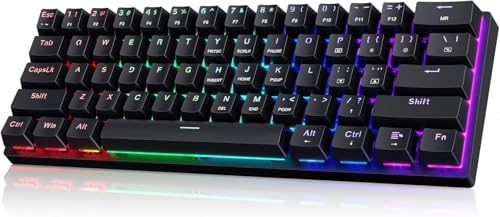
This CACKBIRD model uses 61 blue mechanical switches, rainbow LED effects, and a detachable Type-C cable. The supplied details list plug-and-play support for Windows versions, Mac OS, and Windows Vista, plus full-key anti-ghosting.
Pros: Clicky switch feedback, lighting controls, and broad stated operating-system compatibility. Cons: Its blue switches are clicky, and arrow-key access uses an Fn shortcut. Who should skip it: People who need quiet keystrokes, wireless use, or dedicated arrow keys.
It suits users who want a basic wired mechanical board and prefer audible, tactile feedback. The product details do not specify advanced remapping software.
60% Wired Mechanical Gaming Keyboard with Blue
Logitech G PRO X 60% Wireless Gaming Keyboard
Logitech’s PRO X 60 uses optical switches and supports LIGHTSPEED wireless, Bluetooth, and optional USB connectivity. Listed features include G HUB customization, media controls, a volume roller, five KEYCONTROL layers, and an included carrying case.
Pros: Multiple connection options, optical switches, layered customization, and included transport case. Cons: It is a premium-feature option, and the supplied details describe a compact layout without specifying dedicated arrow keys. Who should skip it: Buyers who want a simple wired board or do not need wireless and software features.
The supplied product data lists both linear and tactile optical variants under the same model family. Verify the selected configuration before ordering, since switch feel is a key difference.
Logitech G PRO X 60% Wireless Gaming Keyboard
Razer Huntsman Mini 60% Gaming Keyboard
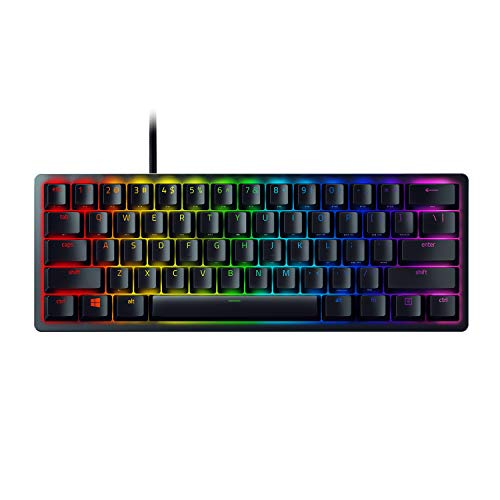
The Huntsman Mini pairs linear optical switches with an aluminum top frame, doubleshot PBT keycaps, onboard memory, and Chroma RGB. Razer Synapse 4 supports programmable macros and Snap Tap, which the supplied information says is off by default.
Pros: Optical linear switches, PBT keycaps, aluminum frame, and onboard memory. Cons: Snap Tap requires Synapse 4 to toggle, and the provided feature list does not specify wireless connectivity. Who should skip it: Users seeking a wireless board or a model with adjustable Hall Effect actuation.
It is a good match for users already interested in Razer lighting and software features. The listed switch version is linear, so tactile-switch buyers should consider another configuration.
Razer Huntsman Mini 60% Gaming Keyboard
Logitech G PRO X 60% Wireless Gaming Keyboard, Tactile Optical
This listing describes the tactile optical version of Logitech’s wireless PRO X 60 family. It shares the stated LIGHTSPEED, Bluetooth, optional USB, G HUB, KEYCONTROL, media-control, and carrying-case features.
Pros: Tactile optical switches, wireless choices, and layered key customization. Cons: The compact layout may require Fn combinations for commands, and the product data does not specify dedicated arrow keys. Who should skip it: Buyers who prefer linear switches or want a larger layout with more dedicated keys.
Choose this listed variant if tactile feedback matters more than the linear feel of the other PRO X 60 listing. Check the selected switch configuration carefully.
Logitech G PRO X 60% Wireless Gaming Keyboard
Aula WIN60 HE 60% Mechanical Gaming Keyboard
The WIN60 HE lists Hall Effect magnetic switches, up to 8000Hz polling, rapid-trigger functionality, RGB, and a web-based driver. Its advertised rapid-trigger step is 0.02mm, with customization for key mapping, macros, and lighting described in the supplied details.
Pros: Magnetic actuation, advertised rapid trigger, and browser-based configuration. Cons: It is wired, and the compact layout does not list dedicated arrow keys. Who should skip it: Users who want wireless operation or require a physical arrow-key cluster.
This model shares several specifications with the WIN60 HE PRO, so compare the exact listing and feature set rather than assuming the names indicate identical versions. Its rapid-trigger figures are advertised specifications.
Aula WIN60 HE – 60% Mechanical Gaming Keyboard
Womier 60% Percent Keyboard
The Womier WK61 PRO combines hot-swappable POM linear red switches, PBT keycaps, layered sound-dampening materials, and VIA remapping. The supplied data says key remapping is performed in wired mode and lists compatibility with Windows, macOS, and Linux.
Pros: Hot-swappable switches, VIA support, and multiple listed operating systems. Cons: Remapping is specified for wired mode, and the switches are linear red. Who should skip it: Users who need wireless remapping or prefer tactile or clicky switches.
Its replaceable switches and remapping options make it suitable for customization-focused users. The product listing also identifies compatibility with selected PlayStation and Xbox consoles, but does not detail every console function.
MageGee Portable 60% Mechanical Gaming Keyboard
The MageGee MK-Box is a 68-key wired keyboard with red linear switches, separate arrow keys, and Fn-accessed F1 through F12 functions. It uses a USB 2.0 connection, has blue backlighting, and is listed as compatible with Windows, Linux, and Mac.
Pros: Arrow keys, a detachable USB cable, anti-ghosting, and plug-and-play operation. Cons: Lighting is blue rather than described as full RGB, and wireless connectivity is not listed. Who should skip it: Buyers who want RGB color customization or wireless connections.
The 68-key arrangement may be more convenient than a stricter 61-key layout for everyday navigation. It is a practical option for users who value arrow keys and straightforward wired setup.
MageGee Portable 60% Mechanical Gaming Keyboard
Which Best 60 Percent Keyboard Should You Choose?
Choose the AULA WIN60 HE PRO or WIN60 HE if adjustable magnetic actuation and rapid-trigger features are priorities. The WIN68 HE is a better fit if you want magnetic switches but also value retained arrow keys and use Windows for its listed driver.
For wireless connections, consider the DIERYA DK63 or Logitech G PRO X 60, then select based on switch feel and software needs. The Womier suits switch customization, while CACKBIRD and MageGee offer simpler wired layouts with different key counts and switch styles.
Before choosing the best 60 percent keyboard for your setup, confirm the layout, operating-system support, connection method, and switch type. Readers comparing complete gaming peripherals may also find our guides to keyboards for StarCraft 2 and keyboard and mouse combinations for PC gaming useful.





Write Your Review
No reviews yet. Be the first to share your experience!