

If you specifically need a 40% layout, none of the keyboards in this selection is a match. The listed options are 60%, 65%, or tenkeyless, so consider them only if a larger compact layout works for your desk and games.
For a compact mechanical option with documented Hall Effect features, consider the AULA WIN68 HE. The Razer Reclusa X Mini adds hot-swappable switches in a 65% layout, while the Logitech G413 TKL SE preserves more familiar keys in a tenkeyless form.
This is a specification-based comparison, not a report of firsthand use. Layout labels vary between manufacturers, so check the stated key count and retained keys against your own game shortcuts before choosing.
Compact Gaming Keyboard Picks
Pros
- Sturdy aluminum-magnesium alloy top plate
- Durable wear-resistant PBT keycaps
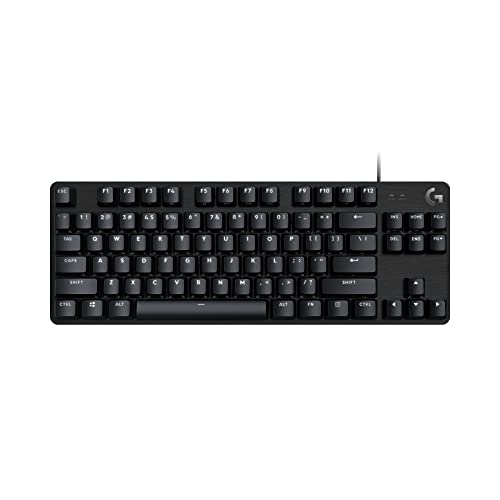
- Space-saving tenkeyless layout
- Integrated FN media and lock shortcuts
- Tactile switches provide clear physical feedback
Cons
- Single-color white LED backlighting without RGB
- Rollover limited to 6 keys instead of full NKRO
- Fixed wired connection lacks a detachable cable

Pros
- Space-saving 68-key layout with dedicated arrows
- Detachable Type-C cable for easy travel
- Quiet membrane operation suitable for shared rooms
- 26-key anti-ghosting for accurate key registration
Cons
- Uses membrane switches instead of authentic mechanical switches
- No integrated number pad for data entry

Pros
- Hall Effect switches with adjustable actuation
- Fast 8000Hz polling rate
- Compact 68-key layout preserves arrow keys
- Detachable wired USB connection
- South-facing RGB with web-based configuration
Cons
- Web configuration driver does not support macOS
- Wired-only connection with no wireless functionality

Pros
- Hot-swap PCB supports 3-pin and 5-pin switches
- Integrated dual-layer silicone dampening for cleaner sound
- South-facing RGB improves aftermarket keycap clearance
- Compact 65% layout preserves dedicated arrow keys
- Detachable USB-C cable simplifies travel and replacement
Cons
- Wired-only operation with no wireless connectivity support
- Uses ABS keycaps rather than denser PBT plastic
- Compact layout lacks dedicated function and numpad keys
Pros
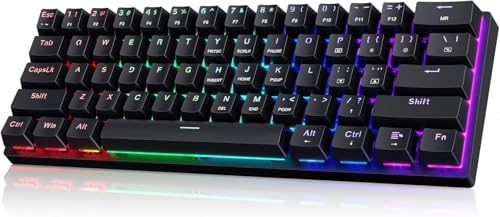
- Compact 61-key layout maximizes desk space
- Tactile and clicky mechanical switch feedback
- Detachable USB-C cable simplifies transport
- Full-key anti-ghosting prevents input conflicts
- Double-shot keycaps provide clear legend backlighting
Cons
- Lacks dedicated arrow and navigation keys
- Fixed rainbow lighting lacks full RGB customization

Pros
- Hot-swappable linear red switches
- Full-key anti-ghosting support
- Software macro editing and remapping
- Includes four spare replacement switches
- Twelve quick-access multimedia shortcuts
Cons
- Backlight LED colors cannot be changed
- Wired-only design without wireless functionality

Pros
- Hot-swappable linear red mechanical switches
- Open-source VIA key remapping and macro support
- Integrated multi-layer sound-dampening fillings
- Durable Cherry profile PBT pudding keycaps
- Broad compatibility with PC and major consoles
Cons
- Key remapping requires a wired connection to configure
- Compact 60% layout lacks dedicated arrow and function keys

Pros
- Compact layout retains dedicated arrow keys
- Smooth linear red mechanical switches
- Full anti-ghosting across all keys
- Detachable cable simplifies transport
- Dual adjustable kickstands for ergonomics
Cons
- Single-color blue lighting without RGB customization
- Lacks wireless connectivity options
How to Choose a Compact Keyboard
Start with layout rather than the percentage printed in a listing. A 60% board typically removes dedicated keys, while the supplied 65% models include arrow keys; the tenkeyless Logitech retains more of a conventional layout but omits the number pad.
Check whether a game depends on dedicated function, navigation, or arrow keys. Some compact boards access secondary commands through Fn combinations, and moving between layers can be inconvenient if your games require those commands frequently.
Switch type matters for both feel and noise. The products here range from linear mechanical switches to tactile or clicky mechanical switches, as well as a membrane model described as having a mechanical feel.
Software and operating-system support also differ. AULA’s web driver is specified for Windows only, while Womier describes VIA remapping across Windows, macOS, and Linux, with key remapping performed in wired mode.
Product Notes and Trade-Offs
Logitech G413 TKL SE Mechanical Gaming Keyboard
This tenkeyless wired mechanical board uses tactile switches, PBT keycaps, white backlighting, and a brushed aluminum-magnesium alloy top case. Its FN media controls and six-key rollover anti-ghosting offer a more familiar layout than the smaller choices, though it is not a 40% or 60% board.
Pros: PBT keycaps, tactile switches, media shortcuts, and a durable metal-alloy top case are documented features. Cons: It takes more desk space than the mini keyboards and uses white lighting rather than per-key RGB. Who should skip it: Skip it if your priority is the smallest possible keyboard or a true 40% layout.
Product details: Logitech G413 TKL SE Mechanical Gaming Keyboard.
AULA WIN68 HE Mechanical Gaming Keyboard 60%
This 68-key wired model is described as retaining arrow keys and basic function access through Fn combinations. Its Hall Effect switches have adjustable actuation from 0.02 mm to 3.44 mm, and the advertised 8,000 Hz polling rate and 0.3 ms latency are manufacturer specifications, not independent measurements.
Pros: Adjustable actuation and rapid-trigger options may suit players who want to tune key response, and the detachable cable aids transport. Cons: The customization driver supports Windows only, and Fn layers remain part of the compact layout. Who should skip it: Skip it if you use macOS for configuration or need dedicated keys without layer shortcuts.
Product details: AULA WIN68 HE Mechanical Gaming Keyboard 60%.
GEODMAER 65% Gaming Keyboard
This is a 68-key membrane keyboard with separate arrow keys, a detachable Type-C cable, backlighting, and 26-key no-conflict input. The listing describes its keys as having a mechanical feel, but it is not a mechanical-switch model.
Pros: Separate arrows, media shortcuts, and a membrane design make it a straightforward compact option for gaming and general use. Cons: It lacks mechanical switches and the listing specifies no advanced remapping or switch customization. Who should skip it: Skip it if you require mechanical switches, per-key programming, or a verified 40% layout.
Product details: GEODMAER 65% Gaming Keyboard.
Razer Reclusa X Mini 65% Hot-Swappable Mechanical
This 65% wired mechanical keyboard includes tactile Razer Orange Gen-3 switches, hot-swap sockets compatible with three-pin and five-pin switches, per-key Chroma RGB, and a detachable USB-C connection. The listing also specifies 1,000 Hz polling, N-key rollover, and anti-ghosting.
Pros: Hot-swap support allows compatible switches to be changed, while the retained compact layout and N-key rollover suit gaming use. Cons: It is larger than a 40% board, and the tactile switches may not suit someone seeking a linear feel. Who should skip it: Skip it if you want a smaller 60% layout or do not value switch swapping.
Product details: Razer Reclusa X Mini 65% Hot-Swappable Mechanical.
Redragon Mechanical Gaming Keyboard Wired
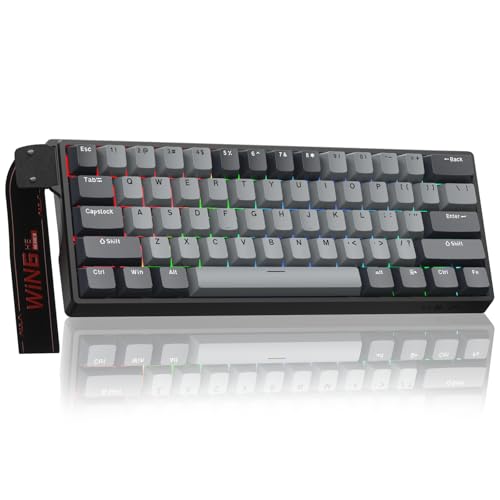
This wired mechanical keyboard has linear red switches, hot-swap support, full-key anti-ghosting, programmable macros, and 11 backlight modes. The listing says the lighting color cannot be changed, so its effects are not equivalent to customizable multicolor RGB.
Pros: Linear switches, macro editing, and hot-swap capability provide useful customization, and the listing specifies a 24-month warranty. Cons: The layout size is not provided in the supplied specifications, and lighting color cannot be changed. Who should skip it: Skip it if a confirmed 40% or 60% footprint is essential to your setup.
Product details: Redragon Mechanical Gaming Keyboard Wired.
60% Wired Mechanical Gaming Keyboard with Blue
This 61-key CACKBIRD model uses clicky blue mechanical switches, has a detachable Type-C cable, and offers multiple rainbow backlight effects. Arrow-key access is assigned to an Fn combination, and the listing states compatibility with Windows and Mac OS.
Pros: Its 60% layout saves space, and the listing specifies full-key anti-ghosting and plug-and-play operation without drivers. Cons: Clicky switches are an unsuitable choice for people who need a quiet typing environment, and arrows require a function shortcut. Who should skip it: Skip it if you need dedicated arrow keys or a quieter switch type.
Product details: 60% Wired Mechanical Gaming Keyboard with Blue.
Womier 60% Percent Keyboard
This 60% mechanical keyboard uses linear POM red switches, PBT keycaps, hot-swap support, and layered sound-dampening material. Its listing describes VIA remapping for Windows, macOS, and Linux, but says key remapping must be performed while connected in wired mode.
Pros: Hot-swappable switches and broad stated operating-system support make it a flexible option for customization. Cons: It has a compact 60% layout, and the product details do not specify polling rate or actuation adjustment. Who should skip it: Skip it if you need dedicated arrow keys or want documented rapid-trigger settings.
Product details: Womier 60% Percent Keyboard.
MageGee Portable 60% Mechanical Gaming Keyboard
The MageGee MK-Box is a 68-key wired mechanical keyboard with linear red switches, separate arrow keys, and Fn access to F1 through F12. It uses blue backlighting, has a detachable cable, and is specified for Windows, Linux, and Mac compatibility.
Pros: Separate arrows preserve convenient navigation in a compact format, and the listing specifies all-key anti-ghosting without software installation. Cons: Lighting is blue rather than RGB, and the 68-key layout is not a 40% design. Who should skip it: Skip it if you want RGB color selection or the smallest available layout.
Product details: MageGee Portable 60% Mechanical Gaming Keyboard.
Which Layout Is Right for You?
Choose the AULA if adjustable Hall Effect actuation is your priority and Windows software support fits your setup. Choose the Razer for hot-swappable switches and a 65% layout, or the Womier for a compact mechanical board with VIA remapping and linear switches.
The GEODMAER is the membrane choice, while the CACKBIRD offers a 61-key layout with clicky switches. The MageGee keeps separate arrows in a compact mechanical format, and the Logitech is the more conventional tenkeyless option. Redragon may appeal to macro users, but its layout size is not stated in the supplied details.
If a true 40% keyboard is non-negotiable, do not treat these larger layouts as direct substitutes. For more compact-layout guidance, see our 60% gaming keyboard comparison and the compact keyboards category.
For broader layout and typing comparisons, browse our guides to keyboards for gaming and typing and gaming keyboards for small hands.





Write Your Review
No reviews yet. Be the first to share your experience!