

Choosing an OLED display for console or PC gaming requires balancing screen size, peak panel refresh rate, and anti-glare coatings. Current premium panels support variable refresh rate technology, fast pixel transitions, and HDMI 2.1 bandwidth to handle high-frame-rate 4K output.

Pros
- Up to 165Hz refresh rate for responsive gaming
- NVIDIA G-SYNC and AMD FreeSync Premium Pro support
- Glare Free panel coating limits ambient reflections
- NQ4 AI Gen3 processor provides 4K upscaling
- Deep OLED contrast with Auto HDR Remastering
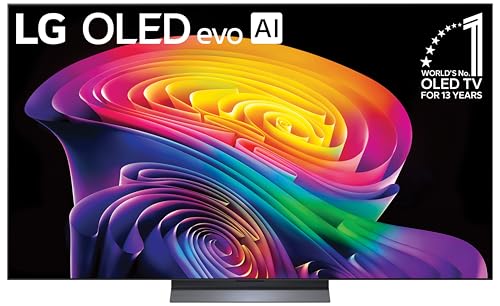
Pros
- Up to 165Hz VRR support for PC gaming
- Four full-bandwidth HDMI 2.1 inputs
- Infinite contrast with self-lit OLED pixels
- NVIDIA G-Sync and AMD FreeSync Premium compatible
- Fast 0.1ms response time for gaming
Cons
- Peak 165Hz refresh rate is limited to PC gaming
- Included stand requires 9.1 inches of table depth

Pros
- Fluid 4K gaming at up to 144Hz with VRR
- Deep per-pixel OLED contrast and enhanced brightness
- NQ4 AI Gen3 processor provides 4K upscaling
- AI motion smoothing reduces action blur
- Built-in Alexa for voice and smart control

Pros
- Inky black levels and high contrast
- Smooth 120Hz variable refresh rate support
- NVIDIA G-SYNC and AMD FreeSync Premium compatibility
- Pantone-validated color accuracy
- Real-time 4K AI upscaling processor
Pros
- Up to 165Hz refresh rate for smooth gaming
- NVIDIA G-SYNC and AMD FreeSync Premium Pro support
- Glare Free panel coating limits reflections
- Advanced AI-driven 4K upscaling and motion smoothing
Technical Specifications Comparison
The table below summarizes key documented specifications across each evaluated television. Variable refresh rate support, refresh ceiling, and panel size dictate how each model fits specific gaming desks or living rooms.
| Model | Screen Size | Peak Refresh Rate | VRR Support | Processor |
|---|---|---|---|---|
| Samsung S90H 55-Inch | 55 inches | 165Hz | G-SYNC, FreeSync Premium Pro | NQ4 AI Gen3 |
| LG C6 Series 65-Inch | 65 inches | 165Hz | G-Sync, FreeSync Premium | Alpha 11 AI Gen3 |
| Samsung S90F 65-Inch | 65 inches | 144Hz | VRR (FreeSync) | NQ4 AI Gen3 |
| Samsung S90H 65-Inch | 65 inches | 165Hz | G-SYNC, FreeSync Premium Pro | NQ4 AI Gen3 |
| Samsung S85H 48-Inch | 48 inches | 120Hz | G-SYNC, FreeSync Premium | NQ4 AI Gen2 |
Detailed Reviews: The Best OLED TVs for Gaming
Samsung 55-Inch Class S90H Series, OLED, 4K
The Samsung 55-Inch Class S90H Series, OLED, 4K features a native 165Hz refresh ceiling driven by the NQ4 AI Gen3 processor. This refresh rate pairs with Motion Xcelerator technology alongside NVIDIA G-SYNC and AMD FreeSync Premium Pro certification, ensuring tear-free PC gaming at high frame rates.
Samsung integrates a Glare Free coating designed to diffuse ambient light without washing out deep black levels. This makes the 55-inch display practical for brighter gaming rooms where reflections often obscure darker titles. The compact 55-inch profile fits well into medium entertainment centers or deep hybrid desk setups.
A notable trade-off is Samsung’s lack of native Dolby Vision support, relying instead on HDR10+ and Auto HDR Remastering. Players who prioritize Dolby Vision gaming on Xbox Series X or streaming services may prefer alternatives that license the format.
LG 65-Inch Class OLED evo AI 4K C6 Series
The LG 65-Inch Class OLED evo AI 4K C6 Series utilizes self-lit OLED pixels alongside LG Brightness Booster technology powered by the Alpha 11 AI Gen3 dual engine processor. It delivers 165Hz refresh support and an advertised 0.1ms response time, making it exceptionally responsive for competitive multiplayer titles.
LG includes full compatibility with Dolby Vision, Dolby Atmos, and Filmmaker Mode, making this screen versatile for both high-end gaming and cinema viewing. The webOS platform integrates Google Gemini AI assistance and access to streaming platforms without needing an external streaming box.
At 65 inches wide and requiring a stand depth of 9.1 inches, this television requires substantial surface area or a sturdy VESA wall mount. Gamers seeking an ultra-dense pixel pitch for close-up desktop usage might find the 65-inch footprint too large for arm’s length viewing.
Samsung 65-Inch Class OLED S90F 4K Smart TV
The Samsung 65-Inch Class OLED S90F 4K Smart TV offers a 144Hz panel driven by the NQ4 AI Gen3 processor with 128 neural networks for 4K upscaling. It handles smooth 4K VRR output, providing ample bandwidth for modern gaming rigs to exceed standard 120Hz console limits.
The AI Motion Enhancer Pro feature targets fast-moving objects to minimize ghosting, which benefits sports simulations and fast-paced action titles. Its HDR+ panel mapping boosts small specular highlights while preserving deep shadow detail across complex gaming scenes.
While 144Hz exceeds the requirements of current gaming consoles, it falls slightly behind the 165Hz ceiling of newer S90H models. PC players searching for the absolute highest refresh rates on an OLED TV may view this as a minor compromise.
Samsung 65-Inch Class S90H Series, OLED, 4K
The Samsung 65-Inch Class S90H Series, OLED, 4K combines a generous 65-inch screen size with a rapid 165Hz panel refresh rate. Driven by the NQ4 AI Gen3 processor, it incorporates Glare Free surface treatments to preserve deep contrast even under direct overhead room lights.
Equipped with FreeSync Premium Pro and G-SYNC compatibility, this model pairs cleanly with high-end graphics hardware like those featured in our guide to the best prebuilt gaming PCs. The larger 65-inch format creates an immersive field of view when placed across a dedicated living room battlestation.
Users should measure their entertainment furniture carefully, as 65-inch televisions require substantial clearance. Similar to other Samsung displays, this model lacks Dolby Vision processing, relying exclusively on HDR10+ and dynamic tone mapping.
Samsung 48-Inch Class S85H Series, OLED, 4K
The Samsung 48-Inch Class S85H Series, OLED, 4K is designed specifically for tighter gaming rooms or dedicated desktop workstations. It features a 120Hz refresh rate, Motion Xcelerator technology, and FreeSync Premium compatibility driven by the NQ4 AI Gen2 processor.
Because of its smaller 48-inch form factor, pixel density is significantly sharper than on larger panels, making it an excellent alternative to conventional desk displays. Readers planning a custom setup can reference our walkthrough on how to build the ultimate battlestation on a budget to see how compact screens fit smaller desk layouts.
The primary trade-off is the 120Hz maximum refresh rate, which does not reach the 144Hz or 165Hz speeds seen on the S90 series. However, console gamers locked to 120Hz maximum output will find the hardware well-matched to current hardware limits.
Key Buying Considerations for Gaming OLEDs
When selecting between high-performance OLED televisions, consider how your primary gaming device interacts with the panel’s interface specifications. Consoles like the Xbox Series X and PlayStation 5 operate at a maximum of 4K at 120Hz over HDMI 2.1 connections. Purchasing a 144Hz or 165Hz television offers headroom for PC graphics cards, but will not increase framerates beyond console hardware limits.
Screen coating is another practical factor. Standard glossy OLED panels deliver deep perceived black levels in dark environments, but they reflect lamps and windows during daytime play. Samsung’s Glare Free technology diffuses reflections, whereas traditional glossy panels like LG’s C6 require controlled room lighting for optimal contrast performance.
Those transitioning from dedicated PC monitors should also compare viewing distances. While desktop users often prefer monitors detailed in our roundup of the best 1440p gaming monitors, a 48-inch OLED demands at least three to four feet of viewing distance to prevent neck strain during long sessions.
Frequently Asked Questions
Can I use an OLED TV as a PC monitor?
Yes, modern OLED TVs support standard PC resolutions, 4:4:4 chroma subsampling, and variable refresh rates over HDMI 2.1. However, ensure your graphics card has an HDMI 2.1 port to achieve 4K resolution above 60Hz.
Do OLED TVs suffer from input lag?
Dedicated gaming modes on contemporary OLED televisions disable heavy post-processing to minimize input latency. With Game Mode active, input latency drops to single-digit milliseconds, competing directly with desktop gaming displays.
Is 165Hz necessary for console gaming?
No, current generation consoles cap video output at 120Hz in supported titles. A 165Hz television provides extra smoothness exclusively when connected to a capable gaming PC via high-bandwidth HDMI cables.
Final Verdict: Which OLED TV Should You Choose?
For PC gamers seeking maximum refresh rates alongside Dolby Vision support, the LG 65-Inch Class OLED evo AI 4K C6 Series is the most complete entertainment centerpiece. Those battling brightly lit rooms will appreciate the matte, reflection-resistant coating on the Samsung 65-Inch Class S90H Series, OLED, 4K. Meanwhile, desktop battlestation builders should prioritize the compact dimensions of the Samsung 48-Inch Class S85H Series, OLED, 4K for balanced viewing ergonomics.




Write Your Review
No reviews yet. Be the first to share your experience!