

Choosing the best 60 percent keyboards comes down to whether you prioritize rapid competitive gaming performance or ergonomic typing acoustics. A 60 percent layout eliminates the number pad, navigation cluster, and dedicated function row to maximize mouse travel space.
Modern compact boards generally split into two categories. Magnetic Hall Effect models offer adjustable actuation points for competitive first-person shooters, while traditional mechanical boards prioritize hot-swappable switches and dampening foam for a softer typing feel. You can explore how these key mechanisms differ in our guide to mechanical keyboard switches.
The Best 60 Percent Keyboards at a Glance

Pros
- Up to 8000 Hz polling rate
- Rapid trigger with 0.02mm step distance
- Hall Effect magnetic switches avoid mechanical wear
- Browser-based configuration requires no local software installation
- Compact 60 percent layout saves desk space
Cons
- Compact 60 percent layout lacks dedicated arrow and navigation keys
- Restricted to a wired connection

Pros
- Solid aircraft-grade aluminum build
- Long-lasting double-shot PBT keycaps
- Smooth linear switch feel
- Detachable braided USB-C cable
- Three adjustable tilt angles
Cons
- Lacks dedicated arrow and navigation keys
- Advanced lighting adjustments require NGENUITY software

Pros
- QMK and VIA programmability across major operating systems
- Versatile tri-mode wireless and wired connectivity
- Hot-swappable sockets support 3-pin and 5-pin switches
- Vibration-dampening gasket mount design
- Dedicated rotary knob on a compact 60% layout
Cons
- Key remapping requires an initial wired connection
- Compact 60% layout lacks dedicated navigation keys
Pros
- Hall Effect switches with adjustable actuation
- Rapid Trigger mode down to 0.02mm
- High 8000Hz polling rate
- No-install web-based driver
- Compact footprint maximizes mouse space
Cons
- Compact 60% layout omits dedicated navigation keys
- Wired-only design lacks wireless connectivity

Pros
- Space-saving 68-key compact design
- Smooth and quiet linear red switches
- Full key anti-ghosting support
- Nineteen selectable backlight modes
Cons
- Only partially compatible with macOS
- Single-color blue backlighting without full RGB

Pros
- Compact layout retains dedicated arrow keys
- Smooth linear red mechanical switches
- Full anti-ghosting across all keys
- Detachable cable simplifies transport
- Dual adjustable kickstands for ergonomics
Cons
- Single-color blue lighting without RGB customization
- Lacks wireless connectivity options
Pros
- Tri-mode wireless connects with up to five devices
- Supports open-source QMK and VIA key remapping
- Gasket mount and sound dampening provide softer typing
- Hot-swappable sockets support 3-pin and 5-pin switches
- Large 4000mAh built-in rechargeable battery
Cons
- Key remapping requires an active wired USB-C connection
- Compact 60 percent layout omits dedicated navigation keys

Pros
- Hot-swappable linear red mechanical switches
- Open-source VIA key remapping and macro support
- Integrated multi-layer sound-dampening fillings
- Durable Cherry profile PBT pudding keycaps
- Broad compatibility with PC and major consoles
Cons
- Key remapping requires a wired connection to configure
- Compact 60% layout lacks dedicated arrow and function keys

Pros
- Hall Effect switches with adjustable actuation
- Fast 8000Hz polling rate
- Compact 68-key layout preserves arrow keys
- Detachable wired USB connection
- South-facing RGB with web-based configuration
Cons
- Web configuration driver does not support macOS
- Wired-only connection with no wireless functionality
Individual Product Analysis
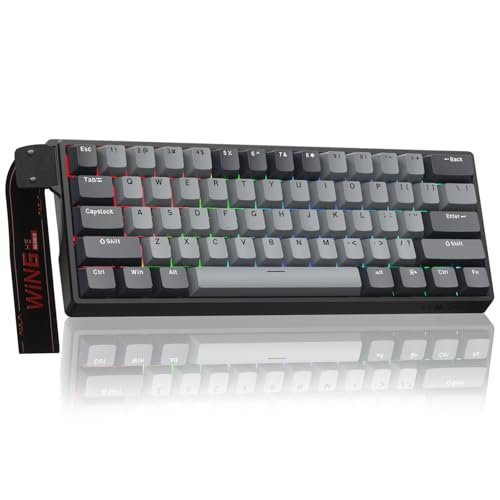
Aula WIN60 HE – 60% Mechanical Gaming Keyboard
The Aula WIN60 HE – 60% Mechanical Gaming Keyboard utilizes Hall Effect magnetic switches paired with an 8000Hz polling rate. This setup delivers rapid trigger response with an ultra-low reset step distance of 0.02mm, making it ideal for counter-strafing in games like Valorant and Counter-Strike 2.
Configuration is handled through a web-based driver, which removes the need to run heavy background applications in Windows. However, magnetic switches require specific calibration, and they are not compatible with standard mechanical switch replacements.
HyperX Alloy Origins 60
Built with a full aircraft-grade aluminum body, the HyperX Alloy Origins 60 delivers structural rigidity that plastic boards cannot match. It features linear HyperX Red mechanical switches rated for 80 million keypresses, alongside double-shot PBT keycaps with side-printed secondary functions.
The solid metal chassis keeps the board anchored during intense gameplay, while two-step feet offer three tilt angles. Its primary drawback is the lack of hot-swappable switch sockets, meaning you cannot replace damaged switches without desoldering.
Womier Wireless Gaming Keyboard 60 Percent
The Womier Wireless Gaming Keyboard 60 Percent provides open-source QMK and VIA programming support alongside a dedicated control knob. It features full POM linear switches inside a gasket-mounted assembly that absorbs bottom-out harshness and dampens typing noise.
Connectivity spans 2.4GHz wireless, Bluetooth 5.0, and USB-C wired mode backed by a 3000mAh battery. Note that key remapping via VIA requires an initial wired connection before those custom layouts apply across wireless profiles.
AULA WIN60 HE PRO 60% Mechanical Gaming Keyboard
Similar to its sibling, the AULA WIN60 HE PRO 60% Mechanical Gaming Keyboard provides contactless magnetic switches with an 8000Hz polling rate and rapid trigger sensitivity down to 0.02mm. It incorporates textured PBT keycaps with under-LED RGB illumination for solid keycap durability.
The web driver provides direct access to key actuation depths without local client installation. Because the board relies entirely on magnetic sensors, typists seeking traditional tactile bump feedback should look elsewhere.
DIERYA T68SE 60% Gaming Mechanical Keyboard,Ultra
The DIERYA T68SE 60% Gaming Mechanical Keyboard,Ultra bridges the gap between ultra-compact layouts and practical navigation by preserving dedicated arrow keys in a 68-key footprint. It offers tri-mode connectivity across Bluetooth, 2.4GHz wireless, and USB-C wired connections.
Equipped with smooth linear red switches, it handles rapid key presses without finger fatigue. While functional for multi-device setups, lighting is limited to single-color blue illumination rather than customizable per-key RGB.
MageGee Portable 60% Mechanical Gaming Keyboard
The MageGee Portable 60% Mechanical Gaming Keyboard is a stripped-back wired entry that also retains independent arrow keys. It uses linear red switches with minimal resistance and includes a detachable USB cable for quick packing into a backpack.
It provides plug-and-play operation across Windows, Mac, and Linux systems without requiring proprietary software drivers. The compromise lies in its simpler plastic chassis and fixed blue backlighting without custom macro capability.
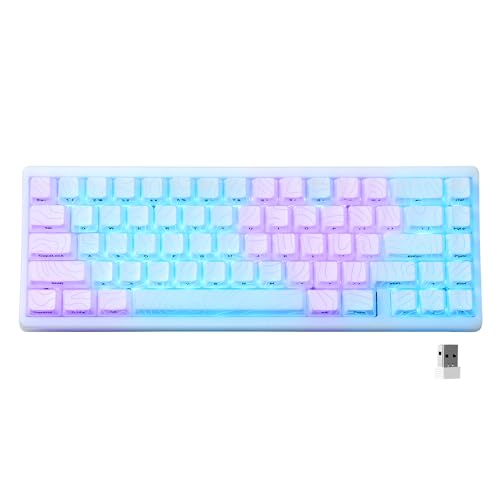
HITIME x XVX M67 Wireless 60% Percent Keyboard
For enthusiasts who value custom aesthetics, the HITIME x XVX M67 Wireless 60% Percent Keyboard combines IMD shine-through keycaps with a multi-layer sound-dampened gasket structure. Its hot-swappable PCB supports both 3-pin and 5-pin mechanical switches and features single-key PCB slotting for flexible typing feedback.
The keyboard houses a generous 4000mAh battery and supports full QMK and VIA programming across Windows and macOS. The detailed topographic pattern gives it a distinct appearance, though users who prefer minimalist setups might find the graphic styling busy.
Womier 60% Percent Keyboard
Featuring a themed Kanagawa aesthetic, the wired Womier 60% Percent Keyboard includes multi-layer sound-dampening material to eliminate internal case ping and hollow noise. It runs POM linear red switches rated for 50 million keystrokes and supports full 3-pin or 5-pin hot swapping.
Support for VIA open-source software gives users deep control over layer navigation and macro execution. Console gamers will also appreciate its native wired compatibility with PlayStation and Xbox platforms, though it lacks wireless capability.
AULA WIN68 HE Mechanical Gaming Keyboard 60%
The AULA WIN68 HE Mechanical Gaming Keyboard 60% retains dedicated arrow keys while incorporating magnetic Hall Effect switches with an 8000Hz polling rate. Actuation travel can be customized between 0.02mm and 3.44mm in precise 0.1mm increments.
Its web driver provides advanced control over dynamic keystroke depth and rapid trigger parameters. A critical limitation is that its web configuration interface only supports Windows operating systems, making it unsuitable for Mac users needing switch adjustment.
Key Technical Differences
| Model | Switch Type | Connectivity | Actuation Customization | Software Type |
|---|---|---|---|---|
| Aula WIN60 HE | Magnetic Hall Effect | Wired USB-C | 0.02mm to 3.44mm | Web Driver (Windows) |
| HyperX Alloy Origins 60 | HyperX Red Linear | Wired USB-C | Fixed (Mechanical) | HyperX NGENUITY |
| Womier Wireless 60% | Full POM Linear | 2.4GHz / BT / Wired | Fixed (Mechanical) | QMK / VIA |
| AULA WIN60 HE PRO | Magnetic Hall Effect | Wired USB-C | 0.02mm Rapid Trigger | Web Driver (Windows) |
| DIERYA T68SE | Linear Red | 2.4GHz / BT / Wired | Fixed (Mechanical) | Onboard FN shortcuts |
| MageGee Portable 60% | Linear Red | Wired USB-C | Fixed (Mechanical) | Hardware Plug & Play |
| HITIME x XVX M67 | Pre-lubed Linear | 2.4GHz / BT / Wired | Fixed (Mechanical) | QMK / VIA |
| Womier 60% Anime | POM Linear Red | Wired USB-C | Fixed (Mechanical) | VIA Open Source |
| AULA WIN68 HE | Magnetic Hall Effect | Wired USB-C | 0.02mm to 3.44mm | Web Driver (Windows) |
How to Choose the Right 60 Percent Keyboard
When shopping for compact keyboards, your primary gaming genres and typing demands will dictate the best hardware profile. To pair your setup with matching low-latency gear, explore our evaluations of the best gaming keyboards and top-performing gaming mice.
Mechanical vs Magnetic Hall Effect Switches
Traditional mechanical switches rely on metallic contact leaves. They provide familiar bottom-out feedback and allow you to swap in tactile, clicky, or silent switches using hot-swap sockets. They represent the best choice for everyday typing, productivity, and casual gaming.
Magnetic Hall Effect switches use sensors to track the travel distance of a magnet inside the stem. This enables Rapid Trigger, where a key resets the exact instant your finger begins traveling upward. For fast-paced tactical shooters requiring instant movement stopping, magnetic switches provide a measurable performance advantage.
Pure 60 Percent vs 68-Key Layouts
A true 60 percent keyboard houses 61 keys and requires holding an FN key to access arrow directions, delete keys, and the F-row. If your daily routine involves heavy spreadsheet navigation, coding, or text editing, a 68-key variant like the AULA WIN68 HE or DIERYA T68SE preserves physical arrow keys with only a minor width increase.
Firmware and Software Capabilities
Boards supporting QMK and VIA store key mappings directly inside onboard memory. This allows you to program complex secondary function layers on a PC and have them work automatically on Linux or macOS systems. If you prefer avoiding background software, prioritize boards with web drivers or VIA compatibility.
Frequently Asked Questions
Are 60 percent keyboards good for typing?
They are fully functional for typing, but they carry a short learning curve. Accessing numbers requires familiarizing yourself with the number row, while function keys and arrow controls rely on secondary layer combinations.
Can I hot-swap switches on Hall Effect keyboards?
Most magnetic keyboards allow you to remove and swap switches, but only with compatible magnetic Hall Effect switches designed for that specific board and sensor polarity. Standard 3-pin or 5-pin mechanical switches will not register on a Hall Effect circuit board.
Summary Recommendation
For competitive tactical shooter enthusiasts, the Aula WIN60 HE or AULA WIN68 HE provide the lowest input latency and rapid trigger responsiveness at an accessible price point. Those prioritizing long-term durability and structural rigidity will find the HyperX Alloy Origins 60 and its solid aluminum frame an excellent wired choice.
If you prefer an acoustic-focused typing experience with custom firmware flexibility, the gasket-mounted Womier Wireless 60% and HITIME x XVX M67 offer deep QMK/VIA key remapping alongside multi-device wireless versatility.



Write Your Review
No reviews yet. Be the first to share your experience!