

For a thumb-operated design and a small workspace, consider the Logitech Ergo M575S. Choose the Lift for a vertical grip, the M330 for quiet, straightforward use, or the M650 L for a larger conventional shape and flexible scrolling.
This specification-based comparison covers six wireless mice for different desk routines. The main choice is between changing your hand position with an ergonomic design and keeping a familiar mouse shape.

Pros
- Dual connectivity via Bluetooth and Logi Bolt receiver
- Stationary thumb design saves desk space
- Rated for up to 18 months on one battery
- Quiet clicks minimize workspace noise
- Customizable buttons via Logi Options+ app
Cons
- Uses disposable AA battery instead of USB-C recharging
- Trackball cage requires periodic manual cleaning

Pros
- Substantially reduces click sounds for quiet environments
- Contoured body suited for comfortable right-handed use
- Long battery life up to 18 months
- Simple plug-and-play USB-A wireless pairing
- Compatible across multiple major desktop operating systems
Cons
- Asymmetrical shape is incompatible with left-handed use
- Requires a USB-A port with no Bluetooth option

Pros
- 57-degree vertical angle promotes natural wrist posture
- Dual connectivity via Bluetooth Low Energy or Logi Bolt
- SmartWheel provides smooth and precise scrolling
- Whisper-quiet clicks minimize workspace distractions
- Long battery life rated up to two years
Cons
- Designed exclusively for right-handed users
- Not optimized for larger hand sizes

Pros
- Fast 1 ms wireless report rate
- Long-lasting battery life from single AA cell
- Precise 12,000 DPI HERO optical sensor
- Integrated internal storage for USB nano receiver
Cons
- Requires replaceable AA batteries instead of internal recharging
- Accessing extended Endurance mode requires Logitech G HUB software
Pros
- Up to two-year battery life
- Ergonomic contoured shape with rubber side grips
- Logitech Unifying receiver pairs multiple compatible devices
- Built-in battery status indicator light and power switch
Cons
- Side-to-side scrolling requires dedicated Logitech software
- Side buttons primarily favor right-handed users
Pros
- Dual Bluetooth and Logi Bolt wireless connectivity
- Quiet click design reduces ambient noise
- Adaptive SmartWheel for fast or precise scrolling
- Up to two years of battery life on one AA
- Ergonomic shape with textured rubber side grips
Cons
- Software customization is limited to Windows and macOS
- Powered by replaceable AA battery instead of USB rechargeability
- Small desk and thumb control: Logitech Ergo M575S Wireless Bluetooth Trackball.
- Vertical grip for small to medium right hands: Logitech Lift Vertical Ergonomic Wireless Mouse.
- Quiet, simple everyday use: Logitech M330 Silent Plus Full Size 2.4 GHz.
- Work and occasional gaming: Logitech G305 Lightspeed Wireless Gaming Mouse.
- Large right hand and scrolling flexibility: Logitech Signature M650 L Full Size Wireless Mouse.
- Contoured shape with horizontal scrolling: Logitech M510 Full Size Ambidextrous 2.4 GHz.
Recommended Work Mice
Logitech Ergo M575S Wireless Bluetooth Trackball
The M575S moves the cursor with a thumb-operated trackball, so you can work without sliding the mouse across your desk. Bluetooth and the included Logi Bolt receiver provide connection options, while its advertised battery life is up to 18 months with the included AA battery.
Its stationary operation suits crowded desks, limited mouse space, or surfaces where moving a conventional mouse is inconvenient. Three customizable buttons and adjustable cursor speed through Logi Options+ add configuration choices.
Pros: Thumb control saves desk space, quiet clicks, Bluetooth or Logi Bolt connectivity, and customizable controls.
Cons: Trackball control feels different from moving a standard mouse, and the listed customization features depend on Logi Options+.
Who should skip it: People who prefer moving the whole mouse or need a left-handed trackball should consider another design.
Logitech Lift Vertical Ergonomic Wireless Mouse
The Lift uses a 57-degree vertical shape, a textured grip, and a thumb rest. Logitech describes it as a fit for small to medium right hands, making hand size and handedness important selection checks.
It connects through Bluetooth Low Energy or the included Logi Bolt USB receiver and supports Windows, macOS, iPadOS, ChromeOS, and Linux. Quiet clicks, a SmartWheel, customizable buttons, and advertised battery life of up to two years suit office routines that value comfort and flexible scrolling.
Pros: Vertical grip, quiet clicks, multiple supported operating systems, and Bluetooth or Logi Bolt connections.
Cons: The stated fit is for small to medium right hands, and its upright shape may not suit users who want a conventional mouse.
Who should skip it: Left-handed users and people with larger hands should look for a design specified for their needs.
Logitech M330 Silent Plus Full Size 2.4 GHz
The M330 is a conventional, right-handed wireless mouse with contoured grips and Logitech SilentTouch technology. Logitech says the technology reduces clicking sounds by more than 90 percent, which makes this a practical option for shared or quiet workspaces.
It uses a USB-A receiver and supports Windows, macOS, ChromeOS, and Linux. An included AA battery is rated for up to 18 months, but Bluetooth is not listed, so check for an available USB-A port before choosing it.
Pros: Quiet clicks, simple receiver-based setup, right-handed contours, and long advertised battery life.
Cons: It relies on a USB-A receiver, is designed for right-handed users, and its listed features do not include Bluetooth or customizable side buttons.
Who should skip it: Left-handed users or people who need Bluetooth, programmable controls, or scrolling modes should compare other options.
Logitech G305 Lightspeed Wireless Gaming Mouse
The G305 is the gaming-focused choice here, with a HERO optical sensor rated up to 12,000 DPI and 400 IPS, plus a 1 ms LIGHTSPEED report rate. Those specifications may appeal to people who use one mouse for office work and responsive PC gaming.
Its compact design weighs 3.4 oz and stores its nano receiver inside the mouse. It runs on one AA battery, with Logitech listing up to 250 hours of continuous gameplay or up to nine months in Endurance mode through G HUB software.
Pros: High-DPI sensor specifications, low-latency wireless gaming mode, portable receiver storage, and configurable Endurance mode.
Cons: Its gaming-focused features may be unnecessary for office-only work, and the supplied information does not list Bluetooth connectivity or quiet clicks.
Who should skip it: Choose another model if silent operation, Bluetooth, or a specifically ergonomic shape matters more than gaming-oriented specifications.
Logitech Signature M650 L Full Size Wireless Mouse
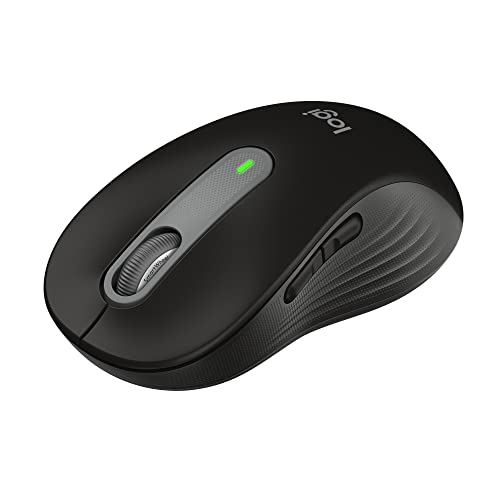
The M650 L is the large-sized version in this lineup, with a soft thumb area, rubber side grips, and Logitech’s SmartWheel. The wheel switches between line-by-line precision and faster scrolling, a useful combination for documents and long web pages.
It connects by Bluetooth Low Energy or Logi Bolt, and supports Windows, macOS, Linux, ChromeOS, iPadOS, and Android. SilentTouch reduces click noise, side buttons can be customized through Logi Options+ on Windows and macOS, and the included AA battery is rated for up to 24 months.
Pros: Large-size option, two wireless connection methods, quiet clicks, customizable side buttons, and selectable scrolling behavior.
Cons: The listed large model may not suit smaller hands, and side-button customization through Options+ is specified for Windows and macOS.
Who should skip it: Users seeking a vertical or trackball design, or a mouse sized specifically for smaller hands, should compare other shapes.
Logitech M510 Full Size Ambidextrous 2.4 GHz
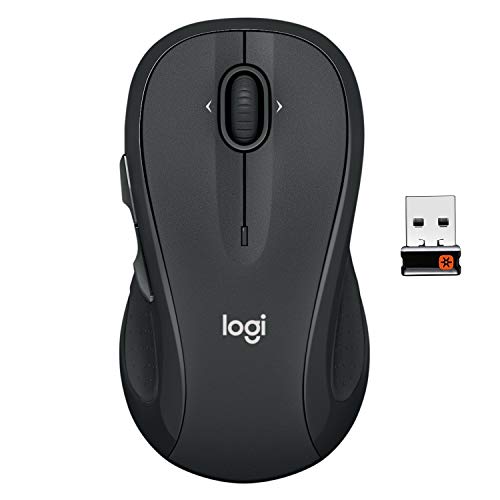
The M510 has a contoured body, soft rubber grips, a broad palm area, and Back and Forward buttons. Its side-to-side scrolling and zoom functions may help with wide spreadsheets, maps, and image browsing.
It uses a 2.4 GHz Unifying receiver and an included AA battery, with advertised battery life of up to two years. Logitech specifies software requirements for programming buttons and using some controls: SetPoint on Windows or Logitech Control Center on Mac OS X.
Pros: Contoured grips, extra navigation buttons, horizontal scrolling, zoom controls, and an advertised two-year battery life.
Cons: It requires a USB receiver, and some customization depends on software listed for Windows or Mac OS X. The supplied features do not specify Bluetooth or quiet clicks.
Who should skip it: Consider another model if you need Bluetooth, quiet-click specifications, or software support explicitly listed for a newer operating system.
How to Choose a Work Mouse
Choose a shape that suits your hand and movement
A trackball keeps the mouse stationary, while a vertical model changes the angle of your grip. Conventional contoured mice preserve a familiar movement style, so prioritize the shape that matches your preferences and available workspace.
Check stated hand sizing and handedness before buying. The Lift is specified for small to medium right hands, the M330 is right-handed, and the M650 L is explicitly the large version.
Check wireless connections and computer compatibility
Bluetooth can avoid using a USB port, while receiver-based models need a compatible port and their included receiver. The M575S, Lift, and M650 L list Bluetooth alongside Logi Bolt; the M330 and M510 use USB receivers.
Confirm that the operating system and any required software match your setup. The G305’s listed Endurance mode uses G HUB, while the M510’s programming requirements name SetPoint for Windows and Logitech Control Center for Mac OS X.
Match controls, noise, and battery needs to your work
For quieter shared spaces, compare the M330’s stated SilentTouch reduction with the quiet-click descriptions for the M575S, Lift, and M650 L. The M510 and G305 data do not specify quiet-click features.
Scrolling needs vary by workload: the M650 L offers SmartWheel modes, and the M510 lists horizontal scrolling and zoom. Battery-life figures are manufacturer specifications and can vary with use, so treat them as estimates rather than guarantees.
For additional context on shape and hand position, see our guides to mouse forms, mouse grips, and mouse rests.



Write Your Review
No reviews yet. Be the first to share your experience!