

For a claw grip, prioritize a shape that lets your fingers arch naturally and reach the buttons without strain. The Corsair KATAR PRO XT is the clearest fit here because its compact symmetric shape is specifically described as suitable for claw and fingertip grips.
The SteelSeries Prime is another claw-compatible mouse, while the DeathAdder Essential is a larger ergonomic option whose listed features do not specify claw-grip fit. Grip tape can add traction to a mouse you already own, but it cannot change its shape.

Pros
- Ultra-thin 0.3mm profile preserves original peripheral feel
- Sweat-absorbing material maintains traction under moisture
- Residue-free 3M adhesive allows clean replacement
- Universal application fits mice, controllers, and keyboards
- Generous 30-piece count across two distinct sheets
Cons
- Rectangular pre-cuts lack device-specific ergonomic contours
- Requires manual placement and spacing on curved shells

Pros
- Ergonomic right-handed shape for comfortable handling
- On-the-fly DPI sensitivity adjustment buttons
- Five fully programmable buttons via Razer Synapse
- Ridged rubber scroll wheel provides tactile grip
- Reliable high-precision 6,400 DPI optical tracking
Cons
- Tethered wired cable limits placement flexibility
- Mechanical switch lifespan limited to 10 million clicks
- Button remapping depends on Razer Synapse software
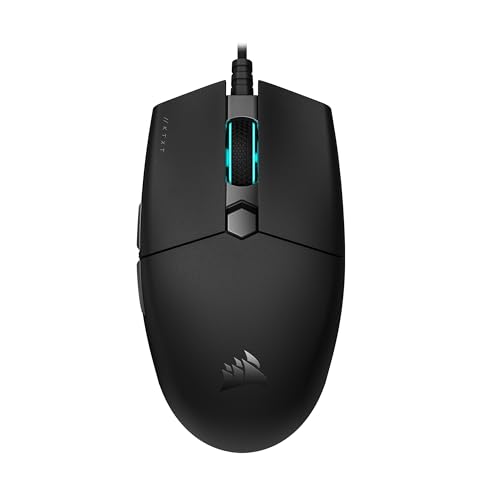
Pros
- Lightweight 73-gram chassis for rapid handling
- Spring-loaded Quickstrike buttons with zero click gap
- 18,000 DPI PixArt sensor with 1 DPI step adjustments
- Flexible drag-reducing paracord cable
- Broad compatibility across PC, Mac, and consoles

Pros
- Lightweight 69g frame
- Optical magnetic switches rated for 100 million clicks
- High-accuracy 18,000 CPI TrueMove Pro sensor
- Comfortable right-handed shape for various grip styles
- Cross-platform compatibility for PC and Mac
Cons
- Right-handed shape excludes left-handed users
- Tethered wired cable lacks wireless portability

Pros
- Slip-resistant DuraSoft Polymer surface
- Ultra-thin 0.5mm profile maintains ergonomic shape
- Included grid transfer sheet for precise cutting
- Lightweight construction adds negligible mass
- Universal design fits any mouse model
Cons
- Requires manual tracing and cutting before installation
- Not pre-cut for specific mouse models

Pros
- Up to 532 hours of Bluetooth battery life
- High-precision 26,000 DPI Marksman sensor
- Ten programmable buttons for custom keybinds
- Comfortable asymmetric shape for larger hands
- Versatile 2.4GHz and Bluetooth dual-mode wireless
Cons
- Asymmetric shape restricted to right-handed users
- Bulky profile unsuitable for smaller hands or fingertip grips

Pros
- Ultra-thin 0.5mm profile maintains mouse ergonomics
- Diamond texture provides reliable grip traction
- Pre-cut shapes allow quick and simple application
- 3M adhesive removes cleanly without sticky residue
- Absorbent polymer construction manages hand sweat
Cons
- Not compatible with G Pro X Superlight 2 DEX
- Restricted to specific Logitech G PRO mouse shapes
How to Choose a Claw-Grip Mouse
Claw grip keeps the palm partly raised while the fingers curve over the buttons. A compact, symmetric shape can suit this posture, but hand size and personal comfort still matter.
- Shape and grip fit: Prefer a model explicitly described as suitable for claw grip when that information is available. The supplied data identifies the KATAR PRO XT and SteelSeries Prime as supporting claw use.
- Weight and movement: The two claw-relevant mice list weights of 73 g and 69 g, respectively. These specifications may appeal to players who prefer a lightweight mouse for frequent repositioning.
- Buttons and software: Check whether programmable buttons and customization software suit your games and setup. Button counts alone do not establish that a mouse will feel comfortable in a claw grip.
- Traction: Grip tape may help when fingers slip, but check the cut and compatibility details before applying it. Universal sheets require trimming, while model-specific tape is designed for named Logitech mice.
Recommended Mice and Grip Tape
Corsair KATAR PRO XT: Best-Specified Claw-Grip Fit
The Corsair KATAR PRO XT has a compact symmetric shape that the manufacturer describes as suitable for claw and fingertip grips. Its 73 g weight and drag-reducing paracord cable are relevant to players who make frequent, quick mouse movements.
The wired mouse includes an 18,000 DPI PixArt optical sensor and spring-loaded Quickstrike buttons. DPI is adjustable in one-step increments, though a high maximum sensitivity does not guarantee better aim or suit every player.
Pros: Explicit claw-grip suitability, compact symmetric design, lightweight construction, and a flexible paracord cable. Cons: Wired connection, and the supplied specifications do not include dimensions or adjustable weight.
Who should skip it: Skip this model if you need wireless play or prefer a larger ergonomic shape. See our guide to gaming mouse shapes for more form-factor considerations.
SteelSeries Prime: Lightweight Right-Handed Alternative
The SteelSeries Prime is a right-handed, 69 g mouse designed for multiple grip styles, including claw. Its TrueMove Pro sensor is specified at 18,000 CPI, 450 IPS, and 50G, making it a feature-rich option for players who value sensor specifications.
Five programmable buttons and magnetic optical switches are listed among its features. The supplied information does not provide dimensions, so check the shape against your hand and preferred finger placement before choosing it.
Pros: Claw-grip support, low listed weight, programmable buttons, and a high-specification sensor. Cons: Right-handed shape may not suit left-handed players, and the available details do not give dimensions.
Who should skip it: Skip it if you need a left-handed design or cannot confirm that its shape fits your hand. Its sensor figures are specifications, not independently measured results.
Razer DeathAdder Essential: Ergonomic Wired Option
The DeathAdder Essential is an ergonomic wired mouse with a 6,400 DPI optical sensor, five programmable buttons, and reprogrammable DPI buttons. Razer Synapse supports button remapping and macro assignment, which may suit players who want configurable controls.
The supplied product details do not identify this model as claw-grip-specific or provide its dimensions and weight. Treat it as an ergonomic alternative to compare in person or against your hand measurements, rather than assuming its shape will suit every claw grip.
Pros: Adjustable sensitivity, five programmable buttons, and a tactile rubberized scroll wheel. Cons: Wired connection and no supplied confirmation of claw-specific fit or weight.
Who should skip it: Skip it if claw-grip shape compatibility and a documented lightweight build are your main requirements. For grip-related alternatives, read our overview of mouse grips for gaming.
Corsair IRONCLAW Wireless SE: Better Suited to Palm Grip
The IRONCLAW Wireless SE has an asymmetric right-handed shape designed for larger hands and players who prefer a palm grip. It offers ten programmable buttons, a 26,000 DPI sensor, and stated battery life of up to 285 hours over 2.4 GHz or 532 hours over Bluetooth.
Those features may appeal to users who need wireless connectivity, extensive button mapping, or a larger palm-oriented design. Its stated shape and intended grip make it a less direct match for claw-grip shoppers than the KATAR PRO XT or Prime.
Pros: Wireless 2.4 GHz and Bluetooth modes, ten programmable buttons, and a shape intended for larger hands. Cons: The listed design favors palm grip, and the supplied information does not give its weight.
Who should skip it: Skip it if you have smaller hands or specifically want a compact claw-grip mouse. Battery figures are manufacturer-stated maximums and vary by connection mode.
Grip Tape for an Existing Mouse
The TALONGAMES Universal Mouse Grip Tape comes as two sheets of pre-cut pieces, with 0.3 mm polyurethane material and 3M adhesive. It is intended for multiple devices, but the universal format means users should check placement and trim or arrange pieces to fit their mouse.
Lizard Skins DSP Computer Mouse Grip for PC is a 0.5 mm cut-to-fit polymer grip with a transfer sheet for tracing. It may suit users who want to shape coverage themselves, but accurate cutting and careful application are required.
The model-specific TALONGAMES Mouse Anti Slip Grip Tape is listed for Logitech G Pro X Superlight, Superlight 2, G PRO X2 SUPERSTRIKE, and G PRO X3 SUPERSTRIKE. The listing excludes the Superlight 2 DEX and Superlight 2c, so confirm your exact mouse model before applying it.
Pros: Grip tape can add a textured contact surface without replacing the mouse, and the model-specific set is pre-cut for listed devices. Cons: Universal tape may need fitting, and model-specific tape is not compatible with every similarly named mouse.
Who should skip it: Skip tape if your mouse already feels secure or you do not want adhesive material on its shell. These accessories improve surface traction, not the underlying shape or button reach.
Which Option Should You Choose?
Choose the Corsair KATAR PRO XT if you want the clearest documented match for claw grip in a compact wired mouse. Consider the SteelSeries Prime if you want a lightweight right-handed option that also lists claw support.
Choose grip tape when your current mouse shape works but its surface feels slippery. The DeathAdder Essential is a configurable ergonomic alternative, while the IRONCLAW Wireless SE is more appropriate for larger hands and palm grip than for a claw-first shortlist.
These recommendations compare the supplied specifications and stated intended uses. For broader mouse selection advice, browse our Gaming Mice category and guide to gaming mouse rests.


Write Your Review
No reviews yet. Be the first to share your experience!