

The best gaming keyboard RGB option depends on your preferred switch feel, layout, connection, and lighting controls. For a compact mechanical board, consider Womier’s 75% model; for a quiet full-size option, compare the SteelSeries Apex 3 and TECKNET.
This specification-based comparison also includes wireless and keyboard-and-mouse combos, plus entry-level wired choices. Confirm your operating system and console compatibility before choosing, since support differs across these models.
Top RGB Gaming Keyboard Picks

Pros
- IP32 water resistance guards against liquid spills
- Whisper-quiet switches rated for 20 million presses
- Included magnetic wrist rest for palm support
- Dedicated on-the-fly multimedia controls
- Broad compatibility with PC and major consoles

Pros
- Dedicated one-touch lighting toggle button
- 19-key anti-ghosting for essential gaming inputs
- Full 104-key layout with multimedia shortcuts
- Plug-and-play setup across PC and consoles
- Adjustable backlighting brightness and breathing modes
Cons
- Simulates mechanical feel rather than true mechanical switches
- Anti-ghosting is limited to 19 keys

Pros
- Five dedicated macro keys for rapid command input
- Quiet membrane switches suitable for shared workspaces
- Adjustable mouse sensitivity from 800 to 7200 DPI
- Integrated wrist rest helps reduce typing fatigue
- Onboard memory retains lighting and DPI profiles
Cons
- Uses membrane keys rather than mechanical switches
- Wired design restricts flexible cable-free placement
- Full software customization limited to Windows systems

Pros
- Tri-mode connectivity via Bluetooth, 2.4GHz, and USB-C
- Single 2-in-1 USB receiver operates both peripherals
- Ten dedicated multimedia keys for direct playback control
- Mouse supports up to 1000Hz polling rate
- Keyboard battery rated up to 300 hours without RGB
Cons
- Configuration software is limited to Windows systems
- Mouse sensor tops out at 4800 DPI

Pros
- Durable metal panel with integrated ergonomic wrist rest
- Whisper-quiet switches suitable for shared environments
- IP32 spill resistance with built-in drainage holes
- 25-key anti-ghosting support for gaming inputs
- Customizable backlighting with automatic sleep mode
Cons
- Multimedia shortcut keys do not work on Mac systems
- Uses membrane volcano switches instead of mechanical switches
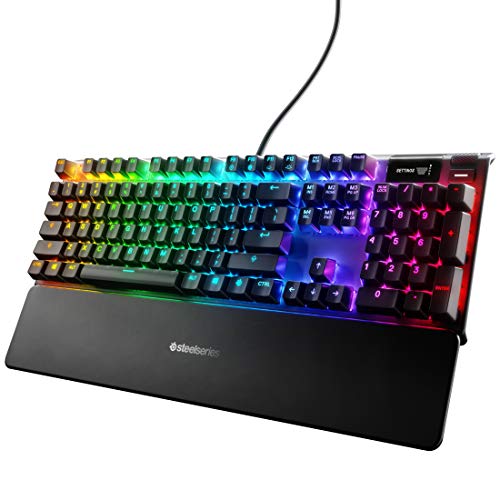
Pros
- Smooth and quiet linear red switches
- OLED screen provides real-time information and profiles
- Durable aircraft-grade aluminum alloy frame
- Magnetic ergonomic wrist rest included
- Convenient integrated USB passthrough port

Pros
- Durable spill-resistant build for simple cleanup
- Dedicated media and volume control buttons
- Tuned tactile keys with gaming anti-ghosting
- Integrated palm rest enhances typing comfort
- Customizable five-zone RGB via Logitech G HUB
Cons
- RGB illumination is limited to five zones
- Integrated palm rest cannot be removed

Pros
- Gasket mount with EVA foam sound dampening
- Hot-swappable PCB accepts 3-pin and 5-pin switches
- Angled color screen displays GIFs and system status
- Pre-lubed linear switches with south-facing LEDs
- Compact 75% layout retains essential navigation keys
Cons
- Only documented for wired USB-C connectivity
- GIF uploads and macros require proprietary software
How These RGB Keyboards Differ
The list ranges from membrane and mechanical-feeling boards to mechanical keyboards, and from wired-only models to a tri-mode wireless combo. Lighting also varies: some offer per-key RGB, while others provide zones, patterns, or rainbow effects.
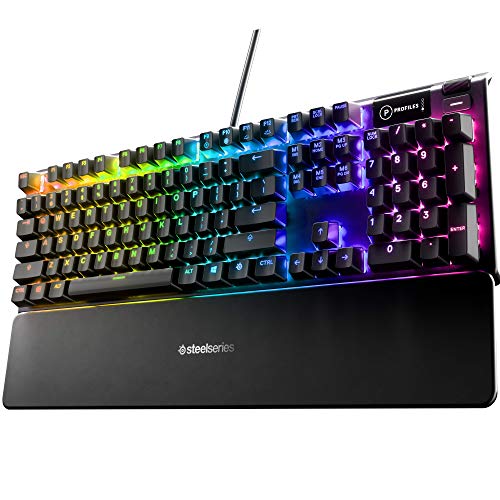
SteelSeries Apex 3 Gaming Keyboard: Quiet, Spill-Resistant Full-Size Use
The SteelSeries Apex 3 combines 10-zone RGB illumination with whisper-quiet switches rated for 20 million keypresses. Its magnetic wrist rest and dedicated media controls suit gaming and everyday typing.
IP32 water resistance is intended to help protect against accidental liquid spills, and the listed compatibility includes Windows, Mac OS X, Xbox Series S and X, PS4, and PS5. Its lighting is divided into zones rather than specified as per-key illumination.
Pros: Quiet switches, wrist rest, media controls, spill resistance, and broad listed console support. Cons: The product information does not specify mechanical switches or per-key RGB. Who should skip it: Players seeking a mechanical board or individually customizable key lighting.
View the SteelSeries Apex 3 Gaming Keyboard – Black.
Redragon K521 Upgrade: Low-Cost Wired Rainbow Lighting
The K521 is a 104-key wired keyboard with rainbow LED backlighting, a one-touch lighting control, and adjustable breathing and brightness settings. Its mechanical-feeling keys and 19-key anti-ghosting support make it a straightforward option for basic gaming.
It also has 12 multimedia combination keys and plug-and-play support listed for Windows, MacOS, PS4, PS5, and Xbox. The listing describes rainbow lighting, not a full per-key RGB system, and does not identify the switches as mechanical.
Pros: Full-size layout, simple lighting controls, anti-ghosting, and broad stated compatibility. Cons: Wired connection and rainbow LED effects limit flexibility compared with per-key RGB models. Who should skip it: Buyers who need wireless operation or mechanical switches.
View the Redragon K521 Upgrade Rainbow LED Gaming Keyboard.
Redragon S101-3 PRO: Wired Keyboard-and-Mouse Combo
This wired combo pairs a full-size RGB keyboard with a gaming mouse and includes five dedicated macro keys. The keyboard has six backlight modes, while the mouse offers 10 lighting effects and adjustable sensitivity from 800 to 7200 DPI.
Its membrane keys are described as quiet, and the keyboard includes an ergonomic wrist rest and anti-ghosting. The supplied compatibility information specifies Windows 10 and 11, so confirm support before choosing it for a Mac or console.
Pros: Includes a mouse, macro keys, adjustable mouse DPI, and several lighting modes. Cons: It is wired, and the stated operating-system support is limited to Windows 10 and 11. Who should skip it: Buyers who already own a mouse or need wireless connectivity.
View the Redragon S101-3 PRO Gaming Keyboard and Mouse.
Redragon S101M-KS: Tri-Mode Wireless Combo
The S101M-KS offers wired, Bluetooth, and 2.4 GHz wireless modes, plus an RGB keyboard and a mouse with five selectable DPI levels. One shared 2.4 GHz receiver can connect both peripherals, and the keyboard’s advertised battery runtime is up to 300 hours with RGB off.
Its keyboard includes independent and combination multimedia keys, splash resistance, and a detachable USB-C cable. The product information lists Windows, PC, and laptop compatibility, but does not establish console support or specify runtime with lighting enabled.
Pros: Three connection modes, bundled mouse, multimedia keys, and a shared wireless receiver. Cons: Battery life is specified only with RGB off, and compatibility details focus on Windows computers. Who should skip it: Buyers who want a keyboard-only purchase or need confirmed console support.
View the Redragon S101M-KS Gaming Keyboard and Mouse.
TECKNET Wired Gaming Keyboard: Quiet Typing and Spill Resistance
TECKNET’s full-size wired keyboard has 15-zone rainbow backlighting, seven illumination modes, and four brightness levels. Its stated features include quiet switches, an integrated wrist rest, an IP32 spill-resistance rating, and 25-key anti-ghosting.
The metal base and ABS keycaps are specified, while the lighting turns off after 30 minutes of inactivity. The supplied information does not list operating-system or console compatibility, and its multimedia keys are not compatible with Mac.
Pros: Quiet operation, wrist rest, spill resistance, and multiple lighting modes. Cons: Rainbow zones are not specified as individually configurable RGB, and multimedia keys do not support Mac. Who should skip it: Mac users who rely on dedicated media controls or buyers seeking per-key lighting.
View the TECKNET Wired Gaming Keyboard.
SteelSeries Apex 7: Mechanical Switches and Per-Key RGB
The Apex 7 is a mechanical keyboard with per-key RGB offering 16.8 million colors, an OLED smart display, and an aluminum alloy frame. Its listed features also include an 84-key rollover specification, USB passthrough, media controls, and a magnetic wrist rest.
The product title identifies red linear switches, described as quiet, making this a fit for users who specifically want a linear mechanical feel. The supplied compatibility details do not identify supported operating systems or consoles, so verify those requirements before purchase.
Pros: Mechanical switches, per-key RGB, OLED display, aluminum construction, and wrist support. Cons: Compatibility details are not provided, and its added features may be unnecessary for simpler setups. Who should skip it: Buyers prioritizing a basic, low-cost keyboard over mechanical features.
View the SteelSeries Apex 7 Mechanical Gaming Keyboard.
Logitech G213 Prodigy: Full-Size RGB for Gaming and Productivity
The Logitech G213 uses five customizable lighting zones, with color and effects managed through Logitech G HUB. It is a full-size wired keyboard with dedicated media controls, an integrated palm rest, adjustable feet, and an anti-ghosting gaming matrix.
Its construction is described as resistant to liquids, crumbs, and dirt for easier cleanup. Lighting is specified by zones rather than individual keys, and the product information does not name compatible consoles or operating systems.
Pros: Customizable lighting zones, media controls, palm rest, and gaming-focused anti-ghosting. Cons: It is wired and does not offer specified per-key lighting or mechanical switches. Who should skip it: Buyers who want a compact mechanical keyboard or wireless use.
View the Logitech G213 Prodigy Wired RGB Gaming Keyboard.
Womier SK80: Compact Hot-Swappable Mechanical Design
The Womier SK80 has a 75% layout, a color multimedia display, and a gasket-mounted mechanical design. Its hot-swappable PCB supports three-pin and five-pin switches, while its pre-lubed linear switches and layered construction are described as supporting a softer typing feel.
RGB features include 19 lighting effects and nine colors, with software customization for lighting, macros, and GIF display. It connects through a detachable Type-C cable and is listed for Mac and Windows; no console support is specified.
Pros: Compact layout, hot-swappable switches, mechanical construction, display, and software customization. Cons: The smaller layout removes some keys compared with a full-size board, and console compatibility is not specified. Who should skip it: Users who need a number pad or prefer a standard full-size layout.
View the Womier SK80 75% Keyboard with Color Multimedia.
How to Choose an RGB Gaming Keyboard
Choose the Switch Type and Typing Feel
Mechanical switches are specified on the Apex 7 and Womier SK80, while the S101-3 PRO uses membrane keys. The Apex 3 and TECKNET emphasize quiet switches, but their supplied descriptions do not identify them as mechanical.
“Mechanical feeling” on the K521 does not establish that it uses mechanical switches. If switch replacement matters, the Womier is the listed model with a hot-swappable PCB and stated three-pin and five-pin support.
Check Layout, Connection, and Compatibility
Full-size models suit users who want a conventional keyboard layout, while the Womier’s 75% format saves space by using a smaller layout. The Redragon S101M-KS offers wired, Bluetooth, and 2.4 GHz modes; the other listed keyboards are wired.
Compatibility is model-specific, so compare the product’s stated support with your computer or console. For example, the Apex 3 names several consoles, while the Womier lists Mac and Windows, and the S101-3 PRO specifies Windows 10 and 11.
Match Lighting Features to Your Priorities
Per-key RGB is specified for the Apex 7, while the Apex 3 uses 10 zones and the Logitech G213 offers five zones. Other models use rainbow lighting, selectable patterns, or a stated set of colors and effects.
Lighting customization can depend on software: Logitech G HUB supports the G213, and the Womier driver handles its lighting and display features. If you prefer onboard controls or fewer setup steps, consider a model whose listing specifies one-touch lighting controls.
Related Gaming Keyboard Guides
For more specialized comparisons, see our guides to keyboards for gaming and typing, gaming keyboards for small hands, and 60% gaming keyboards.
Which RGB Gaming Keyboard Should You Choose?
Choose the Womier SK80 if you want a compact mechanical board with hot-swappable switches, or the Apex 7 for per-key RGB and an OLED display. For quiet full-size use, compare the Apex 3 and TECKNET, checking their different compatibility and lighting details.
The Redragon S101M-KS suits buyers who want a wireless keyboard-and-mouse combo, while the wired S101-3 PRO includes macro keys. The K521 and Logitech G213 are alternatives for straightforward full-size gaming, with different lighting controls and feature sets.
These recommendations compare documented specifications rather than independently measured performance. Check the current product listing for connection details, software requirements, and compatibility before deciding.


Write Your Review
No reviews yet. Be the first to share your experience!