

The best pc setup for gaming starts with the computer and monitor, then adds audio and desk accessories that match how you play. For a lower-cost entry point, the STGAubron desktop pairs an Intel Core i7 processor with an RX 580 8GB graphics card and 16GB memory. For newer 1440p gaming features, the KOTIN system uses a Ryzen 7 8700F, RTX 5060 Ti 8GB, and 16GB DDR5.
The iBUYPOWER Element offers the strongest documented hardware here, with a Ryzen 9 7900X, RTX 5070 12GB, and 32GB DDR5. The remaining products complete a setup with a 27-inch high-refresh monitor, microphones, a wireless headset, speakers, and two desk formats.

Pros
- Dedicated 8GB Radeon RX 580 graphics card
- 16GB RAM supports reliable multitasking
- Modern Wi-Fi 6 and Bluetooth 5.0 wireless
- Includes bundled RGB keyboard and mouse
- Pre-installed Windows 11 Home operating system
Cons
- Specific Intel Core i7 generation is unspecified
- 512GB storage is limited for multiple modern games
- Older GPU architecture lacks advanced modern rendering features

Pros
- AMD Ryzen 7 8700F and RTX 5060 Ti configuration
- High-speed 1TB PCIe Gen4 NVMe storage
- Latest-generation WiFi 7 wireless connectivity
- Expansion-ready motherboard with three M.2 slots
- Efficient 650W 80 PLUS Gold power supply
Cons
- Baseline 16GB RAM may require upgrading for heavy multitasking
- Requires separate adapters to support legacy VGA or DVI displays

Pros
- Dual USB and XLR connection options
- Includes adjustable metal boom arm and clamp
- Onboard gain dials and real-time monitoring jack
- Customizable RGB lighting without extra software
- External windscreen helps reduce vocal plosives
Cons
- XLR cable is not included in the package
- Desk clamp limited to surfaces under 2 inches

Pros
- High 180Hz refresh rate across all inputs
- Extensive connectivity with four total display ports
- Immersive 1500R curved screen design
- Full 100% sRGB color gamut coverage
- Built-in stereo speakers save desk space
Cons
- Advertised 1ms response relies on blur reduction
- Peak 180Hz refresh rate requires an overclocked setting

Pros
- Includes adjustable metal boom arm and desk clamp
- Convenient top tap-to-mute sensor
- Dedicated rotary gain control dial
- Multiple RGB lighting modes with brightness adjustment
- Straightforward USB plug-and-play connectivity
Cons
- Desk clamp restricted to 2.36 inches maximum thickness
- Requires full Type-C cable insertion to prevent connection issues

Pros
- Versatile 2.4GHz, Bluetooth 5.4, and 3.5mm connection options
- Long battery runtime reaching up to 100 hours
- Includes both USB-A and USB-C transmitter dongles
- Retractable microphone with one-touch mute control
- Supports playback while charging via USB-C
Cons
- Wireless functionality does not support Xbox consoles
- Microphone input is unsupported on Nintendo Switch
- PS5 wireless connectivity is limited strictly to 2.4GHz

Pros
- Dedicated elevated PC stand for hardware display
- Integrated ambient RGB LED light strip
- Three storage drawers for cable and accessory management
- Vertical side shelving maximizes usable workspace
- Reinforced steel frame supports heavy PC cases
Cons
- Storage drawers use fabric rather than rigid materials
- Desktop depth is relatively narrow at under 20 inches

Pros
- Elevated PC display stand
- Three built-in storage drawers
- Integrated RGB lighting
- Dedicated collectible display shelf
- 63-inch desktop
Cons
- Stand weight capacity is not specified
- Reversible configuration details are not provided
- Desk weighs 41.9 pounds

Pros
- AMD Ryzen 9 7900X processor
- NVIDIA GeForce RTX 5070 12GB graphics
- 32GB DDR5 dual-channel memory
- Fast 1TB NVMe solid-state storage
- Includes gaming keyboard and mouse
Cons
- Uses older 802.11ac Wi-Fi standard
- Memory speed is limited to 4800MHz
- Heavy 36-pound desktop chassis

Pros
- Touch-controlled RGB lighting with an off setting
- Dedicated physical volume adjustment buttons
- Universal 3.5mm audio and USB power connection
- Compact footprint fits smaller workspaces
Cons
- 31-inch inter-speaker cable restricts wide desk separation
- Requires both USB and 3.5mm ports for operation
| Setup role | Recommended option | Why it fits | Main limitation |
|---|---|---|---|
| Entry-level gaming desktop | STGAubron Gaming PC Desktop,Core I7,RX 580 8G,16G | 16GB RAM, 512GB SSD, Wi-Fi 6, and an RX 580 8GB graphics card | The exact Core i7 generation and detailed graphics performance are not specified |
| Newer 1080p or 1440p gaming desktop | KOTIN Gaming PC Desktop, Ryzen 7 8700F | RTX 5060 Ti 8GB, DDR5 memory, a 1TB Gen4 NVMe SSD, and upgrade-focused connectivity | 16GB memory may become a consideration for heavier multitasking or creative workloads |
| High-performance gaming and creation | iBUYPOWER Element Gaming PC Desktop Computer AMD | Ryzen 9 7900X, RTX 5070 12GB, 32GB DDR5, and a 1TB NVMe SSD | The supplied data does not specify the exact motherboard or power supply model |
| High-refresh display | New! Sceptre Curved 27-inch Prime Gaming Monitor | 27-inch curved panel with HDMI and DisplayPort inputs supporting up to 180Hz | A 180Hz refresh rate does not guarantee that every game will render at 180 frames per second |
| Wireless game audio | Wireless Gaming Headset for PC PS5 PS4 Mac Switch | 2.4GHz wireless, Bluetooth 5.4, 3.5mm connectivity, and a stated battery range up to 100 hours | Wireless operation is not compatible with Xbox Series consoles |
Best PC Setup for Gaming by User and Workload
STGAubron Gaming PC Desktop,Core I7,RX 580 8G,16G: Budget-Oriented Starting Point
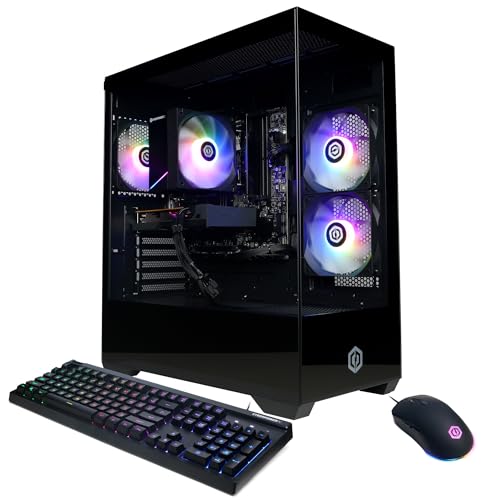
STGAubron Gaming PC Desktop,Core I7,RX 580 8G,16G is the most straightforward choice for a basic best pc setup for gaming. Its documented configuration includes an Intel Core i7 processor rated up to 3.9GHz, 16GB of memory, a 512GB SSD, Windows 11 Home, and Radeon RX 580 8GB graphics.
The system also includes Wi-Fi 6, Bluetooth 5.0, HDMI, DisplayPort, four RGB fans, and a keyboard and mouse. Those connections support a simple plug-and-play desk, although the listing does not identify the exact Core i7 generation, motherboard, or power supply.
KOTIN Gaming PC Desktop, Ryzen 7 8700F: Modern Midrange Choice
KOTIN Gaming PC Desktop, Ryzen 7 8700F suits players who want newer platform features for a best pc setup for gaming. It combines a Ryzen 7 8700F processor, GeForce RTX 5060 Ti 8GB graphics, 16GB DDR5, and a 1TB Gen4 NVMe SSD.
Its advertised feature set includes DLSS 4 and ray tracing support, making it more appropriate than the RX 580 system for newer games that support those technologies. Wi-Fi 7, a 650W 80 PLUS Gold power supply, four DDR5 DIMM slots, and three M.2 slots provide useful expansion options, while the exact motherboard model remains unspecified.
iBUYPOWER Element Gaming PC Desktop Computer AMD: High-End Headroom
iBUYPOWER Element Gaming PC Desktop Computer AMD is the strongest documented option for demanding gaming, streaming, and creative workloads. Its Ryzen 9 7900X, RTX 5070 12GB, 32GB DDR5, and 1TB NVMe SSD give it more stated CPU, memory, and graphics headroom than the other desktops.
The tempered-glass RGB case, Wi-Fi, six USB 3.1 ports, and included keyboard and mouse support a complete desktop build. However, the supplied specifications do not identify the power supply capacity, motherboard, cooling configuration, or available storage slots, so verify those details before planning major upgrades.
Choosing a Monitor for the Best PC Setup for Gaming
New! Sceptre Curved 27-inch Prime Gaming Monitor is designed for fast-refresh gaming and general multimedia use. It has a 27-inch curved display, a 1500R curvature, a stated 1ms blur-reduction feature, and an overclocked refresh rate up to 180Hz.
Two HDMI ports and two DisplayPort inputs provide flexible connection choices, while built-in speakers and an audio-out jack reduce the need for separate accessories. The 100% sRGB claim may suit general gaming and creative tasks, but the supplied information does not specify resolution, adaptive-sync support, or measured color accuracy.
Connect the monitor to the desktop graphics card rather than relying on unverified motherboard video outputs. If using the KOTIN computer, its instructions specifically require the lower horizontal graphics-card ports, and older VGA or DVI monitors need an HDMI or DisplayPort adapter.
Microphones for Streaming, Voice Chat, and Recording
FIFINE AmpliGame AM8T XLR/USB Gaming Microphone
FIFINE AmpliGame AM8T XLR/USB Gaming Microphone offers more connection flexibility than a USB-only microphone. Its dynamic capsule uses a cardioid pattern, and the kit includes a boom arm, mute control, gain control, headphone monitoring, RGB lighting, and USB plug-and-play operation.
The XLR connection leaves room for a mixer or audio interface later, which benefits streamers planning a more configurable audio chain. An XLR cable is not included, and the desk clamp is intended for surfaces under two inches thick.
TONOR Gaming Microphone Set with Boom Arm
TONOR Gaming Microphone Set with Boom Arm is a simpler USB option for voice chat and beginner streaming. It includes a metal boom arm, desk clamp, tap-to-mute control, gain adjustment, and four RGB lighting modes.
The clamp fits desks up to 2.36 inches thick, and the manufacturer recommends a USB 2.0 or USB 3.0 port. Choose it when easy setup matters more than adding an XLR interface later.
Headsets and Speakers for a Complete Gaming Desk
Wireless Gaming Headset for PC PS5 PS4 Mac Switch is the better fit for players who want one headset across several supported platforms. It provides 2.4GHz wireless through a transmitter, Bluetooth 5.4, a 3.5mm wired connection, a retractable microphone, and a stated battery range of 45 to 100 hours depending on mode and lighting.
The headset supports PC, PlayStation, Mac, phones, tablets, and Nintendo Switch through the listed connection methods. Its wireless function is not compatible with Xbox Series consoles, so Xbox users should choose a different connection plan.
Redragon GS520 Wired 2.0 Channel Stereo Sound is a practical desktop-speaker alternative when you do not want to wear a headset. USB power, 3.5mm audio and microphone cables, separate volume controls, and six touch-controlled RGB modes make it suitable for PCs, laptops, and TVs.
Desks for the Best PC Setup for Gaming
AODK Gaming Desk w/PC Showcase Stand is intended for users who want to display a panoramic tempered-glass computer case. Its elevated PC stand, monitor shelf lighting, three fabric drawers, and side display shelf emphasize organization and visibility.
Gaming Desk with PC Display Stand follows the same showcase-focused layout in a larger 63-inch format. Both desks are described for heavy middle-tower cases, but check your case dimensions and weight against the manufacturer’s limits before installation.
How to Choose the Best PC Setup for Gaming
- Start with resolution and games: The graphics card determines the main gaming direction, while a high-refresh monitor only shows its benefit when the system and game can produce sufficiently high frame rates.
- Prioritize newer features when needed: The KOTIN desktop lists DLSS 4 and ray tracing support, while the STGAubron system uses the older RX 580 platform and has fewer specified expansion details.
- Match memory to workload: 16GB is listed in both STGAubron and KOTIN systems, while the iBUYPOWER desktop lists 32GB for heavier multitasking, streaming, and content-creation workloads.
- Check connections before buying: Confirm HDMI or DisplayPort compatibility for the monitor, USB availability for microphones, and wireless support for the headset or network adapter.
- Plan the desk around the case: Showcase desks are useful for panoramic cases and accessories, but their elevated stands require careful checking of case size, weight, and airflow clearance.
- Choose audio based on upgrade plans: FIFINE offers USB and XLR flexibility, TONOR keeps the setup USB-focused, and the Valorise headset prioritizes multi-platform wireless convenience.
Best PC Setup for Gaming FAQs
Which computer is the best pc setup for gaming?
The KOTIN desktop is the balanced choice for newer 1080p or 1440p gaming features, while the iBUYPOWER system suits heavier gaming and creation workloads. The STGAubron computer is better reserved for buyers prioritizing a lower-complexity entry point.
Is a 180Hz monitor suitable for every gaming PC?
It can connect to systems with compatible HDMI or DisplayPort outputs, but refresh rate and game frame rate are separate specifications. A 180Hz panel may be useful for fast games, although the actual benefit depends on the graphics card, settings, resolution, and title.
Should streamers choose USB or XLR microphones?
USB is simpler because it connects directly to a computer, while XLR is useful when adding a mixer or audio interface. The FIFINE microphone supports both paths, whereas the TONOR set is centered on USB use.




Write Your Review
No reviews yet. Be the first to share your experience!