

Building or upgrading a gaming PC means choosing every component yourself, which is both the appeal and the challenge. This guide walks through the essential PC parts, from the processor and graphics card to storage and power, so you can plan a balanced build that fits your games and your budget.
The picks below cover core components with spec-based pros and cons drawn from verified buyer feedback. Start with the buying guide to understand how the parts work together, because compatibility matters as much as any single component.
Top Products



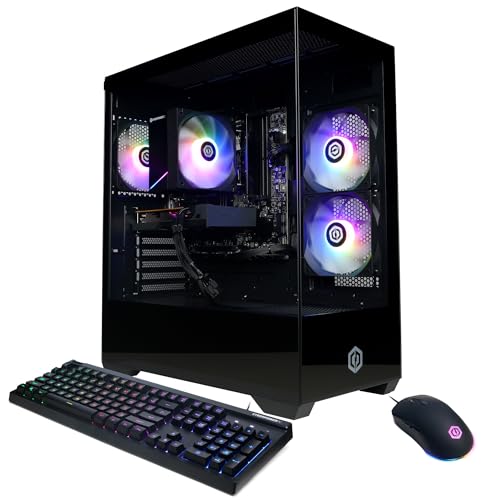
Pros
- Modern Wi-Fi 6 and Bluetooth 5.3 connectivity
- Quick boot times with 256 GB M.2 SSD
- Pre-installed Windows 11 Home operating system
- Includes multiple RGB case fans for airflow
- 400W power supply allows room for basic upgrades
Cons
- No dedicated graphics card included
- Modest 8 GB system memory limits heavy multitasking
- Limited 256 GB storage fills up quickly

Pros
- High-performance AMD Ryzen 7 9850X3D processor
- Capable 16GB AMD Radeon RX 9070 XT GPU
- Pre-installed 360mm AIO liquid cooling solution
- Spacious and fast 2TB Gen4 NVMe SSD
- Generous 32GB of DDR5 memory pre-installed
Cons
- Specific graphics card manufacturer brand may vary
- Substantial chassis dimensions require significant desk space

Pros
- Daisy-chained fans reduce cable clutter significantly
- Fast 3000 RPM ceramic bearing pump
- Low-vibration 3-phase motor design
- Supports latest Intel LGA 1851 and AMD AM5
Cons
- Requires a case with 360mm radiator clearance
- No documented support for older Intel sockets

Pros
- Seven pre-installed PWM ARGB fans included
- 270-degree dual tempered glass panoramic layout
- Accommodates graphics cards up to 400 mm
- Top support for 360 mm liquid radiators
- Equipped with front-panel USB Type-C
Cons
- Tight 140 mm PSU clearance when using HDD cage
- Pre-installed fans offer modest 24.72 CFM airflow

Pros
- Includes three 120mm ARGB cooling fans
- S-FDB bearing ensures smooth blade stability
- PWM-controlled speed up to 1550 RPM
- Daisy-chainable cabling eases fan header connection
- Compatible with motherboard ARGB synchronization
Cons
- Modest 1.53 mm H2O static pressure rating
- Maximum speed is capped at 1550 RPM


Pros
- Four pre-installed PWM ARGB fans included
- Supports back-connect ATX and Micro-ATX motherboards
- Generous clearance for GPUs up to 420mm
- Tool-less side panels for fast interior access
- Accommodates up to 360mm top-mounted radiators
Cons
- Relatively heavy chassis weighing over 18 pounds unbuilt
- Fans reach up to 30.8 dBA at maximum speed

Pros
- Supports AMD Ryzen 7000, 8000, and 9000 series processors
- 14+2+2 power delivery rated at 80A per stage
- Includes fast WiFi 7 and 2.5G Ethernet connectivity
- Provides four M.2 slots with PCIe 5.0 bandwidth
- Equipped with high-speed USB 20Gbps Type-C connectivity

Pros
- Supports long graphics cards up to 360mm
- Flexible modular I/O panel placement
- Removable magnetic dust filters
- Supports up to 240mm liquid radiators
Cons
- Incompatible with standard ATX motherboards
- Power supply length limited to 160mm
- CPU cooler height capped at 159mm

Buying Guide
A gaming PC is only as strong as its weakest link. These are the decisions that shape performance, and the order matters: some parts define your experience for years, while others are easy to upgrade later. Spend where it counts, save where it does not, and always verify compatibility before ordering anything.
CPU: the foundation
The processor handles game logic, background tasks, and streaming, so pick one with strong single-core performance and enough cores for multitasking. For pure gaming, a modern six to eight-core CPU is plenty, while content creation and heavy multitasking justify more. Make sure the socket matches your motherboard, since AMD and Intel platforms are not interchangeable. Cache size and boost clocks matter more for gaming than core count past a point, so compare real gaming benchmarks rather than spec sheets alone. Also consider the included cooler: some CPUs ship without one, which adds to your budget. A CPU is one of the longest-lived parts in a build, so buying slightly above your current needs pays off over several upgrade cycles.
GPU: the biggest gaming lever
The graphics card has the largest single impact on gaming frame rates. Choose based on your monitor: 1080p high-refresh gaming needs far less GPU power than 4K, so there is no reason to overspend for pixels you do not have. Pay attention to VRAM capacity too, since modern titles use increasingly large textures, and 8GB is becoming the practical floor for new releases. Check the card length and power requirements against your case and power supply before buying, since high-end cards keep getting longer and hungrier. If ray tracing matters to you, compare performance with it enabled, not just rasterization numbers. For most builders, the GPU deserves the largest single share of the parts budget.
Motherboard and compatibility
The motherboard ties everything together, so confirm the CPU socket, RAM generation, and form factor before buying anything else. ATX boards offer the most expansion slots, while Micro-ATX and Mini-ITX suit compact builds. Check that the board has enough M.2 slots and USB ports for your storage and peripherals, since adding them later is not always possible. VRM quality matters if you plan to run a power-hungry CPU, though mid-range boards handle most gaming chips fine. BIOS flashback is a genuinely useful feature that lets you update firmware without a compatible CPU installed. Our budget gaming motherboard guide shows what you can expect when keeping this part affordable. Never cheap out so far that the board lacks the connectors your case and cooler need.
Memory: capacity and speed
Sixteen gigabytes of RAM is the practical minimum for gaming in 2026, with 32GB giving comfortable headroom for streaming and background apps. Buy RAM in matched pairs to enable dual-channel mode, which gives a real performance uplift over a single stick. Note that DDR4 and DDR5 are physically incompatible, so your choice must match the motherboard, and DDR5 platforms generally cost more across the board. Speed and latency both matter, but capacity first: 32GB of modest-speed RAM beats 16GB of exotic low-latency RAM for most gamers. Check your motherboard’s qualified vendor list if you want guaranteed compatibility, especially with four-stick configurations. RAM is also one of the easiest future upgrades, so it is a safe place to start modest.
Storage: fast SSDs
Modern games expect an SSD, and mechanical drives are no longer viable as primary game storage. An NVMe drive in the 1TB to 2TB range hits the sweet spot for a gaming library, since flagship titles routinely exceed 100GB each. PCIe 4.0 drives offer the best value right now, while PCIe 5.0 carries a premium for gains you will rarely feel in games. Keep at least 15 to 20 percent of the drive free, since SSDs slow down when nearly full. A two-drive setup, with a fast smaller drive for the OS and a larger value drive for games, is a clean way to balance speed and capacity. See our SSD picks for gaming PCs for current recommendations. Whatever you buy, enable the drive’s full speed in BIOS if it does not activate automatically.
Power supply and cooling
The power supply is the part most builders underthink and most regret skimping on. Add up your components’ draw, add 30 to 40 percent of headroom, and buy a unit with an 80 Plus Gold rating from a reputable brand. A cheap PSU can take other components with it when it fails, so this is not the place to chase the lowest price. Modular or semi-modular cabling makes building dramatically cleaner, which improves airflow as a side benefit. Pair the PSU with adequate cooling, since overheated components throttle performance: even a good air cooler beats a struggling stock solution. For CPUs, a quality tower air cooler handles most gaming chips quietly, while all-in-one liquid coolers make sense for hot flagships or compact cases with limited clearance. Set a sensible fan curve in BIOS rather than running everything at full speed.
Case: airflow and fit
The case determines what fits and how cool everything runs. Measure your GPU length and CPU cooler height against the case specs before committing, since oversized cards are the most common fit surprise. Mesh front panels cool significantly better than solid glass fronts, so prioritize airflow over aesthetics if performance matters to you. Check radiator support if you plan liquid cooling, and confirm the case includes enough fan mounts to establish proper intake and exhaust. Cable management space behind the motherboard tray makes building far less frustrating and improves airflow. If looks matter to you, our white PC case roundup covers options that balance style with sensible thermals. A good case lasts through multiple builds, so it is reasonable to spend a bit more here.
Balancing your budget across parts
With a fixed budget, allocation matters as much as part selection. For a pure gaming build, put the largest share into the GPU, then the CPU, then everything else. Do not pair a flagship graphics card with a bargain power supply or a motherboard that cannot feed it cleanly. Peripherals and aesthetics come last: a beautiful case with a weak GPU is a worse gaming PC than a plain box with balanced internals. Leave upgrade headroom where it is cheap to do so, like a slightly stronger PSU or an extra M.2 slot. If the whole process feels daunting, there is no shame in starting from our prebuilt gaming PC picks or the prebuilt options under $1500 and upgrading individual parts later. Building yourself usually gets more performance per dollar, but a well-chosen prebuilt with standard parts is a perfectly valid starting point.
Frequently Asked Questions
Should I build my own PC or buy a prebuilt?
Building yourself typically gets more performance per dollar and teaches you how everything fits together, which pays off when upgrading later. Prebuilts make sense if you value convenience, a single warranty, and no assembly risk. If you go prebuilt, favor systems with standard, non-proprietary parts so future upgrades are possible. Either way, the component priorities in this guide still apply.
How much RAM do I need for gaming in 2026?
16GB is the practical minimum, and it remains fine for gaming alone. 32GB is the comfortable choice if you stream, keep dozens of browser tabs open, or run creative apps alongside games. Buy in matched pairs for dual-channel performance. RAM is one of the easiest upgrades, so starting at 16GB on an upgradeable board is a reasonable way to save.
Is DDR4 still okay, or must I buy DDR5?
DDR5 is the current standard for new builds and the only option on the latest platforms. DDR4 still performs respectably and can make sense for a strict budget build on an older platform, but you would be buying into a dead end with no upgrade path. For any new motherboard purchase in 2026, go DDR5 unless the savings are dramatic.
What wattage power supply do I need?
Add up your CPU and GPU power draw, add 30 to 40 percent of headroom, and round up to the nearest standard size. Most single-GPU gaming builds land between 650W and 850W. Buy 80 Plus Gold or better from a reputable brand, since PSU quality affects the safety of every other component. When in doubt, going one step higher in wattage is cheap insurance for future GPU upgrades.
Do I need an aftermarket CPU cooler?
It depends on the CPU. Many mid-range chips run fine on their stock cooler for gaming, though aftermarket coolers run quieter. Hotter unlocked or flagship CPUs genuinely benefit from a quality tower air cooler or an all-in-one liquid cooler. If your CPU hits thermal limits and throttles during games, a cooler upgrade is one of the most cost-effective improvements you can make.
How do I make sure all my parts are compatible?
Check four things: CPU socket matches the motherboard, RAM generation matches the board, the GPU physically fits the case, and the PSU has the right connectors and enough wattage. A parts-list builder tool that flags incompatibilities catches most mistakes before you order. When uncertain, the motherboard manual’s specifications page is the authoritative reference for what it supports.




Write Your Review
No reviews yet. Be the first to share your experience!