

Finding the best left handed gaming mouse requires sorting through genuine southpaw designs and ambidextrous shells. True left-handed ergonomic mice feature contoured thumb rests and dedicated side buttons on the right flank, whereas ambidextrous models use symmetrical profiles that accommodate either hand through swappable or dual-sided inputs.
Your choice depends on genre demands, grip style, and whether you require extreme sensor precision for shooters or high button counts for complex keybinds. Players exploring broader pointer categories can also view our guide to the best gaming mice to evaluate standard form factors and sensor benchmarks across modern hardware.
Top Left Handed Gaming Mice Comparison

Pros
- Ergonomic 57-degree vertical angle supports forearm alignment
- Dedicated left-handed design with sculpted thumb rest
- Flexible connection via Bluetooth or Logi Bolt USB
- Quiet clicks and smooth SmartWheel scrolling
- Up to two years of battery life
Cons
- Designed only for small to medium hand sizes
- Not suitable for right-handed users

Pros
- Ergonomic thumb-control layout tailored specifically for left-handed users
- Six customizable buttons via companion software
- Convenient hardware switch for toggling DPI levels
- Clean 2.4 GHz wireless connection via USB receiver
- Built-in battery level indicator light
Cons
- DPI adjustment is restricted to two fixed settings
- Requires replaceable AA batteries instead of integrated recharging
- Horizontal scrolling is unsupported on Windows RT 8.1
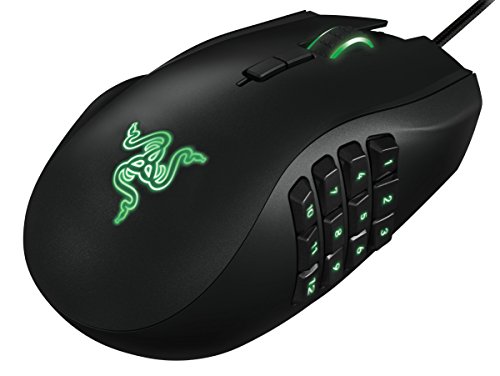
Pros
- Dedicated left-handed ergonomic contouring
- 12 programmable thumb buttons for complex hotkeys
- Multi-directional tilt-click scroll wheel
- Configurable 8,200 DPI 4G laser sensor
- Onboard 32-bit ARM processor handles inputs
Cons
- Restricted solely to left-handed grip orientations

Pros
- High-precision HERO sensor up to 25,600 DPI
- Eleven fully programmable buttons
- Adjustable balance with five removable weights
- Dual-mode hyper-fast scroll wheel
- Tensioned mechanical switches for crisp clicks
Cons
- Tethered wired design restricts cable-free movement
- Full RGB customization requires Logitech Gaming Software

Pros
- Fast 1 ms wireless report rate
- Long-lasting battery life from single AA cell
- Precise 12,000 DPI HERO optical sensor
- Integrated internal storage for USB nano receiver
Cons
- Requires replaceable AA batteries instead of internal recharging
- Accessing extended Endurance mode requires Logitech G HUB software

Pros
- Extremely lightweight 43-gram construction
- Dedicated ergonomic contour for left-handed users
- High-end 32,000 DPI optical sensor
- Optical switches minimize double-click issues
- Includes durable UHMW-PE dot skates
Cons
- Asymmetrical design is unsuitable for right-handed players
- Mini size may feel cramped for larger hands

Pros
- True ambidextrous modular button layout
- High-precision 44,000 DPI HERO 2 sensor
- Responsive LIGHTFORCE optical-mechanical switches
- Up to 95-hour battery life
- Convenient USB-C charging port
Cons
- 8 kHz polling receiver sold separately
- Full feature customization requires Logitech G HUB software
Key Specifications Overview
| Product | Form Factor | Sensor Spec | Weight | Connectivity |
|---|---|---|---|---|
| Pulsar X3 LHD Crazylight | Left-Hand Ergonomic | 32,000 DPI (XS-1) | 43 g | Wireless |
| Logitech G PRO 2 Lightspeed | Modular Ambidextrous | 44,000 DPI (HERO 2) | Not specified | 2.4 GHz Lightspeed / USB-C |
| Razer Naga Left-Handed | Left-Hand MMO Ergo | 8,200 DPI Laser | Not specified | Wired USB |
| Logitech G305 Lightspeed | Symmetrical Ambidextrous | 12,000 DPI (HERO) | 99 g (3.4 oz) | 2.4 GHz Lightspeed |
| Logitech G502 Hero | Right-Hand Ergonomic (Reference) | 25,600 DPI (HERO) | Adjustable (3.6g weights) | Wired USB |
| ELECOM EX-G Left Handed | Left-Hand Trackball | 1,500 DPI Optical | 128 g (4.5 oz) | 2.4 GHz Wireless |
| Logitech Lift Left Handed | Left-Hand Vertical Ergo | Not specified | Not specified | Bluetooth / Logi Bolt |
Evaluating the Best Left Handed Gaming Mice
Pulsar Gaming Gears X3 LHD Crazylight
The Pulsar Gaming Gears X3 LHD Crazylight is engineered specifically for competitive left-handed players seeking modern ultralight performance. Weighing just 43 grams, it features an asymmetrical shell tuned for relaxed claw and palm grips without forcing right-handed compromises.
Internally, it houses an XS-1 sensor running up to 32,000 DPI with 750 IPS tracking and 50g acceleration, backed by optical main switches to resist unintended double clicks. The primary limitation is its compact shell size, which might feel narrow for users with large hands using a pure palm grip.
Logitech G PRO 2 Lightspeed Ambidextrous
The Logitech G PRO 2 Lightspeed Ambidextrous solves southpaw ergonomics through a modular approach. It includes magnetic, swappable side buttons on both flanks, allowing left-handed gamers to enable thumb inputs on the right side while blanking out opposite buttons to avoid accidental presses.
Equipped with a HERO 2 sensor pushing 44,000 DPI, 888+ IPS, and hybrid optical-mechanical Lightforce switches, it caters to high-intensity esports titles. However, obtaining the full 8 kHz polling rate requires purchasing the separate Pro Lightspeed receiver, adding overhead to your initial hardware setup.
Razer RZ01-01050100-R3M1 Naga Left-Handed
For complex macro layouts, the Razer RZ01-01050100-R3M1 Naga Left-Handed provides a mirrored ergonomic layout specifically designed for left-handed MMO and MOBA competitors. The right side features a dedicated 12-button mechanical thumb grid alongside a tilt-click scroll wheel for extensive binding capacity.
An onboard 32-bit ARM processor coordinates in-game macros and profiles through Razer’s overlay software. Because this variant utilizes an 8,200 DPI 4G laser sensor rather than modern low-lift optical tech, tracking on uneven cloth pads requires careful surface calibration, making it best paired with consistent, flat desk surfaces.
Logitech G305 Lightspeed Wireless
The Logitech G305 Lightspeed Wireless Gaming Mouse serves as a budget-conscious ambidextrous option built on an egg-shaped symmetrical chassis. Its HERO sensor scales up to 12,000 DPI, paired with a reliable 1 ms Lightspeed wireless receiver that slots inside the battery compartment for transport.
Power is supplied by a single AA battery, yielding up to 250 continuous gaming hours or nine months in endurance mode. The key trade-off for left-handed users is that the two side buttons remain permanently fixed to the left edge, making thumb actuation awkward unless relying purely on primary top clicks.
ELECOM EX-G Left Handed Thumb Control Trackball
The ELECOM EX-G Left Handed Thumb Control Trackball caters to left-handed gamers and desk workers dealing with wrist strain or restricted mousing surfaces. Navigation is driven by a high-visibility red optical tracking ball operated by the left thumb, keeping the forearm stationary.
A toggle switch swaps hardware resolution between 750 and 1,500 DPI, while six buttons can be remapped through Elecom’s companion utility. Trackballs provide excellent control in strategy and turn-based titles, but the low DPI ceiling and physical rotational physics restrict precision in twitch-based first-person shooters.
Logitech Left Handed Lift Vertical Ergonomic
Designed around ergonomic desk posture, the Logitech Left Handed Lift Vertical Ergonomic presents an upright 57-degree handshake grip sculpted for small to medium left hands. It supports Bluetooth Low Energy and Logi Bolt USB wireless connections across Windows, macOS, and Linux systems.
Features include whisper-quiet main switches, a SmartWheel for variable-speed document scrolling, and up to two years of battery life. While ideal for office duties and relaxed simulation games, its lack of high-polling sensor profiles or ultra-low click latencies limits effectiveness in competitive gaming environments.
Logitech G502 Hero Wired Gaming Mouse
The Logitech G502 Hero Wired Gaming Mouse – Black is a widely recognized benchmark featuring 11 programmable switches, a dual-mode hyper-fast scroll wheel, and a 25,600 DPI HERO optical sensor. It includes five modular 3.6-gram weights for users who prefer custom balance adjustments.
Buyers must note that the G502 Hero is strictly a right-handed ergonomic mouse with left-side thumb controls and a severe rightward slope. It is included here as a design reference, illustrating why southpaw gamers require true mirrored shells or ambidextrous frames rather than adapted right-hand flagships.
Key Buying Considerations for Left-Handed Setups
When selecting input hardware as a southpaw, the core decision begins with shell geometry. True left-handed ergonomic models offer sculpted palm contours and dedicated thumb shelves on the right flank, while ambidextrous designs offer symmetrical balance suitable for either hand.
Button layout matters significantly when evaluating ambidextrous shells. True ambidextrous gaming mice include physical side buttons on both flanks with the ability to deactivate non-thumb buttons in firmware, preventing unintended inputs from pinky fingers during rapid movements.
Pairing your mouse with an optimized layout enhances control. Left-handed players using standard keyboards often migrate their keybinds to the IJKL cluster or the numeric keypad. If you are refining your full desk environment, consult our guide on how to build the ultimate battlestation on a budget to improve workspace efficiency and desk clearance.
Frequently Asked Questions
What is the difference between an ambidextrous mouse and a left-handed mouse?
A true left-handed mouse is physically asymmetrical, sculpted with curves, thumb rests, and side buttons mapped specifically for the left hand. An ambidextrous mouse features a symmetrical outer shell that feels identical in either hand, though side button availability varies between models.
Can I play competitive shooters with a trackball or vertical mouse?
While trackballs and vertical mice reduce forearm pronation and wrist strain, their sensors generally feature lower DPI ranges and tracking speeds. Competitive shooters benefit significantly from low-weight optical mice that glide freely across a mousepad for fast target acquisition.
Are ambidextrous side buttons easy to disable?
High-end modular mice allow you to physically remove unused side buttons or replace them with flush covers. Entry-level symmetrical mice often leave left-side buttons permanently attached, which left-handed gamers must disable through vendor software to avoid misclicks.



Write Your Review
No reviews yet. Be the first to share your experience!