

Programming demands sustained typing comfort and reliable key registration without distracting noise in shared office environments. Selecting a quiet keyboard under a strict budget often forces developers to weigh switch mechanics, sound dampening materials, and layout efficiency against overall build durability.
This guide analyzes 6 keyboards that prioritize low acoustic output and dependable ergonomics for developers working within a modest budget. The evaluated options include linear mechanical models with factory silencing layers as well as low-profile scissor-switch boards suitable for compact workstations.
Top Quiet Keyboards Under $50 for Programming at a Glance

Pros
- Cushioned gasket-mount typing feel
- Dedicated Windows and Mac hardware toggle
- Durable double-shot PBT keycaps
- Quiet pre-lubed linear switches
- Full N-Key Rollover anti-ghosting support
Cons
- PCB only accepts 3-pin sleeve-style switches
- Requires a permanent wired connection

Pros
- Tactile CHERRY MX2A Brown mechanical switches
- Sturdy metal plate frame construction
- Rated lifespan exceeding 100 million keystrokes
- Precision German-made Gold-Crosspoint contacts
- Built-in white LED lock status indicators
Cons
- Renewed condition rather than factory new
Pros
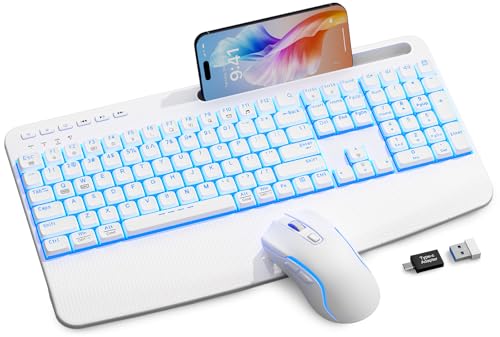
- Quiet scissor-switch keys with durable lifespan
- Includes both USB-A and USB-C receiver options
- Built-in wrist rest and integrated device holder
- Adjustable seven-color LED backlighting with three levels
- Rechargeable battery configuration
Cons
- Mouse sensitivity tops out at 1600 DPI
- Device cradle restricted to widths of 8.27 inches or less

Pros
- Full 104-key layout with dedicated number pad
- Smooth and quiet linear red mechanical switches
- Ergonomic XDA keycaps with wide contact area
- Built-in RGB lighting with 18 preset modes
- Full N-key rollover anti-ghosting capability
Cons
- Lacks wireless or Bluetooth connectivity options
- Large footprint consumes considerable desk space

Pros
- Full N-Key rollover and 1000Hz polling rate
- Customizable 16.8 million color RGB lighting
- Includes four spare switches and removal tools
- Double-shot keycaps prevent legend wear
- Software support for macros and three profiles
Cons
- Only supports wired USB connectivity
- Lacks a dedicated numeric keypad

Pros
- Versatile Bluetooth, 2.4GHz, and USB-C connectivity options
- Hot-swap PCB supports both 3-pin and 5-pin switches
- Durable double-shot PBT keycaps in ergonomic Cherry profile
- Dual-layer sound dampening foam reduces internal hollow resonance
- Compact 60% footprint maximizes desktop space for gaming
Cons
- Lacks dedicated arrow keys and physical function row
- Lighting customization is limited to single-color blue illumination
Key Factors for Quiet Coding Keyboards Under $50
Switch mechanics dictate most of the acoustic footprint on any computer keyboard. Linear mechanical switches and low-profile scissor mechanisms generate significantly less chatter than tactile clicky switches, making them far better suited for continuous coding marathons. Factory lubrication and silicone padding further absorb high-frequency impact sounds against the circuit board.
Layout selection also determines how quickly programmers navigate codebases during long work sessions. While full-size boards maintain dedicated navigation blocks and numeric pads, compact form factors save desk space and allow comfortable mouse positioning. Maintaining a tidy environment paired with desks engineered for cable routing can noticeably reduce desktop clutter and unwanted reverberation.
Detailed Reviews of the 6 Best Options
RK ROYAL KLUDGE R104 Wired Mechanical Keyboard
The RK ROYAL KLUDGE R104 combines a full 104-key footprint with internal acoustic management rarely found in budget peripherals. Its gasket-mounted chassis utilizes silicone dampening layers to reduce plate reverberation during brisk typing sessions. Pre-lubricated Violet quiet linear switches yield minimal sound signature when striking code blocks.
Programmers who switch between operating environments will appreciate the dedicated hardware toggle for Windows and macOS layouts. Double-shot PBT keycaps resist skin oil degradation and retain legible lettering over extended software development cycles. Note that switch replacements are restricted to 3-pin sleeve sockets rather than standard universal pins.
Cherry KC 200 MX Mechanical Office Keyboard
The Cherry KC 200 MX brings German-engineered mechanical reliability to an understated office layout. Built around an anodized metal faceplate, the board avoids hollow rattling sounds while offering crisp switch stability. It features updated MX2A switches that incorporate factory-applied lubrication to eliminate friction and spring ping.
For silent operation, configurations with MX2A Silent Red switches provide internal dampening stems to silence bottom-out noise. Users who prefer subtle feedback can opt for MX2A Brown variants, which retain moderate acoustic control. As a renewed hardware unit, external finish consistency may vary between individual boards.
White Keyboard and Mouse Wireless Combo
SABLUTE offers a whisper-quiet option built on laptop-style scissor switches instead of traditional mechanical stems. The shallow travel distance minimizes hand fatigue while generating virtually zero key chatter during late-night debugging. An integrated wrist rest and mobile device cradle provide practical ergonomic support on crowded desks.
The wireless connection operates over a 2.4GHz receiver with dual USB-A and USB-C adapters for direct laptop compatibility. Its rechargeable internal battery eliminates frequent disposable cell swaps across work weeks. However, scissor switches cannot be repaired individually if internal membrane stabilizers degrade over time.
Owpkeenthy Full Size Green Mechanical
Owpkeenthy presents an eye-catching full-size mechanical board equipped with smooth linear red switches. The uniform XDA profile keycaps increase finger surface contact, which promotes consistent hand placement when writing syntax. Full N-key rollover ensures that complex IDE keybindings register reliably without dropped strokes.
The red linear stems operate without a tactile bump, keeping acoustic output soft during continuous typing. The flat profile of XDA keycaps may require a slight adjustment period for developers used to curved OEM rows. It connects through a standard wired USB cable to guarantee zero input lag during work.
TECWARE Phantom 87 Key RGB Mechanical
The TECWARE Phantom 87 is a tenkeyless mechanical board designed around Outemu Brown switches. It features a rigid fiberglass circuit board and modular switch sockets that allow quick maintenance using the included replacement parts. The compact tenkeyless footprint frees up desk area, which works well on workstations using compact microphone solutions for team meetings.
Double-shot ABS keycaps provide clean legend illumination while resisting surface wear over months of compilation cycles. Outemu Brown switches offer a faint tactile resistance without loud audible clicks, making them appropriate for home development setups. Lacking internal foam layers, the hollow casing produces slightly higher pitch resonance than gasket-mounted options.
RK ROYAL KLUDGE RK61 Wireless 60% Mechanical
The RK ROYAL KLUDGE RK61 delivers an ultra-compact 60 percent layout tailored for minimalist programming setups. Dual-layer sound absorbing foam inside the tray isolates internal reverberation, producing a deeper acoustic tone upon key actuation. Three-mode connectivity supports seamless toggling between a development desktop, work laptop, and tablet via Bluetooth or 2.4GHz wireless.
Hot-swappable sockets support standard 3-pin and 5-pin switches, enabling easy mechanical customization when users wish to install specialized silent stems. Oil-resistant PBT keycaps maintain a textured matte feel through long programming shifts. Programmers who rely heavily on dedicated arrow keys must use secondary function layers to navigate code.
Keyboard Specifications Comparison
| Model | Switch Type | Layout Size | Mounting / Sound Prep | Connectivity |
|---|---|---|---|---|
| RK ROYAL KLUDGE R104 | Violet Quiet Linear | Full Size (104 Keys) | Gasket Mount, Foam Layers | Wired USB |
| Cherry KC 200 MX | Cherry MX2A Brown / Silent Red | Full Size (108 Keys) | Metal Plate Frame | Wired USB |
| SABLUTE Wireless Combo | Scissor Switch | Full Size with Rest | Low-Profile Membrane | 2.4GHz Wireless (USB-A/C) |
| Owpkeenthy Mechanical | Linear Red | Full Size (104 Keys) | Integrated Plate | Wired USB |
| TECWARE Phantom 87 | Outemu Brown Tactile | Tenkeyless (87 Keys) | Fiberglass PCB Tray | Wired USB |
| RK ROYAL KLUDGE RK61 | RK Linear / Tactile | 60% Compact (61 Keys) | Dual-Layer Silencing Foam | Bluetooth, 2.4GHz, USB-C |
Frequently Asked Questions
Are linear switches quieter than tactile switches for programming?
Linear switches generally produce less noise because they glide downward without the internal click or tactile friction bump present in other stems. When paired with internal case dampening, linear designs eliminate high-pitched chatter during fast typing.
Can compact 60 percent keyboards work efficiently for writing code?
Compact 60 percent keyboards work well for developers who memorize function layer commands for arrow navigation and bracket entry. However, programmers who frequently access separate navigational clusters or numerical data pads may experience a slower initial workflow.
Final Recommendation
For programmers seeking the quietest typing experience with a full layout, the RK ROYAL KLUDGE R104 provides exceptional noise isolation through its gasket mount structure and pre-lubricated switches. If office durability and proven mechanical heritage matter most, the Cherry KC 200 MX offers robust construction and smooth switch actuation.
Developers working in mobile setups or constrained desk spaces will find the RK ROYAL KLUDGE RK61 ideal due to its multi-device wireless pairing and internal silencing foam. Meanwhile, those who favor ultra-low travel profiles and silent membrane strokes will appreciate the integrated palm support on the SABLUTE Wireless Combo.


Write Your Review
No reviews yet. Be the first to share your experience!