

Finding the best gaming keyboards under $100 mechanical comes down to choosing the right switch behavior and form factor for your desk setup. Budget mechanical boards now offer robust aluminum frames, fast optical or linear switches, and compact layouts that preserve mouse space. Identifying your preferred switch feel and connectivity helps narrow the field without exceeding your price limit.
Quick Picks: Top Budget Mechanical Keyboards
Below are 6 keyboards that satisfy the under-$100 threshold while delivering distinct switch types, layout sizes, and physical builds. For a detailed breakdown of how key mechanisms operate, review our guide on mechanical keyboard switches explained.

Pros
- Durable full aluminum frame
- Wear-resistant double-shot PBT keycaps
- Compact footprint maximizes desk surface
- Detachable USB-C cable enhances portability
- Three adjustable typing angles
Cons
- Lacks dedicated arrow and navigation keys
- Requires secondary key bindings for full functionality

Pros
- Quiet linear CHERRY MX2A Silent Red switches
- Durable aluminum housing with sound damping
- Full N-key rollover and anti-ghosting support
- Customizable RGB backlighting via software
Cons
- Tethered USB-A wired connection only
- Software required for in-depth lighting configuration

Pros
- Compact 60% footprint frees up mouse space
- Responsive GX tactile optical switches
- Low-latency LIGHTSPEED wireless and Bluetooth support
- Multi-layer key customization via KEYCONTROL
- Includes protective carrying case for travel
Cons
- Lacks dedicated arrow keys and navigation cluster
- Requires learning secondary function layers for commands

Pros
- Space-saving tenkeyless design frees mouse room
- Tactile, audible GX Blue clicky mechanical switches
- Detachable 1.8-meter cable ensures easy transport
- Onboard memory stores static LIGHTSYNC profiles
- Three-step tilt adjustment provides stable ergonomics
Cons
- Key and lighting programming requires Logitech G HUB
- Macro assignments are restricted to F1 through F12
- Equipped with an older Micro USB connection

Pros
- Tactile hybrid switches rated for 20 million clicks
- Built-in customizable OLED smart display
- Durable aircraft-grade aluminum alloy frame
- Dynamic per-key RGB backlighting with reactive effects
- Detachable magnetic wrist rest included

Pros
- Versatile tri-mode wireless and wired connectivity
- Gasket-mounted design with five layers of sound foam
- Smooth, responsive 40gf linear mechanical switches
- Compact 75% footprint optimizes desk space
- Built-in 4000mAh rechargeable battery
Cons
- Lacks a dedicated numeric keypad
- Transparent exoskeleton styling may not suit understated desks
Individual Keyboard Analysis
CHERRY XTRFY MX 3.1, Wired Mechanical
The CHERRY XTRFY MX 3.1 is constructed with a rigid aluminum housing and integrated sound-damping mechanisms. It features factory-lubed CHERRY MX2A Silent Red switches designed for linear travel without auditory clicks. This combination makes it a strong contender for shared bedrooms or offices, similar to the hardware in our best silent gaming keyboards roundup.
This model includes screw-in metal feet for angle adjustment alongside standard full N-key rollover and anti-ghosting. The full-size layout includes dedicated function rows and a numeric keypad, which requires more desk area than smaller competitive boards. It relies on a wired USB-A connection, so users needing cable detachment or ultra-low travel profiles should look elsewhere.
HyperX Alloy Origins 60
The HyperX Alloy Origins 60 uses a dense, aircraft-grade aluminum body that resists flexing during aggressive typing. It is outfitted with tactile HyperX Aqua switches, offering moderate resistance before actuation. Double-shot PBT keycaps come standard with side-printed secondary legends to keep navigation commands accessible.
A detachable USB-C cable and three selectable tilt angles make this 60 percent layout convenient for transport. Because physical arrow keys and dedicated function rows are absent, users must adapt to keyboard layers managed through HyperX NGENUITY software. It excels for low-sensitivity FPS players who need unobstructed space for their best gaming mice.
Logitech G PRO X 60% Wireless Gaming Keyboard
The Logitech G PRO X 60 features GX tactile optical switches that register inputs via light beams, eliminating debounce delay. It provides dual wireless connectivity through either high-speed Lightspeed USB or Bluetooth, supplemented by USB-C wired charging. An onboard volume roller and a dedicated game mode switch provide physical hardware controls despite the small footprint.
Logitech KEYCONTROL technology allows up to five configurable command layers across the 60 percent surface. The keyboard comes with a molded semi-hard carrying case, catering to tournament competitors. However, third-party switch swapping is restricted due to the proprietary optical switch architecture.
Logitech G PRO Mechanical TKL Tenkeyless
The Logitech G PRO Mechanical TKL uses a tenkeyless layout that removes only the numeric pad, retaining dedicated arrow and navigation blocks. It uses GX Blue clicky switches that deliver pronounced audible and tactile feedback on actuation. Three-step angle adjustment feet and solid rubber pads ensure stability on bare desks or large cloth mouse mats.
The detachable cable uses a proprietary three-pronged Micro-USB connector designed to prevent port strain during packing. Programmable lighting and F-key macros can be stored on the internal memory via Logitech G HUB software. Users in quiet environments should note that the clicky switches produce substantial acoustic output.
SteelSeries USB Apex 5 Hybrid Mechanical
The SteelSeries Apex 5 combines a mechanical tactile click mechanism with a rubber dome membrane sheet underneath. This hybrid design mimics the snap of a blue switch while relying on membrane contact for signal registration. A notable addition at this price level is the integrated monochrome OLED smart display for profile and app notifications.
Built with an aluminum alloy top frame, the Apex 5 includes a full-sized magnetic wrist rest for palm support. Per-key RGB illumination allows extensive personalization through SteelSeries software. Because the switches rely on internal membrane elements, switch lifespan is rated lower than pure mechanical contacts.
GravaStar Mercury K1 Lite 75% Wireless Mechanical
The GravaStar Mercury K1 Lite uses a compact 75 percent layout with 80 keys, retaining dedicated arrow and navigation keys. It is built around a gasket-mounted assembly paired with five layers of internal sound-absorbing foam. Smooth GravaStar x BSUN linear switches feature a light 40-gram actuation force that favors fast, repeated keystrokes.
The transparent polycarbonate chassis and see-through keycaps showcase striking exoskeleton styling and 13 dynamic RGB modes. Tri-mode wireless capability supports 2.4GHz wireless, Bluetooth, and wired Type-C connectivity powered by a 4000mAh battery. The aggressive transparent visual design will appeal strongly to stylized battlestations rather than conservative office environments.
Key Factors When Choosing a Mechanical Keyboard Under $100
Evaluating mechanical keyboards requires matching layout proportions to your room setup. Full-size layouts provide a separate numeric keypad for data entry, while tenkeyless models keep arrow clusters intact. Ultra-compact 60 percent keyboards maximize sweep area for low-DPI mouse aiming, though they relegate arrow keys to secondary key layers.
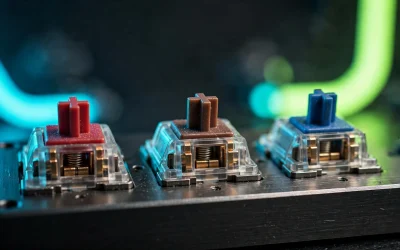
Switch mechanics dictate key feel, sound profile, and trigger speed. Linear switches move straight down with uniform resistance, while tactile switches provide a small bump before registration. Clicky switches add a sharp auditory crack at the tactile event, which can disrupt shared household areas or open microphones.
Chassis materials and acoustic dampening separate modern budget boards from older iterations. Look for models featuring aluminum structural plates or internal silicone damping pads to prevent hollow casing echoes. If you are comparing general keyboard categories, browse our complete list of mechanical keyboards for wider context.
Budget Mechanical Keyboard Comparison
| Keyboard Model | Layout | Switch Type | Connectivity | Frame Material |
|---|---|---|---|---|
| CHERRY XTRFY MX 3.1 | Full Size | MX2A Silent Red (Linear) | Wired USB-A | Aluminum Housing |
| HyperX Alloy Origins 60 | 60% | HyperX Aqua (Tactile) | Detachable USB-C | Aircraft Aluminum |
| Logitech G PRO X 60 | 60% | GX Optical (Tactile) | Wireless / BT / USB-C | Plastic / Internal Plate |
| Logitech G PRO TKL | Tenkeyless (TKL) | GX Blue (Clicky) | Detachable Micro-USB | Rigid Plastic Frame |
| SteelSeries Apex 5 | Full Size | Hybrid Blue (Clicky) | Wired USB-A | Aluminum Alloy |
| GravaStar Mercury K1 Lite | 75% | BSUN Linear (40gf) | Tri-Mode Wireless / USB-C | Polycarbonate Gasket |
Frequently Asked Questions
Are optical switches better than standard mechanical switches?
Optical switches actuate when an infrared light beam is interrupted, bypassing traditional metal contact leaves. This design eliminates electrical debounce delay and lowers mechanical wear over time. While the latency difference is minuscule in practice, optical switches generally resist signal degradation better over millions of presses.
What is the benefit of a gasket mount on a budget keyboard?
A gasket mount suspends the keyboard switch plate between soft dampening pads rather than screwing it directly into a rigid housing. This layout reduces the sharp vibration transmitted to your fingertips when bottoming out keys. It also creates a deeper, less metallic sound profile compared to traditional tray-mount keyboards.
Why do some keyboards use double-shot PBT keycaps?
Double-shot PBT keycaps are formed by molding two separate layers of plastic together. This manufacturing technique ensures the lettering on top will never rub off or fade over years of heavy use. PBT plastic also resists finger oils, preventing the shiny, slick surface common on standard ABS caps.
Final Verdict: Which Keyboard Should You Choose?
If minimal desk space and low-latency wireless play are your top goals, the Logitech G PRO X 60 provides tournament-grade optical response. Users seeking an all-metal build with a tactile feel should select the HyperX Alloy Origins 60. For low-noise office or streaming spaces, the CHERRY XTRFY MX 3.1 offers superior quiet actuation and heavy-duty casing. Finally, the GravaStar Mercury K1 Lite delivers gasket-mounted acoustic balance and balanced 75 percent utility at a competitive sub-$100 price.


Write Your Review
No reviews yet. Be the first to share your experience!