

Finding the best gaming keyboards under $75 mac compatible means balancing low input latency with reliable macOS command key mapping. Budget keyboards often prioritize Windows layouts, which can lead to frustrating modifier key conflicts during fast gaming sessions or daily desktop tasks.
Modern boards at this accessible price point now feature hardware toggle switches, multi-device wireless pairing, and customizable onboard firmware. If you want a complete desktop overhaul, pairing one of these with responsive pointers from our gaming mice catalog creates a clean setup.
Quick Comparison: Best Gaming Keyboards Under $75 Mac Compatible

Pros
- Durable wear-resistant PBT keycaps
- Sturdy aluminum-magnesium alloy top plate
- Tactile mechanical switches for responsive feedback
- Convenient FN-layer media and lighting controls
Cons
- Lighting limited to single-color white LEDs
- Key rollover capped at six simultaneous inputs

Pros
- Versatile 2.4GHz, Bluetooth, and wired USB-C connectivity
- Hot-swappable sockets support 3-pin and 5-pin switches
- Multi-function knob for volume and lighting control
- High-capacity 4000mAh rechargeable internal battery
- Compact 75% layout retains dedicated arrow keys
Cons
- Lacks a dedicated numeric keypad
- Full macro programming requires optional driver software
- Side-printed legends may reduce visibility from certain angles

Pros
- Gasket mount with EVA foam sound dampening
- Hot-swappable PCB accepts 3-pin and 5-pin switches
- Angled color screen displays GIFs and system status
- Pre-lubed linear switches with south-facing LEDs
- Compact 75% layout retains essential navigation keys
Cons
- Only documented for wired USB-C connectivity
- GIF uploads and macros require proprietary software
Pros
- Versatile tri-mode wireless and wired connectivity
- Hot-swappable PCB supports 3-pin and 5-pin switches
- QMK and VIA programmability for custom layouts
- Integrated multimedia volume control knob
- Durable double-shot PBT keycaps included
Cons
- Advertised battery life drops to 16 hours with backlighting
- Requires contacting vendor support to acquire VIA JSON file
Detailed Product Breakdown
1. Logitech G413 SE Full-Size Mechanical
The Logitech G413 SE Full-Size Mechanical delivers an aluminum top plate and tactile mechanical switches in a full desktop layout. Its durable PBT keycaps resist skin oils over extended play sessions while white LED backlighting provides clear legend visibility in dimly lit gaming spaces.
Because it operates over a straightforward wired USB connection, macOS recognizes standard keystrokes and function row commands without requiring specialized background drivers. The primary trade-off is the lack of dedicated Mac keycap legends, which means you must map Command and Option keys inside system preferences.
2. AULA F75 Pro Wireless Mechanical Keyboard,75% Hot
The AULA F75 Pro Wireless Mechanical Keyboard,75% Hot incorporates pre-lubricated LEOBOG Reaper linear switches and a sound-dampening gasket structure. It supports tri-mode connectivity across low-latency 2.4GHz wireless, Bluetooth 5.0, and detachable USB-C to accommodate desk changes easily.
A physical switch toggles seamlessly between Mac and Windows modes, ensuring instant Command and Option positioning without configuration headaches. However, the proprietary desktop driver software for macro programming remains largely restricted to Windows computers, limiting complex customization on Mac systems.
3. Womier SK80 75% Keyboard with Color Multimedia
The Womier SK80 75% Keyboard with Color Multimedia stands out with an integrated color screen that displays active system indicators like operating system selection. Its gasket-mounted interior uses multi-layer EVA foam to cushion bottom-out strikes during competitive play.
A built-in Mac mode switch simplifies cross-platform use while south-facing hot-swappable switch sockets invite future hardware upgrades. For players learning about actuation dynamics, our guide on mechanical keyboard switches explained details how linear choices impact responsiveness. Note that deep screen customization requires desktop software support.
4. Redragon K742 Wireless Mechanical Gaming Keyboard
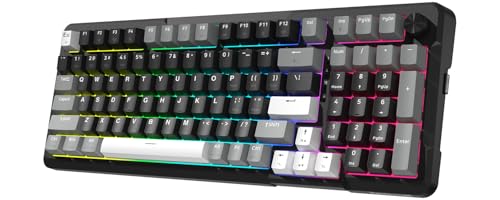
The Redragon K742 Wireless Mechanical Gaming Keyboard combines a space-saving 98 percent compact layout with a dedicated volume knob and factory-lubricated POM switches. Its five-layer internal sound padding creates an exceptionally quiet keystroke acoustic profile suitable for shared environments.
Crucially for Apple users, this model features open-source QMK and VIA compatibility that lets you flash customized Mac layers directly into onboard memory. If you enjoy serene gaming stations, check our roundup of the best silent gaming keyboards for similar low-noise acoustic builds.
How to Select a Budget Mac Compatible Gaming Keyboard
Hardware compatibility on macOS demands verification before purchase because many budget peripherals prioritize Windows shortcut layers. Look for keyboards with dedicated operating system toggle switches or onboard memory that preserves custom key positions across different computers.
Firmware architecture represents another critical consideration when selecting boards from our wider mechanical keyboards directory. Keyboards supporting VIA or QMK allow full configuration within web browsers, bypassing the need for Windows-exclusive utility installers entirely.
Frequently Asked Questions
Can I use any standard Windows gaming keyboard on macOS?
Standard USB keyboards function for standard alphanumeric typing on macOS out of the box through generic peripheral drivers. However, Windows and Alt keys swap positions compared to standard Mac layouts, requiring manual reassignment inside macOS Keyboard settings.
Is 2.4GHz wireless better than Bluetooth for Mac gaming?
A dedicated 2.4GHz USB receiver provides substantially lower latency and higher polling stability than standard Bluetooth protocol connections. Competitive titles benefit noticeably from 2.4GHz dongles or direct USB-C cables, whereas Bluetooth remains practical for casual desktop work.
Final Recommendation
If you prioritize open-source firmware flexibility and require a number pad, choose the Redragon K742 for its versatile VIA layout remapping. For players wanting a compact 75 percent wireless chassis with pre-lubricated switches, the AULA F75 Pro represents an exceptional sub-budget contender.


Write Your Review
No reviews yet. Be the first to share your experience!