

Finding the best gaming routers under $100 comes down to prioritizing low latency, steady packet delivery, and stable local connections over superficial marketing features. Modern budget models now include advanced Wi-Fi 6, Wi-Fi 6E, and early Wi-Fi 7 standards that manage multi-device network congestion far better than older hardware.
When you are assembling an affordable PC setup alongside guides like how to build the ultimate battlestation on a budget, network reliability remains just as critical as your peripherals. A capable entry-level router minimizes jitter and bufferbloat, ensuring that other household streaming does not interrupt competitive gaming sessions.
Top Budget Gaming Routers Compared

Pros
- Dual-band WiFi 6 speeds up to 3 Gbps
- Coverage for up to 2,000 square feet
- Four dedicated Gigabit Ethernet LAN ports
- Integrated VPN support and USB 3.0 connectivity
Cons
- Requires a separate standalone modem
- Caps internet service provider compatibility at 1 Gbps

Pros
- WiFi 6 speeds up to 3000 Mbps
- AiMesh compatible for easy network expansion
- OFDMA and MU-MIMO enhance multi-device efficiency
- Built-in VPN and Instant Guard security features
- Configurable parental control scheduling

Pros
- WiFi 6 speeds up to 5400 Mbps with 160MHz channels
- Dedicated gaming port prioritizes wired hardware
- Mobile Game Mode reduces latency via ASUS app
- AiMesh support for expanding whole-home coverage
- Included AiProtection Pro network security

Pros
- Dedicated 6 GHz band reduces local network congestion
- Equipped with a 2.5 Gbps multi-gigabit Ethernet port
- Up to 7.8 Gbps total rated wireless bandwidth
- Supports capacity for up to 200 connected devices
Cons
- Sold as a renewed unit rather than factory new
- Substantial physical dimensions require dedicated setup space

Pros
- Dedicated 2.5 Gbps WAN and LAN ports
- Up to BE5000 dual-band Wi-Fi 7 speeds
- Coverage rated up to 2,400 square feet
- Integrated VPN client and server support
- EasyMesh support for flexible network expansion
Cons
- Does not support the 6 GHz band
- Incompatible with TP-Link Deco mesh systems
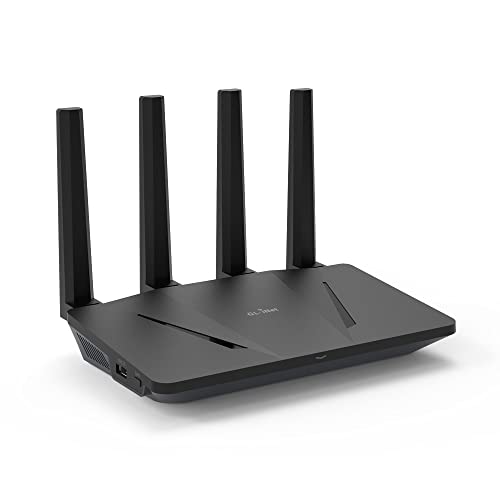
Pros
- Dual-band Wi-Fi 6 speeds up to 1.8 Gbps
- Hardware-accelerated WireGuard VPN up to 500 Mbps
- Built-in AdGuard Home ad and tracker filtering
- Five dedicated Gigabit Ethernet ports
- OFDMA support for up to 120 connected devices
Detailed Product Breakdown
1. NETGEAR Nighthawk WiFi 6 Router (RAX36)
The NETGEAR Nighthawk WiFi 6 Router (RAX36) is designed for basic households wanting solid dual-band throughput without complicated management menus. It provides AX3000 speeds up to 3 Gbps across its bands, alongside four dedicated gigabit LAN ports for hardwired desktop PCs and consoles.
Rated for coverage up to 2,000 square feet and handling up to 25 devices, it serves smaller homes and apartments effectively. However, it lacks dedicated multi-gigabit ports, so users on fiber plans faster than 1 Gbps will hit a hardware bottleneck at the WAN interface.
2. ASUS RT-AX3000S Dual Band WiFi 6 Extendable
The ASUS RT-AX3000S Dual Band WiFi 6 Extendable offers 1024-QAM modulation with a combined bandwidth of 3000 Mbps, splitting 574 Mbps onto 2.4 GHz and 2402 Mbps onto the 5 GHz band. Its integration of OFDMA and MU-MIMO allows consistent communication across several wireless endpoints simultaneously.
Gamers will appreciate ASUS firmware features such as built-in VPN client support and AiMesh compatibility, allowing future expansion without replacing base hardware. The primary trade-off is standard gigabit routing limits, which caps wired transfer speeds at basic gigabit ceilings.
3. ASUS RT-AX82U (AX5400) Dual Band WiFi 6 Extendable
The ASUS RT-AX82U (AX5400) Dual Band WiFi 6 Extendable steps up throughput with AX5400 capacity and 160 MHz channel support driven by a 1.5 GHz tri-core processor. It features a dedicated hardware Gaming Port that automatically prioritizes traffic for whatever wired system is plugged into it.
Mobile players benefit from a dedicated Mobile Game Mode accessible within the ASUS Router app to reduce packet queuing on mobile devices. While it includes Aura RGB lighting and AiProtection Pro security, it remains a dual-band unit that lacks access to the newer, uncongested 6 GHz frequency band.
4. TP-Link Archer AXE7800 Tri-Band Wi-Fi 6E Router
The renewed TP-Link – Archer AXE7800 Tri-Band Wi-Fi 6E Router introduces true tri-band capabilities to the sub-$100 price bracket. By delivering a clean 6 GHz frequency band alongside 2.4 GHz and 5 GHz, it isolates compatible gaming PCs from common household interference.
A major physical advantage is the inclusion of a 2.5 Gbps WAN/LAN port, accommodating high-speed fiber internet tiers. The key caveat is its renewed product status, which means units are factory-inspected refurbished stock rather than brand-new retail packaging.
5. TP-Link Dual-Band BE5000 WiFi 7 Router
The TP-Link Dual-Band BE5000 WiFi 7 Router brings Wi-Fi 7 modulation into entry-level pricing, delivering up to 4324 Mbps on 5 GHz and 688 Mbps on 2.4 GHz. It stands out by providing both a 2.5 Gbps WAN port and a 2.5 Gbps LAN port for local multi-gigabit device bridging.
Five external antennas and Beamforming provide up to 2,400 square feet of coverage for dense device environments. Readers must note that this is a dual-band Wi-Fi 7 device, meaning it operates strictly on 2.4 GHz and 5 GHz without 6 GHz spectrum access.
6. GL.iNet GL-AX1800 (Flint) WiFi 6 Router
The GL.iNet GL-AX1800(Flint) WiFi 6 Router -Dual Band targets enthusiasts who prefer deep network customization, open software, and built-in privacy tools. It comes equipped with five gigabit Ethernet ports and native support for OpenVPN alongside high-throughput WireGuard profiles hitting up to 500 Mbps.
Integrated AdGuard Home DNS blocking helps eliminate intrusive advertising and network trackers right at the gateway level. However, its overall wireless ceiling is lower at AX1800, making it best suited for players relying mostly on Ethernet connections rather than pure wireless bandwidth.
Key Hardware Specifications Compared
| Model | Wi-Fi Standard | Total Throughput | Ethernet Port Speeds | Tri-Band Support |
|---|---|---|---|---|
| NETGEAR RAX36 | Wi-Fi 6 | Up to 3.0 Gbps | 4x 1 Gbps LAN, 1x 1 Gbps WAN | No |
| ASUS RT-AX3000S | Wi-Fi 6 | Up to 3.0 Gbps | 4x 1 Gbps LAN, 1x 1 Gbps WAN | No |
| ASUS RT-AX82U | Wi-Fi 6 | Up to 5.4 Gbps | 4x 1 Gbps LAN (1 Gaming), 1x 1 Gbps WAN | No |
| TP-Link Archer AXE7800 | Wi-Fi 6E | Up to 7.8 Gbps | 1x 2.5 Gbps, 4x 1 Gbps | Yes (6 GHz) |
| TP-Link BE5000 | Wi-Fi 7 | Up to 5.0 Gbps | 2x 2.5 Gbps, 3x 1 Gbps | No |
| GL.iNet GL-AX1800 | Wi-Fi 6 | Up to 1.8 Gbps | 5x 1 Gbps | No |
How to Choose a Gaming Router Under $100
Shopping under a strict budget requires knowing which hardware specifications actually influence in-game responsiveness. Advertised wireless speed ratings aggregate theoretical maximums across all bands, but latency and local network queue management matter far more during active play.
If you connect primarily over Ethernet, prioritize models with dedicated hardware prioritization ports or multi-gigabit interfaces. A 2.5 Gbps port prevents local bottlenecks when connecting to high-speed modems or multi-gig switches, whereas dual-band Wi-Fi 6 suffices for standard wireless setups.
For homes with heavy smart device traffic, routers offering OFDMA and 160 MHz channel width maintain clearer signals. Tri-band Wi-Fi 6E devices offer an entirely uncrowded 6 GHz airwave, making them valuable when playing on wireless gaming laptops in dense apartment complexes.
Frequently Asked Questions
Does a sub-$100 gaming router improve in-game ping?
A router cannot reduce the physical distance between your home and game servers, so base ping remains limited by your internet service provider. However, quality budget routers reduce jitter, mitigate local bufferbloat, and prioritize packets so that ping spikes do not occur when other household members stream media.
Is Wi-Fi 6 sufficient for online gaming, or do I need Wi-Fi 6E or Wi-Fi 7?
Standard Wi-Fi 6 is more than adequate for competitive online titles, provided your home environment is not severely congested by neighboring signals. Wi-Fi 6E adds the clean 6 GHz band, and Wi-Fi 7 introduces refined multi-link operations, but Ethernet remains the ideal medium for latency-critical matches.
Do I need a separate modem with these routers?
Yes, all the units listed here are standalone wireless routers and do not include integrated cable or DSL modems. You will need to connect them via an Ethernet patch cable to your existing ISP modem or optical network terminal.
Final Recommendation
For players needing multi-gigabit Ethernet flexibility and modern Wi-Fi 7 protocol support, the TP-Link Dual-Band BE5000 WiFi 7 Router stands out as a strong hardware choice. If your priority is bypassing neighborhood Wi-Fi congestion entirely on supported client devices, the renewed TP-Link – Archer AXE7800 Tri-Band Wi-Fi 6E Router provides 6 GHz tri-band access at an accessible price point.
For users who want built-in gaming prioritization menus and mesh expansion, the ASUS RT-AX82U (AX5400) Dual Band WiFi 6 Extendable delivers reliable performance with robust gaming traffic management. Meanwhile, enthusiasts looking for OpenVPN, WireGuard, and AdGuard network filtering will find the GL.iNet GL-AX1800(Flint) WiFi 6 Router -Dual Band ideally matched to their requirements.





Write Your Review
No reviews yet. Be the first to share your experience!