

Cable drag adds friction to every flick shot, swipe, and quick turn on your desk surface. Adding a dedicated cord holder removes cable resistance and prevents your mouse wire from catching on monitor edges or desk corners. This guide compares 10 options across weight profiles, spring flexibility, and mounting styles.

Pros
- Weighted base prevents tipping during intense mouse movements
- Non-slip feet provide dependable desk grip
- Elevated spring arm significantly reduces cord drag
- Compatible with rubber, braided, and paracord cables
- Customizable Chroma RGB underglow lighting

Pros
- Heavy 220g base prevents shifting during use
- Anti-slip rubber feet provide strong desktop grip
- Flexible clip holds various cable thicknesses
- Compact and retractable design aids portability

Pros
- Compatible with any corded mouse
- Flexible metal and plastic arm design
- Compact desktop footprint
- Lightweight and portable construction
Cons
- Light 0.35-pound weight may shift during intense play
- Does not include an integrated cable clip adapter

Pros
- Mounts to surfaces to free up desk space
- Flexible silicone allows 360-degree mouse movement
- Firm hold via 3M VHB adhesive
- Includes an extra adhesive pad for reuse
Cons
- Requires replacing adhesive tape to reposition
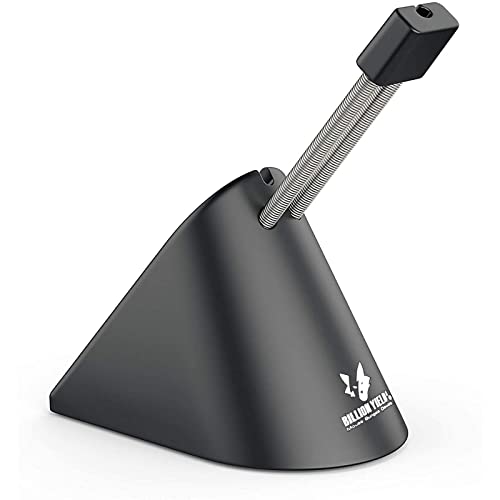
Pros
- Heavy 12.7-ounce weighted base enhances stability
- Spring arm adjusts up to 3 inches
- Non-slip rubber footing prevents slipping
- Flexible clip secures various mouse cord sizes
- Compact footprint takes up minimal desk space

Pros
- Weighted 220g base resists sliding during rapid movements
- Flexible rubber clip fits most corded mouse cables
- Retractable spring enhances travel portability
- Effectively eliminates mouse cable drag and friction
Pros
- Weighted 220-gram base stays planted
- Flexible spring arm reduces cable drag
- Anti-slip rubber feet provide solid grip
- Compact retractable build travels easily
- Rubber clip accommodates diverse cord thicknesses

Pros
- Spring-loaded arm reduces cable drag during mouse movement
- Integrated 4-port USB hub provides convenient desktop connectivity
- Weighted base with non-slip grip stays firmly in place
- Seven selectable LED lighting modes including rainbow
- Includes a 3-year manufacturer warranty
Cons
- Integrated hub limited to USB 2.0 speeds

Pros
- Heavy 220g base prevents shifting during use
- Anti-slip rubber feet maintain solid surface grip
- Flexible rubber clip fits most corded mice
- Retractable spring design enables easy travel packing
Cons
- Only useful for corded mouse setups
- Specific black and orange styling may clash with setups

Pros
- Weighted base resists movement during intense swipes
- Rubber feet maintain grip on smooth desks
- Rubber clip holds multiple cord diameters
- Effectively reduces wired cable drag
- Compact footprint preserves desk space
Evaluating the Top Mouse Bungee Options
Sisyphy Gaming Mouse Bungee
The Sisyphy Gaming Mouse Bungee emphasizes raw stability with a 360-gram (12.7 oz) weighted base. It features an adjustable spring arm that extends up to three inches in height to clear oversized mouse pads easily. The three-point rubber clip accommodates standard braided cords and thin paracord cables alike without pinching the sheath.
SteelSeries Mouse Bungee
With a compact footprint of 63 x 97 x 88 mm and an overall weight of 263 grams, the SteelSeries Mouse Bungee delivers reliable desktop anchorage. The dual-spring arm bends cleanly under tension during sudden peripheral flicks. Its rubberized cable slot handles variable cord thicknesses without letting loose over long competitive sessions.
Razer Gaming Mouse Bungee V3 Chroma
The Razer Gaming Mouse Bungee V3 Chroma pairs a 240-gram weighted core with an anti-slip grip base designed to resist tipping. Its rust-resistant spring arm provides an elevated cable path that mimics a cordless feel across high-velocity swipes. Integrated Razer Chroma RGB lighting offers desk illumination, though it requires an active USB connection strictly for power and customization.
Pulsar Gaming Gears Micro Bungee ES
The Pulsar Gaming Gears Micro Bungee ES eliminates the desktop footprint entirely by using heavy-duty 3M VHB adhesive. Constructed from polycarbonate and flexible silicone, it adheres directly to the bottom edge of a display monitor. This approach frees up pad surface area, which is helpful if you manage compact desk layouts or dual-screen workstations built around gaming desks for dual monitors.
ENHANCE Pro Gaming Mouse Bungee
The Enhance Pro Gaming Mouse Bungee Cable Holder 4 integrates a four-port active USB 2.0 hub directly into its weighted chassis. This allows gamers to plug in keyboards, headsets, and flash drives right beside the mouse pad. While convenient, the internal electronics make the unit slightly bulkier on narrow surfaces than a purely mechanical holder.
HOTLINEGAMES 3.0 Series Bungees
Hotline Games offers several variations of its proven 220-gram cord fixer, including the Hotline Games Mouse Bungee Mouse Cord Clip Cord in black, the HOTLINEGAMES Mouse Bungee Mouse Cord Clip Cord in white, the HOTLINEGAMES Mouse Bungee Mouse Cord Clip Cord 3.0 New White edition, and the HOTLINEGAMES [NEW] Mouse Bungee in black-orange. Each model utilizes a retractable spring mechanism and embedded rubber clip system that holds cables firmly while keeping transit dimensions manageable for tournament travel.
AOBOR AOZCBOR Flexible Mouse Bungee
The AOBOR AOZCBOR Flexible Mouse Bungee Mouse Cord serves as a basic entry point built from plastic and metal spring coils. It supports standard braided and rubber cables for games like Counter-Strike. However, its lightweight build makes it more susceptible to sliding under violent mouse pulls compared to 200g-plus alternatives.
Key Specifications Comparison
| Product | Base Weight | Mounting Type | Extra Features |
|---|---|---|---|
| Sisyphy Bungee | 360 g | Weighted Desktop | Height-adjustable arm (up to 3 in) |
| SteelSeries Bungee | 263 g | Weighted Desktop | Compact 63 x 97 mm footprint |
| Razer Bungee V3 Chroma | 240 g | Weighted Desktop | Razer Chroma RGB underglow |
| HOTLINEGAMES 3.0 Series | 220 g | Weighted Desktop | Retractable spring construction |
| ENHANCE Pro Bungee | Not specified | Weighted Desktop | 4-Port USB 2.0 hub, 7 LED modes |
| Pulsar Micro Bungee ES | Minimal | 3M VHB Monitor Mount | Zero desktop footprint |
| AOBOR Flexible Bungee | Not specified | Standard Desktop | Basic spring wire support |
How to Choose the Best Gaming Mouse Bungee
Choosing a suitable mouse bungee depends on your mouse sensitivity, desk dimensions, and cable build. Understanding these specifications prevents cable catch and keeps mouse movements fluid across competitive titles.
Base Weight and Surface Grip
Low-sensitivity FPS players often execute large mouse swipes that pull on the tether. If the base weighs less than 200 grams, an aggressive swipe can drag the bungee across the desk. Weighted models starting at 220 grams up to 360 grams use dense internal plates and non-slip rubber footing to anchor themselves firmly during abrupt stops.
Arm Flexibility and Material
Metal dual-spring arms provide the right balance between tension and give. When you reach the edge of your mouse pad, the spring flexes forward to yield extra slack without creating sudden resistance. Silicone arms offer quiet movement, but heavy-gauge steel springs deliver superior rebound consistency over prolonged gaming sessions.
Cable Slot Compatibility
Modern gaming peripherals feature distinct cable materials, ranging from thick rubber to ultra-flexible paracord. If you browse our gaming mice guides, you will notice variations in outer braiding diameters. Rubberized clips with tapered channels hold thin paracord tight while flexing enough to insert stiffer, thick-jacketed cables without crushing the internal wiring.
Desktop Space Versus Monitor Mounts
Standard desktop bungees occupy a footprint roughly the size of an espresso cup. If your desk already holds large audio gear or dual monitor stands, micro bungees mounted directly to the monitor bezel keep cords suspended completely off the desk surface. For more desk planning advice, check out our broader setup guides.
Frequently Asked Questions
Does a mouse bungee make a wired mouse feel wireless?
A properly calibrated bungee suspends the mouse cable in the air, preventing desk friction and cable catch. While it does not eliminate the physical mass of the cord entirely, it removes drag across the mouse pad, providing a smooth glide similar to a wireless mouse.
How much slack should you leave between the bungee and the mouse?
Move your mouse to the furthest corner of your mouse pad. Adjust the cable in the bungee clip so there is just enough tension to reach the corner without pulling the bungee off its feet or exerting excessive spring pull on your hand.
Final Verdict: Selecting Your Mouse Bungee
If you play competitive FPS titles with low sensitivity and require unyielding desk stability, choose the 360-gram Sisyphy Gaming Mouse Bungee. For standard esports setups, the SteelSeries Mouse Bungee and Razer Bungee V3 Chroma provide an ideal blend of compact size, robust base weighting, and consistent spring feedback. Finally, gamers with crowded desks should opt for the Pulsar Gaming Gears Micro Bungee ES to clear the pad surface entirely.




Write Your Review
No reviews yet. Be the first to share your experience!