

Finding the best speakers for under $50 pc gaming means balancing physical space constraints against realistic audio output. Budget desktop audio generally divides into two formats: discrete stereo systems with dedicated subwoofers or single-chassis under-monitor soundbars.
If you play action games where low-frequency explosions matter, a 2.1 setup with a powered subwoofer delivers noticeable bass depth. For compact workspaces, USB-powered soundbars save space while upgrading basic monitor audio without extra wall plugs. If wireless convenience is essential, browse our guide to the best bluetooth PC speakers for broader connectivity options.

Pros
- Dedicated control pod for volume and power
- Separate bass level control on the subwoofer
- Compact flat-panel satellites save desktop space
- Includes dedicated four-inch side-firing subwoofer
Cons
- Modest 9W RMS total power output
- Bass adjustment dial placed directly on subwoofer
- Requires 110V AC wall outlet power
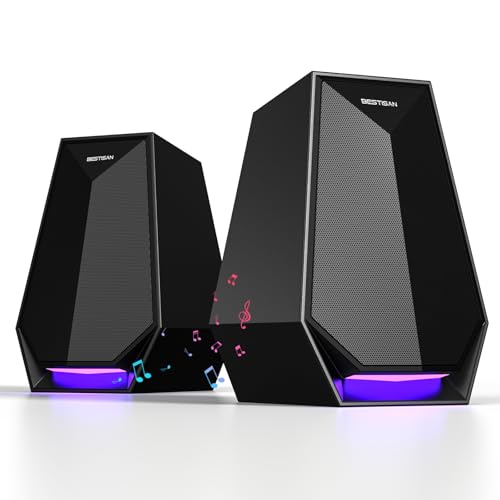
Pros
- Versatile Bluetooth, AUX, and Type-C connections
- Compact footprint ideal for small desks
- Six adjustable LED lighting effects
- Plug-and-play operation with onboard controls

Pros
- Compact footprint fits underneath most desktop displays
- Convenient physical volume knob with integrated power switch
- Audio-synced RGB lighting with multiple display modes
- Simple plug-and-play setup requires no dedicated software
Cons
- Requires both USB power and 3.5mm audio connections
- No documented Bluetooth or wireless audio support
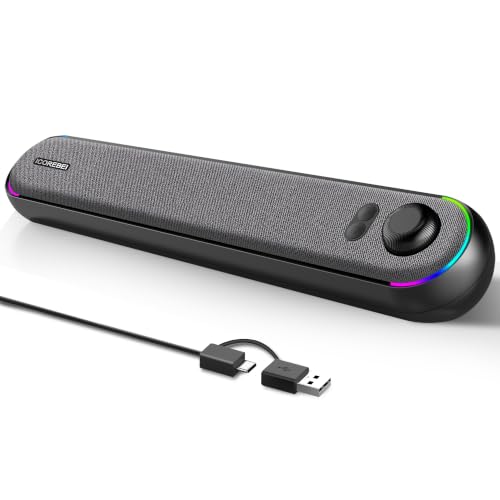
Pros
- Single-cable USB audio and power connection
- Bluetooth 5.3 plus wired USB connectivity
- Low-profile angled design fits under monitors
- Driver-free plug-and-play operation
- Customizable RGB lighting with power toggle
Cons
- Requires constant USB power with no internal battery
- No built-in microphone for calls

Pros
- Compact profile fits easily under desktop monitors
- Integrated volume knob with power switch
- Dynamic RGB lighting with audio sync modes
- Convenient USB bus-powered operation
- Broad compatibility via standard 3.5mm connectors
Cons
- Requires tethered cables for both power and audio
- No supported wireless connectivity options
Key Differences Between Budget Gaming Audio Formats
Stereo separation and power handling determine how games sound at your desk. Compact soundbars keep cables tidy beneath a monitor on modern gaming desks for dual monitors, but their closely spaced drivers narrow positional soundstage cues.
Discrete 2.0 or 2.1 configurations allow wider satellite placement to improve directional cues in competitive titles. However, standalone subwoofers demand floor or desk space and rely on separate wall power rather than standard USB ports. For tactical communication, pair these speakers with gear from our gaming headsets category to avoid desktop audio bleed into voice chat.
Cyber Acoustics CA-3090 2.1 Speaker System: Dedicated Subwoofer Performance
The Cyber Acoustics CA-3090 2.1 Speaker System, 18W remains a traditional three-piece audio solution. It features an 18W peak output profile backed by 9W continuous RMS power. A four-inch side-firing polycarbon subwoofer pairs with twin two-inch satellite drivers to produce audible lower-frequency response.
A desktop control pod provides easy access to master volume and system power, while the subwoofer unit houses a separate bass adjustment dial. Because it runs on an included 110V AC wall adapter, this system avoids the low power limits of standard USB ports. Its primary limitation is cable clutter, as multiple wires connect the satellites, control pod, and bass enclosure.
BESTISAN Computer Gaming Speakers: High Wattage and Triple Input Flexibility
The BESTISAN Computer Gaming Speakers for Desktop PC offer an active 2.0 stereo footprint rated up to 30W of driver output. They fit neatly on either side of a monitor, providing wider left-and-right channel separation than single soundbars.
Connectivity options include standard 3.5mm AUX, modern USB Type-C, and wireless Bluetooth. Six selectable LED lighting modes allow users to adjust aesthetic glow or match desk themes. While driver volume is generous for close-up desktop gaming, low-end bass impact lacks the physical depth of a dedicated subwoofer cabinet.
Redragon GS560 RGB Desktop Soundbar: Streamlined Under-Monitor Profile
The Redragon GS560 RGB Desktop Soundbar measures approximately 16 inches wide, designed specifically to slide directly beneath flat or curved displays. An analog front-facing knob handles power toggling and volume adjustments in a single physical dial.
This unit draws power via a standard USB cable while receiving audio signals through a 3.5mm auxiliary jack. Dynamic lighting accents sync along the front grille with touch-sensitive backlighting controls. The alternative Redragon GS560 RGB Desktop Soundbar configuration shares the same compact 16-inch chassis, providing simple plug-and-play operation for space-constrained desks with modest volume needs.
ICOREBEI Computer Speakers USB Powered SoundBar: Integrated USB-C Audio Delivery
The ICOREBEI Computer Speakers USB Powered SoundBar combines dual full-range drivers with an internal passive bass radiator inside an angled chassis. The upward tilt directs near-field sound straight toward the listener to enhance dialogue clarity during gaming sessions.
Its standout feature is single-cable USB-C connection capability, handling both power and digital audio transmission without requiring analog 3.5mm connections or driver software. It also supports Bluetooth 5.3 for mobile device pairing, though continuous USB power remains mandatory because the unit does not contain an internal battery.
Technical Comparison of 5 Budget Gaming Audio Options
| Model | Form Factor | Stated Power | Primary Inputs | Power Source |
|---|---|---|---|---|
| Cyber Acoustics CA-3090 | 2.1 Speaker System | 18W Peak / 9W RMS | 3.5mm AUX | 110V AC Adapter |
| BESTISAN Desktop PC Speakers | 2.0 Stereo Pair | 30W | USB-C, AUX, Bluetooth | USB / DC Cable |
| Redragon GS560 Soundbar | Compact Soundbar | Not specified | 3.5mm Audio | USB-A Powered |
| ICOREBEI USB SoundBar | Angled Soundbar | Not specified | USB-C Digital, Bluetooth 5.3 | USB-C Powered |
How to Select Gaming Speakers in the Entry-Level Tier
Desktop dimensions determine your ideal audio format. If your desk accommodates extra wiring and you prefer rumble in vehicle engines or shooters, select a 2.1 setup with an independent subwoofer. The physical air displacement of a dedicated bass driver cannot be duplicated by small soundbars.
If clear desk space is your priority, soundbars like the Redragon GS560 or ICOREBEI USB-C bar eliminate satellite cable clutter. Look for angled speaker housings or dedicated volume dials so you can make quick volume adjustments mid-match without opening software control panels.
Frequently Asked Questions
Can USB-powered speakers provide sufficient volume for PC gaming?
USB-powered speakers provide plenty of volume for near-field desk setups where you sit two to three feet away. However, they lack the high wattage needed to fill larger rooms without introducing distortion at maximum volume levels.
Are soundbars or 2.0 bookshelf speakers better for gaming accuracy?
Separate 2.0 speakers produce better positional audio because you can place them on opposite sides of your monitor. Soundbars condense left and right channels into a compact 16-inch bar, which narrows the acoustic soundstage.







Write Your Review
No reviews yet. Be the first to share your experience!