

Finding the best under $50 gaming mouse no longer requires settling for erratic optical sensors or stiff cables. Modern budget mice routinely feature zero-acceleration sensors, 1000Hz polling rates, and reliable switches suitable for fast-paced titles. Whether you are building an entry-level battlestation or pairing a peripheral with a gaming PC under $1500, solid tracking and ergonomic stability are readily achievable within this price tier.
Your main decision comes down to intended genres, preferred grip style, and connection type. Wired mice in this budget category often provide higher native tracking accuracy and lighter overall shells. In contrast, wireless mice provide cleaner desk setups and greater mobility, though they require battery management or occasional recharging breaks.
Quick Picks: Top Gaming Mice Under $50

Pros
- Dual connectivity via Bluetooth and Logi Bolt USB
- SilentTouch mechanism drastically reduces clicking noise
- Long 24-month battery life on one AA battery
- Adaptive SmartWheel handles detailed and fast scrolling
- Customizable side shortcuts through Logi Options+
Cons
- Form factor is limited to small and medium hands
- Uses a replaceable AA battery instead of USB-C charging

Pros
- Versatile 2.4GHz, Bluetooth, and USB-C wired connections
- Adjustable tracking up to 24,000 DPI with 1000Hz polling
- Up to 250 hours of wireless battery life
- Convenient dedicated rapid fire hardware key
- Ergonomic contoured profile for medium and large hands
Cons
- Configuration software is not supported on macOS
- Dedicated rapid fire key cannot be remapped in software

Pros
- Lightweight 67g honeycomb chassis
- Responsive Pixart 3360 optical sensor
- Flexible paracord cable minimizes drag
- Virgin PTFE mouse skates provide smooth gliding
- Durable Omron switches rated for 20M clicks
Cons
- Tethered wired connection limits movement range
- Designed primarily for medium and large hands
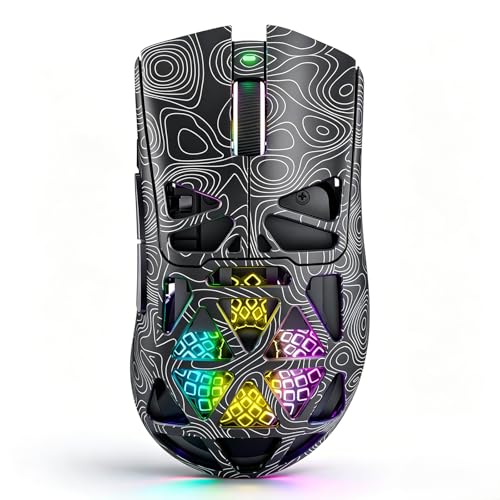
Pros
- Tri-mode wireless and USB-C wired connectivity
- Lightweight breathable honeycomb shell design
- Fast Trigger button for rapid shooting commands
- Up to 1000Hz polling rate for low latency
- Play-while-charging support via USB-C
Cons
- Honeycomb openings expose internal components to dust
- Configuration software requires downloading via external shortlink

Pros
- Dual HyperSpeed wireless and Bluetooth connectivity options
- Up to 535 hours of extended battery life
- Nine programmable buttons for custom macro setups
- Durable mechanical switches rated for 60M clicks
- High-precision 18,000 DPI optical sensor
Cons
- Configuration and optimization require Razer Synapse software
- Battery life varies depending on usage conditions

Pros
- Flexible tri-mode wireless and wired connectivity
- Four modular magnetic side plates included
- Up to 16 programmable macro buttons
- Web-based configuration saves directly to onboard memory
- Large 1000mAh rechargeable battery capacity
Cons
- Ergonomic contour is restricted to right-handed users
- Honeycomb shell design leaves internals open to debris

Pros
- High-precision HERO sensor up to 25,600 DPI
- Eleven fully programmable buttons
- Adjustable balance with five removable weights
- Dual-mode hyper-fast scroll wheel
- Tensioned mechanical switches for crisp clicks
Cons
- Tethered wired design restricts cable-free movement
- Full RGB customization requires Logitech Gaming Software

Pros
- Dual connectivity via Bluetooth and Logi Bolt receiver
- Stationary thumb design saves desk space
- Rated for up to 18 months on one battery
- Quiet clicks minimize workspace noise
- Customizable buttons via Logi Options+ app
Cons
- Uses disposable AA battery instead of USB-C recharging
- Trackball cage requires periodic manual cleaning

Pros
- Ergonomic design with supportive thumb rest
- High-precision 26K DPI optical sensor
- Dual-mode HyperScroll tilt wheel
- 11 programmable macro and action buttons
- Fast 0.2ms optical switch actuation
Cons
- Tethered wired cable limits desk mobility
- Right-handed ergonomic layout is unsuitable for left-handed users
- Full feature customization requires Razer Synapse software
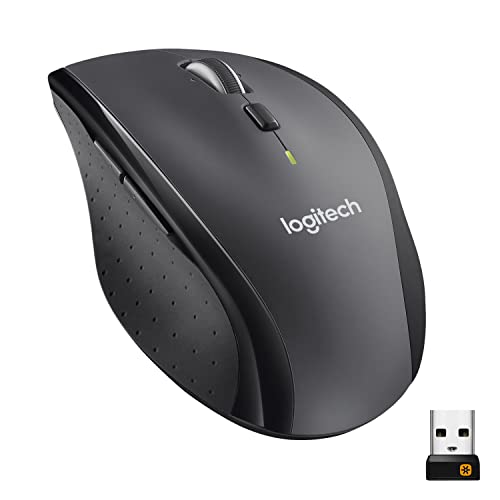
Pros
- Up to three years of battery life
- Hyper-fast frictionless metal scroll wheel
- Logitech Unifying receiver connects multiple devices
- Comfortable sculpted right-handed design
- Accurate tracking on polished and wood surfaces
Cons
- Design is strictly restricted to right-handed users
- Requires a free USB-A port for wireless connectivity
Detailed Analysis of the Best Under $50 Gaming Mice
Logitech G502 Hero Wired Gaming Mouse – Black
The Logitech G502 Hero Wired Gaming Mouse – Black remains a benchmark for control-focused players. Its HERO sensor scales up to 25,600 DPI with zero hardware smoothing or acceleration, ensuring consistent tracking during rapid mouse swipes. With 11 programmable inputs and a dual-mode hyper-fast scroll wheel, it gives players extensive macro options for complex loadouts.
Logitech equips this model with five removable 3.6-gram weights, letting users customize center-of-gravity balance to match their palm or claw grip. Mechanical switch spring tensioning keeps button actuations tactile and rapid. However, the relatively heavy base chassis may feel cumbersome for dedicated FPS players seeking an ultralight setup.
Razer Basilisk V3 Customizable RGB Wired Ergonomic
The Razer Basilisk V3 Customizable RGB Wired Ergonomic is engineered for right-handed comfort with an integrated thumb rest and 11 programmable controls. Its Focus+ 26,000 DPI optical sensor tracks swift flick shots without jitter or spinouts. The standout HyperScroll tilt wheel allows toggling between tactile notches and free-spinning action for quick inventory scrolling.
Razer utilizes second-generation optical switches rated for 70 million clicks, eliminating unintended double-clicks through light-beam actuation. Dynamic multi-zone RGB lighting covers the base skirt and scroll wheel for desktop customization. The primary trade-off is the non-detachable braided cable, which requires adequate desk clearance to prevent edge drag.
Razer Basilisk V3 X HyperSpeed Customizable
For players who prefer a cordless layout, the Razer Basilisk V3 X HyperSpeed Customizable brings the classic Basilisk shape to budget wireless tiers. It features dual-mode connectivity: low-latency 2.4GHz Razer HyperSpeed for competitive gaming and Bluetooth for casual productivity. Power is supplied via a single AA battery, yielding up to 285 hours over 2.4GHz or 535 hours on Bluetooth.
The Razer 5G Advanced 18,000 DPI sensor and Gen-2 mechanical switches ensure crisp response during intense matches. You get nine remappable buttons via Razer Synapse software. Because it relies on standard disposable or rechargeable AA cells, the overall mouse weight is heavier than wired alternatives, and it lacks internal USB-C charging.
Glorious Model O Wired Gaming Mouse 67g Superlight
Weighing approximately 67 grams, the Glorious Model O Wired Gaming Mouse 67g Superlight targets competitive tactical shooters. Its ventilated honeycomb shell lowers total mass without sacrificing structural rigidity, allowing for rapid direction changes during low-DPI aiming. Underneath, pure virgin PTFE feet provide smooth gliding across cloth and hard mousepads alike.
The interior houses a Pixart 3360 sensor with a 1000Hz polling rate and a low lift-off distance under 0.7mm. The Ascended paracord cable reduces cord drag to approximate a wireless feel. Keep in mind that the perforated shell leaves internal electronics exposed to dust and spilled liquids over prolonged use.
Redragon Wireless Gaming Mouse (M814W)
The Redragon Wireless Gaming Mouse provides tri-mode connectivity, switching between 2.4GHz wireless, Bluetooth, and wired USB-C mode. It incorporates an optical sensor capable of 24,000 DPI with a 1000Hz polling rate for fast tracking. A pre-set hardware rapid-fire key executes three clicks in a single press without extra software setup.
The internal rechargeable battery is specified for up to 250 hours of runtime in 2.4GHz mode with RGB lighting disabled. Its contoured shape suits medium to large right-handed palm grips. Buyers should note that full macro customization software is limited to Windows systems, with no official configuration suite for macOS.
SM809 Pro Tri-Mode MMO Gaming Mouse
MMO and MOBA players needing an abundance of hotkeys will find flexibility in the SM809 Pro Tri-Mode MMO Gaming Mouse. It features four interchangeable magnetic side panels, allowing users to alternate between a conventional 3-button side layout and a full 9-button grid. In total, up to 16 buttons can be mapped to custom macros and action bars.
A PAW3311 optical sensor handles tracking up to 24,000 DPI, supported by a 1000mAh internal battery for extended raid sessions. A web-based configuration utility saves button mappings directly to onboard memory across Windows, Mac, and Linux. The wide shell and thumb-grid layout may, however, feel bulky for gamers with smaller hands.
NSYCA G11 Lightweight Wireless Gaming Mouse
The NSYCA G11 Lightweight Wireless Gaming Mouse combines a breathable honeycomb chassis with versatile tri-mode wireless operation. It is powered by a PAW3311 sensor delivering up to 22,000 DPI, a 1000Hz polling rate, and six programmable inputs. A dedicated hardware fast-trigger button offers quick-fire functionality during intense FPS matches.
The built-in 500mAh battery charges via standard USB-C, allowing users to keep playing while plugged into a PC. Its lightweight frame minimizes wrist fatigue during long gaming sessions. The lightweight plastic construction may flex slightly under firm palm pressure compared to solid-shell competitors.
Logitech Signature M650 Wireless Mouse Small
While primarily built for daily office productivity, the Logitech Signature M650 Wireless Mouse Small works well for casual gaming on laptops and travel rigs. It features Logitech SilentTouch switches that dampen click noise by roughly 90 percent. The SmartWheel scroll wheel shifts between precise line-by-line ratcheting and fast document scrolling automatically.
Running on a single included AA battery, this mouse offers up to 24 months of operation via Logi Bolt USB or Bluetooth Low Energy. The compact chassis suits small-to-medium hand sizes exceptionally well. However, the standard office sensor lacks high DPI customization and competitive polling rates needed for precision first-person shooters.
Logitech Ergo M575S Wireless Bluetooth Trackball
Gamers with limited desk area or repetitive strain concerns can consider the Logitech Ergo M575S Wireless Bluetooth Trackball. Thumb-driven navigation removes the need to slide the mouse base across a surface, making it ideal for compact workstation environments. Its sculpted form factor keeps the forearm and wrist in a relaxed, natural posture.
Connectivity is handled through either Bluetooth or a Logi Bolt USB receiver, powered up to 18 months by an AA battery. Three programmable buttons allow assignment of essential shortcuts using Logi Options+. While capable for strategy games and turn-based RPGs, the thumb trackball mechanism is not suited for twitch reflex FPS aiming.
Logitech M705 Marathon Full Size 2.4 GHz
The Logitech M705 Marathon Full Size 2.4 GHz focuses on extreme battery efficiency, boasting up to three years of use on standard AA batteries. Its sculpted, right-handed contour supports palm grip styles comfortably. Dual thumb buttons and a frictionless hyper-fast scroll wheel simplify navigation across web pages and operating systems.
Laser-grade tracking operates reliably across varied desk surfaces without a specialized mousepad. The compact Logitech Unifying receiver enables multi-device pairing on a single USB port. Because it lacks a gaming-grade optical sensor and high polling rate, it is best suited for turn-based titles and mixed work-and-play setups.
Key Factors When Choosing a Budget Gaming Mouse
Sensor capability is the foundation of any reliable gaming peripheral. Look for documented sensors such as the Logitech HERO, Razer Focus+, or Pixart 3360/3311 that track without acceleration or angle snapping. A reliable 1000Hz polling rate ensures movements register on your display every millisecond, matching the speed of a low-latency connection from modern gaming routers.
Weight and chassis dimensions determine hand comfort over long gaming sessions. Ultralight honeycomb mice under 70 grams favor rapid arm flicking in tactical shooters. Heavier, feature-packed ergonomic mice offer contoured thumb rests, programmable side clusters, and adjustable weight trays that suit palm grip styles and macro-heavy titles.
Frequently Asked Questions
Can an under $50 gaming mouse compete in esports titles?
Yes. Budget mice from established brands frequently use identical or slightly tuned versions of flagship optical sensors. As long as the mouse offers a 1000Hz polling rate, consistent DPI steps, and zero software smoothing, your in-game precision will not be limited by the hardware.
Is wired or wireless better in the under $50 category?
Wired options under $50 generally provide lighter shells and higher-tier sensors without charging concerns. Budget wireless mice offer cable-free convenience and hybrid Bluetooth modes, but they often add weight due to internal batteries or standard AA cells.
Are honeycomb mouse designs durable?
Perforated honeycomb shells are structurally rigid when molded from high-grade ABS plastic. The primary drawback is susceptibility to dust, pet hair, and moisture reaching the circuit board, requiring periodic cleaning with compressed air.
Which Mouse Should You Pick?
If you want proven tracking performance and extensive macro flexibility, the wired Logitech G502 Hero and Razer Basilisk V3 offer the most comprehensive feature sets under $50. For competitive FPS players prioritizing speed and low hand fatigue, the Glorious Model O provides a responsive ultralight chassis with smooth PTFE skates. If clean desk ergonomics and cordless freedom matter most, the Razer Basilisk V3 X HyperSpeed delivers dependable low-latency wireless play.




Write Your Review
No reviews yet. Be the first to share your experience!