

Samsung’s T9 models advertise up to 2,000 MB/s, the fastest stated transfer rate in this group. Lexar’s ES3 and Samsung’s T7 advertise up to 1,050 MB/s read speeds, which can suit storage expansion and game-library transfers when your device supports their interface.
These are portable USB drives, not internal upgrades. Check your PC or console’s USB requirements and game-installation rules before buying. USB 3.2 Gen 2×2’s higher advertised rate requires a compatible host connection, and real transfer speeds depend on the connected system.
Recommended External SSDs

Pros
- Up to 1050MB/s read and 1000MB/s write speeds
- Lightweight 42-gram compact design
- Lexar DataShield 256-bit AES encryption included
- Compatible with PC, Mac, consoles, and mobile devices
Cons
- No MagSafe mounting functionality
- Incompatible with iPhone 14 and earlier models
- Requires USB 3.2 Gen 2 host for maximum speeds
Pros
- Read and write speeds up to 2,000 MB/s
- Supports iPhone 15 ProRes 4K at 60fps
- Dynamic Thermal Guard helps maintain steady temperatures
- Compact and lightweight 0.27-pound enclosure
- Firmware and health monitoring via Samsung Magician
Cons
- Requires USB 3.2 Gen 2x2 for peak performance
- iPhone ProRes recording recommends using the included cable
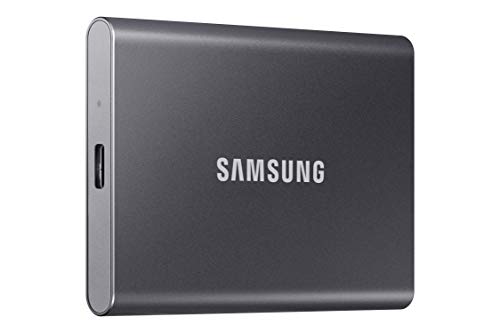
Pros
- Read speeds reaching up to 1,050 MB/s
- Durable aluminum casing with 6-foot drop resistance
- Extremely lightweight at just 0.13 pounds
- Direct 4K 60 fps ProRes recording support
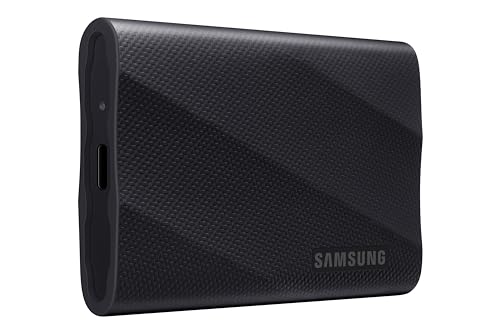
Pros
- Up to 2,000 MB/s read and write speeds
- Fast USB 3.2 Gen 2x2 interface
- Direct iPhone 15 ProRes 4K 60fps recording support
- Integrated Dynamic Thermal Guard for heat management
- Compact and portable lightweight form factor
Cons
- Full transfer speeds require USB 3.2 Gen 2x2 hardware
- Optimal iPhone video recording requires specific cable use
How These Drives Differ
| Drive | Capacity | Interface and stated speed | Useful distinction |
|---|---|---|---|
| Lexar ES3 | 1TB | USB 3.2 Gen 2, up to 1,050 MB/s read and 1,000 MB/s write | 42 g; 10.5 mm thick; DataShield 256-bit AES encryption software |
| Samsung T9 | 1TB or 2TB | USB 3.2 Gen 2×2, up to 2,000 MB/s | Thermal management feature; higher capacity option |
| Samsung T7 | 1TB listed | USB 3.2 Gen 2, up to 1,050 MB/s read and 1,000 MB/s write | Aluminum body; stated shock resistance and fall protection up to 6 feet |
Choosing an External SSD for Gaming
Match the USB interface to your system
The T9 uses USB 3.2 Gen 2×2, while the ES3 and T7 use USB 3.2 Gen 2. Check the exact port and supported USB mode on your PC before paying for a drive’s peak-speed capability. A connector’s shape alone does not confirm that it supports a particular transfer rate.
Check console storage rules
Product listings name console compatibility, but they do not establish which games can run from an external drive. Console rules vary by generation and game. Verify the console maker’s storage guidance, required formatting, and whether external storage can store, launch, or transfer the games you play.
Choose capacity for your library
Both T9 capacities are listed, while the ES3 and T7 options here are 1TB. Consider the size of your installed games and whether the drive will also hold captures, backups, or work files. Keep capacity needs separate from speed: more space does not mean faster transfers.
Understand speed claims
Advertised maximum transfer rates describe drive specifications, not guaranteed gaming load times or measured performance in a particular PC. Game loading also depends on the host, software, and workload. For routine storage expansion, interface compatibility and capacity may matter more than the T9’s higher peak rate.
Frequently Asked Questions
Can an external SSD store PC games?
These products are portable external drives, but the supplied information does not confirm compatibility with every PC game launcher or installation setup. Check your launcher’s storage options and format the drive as required before moving a library.
Is the Samsung T9 faster on every PC?
No. Its advertised rate reaches up to 2,000 MB/s over USB 3.2 Gen 2×2, so the host must support that interface to access its peak capability. Actual transfer rates also vary with system and workload.
Final Recommendation
Choose the Samsung T9 1TB for the highest stated speed when your PC supports USB 3.2 Gen 2×2; choose the 2TB model when capacity matters more. The Lexar ES3 suits buyers prioritizing a light, compact drive, while the Samsung T7 adds specified drop protection. For PC and console use, confirm interface, formatting, and game-running rules first. For broader setup choices, see our gaming PC recommendations.






Write Your Review
No reviews yet. Be the first to share your experience!