

Redragon K585 suits players who want programmable macro keys and switch customization. RedThunder is a simpler choice for plug-and-play use and recorded macros.
Both are wired, one-handed keypads intended to supplement a main keyboard, not replace every key for general PC use. Compare macro controls, switch options, software needs, and supported operating systems before choosing.
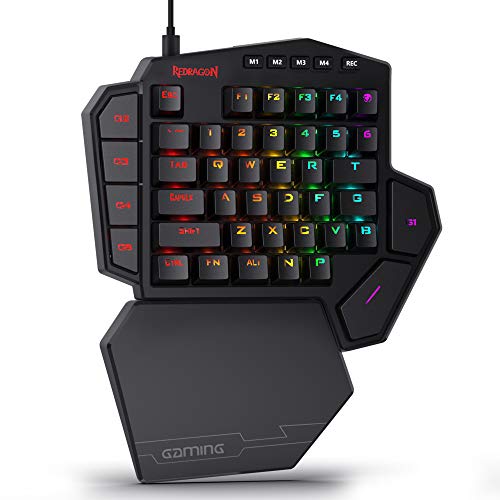
Pros
- Hot-swappable sockets compatible with 3-pin and 5-pin switches
- Dedicated USB pass-through port for peripherals
- Seven onboard macro keys across four switchable profiles
- Detachable magnetic wrist rest offers ergonomic flexibility
- Compact footprint expands desk space for mouse mobility
Cons
- Cannot replace a standard keyboard for regular typing
- Wired-only design restricts cable routing options
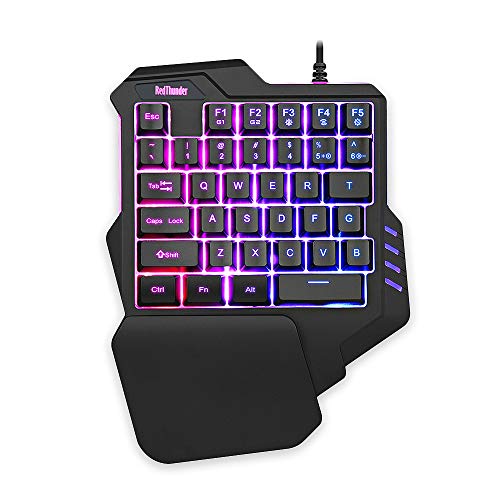
Pros
- Compact footprint saves desk space
- Full 35-key anti-ghosting capability
- Built-in wrist rest for ergonomic support
- Hardware macro recording without additional software
- Driver-free plug-and-play connectivity
Cons
- Limited key count unsuitable for general typing
- Only two macro recording shortcut options
- Backlighting restricted to preset colors and modes
Redragon K585 Wired One-Handed RGB Gaming Keypad: Best for Customization
The K585 provides seven onboard macro keys, with support for 28 assignments across four profiles. That setup suits MMO and MOBA players who want frequently used command sequences within reach.
Its socket accepts most 3-pin or 5-pin switches, allowing switch changes without soldering. A USB pass-through, detachable magnetic wrist rest, and configurable RGB lighting add setup flexibility.
Pros: Multiple macro profiles, hot-swappable switch support, USB pass-through, detachable wrist rest, and software-based macro and lighting customization.
Cons: Deeper customization relies on its software, and switch compatibility is described as covering most rather than every 3-pin or 5-pin switch. Wired connection only.
Who should skip it: Skip this model if you want a driver-free keypad or do not need macro profiles and switch customization.
RedThunder One Handed Gaming Keyboard RGB Backlit: Best for Simple Setup
RedThunder has 35 keys with anti-ghosting and two macro recording slots, assigned through FN+F1 and FN+F2. Its advertised 3 ms response specification comes from the manufacturer; it is not an independently measured result.
The keypad is driver-free and advertised as compatible with Windows 10, 8, 7, Vista, ME, Mac, Linux, and IBM systems. Check your operating system and game configuration before purchase, since the provided details do not specify platform-specific setup steps.
Pros: Plug-and-play operation, anti-ghosting across all 35 keys, two recordable macros, and seven selectable backlight colors with static and breathing modes.
Cons: Only two macro recording slots are specified, and lighting choices are less extensive than the K585’s listed 16.8 million colors and five modes. Switch hot-swapping and USB pass-through are not specified.
Who should skip it: Skip this model if you need several saved macro profiles, switch replacement, or a USB pass-through port.
How to Choose a Onehanded Gaming Keypad
Start with keybinds and macros. A keypad works best when its available keys cover the movement, abilities, and commands you use regularly. K585 lists seven macro keys and four profiles; RedThunder lists two macro recording slots.
Check switch preferences. K585 supports switch swaps through its socket, useful for users who want to change key feel. RedThunder’s supplied specifications do not describe replaceable switches.
Match software to your setup. RedThunder is described as driver-free and compatible with several operating systems. K585’s deeper macro and lighting customization uses Pro Software, so consider whether installing and configuring software fits your preferences.
Consider desk connections and comfort features. K585 includes USB pass-through and a detachable wrist rest. RedThunder lists a large wrist rest and portable design, but the supplied details do not specify pass-through connectivity.
For broader layouts and full-keyboard options, see our guides to gaming keyboards for MMO games and compact keyboards.
Final Recommendation
Choose Redragon K585 if switch customization, multiple macro profiles, and USB pass-through matter most. Choose RedThunder if you prefer driver-free operation, broad stated OS compatibility, and straightforward macro recording. Check the listed features against your games and operating system before deciding.






Write Your Review
No reviews yet. Be the first to share your experience!