

For MMO hotkeys, choose a keyboard with programmable macros or full anti-ghosting first. Redragon K580 adds five dedicated macro keys, while the wired Redragon K671 offers macro editing and full-key anti-ghosting.
Compact boards save desk space but omit the number pad, and some models also reduce access to dedicated keys. If you rely on many mapped commands, consider a full-size layout or pair your keyboard with an MMO mouse that has programmable side buttons.

Pros
- Compact 61-key layout maximizes mouse room
- Lightweight 65g honeycomb mouse chassis
- Spill-resistant keyboard build
- Fast optical sensor up to 7200 DPI
- Durable braided USB cables
Cons
- Lacks dedicated numeric keypad and arrow keys
- Fully wired setup requires available USB ports

Pros
- Hot-swappable linear red switches
- Full-key anti-ghosting support
- Software macro editing and remapping
- Includes four spare replacement switches
- Twelve quick-access multimedia shortcuts
Cons
- Backlight LED colors cannot be changed
- Wired-only design without wireless functionality

Pros
- 15 programmable buttons for complex keybinds
- Dedicated eight-button MMO side panel
- Ergonomic grip shape for extended sessions
- Five onboard DPI switching levels
- Customizable dynamic RGB lighting modes
Cons
- Tethered wired design limits placement flexibility
- Advanced keybinds require dedicated software setup

Pros
- Shared single USB receiver for both peripherals
- Rechargeable internal batteries for keyboard and mouse
- Durable metal top plate and double-shot keycaps
- Adjustable mouse tracking up to 3200 DPI
Cons
- Battery life rated at only 8 hours with backlighting
- Limited support for Mac OS systems
- Long initial charging requirement of eight hours

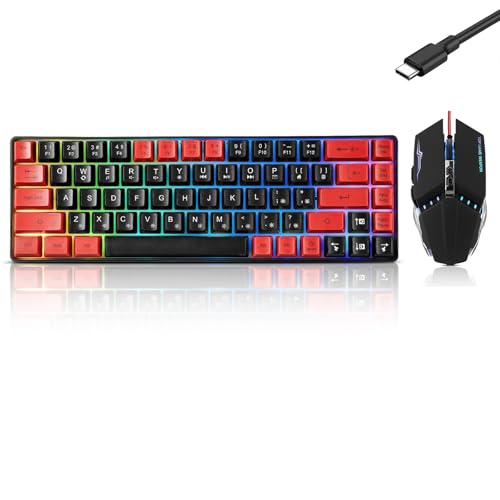
Pros
- Compact layout frees up significant mouse space
- Detachable Type-C cable aids portability
- Quiet membrane typing with simulated mechanical feel
- Retains dedicated physical arrow keys
Cons
- Uses membrane switches instead of true mechanical switches
- Anti-ghosting is limited to 26 keys
- Lacks a dedicated numeric keypad

Pros
- 18 programmable buttons including 12-key side grid
- Pixart PAW3327 sensor with up to 12400 DPI
- Includes eight-piece modular weight tuning set
- Five onboard memory profiles for rapid switching
Cons
- Macro remapping software is incompatible with macOS
- Lacks wireless connectivity options


Pros
- Space-saving 68-key layout with dedicated arrows
- Detachable Type-C cable for easy travel
- Quiet membrane operation suitable for shared rooms
- 26-key anti-ghosting for accurate key registration
Cons
- Uses membrane switches instead of authentic mechanical switches
- No integrated number pad for data entry

Pros
- IP32 water resistance guards against liquid spills
- Whisper-quiet switches rated for 20 million presses
- Included magnetic wrist rest for palm support
- Dedicated on-the-fly multimedia controls
- Broad compatibility with PC and major consoles

Pros
- Five dedicated macro keys for rapid command input
- Quiet membrane switches suitable for shared workspaces
- Adjustable mouse sensitivity from 800 to 7200 DPI
- Integrated wrist rest helps reduce typing fatigue
- Onboard memory retains lighting and DPI profiles
Cons
- Uses membrane keys rather than mechanical switches
- Wired design restricts flexible cable-free placement
- Full software customization limited to Windows systems
How These Keyboards Fit MMO Play
Redragon K580 Wired RGB Mechanical: Dedicated Macros and Full Layout
The K580 provides five dedicated G1-G5 macro keys, onboard macro recording without software, dedicated media controls, and 104-key anti-ghosting. Its hot-swappable socket supports switch changes without soldering, and stock Blue switches provide audible clicks and tactile feedback.
Pros: Five dedicated macro keys, full-size layout, full-key anti-ghosting, and optional software for advanced RGB and macro profiles. Cons: Blue switches are explicitly clicky, which may not suit quiet shared rooms; the supplied information does not specify operating-system compatibility.
Who should skip it: Players who need quiet switches or a compact keyboard.
Redragon Mechanical Gaming Keyboard Wired: Remapping and Linear Red Switches
This wired K671 supports macro editing, key remapping, and multi-function shortcuts through software. Its linear Red switches are described as smoother and requiring less force than the product’s alternative switch style, while full-key anti-ghosting supports simultaneous key presses.
Pros: Macro editing, remapping, hot-swappable Red switches, full-key anti-ghosting, and 12 multimedia shortcuts. Cons: The product data does not state layout size or operating-system compatibility, and lighting effects can change but lighting color cannot.
Who should skip it: Buyers who require confirmed platform support or dedicated physical macro keys.
SteelSeries Apex 3 Gaming Keyboard: Quiet Switches and Console Support
The Apex 3 uses whisper-quiet gaming switches rated for 20 million keypresses, with 10-zone RGB lighting, dedicated multimedia controls, and a magnetic wrist rest. Listed compatibility includes Windows, Mac OS X, Xbox Series S and X, PS4, and PS5.
Pros: Quiet switch design, included wrist rest, multimedia controls, IP32 spill resistance, and stated PC and console compatibility. Cons: The product data does not specify programmable macros or anti-ghosting, so MMO players should confirm those functions matter before choosing it.
Who should skip it: Players who need documented dedicated macro keys or extensive key remapping.
RedThunder 60% Gaming Keyboard and Mouse Combo: Compact Desk Setup
This wired set pairs a 61-key keyboard with a lightweight honeycomb mouse rated at 7200 DPI. The compact keyboard leaves more room for mouse movement, but its 60% layout lacks a number pad and offers fewer dedicated keys than full-size options.
Pros: Keyboard and mouse included, compact footprint, adjustable keyboard lighting, and a symmetrical mouse design described for left- or right-handed use. Cons: No programmable keyboard macros or anti-ghosting specification is supplied, and the small layout may constrain MMO keybind access.
Who should skip it: Players who map many abilities to dedicated keys or need documented macro software.
Redragon S101-3 PRO Gaming Keyboard and Mouse: Macro Keys in a Wired Bundle
This full-size wired combo includes five dedicated macro keys, software customization, and an anti-ghosting membrane keyboard. Its included mouse has adjustable sensitivity from 800 to 7200 DPI, while the product lists Windows 10 and 11 compatibility.
Pros: Keyboard and mouse bundled, five macro keys, anti-ghosting, wrist rest, and stated Windows 10 and 11 support. Cons: The keyboard uses membrane keys, and the product information does not specify how many simultaneous key presses anti-ghosting supports.
Who should skip it: Buyers seeking mechanical switches or confirmed compatibility beyond Windows 10 and 11.
Other Compact and Wireless Options
The GEODMAER 65% keyboards provide 68 keys, separate arrow keys, a detachable Type-C cable, and 26-key no-conflict support. The product descriptions call these membrane keyboards with mechanical feel, not mechanical-switch boards. Their compact layouts may suit limited desk space, but dedicated MMO macro keys are not listed.
The RedThunder K10 is a 2.4G wireless keyboard-and-mouse combo with a shared USB receiver and limited Mac OS keyboard support. Its keyboard is described as mechanical-feel rather than confirmed mechanical switches; the stated eight-hour continuous use applies with lighting on, and the product advises an eight-hour initial charge.
The Redragon M811 and M908 are mice, not keyboards. Each offers programmable MMO-style side buttons, with 15 editable buttons on the M811 and 18 programmable buttons on the M908. Pairing one with a keyboard can place extra ability binds on the mouse, but check software and OS support: the M908 lists Windows programming support and Mac OS normal use.
What to Consider Before Choosing an MMO Keyboard
- Macro access: Choose dedicated macro keys, software remapping, or onboard recording if your game and its rules allow those functions. K580 has dedicated keys and onboard recording; K671 supports software macro editing.
- Key rollover: Anti-ghosting details vary. K580 specifies all 104 keys, K671 specifies full-key anti-ghosting, and GEODMAER lists 26 no-conflict keys. Do not assume other models have equivalent support.
- Layout: Full-size keyboards retain more dedicated keys. The 60% RedThunder and 65% GEODMAER boards save space but omit the number pad; GEODMAER retains separate arrow keys.
- Switch and sound preference: K580’s stock Blue switches are clicky. K671 uses linear Red switches. Apex 3 is described as whisper quiet, while GEODMAER models use membrane switches with mechanical feel.
- Connection and compatibility: Wired models avoid charging requirements. K10 uses 2.4G wireless with a shared USB receiver. Confirm available USB ports, operating-system support, and software compatibility before buying.
- Console use: Apex 3 lists PS4, PS5, and Xbox Series S and X support. Do not assume other keyboards or their macro software support consoles without confirmation.
Frequently Asked Questions
Are dedicated macro keys necessary for MMO games?
No. They can make extra bindings easier to reach, but software remapping or programmable mouse buttons may provide another route. Check the game’s rules before using recorded command sequences.
Is a compact keyboard suitable for MMO play?
It can work if your essential abilities fit available keys or you use mouse buttons for extra binds. Compact layouts remove dedicated keys, so compare the exact layout against your preferred hotkey setup.







Write Your Review
No reviews yet. Be the first to share your experience!