

For best gaming keyboards for esports, prioritize switch response and layout before lighting or extra controls. Razer Huntsman V3 Pro Mini suits compact FPS setups, while SteelSeries Apex Pro TKL Gen 3 adds TKL keys and adjustable magnetic switches. Choose AULA WIN68 HE for a lower-cost wired Hall Effect option, or Logitech G PRO X 60 for wireless play.
This specification-based comparison covers ten models with different trade-offs. Advertised polling rates and switch features are manufacturer claims, not independently measured results. Check game rules and platform support before relying on features that change how simultaneous directional inputs resolve.

Pros
- Hall Effect switches with adjustable actuation
- Fast 8000Hz polling rate
- Compact 68-key layout preserves arrow keys
- Detachable wired USB connection
- South-facing RGB with web-based configuration
Cons
- Web configuration driver does not support macOS
- Wired-only connection with no wireless functionality

Pros
- Space-saving tenkeyless design
- IP32 spill and dust resistance
- Quiet keystrokes for shared spaces
- Dedicated media buttons and volume roller
- Wide PC and console compatibility
Cons
- Non-mechanical switches lack distinct mechanical tactile response
- RGB illumination is limited to 8 zones instead of per-key

Pros
- Customizable actuation between 0.1 mm and 4.0 mm
- Rapid Trigger enables faster directional resets
- Snap Tap enhances counter-strafing response
- Compact layout frees up significant desk space
- Durable doubleshot PBT keycaps resist wear
Cons
- Requires a firmware update to enable Snap Tap
- Lacks dedicated arrow, navigation, and function keys

Pros
- Gen-2 analog switches with Rapid Trigger support
- True 8000 Hz polling rate minimizes latency
- Adjustable actuation from 0.1 to 4.0 mm
- Onboard settings adjustment via LED indicator
- Durable textured doubleshot PBT keycaps
Cons
- Full-size footprint requires substantial desk space
- Heavier 3.68-pound chassis limits portability

Pros
- Fast 1.2mm linear Yellow switches with sound dampeners
- Six dedicated programmable macro keys
- Multi-function roller and dedicated media controls
- Per-key customizable Razer Chroma RGB lighting
- Built-in acoustic foam and lubricated stabilizers

Pros
- Space-saving 60% form factor
- Fast GX linear optical switches
- Reliable LIGHTSPEED wireless and Bluetooth connectivity
- Convenient onboard volume roller and media controls
- Includes durable travel carrying case
Cons
- Lacks dedicated arrow and function keys
- Requires multi-layer shortcuts for standard navigation tasks

Pros
- Adjustable actuation from 0.1mm to 4.0mm
- Rapid Trigger enables faster repeated keypresses
- Built-in OLED display for direct onboard adjustments
- Protection Mode prevents accidental key activations
- Space-saving tenkeyless form factor
Cons
- Tenkeyless layout lacks a dedicated numeric keypad
- Substantial 3.53-pound weight limits easy portability

Pros
- Gasket mount with EVA foam sound dampening
- Hot-swappable PCB accepts 3-pin and 5-pin switches
- Angled color screen displays GIFs and system status
- Pre-lubed linear switches with south-facing LEDs
- Compact 75% layout retains essential navigation keys
Cons
- Only documented for wired USB-C connectivity
- GIF uploads and macros require proprietary software

Pros
- Tri-mode connectivity via Bluetooth, 2.4GHz, and USB-C
- Single 2-in-1 USB receiver operates both peripherals
- Ten dedicated multimedia keys for direct playback control
- Mouse supports up to 1000Hz polling rate
- Keyboard battery rated up to 300 hours without RGB
Cons
- Configuration software is limited to Windows systems
- Mouse sensor tops out at 4800 DPI

Pros
- Dedicated one-touch lighting toggle button
- 19-key anti-ghosting for essential gaming inputs
- Full 104-key layout with multimedia shortcuts
- Plug-and-play setup across PC and consoles
- Adjustable backlighting brightness and breathing modes
Cons
- Simulates mechanical feel rather than true mechanical switches
- Anti-ghosting is limited to 19 keys
- Compact magnetic pick: AULA WIN68 HE, 60% layout, Hall Effect switches, adjustable actuation, and stated 8,000Hz polling.
- Compact premium FPS pick: Razer Huntsman V3 Pro Mini, analog optical switches, Rapid Trigger, and adjustable actuation.
- TKL competitive pick: SteelSeries Apex Pro TKL Gen 3, OmniPoint 3 magnetic switches and adjustable actuation.
- Wireless compact pick: Logitech G PRO X 60, LIGHTSPEED, Bluetooth, and optional USB connection.
- Full-size macro pick: Razer BlackWidow V4 X, linear switches and six dedicated macro keys.
How These Keyboards Differ
Compact 60% boards leave more desk space for mouse movement but place many commands behind Fn layers. Tenkeyless models remove the number pad while retaining more standard navigation keys. Full-size layouts favor dedicated access and familiar key placement over a smaller footprint.
Hall Effect and analog optical switches allow adjustable actuation on selected models, unlike fixed-actuation switches described here. Rapid Trigger can reset a key as it rises, supporting repeated inputs with less release travel. These features help users tune input behavior, but benefit depends on game, settings, and preference.
Recommended Models
AULA WIN68 HE Mechanical Gaming Keyboard 60%
AULA WIN68 HE combines a 60% wired layout with Hall Effect switches, adjustable actuation from 0.02mm to 3.44mm, and stated 8,000Hz polling. Its 68-key layout retains arrow keys, a useful compromise for players who want a small board without losing direct arrow access. Driver customization supports Windows, not Mac.
Pros: Adjustable actuation, rapid-trigger customization, detachable USB cable, and compact footprint. Cons: Wired only, and advanced configuration is Windows-only. Who should skip it: Mac users needing driver controls or players who require a full-size layout.
AULA WIN68 HE Mechanical Gaming Keyboard 60%
SteelSeries Apex 3 TKL RGB Gaming Keyboard
This TKL board uses whisper-quiet switches, anti-ghosting, and IP32 water and dust resistance. Dedicated media controls and a volume roller add convenient access, while broad listed support includes Windows, Mac OS X, Xbox Series S and X, PS4, and PS5. Its switch type is not identified as adjustable or magnetic in supplied specifications.
Pros: TKL layout, quiet operation, media controls, and stated IP32 protection. Cons: No documented adjustable actuation or Rapid Trigger. Who should skip it: Players specifically seeking magnetic switches or configurable actuation for rapid repeated inputs.
SteelSeries Apex 3 TKL RGB Gaming Keyboard
Razer Huntsman V3 Pro Mini 60% Esports
Razer specifies Gen-2 analog optical switches with 0.1–4.0mm adjustable actuation, Rapid Trigger, and Snap Tap. Onboard controls and an LED array let users adjust settings without software. Its 60% layout saves space, while modifier keys double as arrows when tapped. Snap Tap requires the latest firmware update.
Pros: Adjustable actuation, Rapid Trigger, onboard adjustment, and durable doubleshot PBT keycaps. Cons: Compact layout relies on layered functions, and Snap Tap needs updated firmware. Who should skip it: Users who want a number pad, dedicated navigation cluster, or a less feature-focused board.
Razer Huntsman V3 Pro Mini 60% Esports
Razer Huntsman V3 Pro 8KHz Esports
This full-size-oriented option pairs Gen-2 analog optical switches, 0.1–4.0mm adjustable actuation, Rapid Trigger, and Snap Tap with a stated 8,000Hz polling rate. A digital dial, dedicated controls, onboard adjustment, and magnetic wrist rest add convenience. Its listed feature set suits players who want competitive switch controls without a 60% layout.
Pros: 8,000Hz stated polling, adjustable optical switches, onboard settings, media controls, and included wrist rest. Cons: Larger feature set may be unnecessary for players wanting a simple compact board; Snap Tap is firmware-dependent. Who should skip it: Budget-focused buyers or anyone prioritizing a small tournament-travel layout.
Razer Huntsman V3 Pro 8KHz Esports
Razer BlackWidow V4 X Mechanical Gaming Keyboard
Yellow linear mechanical switches have a stated 1.2mm actuation point and 45g force requirement. Six dedicated macro keys, media controls, and per-key RGB support players who value direct commands and a conventional layout. Foam and lubricated stabilizers are specified for acoustics, but this model lacks documented adjustable actuation.
Pros: Six programmable macro keys, linear switches, media controls, and per-key lighting. Cons: No stated Rapid Trigger or adjustable actuation, and the full-size footprint takes more desk space than compact picks. Who should skip it: Players seeking a small board or magnetic-switch configuration.
Razer BlackWidow V4 X Mechanical Gaming Keyboard
Logitech G PRO X 60% Wireless Gaming Keyboard
Logitech offers LIGHTSPEED wireless with a stated 1ms response rate, Bluetooth, and optional USB connectivity. GX optical switches are available in linear or tactile versions, and KEYCONTROL supports customization across five layers. The compact design and included carrying case suit travel, but wireless use requires managing the adapter or Bluetooth connection.
Pros: Multiple connection options, two switch choices, configurable layers, and included case. Cons: 60% layout has fewer dedicated keys, and adjustable actuation is not specified. Who should skip it: Players who prefer wired-only simplicity or need dedicated function and navigation rows.
Logitech G PRO X 60% Wireless Gaming Keyboard
SteelSeries Apex Pro TKL Gen 3 Gaming Keyboard
OmniPoint 3 Hall Effect switches provide 40 actuation levels from 0.1mm to 4.0mm. Rapid Trigger, Rapid Tap, and Protection Mode target configurable input behavior, while an OLED display supports onboard adjustments and saved configurations. TKL preserves more navigation access than 60% boards, without a number pad.
Pros: Broad actuation adjustment, several input features, onboard display, and saved settings. Cons: The advanced controls may exceed casual needs, and the supplied details do not identify operating-system compatibility. Who should skip it: Buyers who need confirmed Mac or console support before choosing.
SteelSeries Apex Pro TKL Gen 3 Gaming Keyboard
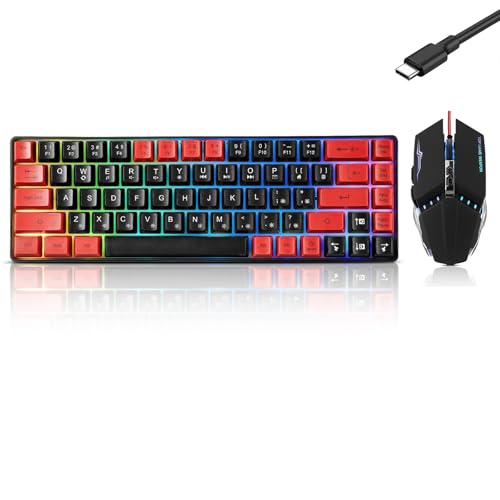
Redragon S101M-KS Gaming Keyboard and Mouse
This package includes a keyboard and 4,800 DPI mouse, with wired, Bluetooth, and 2.4GHz wireless modes. One 2.4GHz receiver serves both devices. The keyboard lists 10 independent multimedia keys, splash resistance, and up to 300 hours with RGB off, according to the product specifications. It is a bundle, not a focused adjustable-switch esports board.
Pros: Keyboard-and-mouse bundle, tri-mode connection, multimedia keys, and stated battery life with lighting off. Cons: Switch adjustability and keyboard polling rate are not specified; battery figure is an advertised claim. Who should skip it: Competitive players prioritizing documented Rapid Trigger or adjustable actuation.
Redragon S101M-KS Gaming Keyboard and Mouse
Womier SK80 75% Keyboard with Color Multimedia
The 75% layout retains more keys than a 60% board while staying compact. Its gasket mount, pre-lubed linear switches, hot-swappable PCB, and compatibility with 3-pin or 5-pin switches appeal to users who want customization. A detachable Type-C connection and stated Mac and Windows support add flexibility, but adjustable actuation is not listed.
Pros: Hot-swappable switches, 75% layout, multimedia screen, and Mac and Windows compatibility. Cons: No stated Rapid Trigger or adjustable actuation, and software controls are part of customization. Who should skip it: Esports players whose main priority is configurable competitive input behavior.
Womier SK80 75% Keyboard with Color Multimedia
Redragon K521 Upgrade Rainbow LED Gaming Keyboard
This wired 104-key board offers a full layout, multimedia combinations, and anti-ghosting for 19 keys. It lists support for Windows, macOS, PS4, PS5, and Xbox, with no driver required. The product describes its keys as mechanical-feeling, not as mechanical switches, so buyers should not assume adjustable actuation or a specific switch mechanism.
Pros: Full-size layout, plug-and-play setup, and listed PC and console compatibility. Cons: Anti-ghosting is specified for 19 keys, and advanced switch features are not listed. Who should skip it: Players who need magnetic or optical switches, Rapid Trigger, or more extensively configurable inputs.
Redragon K521 Upgrade Rainbow LED Gaming Keyboard
How to Choose an Esports Keyboard
Choose layout for your desk and key habits
A 60% keyboard frees desk space but moves many functions to key combinations. The AULA model keeps arrow keys within its 68-key layout, while the Razer and Logitech 60% options use compact layouts with layered functions. TKL models retain more direct access, and full-size boards preserve the number pad and broader key arrangement.
Understand switch features
Adjustable actuation lets users change how far a key travels before registering, within each model’s stated range. Rapid Trigger changes reset behavior based on key movement and is aimed at repeated inputs. These are not universal requirements for esports, and fixed-switch boards may suit players who prefer simpler setup.
Check polling and connection claims carefully
The AULA and full-size Razer list 8,000Hz polling, but the supplied specifications do not establish real-world advantage in a specific game. Logitech lists a 1ms LIGHTSPEED response rate and separate Bluetooth and USB options. Confirm the connection mode and any software or firmware requirements that fit your computer and competition rules.
Verify compatibility and configuration needs
AULA’s web driver supports Windows only. Womier lists Windows and Mac compatibility, while the Redragon K521 lists several PC and console systems. Other models have narrower or unspecified compatibility details here, so confirm support for your exact OS or console before purchase. Check whether desired features need software, an adapter, or firmware updates.
Frequently Asked Questions
Is an 8,000Hz keyboard polling rate necessary for esports?
No. It is a specification to compare, not proof of a measurable advantage in every game or system. Choose based on switch behavior, layout, compatibility, and whether the feature fits your needs.
Are 60% keyboards suitable for competitive play?
Yes, if compact layout and mouse room matter more than dedicated navigation keys. Review each model’s secondary-key arrangement and decide whether its layers suit your games and everyday use.








Write Your Review
No reviews yet. Be the first to share your experience!