

A gaming desktop gives you more performance per dollar than any laptop, plus the freedom to upgrade part by part over the years. This guide rounds up the current pre-built options and explains how to read their specs the way a builder would.
It is aimed at buyers who want to game now without assembling a PC themselves, from first-time buyers to experienced players refreshing an aging rig. Below are our picks, followed by a buying guide on the components and details that separate a good value from a trap.
Top Products
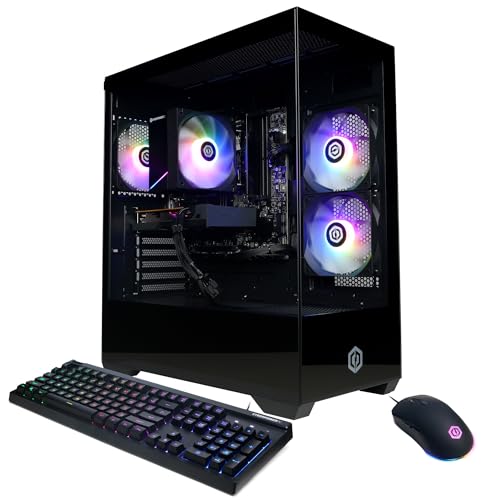


Pros
- Capable 8-core AMD Ryzen 7 5700X processor
- Generous 32GB DDR4 memory configuration
- Fast 1TB M.2 NVMe storage
- Integrated Wi-Fi and Bluetooth wireless support
- 80 Plus Bronze certified power supply
Cons
- Built on older AM4 and DDR4 platform
- Specific graphics card brand varies by unit

Pros
- NVIDIA GeForce RTX 5080 graphics hardware
- Multi-core Intel Core Ultra 9 285 processor
- 240mm heat exchanger thermal management support
- Customizable multi-zone AlienFX lighting
- One year of included onsite hardware support
Cons
- Heavy 33.89-pound chassis restricts easy movement
- Large physical footprint requires significant desktop clearance

Pros
- Generous 16GB RAM for smooth basic multitasking
- Modern Wi-Fi 6 and Bluetooth 5.0 connectivity
- Includes bundled RGB gaming keyboard and mouse
- Solid-state storage ensures fast operating system boot times
- Pre-installed Windows 11 Home operating system
Cons
- Entry-level RX 550 GPU struggles with modern AAA games
- Specific Intel Core i5 processor generation is not disclosed
- Modest 512GB SSD capacity fills quickly with large titles
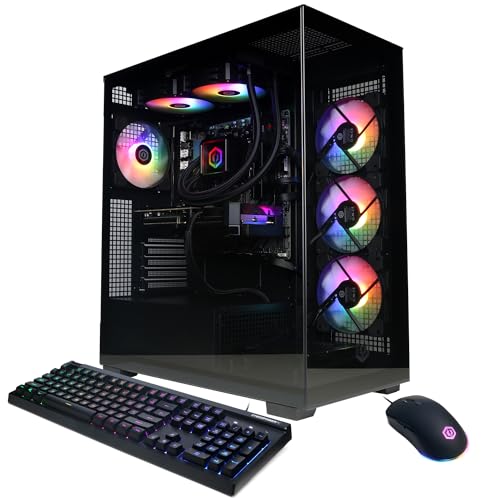
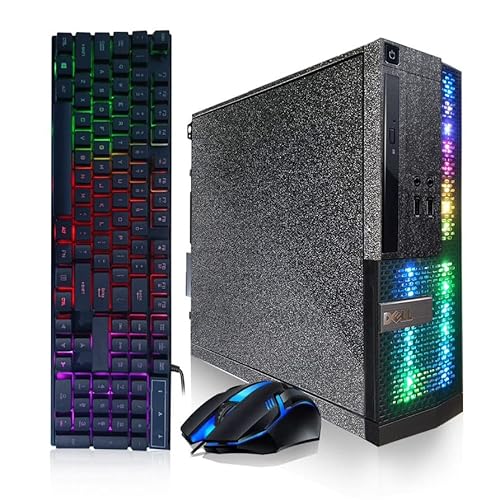
Pros
- 16GB memory for everyday multitasking
- 512GB solid-state storage
- Windows 11 Pro included
- Wi-Fi and Bluetooth connectivity
- RGB keyboard and mouse included
Cons
- Dedicated GPU is not specified
- CPU generation is not specified
- Wireless connectivity standards are not specified
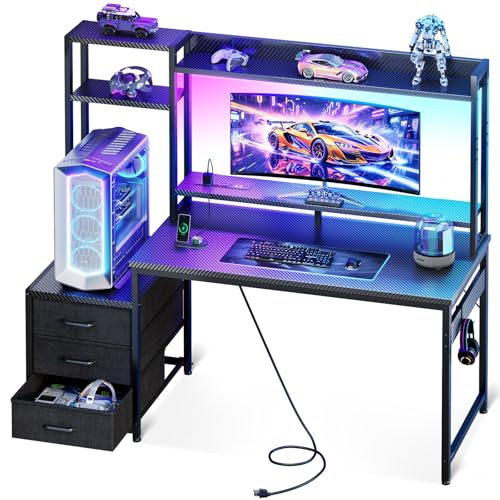
Pros
- Compact design for bedrooms and dorms
- Integrated RGB lighting with adjustable effects
- Three storage drawers reduce desktop clutter
- Reversible shelf supports flexible placement
- Includes elevated monitor stand
Cons
- 11.6-inch tower shelf may limit larger PC cases
- 18.9-inch depth provides a relatively compact workspace
- USB port specifications are not provided

Pros
- NVIDIA GeForce RTX 5070 Blackwell graphics
- 8-core AMD Ryzen 7 8700F processor
- Generous 32GB DDR5 memory and 2TB SSD
- Four pre-installed fans for active chassis airflow
- Convenient dedicated physical LED control button
Cons
- Equipped with CPU air cooling instead of liquid cooling
- Ships with Windows 11 Home rather than Pro
- Substantial 21.3-pound weight requires sturdy desk support

Pros
- NVIDIA GeForce RTX 5070 graphics card
- Intel Core Ultra 7 265F processor
- Dell 1-year onsite hardware service included
- Customizable AlienFX chassis lighting zones
- Alienware Command Center performance monitoring
Cons
- Heavy chassis weighing nearly 34 pounds
- Modest 1 TB base storage capacity
Pros
- Intel Core Ultra 7 265F multi-core processor
- NVIDIA GeForce RTX 5060 Ti dedicated graphics
- Alienware Command Center performance and lighting controls
- Customizable AlienFX chassis and stadium illumination
- Includes one year of Dell onsite service

Pros
- GeForce RTX 5070 12GB and Ryzen 7 9700X hardware
- Fast 32GB DDR5 6000MHz memory
- Integrated 11.3-inch hardware monitoring smart screen
- Robust 360mm AIO liquid cooler included
- Modern WiFi 7 wireless connectivity
Cons
- 1TB SSD capacity may fill quickly with modern games
- VGA and DVI monitors require separate adapters
Buying Guide
A prebuilt gaming desktop trades the hobby of building for the convenience of unboxing something that just works. This guide walks through the components that decide gaming performance, the corners manufacturers sometimes cut, and how to judge whether a given machine is genuinely good value.
Graphics card
The graphics card has the largest single impact on gaming performance, so it deserves most of your attention and budget. Match the GPU to your monitor and the games you play: 1080p high-refresh gaming needs far less GPU power than 4K, and buying far more card than your display can show is wasted money. Pay attention to VRAM capacity too, since modern titles use increasingly large textures, and a card that looks strong on paper can stumble if it runs short on memory. Check the exact model number rather than the series name, because manufacturers sometimes use cut-down variants with similar branding. If you are still choosing a display, our 1080p gaming monitor picks pair well with mid-range cards without overspending.
Processor
For pure gaming, a modern six to eight-core CPU is plenty, and money beyond that buys little extra frame rate. The processor handles game logic, background tasks, and streaming, so strong single-core performance matters more than a high core count for most titles. Content creation and heavy multitasking justify more cores, but a gaming-first build should prioritize the GPU once the CPU is “good enough.” Also confirm the platform: AMD and Intel sockets are not interchangeable, which affects your future upgrade options. A balanced pairing, where neither component obviously bottlenecks the other, beats a lopsided build every time.
Memory and storage
Sixteen gigabytes of RAM is the practical minimum for gaming in 2026, with 32GB giving comfortable headroom for streaming and background apps. Buy in matched pairs to enable dual-channel mode, and note that DDR4 and DDR5 are physically incompatible, so the choice must match the motherboard. For storage, a 1TB NVMe SSD is the sweet spot: 512GB fills up fast with modern game installs, and SSD speed affects load times and texture streaming. Avoid machines that pair a tiny SSD with a slow hard drive as the only storage, a cost-cutting trick that still appears. If you outgrow the stock configuration, our PC parts guide covers what to look for in upgrade components.
Power supply and cooling
The power supply is the component most often cheapened in prebuilts, and it is the one you least want failing. Check the wattage against your GPU and CPU requirements with comfortable headroom, ideally 100 to 150 watts above the estimated load, and look for an 80 Plus Bronze rating or better as a rough quality signal. Cooling matters just as much: a strong GPU in a case with one exhaust fan will thermal-throttle and run loud. Look for mesh front panels, multiple fans, and tower-style CPU coolers rather than tiny stock coolers. If a listing hides the PSU brand and wattage entirely, treat that as a warning sign about what else they are hiding.
Upgrade path
One of the quiet advantages of a desktop is upgradability, but only if the manufacturer uses standard parts. Proprietary motherboards, odd-sized power supplies, and non-standard connectors can lock you out of future upgrades, turning a desktop into a disposable appliance. Before buying, check reviews or teardown photos for standard ATX or micro-ATX boards, regular 24-pin power connectors, and a case with room for longer GPUs. A machine built on standard parts can be refreshed with a new graphics card in three years instead of replaced entirely. This is also where prebuilts from system integrators that use off-the-shelf components beat big-brand machines with custom boards.
Warranty and support
A prebuilt’s warranty is part of what you are paying for, so read it before you buy. One year of parts and labor is the baseline; better builders offer two or three years and advance replacement. Check whether opening the case to add RAM or storage voids the warranty, because some brands are reasonable about user upgrades and others are not. Also look at the support reputation: long hold times and scripted troubleshooting turn a simple RMA into a weeks-long ordeal. Keep your order documentation and take photos of the serial numbers on arrival, which speeds up any claim you might need to make.
What to check when it arrives
Do a short shakedown before the return window closes. First, verify the specs match the listing: check the GPU model, RAM amount and speed, and SSD capacity in system settings, since wrong-component shipments happen. Then remove the side panel and confirm everything is seated firmly, because graphics cards and RAM can loosen in shipping; also peel off any protective film blocking vents. Run a game or benchmark for thirty minutes and watch temperatures, listening for rattling fans or coil whine that would annoy you daily. Finally, uninstall the bloatware most prebuilts ship with, because trial antivirus and vendor utilities slow boot times for zero benefit.
Prebuilt versus building your own
Building your own PC usually gets you better component quality per dollar and full control over every part, but it costs time and carries the risk of troubleshooting. Prebuilts make sense when GPU prices are inflated, when you want a single warranty covering everything, or when you simply do not enjoy the build process. The value gap narrows during sales events, so compare a prebuilt’s price against the sum of its parts before deciding. If you are on the fence, our broader prebuilt gaming PC roundup and the under-$1500 prebuilt picks show what the market offers at different budgets.
Frequently Asked Questions
Are prebuilt gaming PCs worth it in 2026?
Often yes, depending on the builder and the price. Reputable system integrators that use standard off-the-shelf parts offer fair value, a single warranty, and zero build hassle, which suits buyers who want to game rather than tinker. The deals to avoid are big-brand machines with proprietary motherboards and weak power supplies, where the low sticker price hides expensive compromises. Compare the prebuilt’s price against buying the same components separately to see if the convenience premium is reasonable.
How much RAM and storage should a gaming desktop have?
Sixteen gigabytes of RAM and a 1TB NVMe SSD is the sensible baseline for 2026. Eight gigabytes causes stuttering once Windows, the game, and background apps are all running, while 512GB of storage fills up after a handful of modern installs. Thirty-two gigabytes of RAM is worth it for streamers and heavy multitaskers. Anything beyond that is luxury rather than necessity for gaming alone.
Can I upgrade a prebuilt gaming PC later?
Yes, if it uses standard components. Machines with regular ATX or micro-ATX motherboards, standard power connectors, and roomy cases accept new GPUs, more RAM, and extra storage without drama. Proprietary designs from some big brands use custom boards and odd power supplies that block upgrades. Check teardown photos or reviews for standard parts before you buy if future upgrades matter to you.
Do prebuilt PCs come with Windows installed?
Nearly all consumer prebuilts ship with Windows installed and activated, ready to use out of the box. Some budget or barebones systems ship without an OS to hit a lower price, so confirm in the listing rather than assuming. If Windows is included, it is usually the Home edition, which is fine for gaming. Factor the cost of a license into your comparison if you are weighing a no-OS machine.
What should I do first when my prebuilt arrives?
Verify the components match what you ordered, reseat anything that may have loosened in shipping, and remove protective films from vents and glass panels. Then stress-test it for half an hour while monitoring temperatures, and uninstall the pre-installed bloatware. Doing this inside the return window means any defect or misrepresentation is still easy to resolve.
Is it cheaper to build my own gaming PC?
Usually, but not always. Building yourself avoids the assembly markup and lets you choose every component’s quality, which typically saves money or buys better parts for the same budget. Prebuilts can match or beat DIY pricing during sales or when graphics card prices spike, since integrators buy in bulk. Price out both options with current component prices before deciding, and value your own time honestly.



Write Your Review
No reviews yet. Be the first to share your experience!