

The best mouse under $100 depends first on the shape and controls you need, then on wireless convenience and sensor features. For a customizable wireless all-rounder, consider the Razer Basilisk V3 Pro; MMO players may prefer the Corsair Scimitar RGB Elite.
This specification-based comparison covers six wired and wireless models with different strengths and trade-offs. Check your preferred grip, connection needs, and game genres before choosing, because a high DPI figure alone does not determine suitability.

Pros
- Three connection modes
- Up to 26,000 DPI
- Up to 85-hour advertised battery life
- Programmable buttons and RGB profiles
- Hollowed-out design promotes airflow
Cons
- Polling rate tops out at 1,000 Hz
- Only five programmable buttons
Pros
- Versatile 30K optical sensor tracks on glass
- 11 programmable buttons for complex control setups
- Dual-mode tactile and free-spin scroll wheel
- Durable optical switches eliminate mechanical double-click issues
- Up to 150 hours of wireless Bluetooth battery
Cons
- 8000 Hz polling requires separately sold accessories
- Battery life drops to 32 hours at 8KHz

Pros
- Native 8,000Hz hyper-polling rate
- High-resolution 26,000 DPI optical sensor
- Durable anodized aluminum frame
- Fast and responsive optical switches
- Six-axis gyro for precise lift-off tracking

Pros
- High-precision Hero 25K optical sensor
- 11 programmable buttons for custom macros
- Low-latency Lightspeed wireless connection
- Dual-mode hyper-fast scroll wheel
- Compatible with PowerPlay wireless charging
Cons
- PowerPlay wireless charging system sold separately
- Full 25,600 DPI requires Logitech G HUB update

Pros
- Up to 532 hours of Bluetooth battery life
- High-precision 26,000 DPI Marksman sensor
- Ten programmable buttons for custom keybinds
- Comfortable asymmetric shape for larger hands
- Versatile 2.4GHz and Bluetooth dual-mode wireless
Cons
- Asymmetric shape restricted to right-handed users
- Bulky profile unsuitable for smaller hands or fingertip grips
Pros
- 17 fully programmable macro buttons
- Repositionable 12-button side slider system
- Accurate 18,000 DPI PixArt optical sensor
- Durable 50-million-click Omron switches
- Contoured ergonomic shape with a finger rest
Cons
- Tethered wired-only connection
- Right-hand ergonomic design limits ambidextrous use
The Razer and Logitech models offer wireless connectivity with multiple programmable controls, while the Corsair M65 is a wired FPS-focused option. GravaStar provides tri-mode connectivity in a lighter hollowed-out design, and the Ironclaw targets larger-handed palm-grip users.
For MMO and MOBA command access, the Scimitar has 17 programmable buttons and an adjustable side-button panel. These distinctions matter more than maximizing advertised DPI, especially when choosing a mouse for a particular grip or game workload.
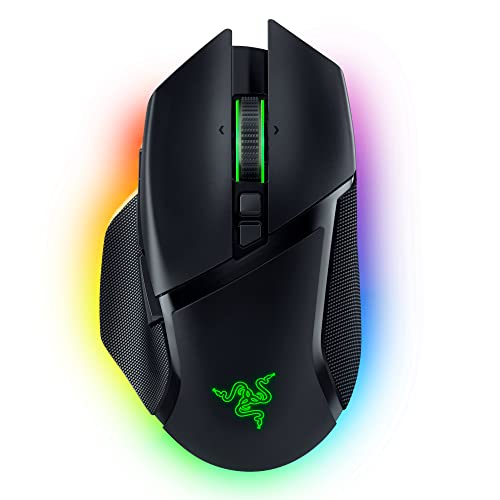
Razer Basilisk V3 Pro Customizable RGB
The Razer Basilisk V3 Pro Customizable RGB combines 10+1 programmable buttons, a Focus Pro 30K optical sensor, and Razer HyperSpeed wireless. Its tilt wheel switches between free-spinning and tactile scrolling, making it useful for gaming and rapid document navigation.
Razer specifies up to 110 hours over HyperSpeed at 1,000 Hz or 150 hours over Bluetooth; the optional 8,000 Hz setup reduces stated battery life. Its higher polling-rate accessories are sold separately, and its many controls may be unnecessary for users seeking a simple FPS mouse.
Pros: Multiple connection options, extensive button customization, and a versatile scroll wheel. Cons: 8,000 Hz polling requires a separately sold accessory and shortens stated battery life. Who should skip it: Players who want a minimal, lightweight control layout.
GravaStar MercuryM2 Wireless Gaming Mouse
The GravaStar MercuryM2 Wireless Gaming Mouse has a PAW3395 sensor, a 1,000 Hz polling rate, and a 26,000 DPI maximum. Its wired, 2.4 GHz, and Bluetooth modes give PC and Mac users connection flexibility, while the 79-gram hollowed-out shell distinguishes its design.
Five programmable buttons support macros and customized functions, and the stated battery life reaches up to 85 hours. Its button count is modest beside the MMO-focused Scimitar, and the open shell may not appeal to users who prefer a conventional exterior.
Pros: Three connection modes, customizable controls, and a comparatively low listed weight. Cons: Five buttons provide fewer dedicated inputs than several alternatives here. Who should skip it: MMO players who need a large bank of side buttons.
Logitech G502 Lightspeed Wireless Gaming Mouse
The Logitech G502 Lightspeed Wireless Gaming Mouse pairs Logitech Lightspeed wireless with 11 customizable buttons and a Hyper-fast scroll wheel. Its HERO 25K sensor supports up to 25,600 DPI, and Logitech specifies 1:1 tracking with more than 400 IPS.
Logitech’s optional PowerPlay system can charge compatible mice while in use, but that charging system is sold separately. This model suits players who want many controls and wireless operation, though buyers seeking a wired setup or built-in MMO keypad should compare other options.
Pros: Wireless gaming connection, 11 programmable buttons, and fast scrolling. Cons: PowerPlay charging requires a separately purchased system. Who should skip it: Users who do not need multiple buttons or prefer wired mice.
Corsair M65 RGB Ultra Wired Adjustable Weight FPS
The Corsair M65 RGB Ultra Wired Adjustable Weight FPS is a wired mouse with an anodized aluminum frame and a MARKSMAN optical sensor rated for up to 26,000 DPI and 650 IPS. Its 8,000 Hz native polling capability and sensor-fusion lift-off controls are aimed at precise FPS-style repositioning.
The wired connection avoids battery management but limits movement compared with the wireless picks. Its feature set is most relevant to players prioritizing FPS control; buyers who need extensive programmable inputs should consider the G502 or Scimitar instead.
Pros: Wired operation, high advertised polling rate, and an aluminum frame. Cons: The cable may not suit users who prefer wireless freedom, and extensive button counts are not specified. Who should skip it: Wireless-first users or players needing many dedicated commands.
Corsair IRONCLAW Wireless SE Gaming Mouse
The Corsair IRONCLAW Wireless SE Gaming Mouse – Black is designed for larger hands and right-handed palm grips. It has 10 programmable buttons, a MARKSMAN sensor rated at 26,000 DPI, and 2.4 GHz and Bluetooth wireless connections.
Corsair lists up to 285 hours of battery life over 2.4 GHz and 532 hours over Bluetooth. Those figures make the stated runtime a notable feature, but its shape is purpose-built for a particular hand size and grip rather than universal comfort.
Pros: Wireless connectivity, 10 programmable buttons, and long stated battery life. Cons: Its asymmetric shape is specifically intended for right-handed users with larger hands and palm grips. Who should skip it: Left-handed users, smaller-handed players, and fingertip-grip users.
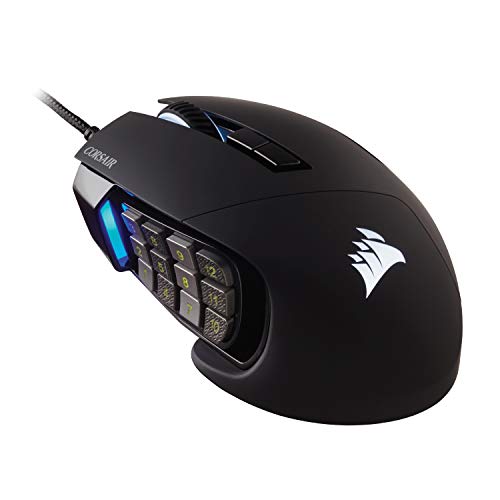
Corsair Scimitar RGB Elite Wired MMO MOBA PC
The Corsair Scimitar RGB Elite Wired MMO MOBA PC has 17 programmable buttons, including 12 side buttons that can be repositioned using its key-slider system. Its 18,000 DPI optical sensor and contoured shape support players who want many accessible commands for MMO or MOBA play.
The wired connection means it does not offer the wireless flexibility of the Basilisk, G502, or Ironclaw. Its button-heavy layout is useful for macros and keybinds, but may add complexity for players who mainly need straightforward aim controls.
Pros: 17 programmable buttons, an adjustable side-button panel, and a contoured right-side finger rest. Cons: Wired-only operation and a dense control layout. Who should skip it: FPS players who want a simple, uncluttered mouse.
How to Choose a Gaming Mouse Under $100
Match the controls to your games
For MMO and MOBA abilities, the Scimitar offers the largest documented button count, while the G502 and Basilisk provide substantial programmable controls for mixed use. The GravaStar has five programmable buttons, a simpler arrangement for users who prefer fewer inputs.
Choose wired or wireless based on your setup
The M65 and Scimitar are wired, while the Basilisk, G502, GravaStar, and Ironclaw offer wireless operation. The GravaStar additionally lists Bluetooth and wired modes; check the specific connection you intend to use and whether your computer supports it.
Prioritize grip and shape over maximum DPI
The Ironclaw is explicitly designed for larger hands and right-handed palm grips, while the Scimitar has a contoured body and right-side finger rest. The provided details do not specify dimensions for every model, so compare shape information with your own grip preferences before deciding.
Interpret sensor and polling specifications carefully
DPI describes adjustable sensitivity, not a guarantee of better aim, and the listed maximums are manufacturer specifications. Polling-rate capabilities also differ: the M65 lists native 8,000 Hz, while the Basilisk needs a separately sold accessory for 8,000 Hz operation.
For more help choosing a shape, read our guides to gaming mouse form and mouse grip styles. You can also browse the wider Gaming Mice category for related advice.
Which Mouse Under $100 Should You Choose?
Choose the Razer Basilisk V3 Pro for wireless versatility, programmable controls, and a multi-mode scroll wheel, or the Logitech G502 for its 11 buttons and Lightspeed connection. For FPS-focused wired use, the M65 offers a high advertised polling rate; for MMO command access, the Scimitar provides the most programmable buttons.
The GravaStar suits users who want tri-mode connections and a distinctive lightweight design, while the Ironclaw is the clearest fit for larger-handed right-handed palm-grip players. The best mouse under $100 is the one whose shape, controls, and connection suit your setup, not simply the model with the largest specification number.




Write Your Review
No reviews yet. Be the first to share your experience!