

For MMO games, start with the side-button layout and whether you want a cable-free setup. Redragon’s wired M908 offers 18 programmable buttons and adjustable weights, while Razer and Corsair options add wireless choices, alternate button plates, or productivity-oriented controls.
This comparison uses supplied specifications to explain practical differences, not claims of measured performance. Check grip comfort, thumb reach, software support, and the number of commands you actually need before prioritizing maximum DPI.
Top MMO Gaming Mouse Picks

Pros
- 18 programmable buttons including 12-key side grid
- Pixart PAW3327 sensor with up to 12400 DPI
- Includes eight-piece modular weight tuning set
- Five onboard memory profiles for rapid switching
Cons
- Macro remapping software is incompatible with macOS
- Lacks wireless connectivity options

Pros
- 19 programmable buttons for comprehensive macro control
- Dual 2.4 GHz wireless and Bluetooth connectivity
- Up to 400 hours of battery life
- Focus Pro 30K sensor tracks on glass
- Dual-mode tactile and free-spin scroll wheel
Cons
- Requires replaceable batteries instead of onboard USB recharging
- Advanced tuning requires the Razer Synapse desktop software

Pros
- Interchangeable side plates for multiple game layouts
- Flexible HyperSpeed, Bluetooth, and wired connectivity
- High-resolution 50,000 DPI optical sensor
- Up to 280 hours of battery life over Bluetooth
- Versatile multi-mode tilt scroll wheel
Cons
- Full software customization is not supported on macOS
- Wireless charging docks and accessories sold separately

Pros
- Swappable 2, 6, and 12-button side plates
- Up to 300 hours of battery life on Bluetooth
- Customizable scroll wheel tension and scroll modes
- Focus Pro 30K optical sensor tracks on glass
- Durable Gen-3 optical switches prevent double-clicking
Cons
- Wireless charging dock and puck sold separately
- Relatively heavy design at 0.48 pounds

Pros
- 19 programmable buttons for complex macros
- Modular weight tuning with eight removable weights
- Five onboard memory profiles for custom layouts
- Wide DPI adjustment range up to 12400
Cons
- Software download required for macro and lighting customization

Pros
- 12 dedicated programmable side buttons
- Dual 2.4GHz wireless and USB-C wired modes
- Pixart 3335 sensor with adjustable 16000 DPI
- Up to 80 hours of battery in Eco mode
- Full wireless configuration through dedicated software
Cons
- Battery life drops to 45 hours with RGB enabled
- Key remapping requires proprietary driver software

Pros
- 16 programmable buttons for complex keybinds
- High-accuracy 33,000 DPI optical sensor
- Versatile Slipstream wireless, Bluetooth, and wired connections
- Native Elgato Stream Deck software integration
- Low-latency 1,000Hz polling rate support
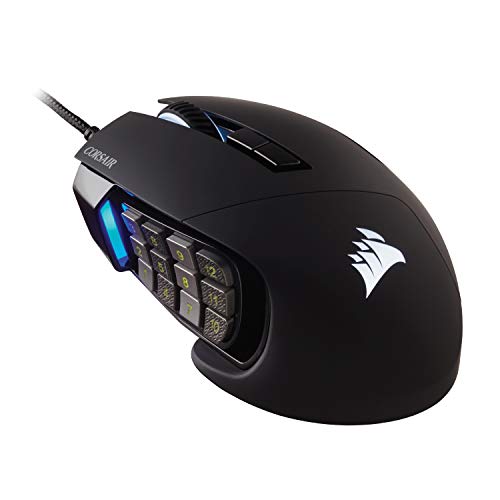
Pros
- 17 fully programmable macro buttons
- Repositionable 12-button side slider system
- Accurate 18,000 DPI PixArt optical sensor
- Durable 50-million-click Omron switches
- Contoured ergonomic shape with a finger rest
Cons
- Tethered wired-only connection
- Right-hand ergonomic design limits ambidextrous use
How These MMO Mice Differ
| Model | Connection | Button setup | Notable trade-off |
|---|---|---|---|
| Redragon M908 Wired MMO RGB Gaming Mouse 12400 DPI | Wired USB | 18 programmable buttons | Wired, with software-based remapping |
| Razer Naga V2 HyperSpeed Wireless MMO | 2.4 GHz wireless or Bluetooth | 19 programmable buttons | Uses a replaceable battery, with stated battery life varying by connection |
| Razer Naga V3 Pro Wireless MMO Gaming Mouse | Wireless or USB-C wired mode | Swappable 12, 6, or 2-button plates | Its full customization is on Windows; macOS supports core functions and onboard settings |
| Razer Naga V2 Pro Wireless MMO Gaming Mouse | HyperSpeed wireless or Bluetooth | Swappable 12, 6, or 2-button plates | Charging accessories for wireless charging are sold separately |
| Redragon Gaming Mouse, MMO Mouse Gaming UP 12400 | Wired USB | 19 programmable buttons | Wired and dependent on software for custom macros |
| Redragon M913 Wireless RGB MMO Gaming Mouse 16000 | 2.4 GHz wireless or USB-C wired mode | 16 programmable buttons | Advertised battery life depends on backlighting and use mode |
| Corsair Scimitar Elite Wireless SE MMO MOBA PC | Wireless, Bluetooth, or USB | 16 programmable buttons | Stream Deck functions require the relevant Elgato software |
| Corsair Scimitar RGB Elite Wired MMO MOBA PC | Wired | 17 programmable buttons | Wired-only connection |
Model-by-Model Buying Notes
Redragon M908 Wired MMO RGB Gaming Mouse 12400 DPI
The M908 combines 18 programmable buttons, five memory profiles, a 1000 Hz polling rate, and a Pixart PAW3327 sensor. Its supplied eight-piece weight set allows weight adjustment, which may appeal to players who prefer a wired mouse and want to tune its feel.
Pros: Extensive button mapping, multiple profiles, adjustable weights, and a braided cable. Cons: It requires a wired connection, and the listed operating-system support separates Windows software programming from Mac normal use. Who should skip it: Players who want wireless play or plan to configure all features on macOS.
Razer Naga V2 HyperSpeed Wireless MMO
This model provides 19 programmable buttons, 2.4 GHz HyperSpeed and Bluetooth connectivity, and a Focus Pro 30K optical sensor. Its listed battery life is up to 250 hours over HyperSpeed or 400 hours over Bluetooth, making connection choice relevant to expected runtime.
Pros: Wireless flexibility, a scroll wheel with tactile and free-spin modes, and a high button count. Cons: The supplied specifications describe battery replacement rather than rechargeable power, and runtime differs by connection. Who should skip it: Buyers seeking rechargeable power or interchangeable side-button plates.
Razer Naga V3 Pro Wireless MMO Gaming Mouse
Three magnetic side plates provide 12-, 6-, or 2-button layouts, allowing the mouse to shift between MMO commands and less crowded layouts for other genres. It also specifies a Focus Pro 50K sensor, three connection modes, and up to 155 hours on HyperSpeed or 280 hours on Bluetooth.
Pros: Adaptable side plates, USB-C wired mode, and broad customization through Razer Synapse on Windows. Cons: Its full customization is Windows-specific, and the listed sensor resolution is not a substitute for choosing a comfortable sensitivity. Who should skip it: Buyers who only need a fixed MMO keypad or want full software customization on macOS.
Razer Naga V2 Pro Wireless MMO Gaming Mouse
The Naga V2 Pro includes magnetic 12-, 6-, and 2-button side plates, a Focus Pro 30K sensor, and an adjustable HyperScroll Pro wheel. Its specifications state up to 150 hours over HyperSpeed or 300 hours over Bluetooth, with USB-C charging.
Pros: Swappable layouts, adjustable scroll resistance and steps, and wireless or Bluetooth connectivity. Cons: The wireless charging dock or puck is an additional accessory, and its button options may be unnecessary for players who want a simple layout. Who should skip it: Budget-conscious buyers or anyone who does not expect to use the alternate side plates.
Redragon Gaming Mouse, MMO Mouse Gaming UP 12400
This wired model has 19 programmable buttons, five memory profiles, adjustable DPI, and a polling-rate range listed from 125 Hz to 1000 Hz. Eight removable weights offer a way to alter balance, while its 12 side buttons can map keyboard combinations through software.
Pros: Many configurable commands, profile storage, and removable weights. Cons: It needs a cable, and customized mappings rely on Redragon software. Who should skip it: Players who prefer wireless hardware or want fewer thumb buttons.
Redragon M913 Wireless RGB MMO Gaming Mouse 16000
The M913 supports 2.4 GHz wireless and USB-C wired modes, with 16 programmable buttons and a Pixart 3335 sensor. Redragon lists up to 45 hours with backlighting on and up to 80 hours in eco mode, so lighting settings affect the stated battery endurance.
Pros: Wireless and wired use, onboard DPI levels, and customizable buttons in either mode. Cons: Its battery figures are conditional on mode, and the supplied details do not specify a Bluetooth connection. Who should skip it: Buyers who need Bluetooth or want the highest number of programmable buttons in this selection.
Corsair Scimitar Elite Wireless SE MMO MOBA PC
This wireless Scimitar has 16 programmable buttons, a MARKSMAN S 33K DPI sensor, and SLIPSTREAM wireless with 1000 Hz polling. It also supports Bluetooth and USB, while Elgato Stream Deck integration can assign related functions through the Stream Deck app.
Pros: Multiple connection options, programmable controls, and optional Stream Deck integration. Cons: The supplied specifications do not state battery life, and Stream Deck features depend on Elgato software. Who should skip it: Players who want a stated battery-life figure or do not need its integration features.
Corsair Scimitar RGB Elite Wired MMO MOBA PC
The wired Scimitar RGB Elite lists 17 programmable buttons and a 12-button side panel that can slide to fit thumb position. Its PixArt PMW3391 sensor supports adjustable resolution, and the sculpted shape includes a right-side finger rest.
Pros: Repositionable side buttons, a wired connection, and a high programmable-button count. Cons: It cannot switch to wireless use, and the panel adjustment may not suit every hand or grip. Who should skip it: Buyers who need wireless connectivity or prefer swappable side plates.
How to Choose an MMO Mouse
Choose a button layout you can reach
A dense 12-button thumb grid can keep abilities close, but more buttons only help when you can distinguish and reach them reliably. Consider a sliding panel such as Corsair’s Scimitar design or Razer’s alternate side plates if a fixed MMO grid feels limiting.
Decide between wired and wireless
Wired models avoid battery management, while wireless options can connect through 2.4 GHz or Bluetooth, depending on the model. Some add a wired mode for charging or continued connected use. Check the exact connection options rather than assuming every wireless mouse supports Bluetooth or USB-C operation.
Consider software and operating-system support
Macros, remapping, profiles, and lighting may rely on manufacturer software. Redragon describes Mac use as normal operation for the M908, while Razer states that the Naga V3 Pro’s full customization is available on Windows and macOS supports core functions and onboard settings. Confirm software support for your system before buying.
Do not choose on DPI alone
Maximum DPI figures vary widely here, but they describe sensor sensitivity options, not a guarantee of better play. A usable range, accessible DPI controls, and comfortable cursor speed are more useful selection points. Also consider weight adjustment if you want to tune a mouse’s feel.
Related Gaming Mouse Guides
For more help with fit and setup, see our guides to gaming mouse shape, mouse grip styles, and mouse rests for gaming. Browse the wider Gaming Mice category for additional peripheral advice.
Final Recommendation
Choose the Redragon M908 if you want a wired MMO mouse with many programmable buttons and adjustable weights. The Razer Naga V2 HyperSpeed suits players seeking wireless flexibility without interchangeable plates, while the Naga V3 Pro or V2 Pro offers layout changes for mixed genres. Consider the Corsair Scimitar Elite Wireless SE for wireless use and Stream Deck integration, or its wired counterpart for a repositionable thumb panel without wireless requirements.




Write Your Review
No reviews yet. Be the first to share your experience!