

The Logitech G PRO Mechanical TKL Tenkeyless is the clearest fit for players who want wired mechanical switches and a detachable cable. For quieter use, consider the SteelSeries Apex 3 TKL; for a compact membrane option, compare the Corsair K55 CORE TKL.
This specification-based roundup focuses on wired tenkeyless keyboards, a layout that removes the number pad to leave more room for mouse movement. The listed models differ in switch type, rollover, lighting, and controls, so choose around your desk, games, and typing preferences.
Wired TKL Gaming Keyboard Picks

Pros
- Space-saving tenkeyless design frees mouse room
- Tactile, audible GX Blue clicky mechanical switches
- Detachable 1.8-meter cable ensures easy transport
- Onboard memory stores static LIGHTSYNC profiles
- Three-step tilt adjustment provides stable ergonomics
Cons
- Key and lighting programming requires Logitech G HUB
- Macro assignments are restricted to F1 through F12
- Equipped with an older Micro USB connection
Pros
- Sturdy aluminum-magnesium alloy top plate
- Durable wear-resistant PBT keycaps
- Space-saving tenkeyless layout
- Integrated FN media and lock shortcuts
- Tactile switches provide clear physical feedback
Cons
- Single-color white LED backlighting without RGB
- Rollover limited to 6 keys instead of full NKRO
- Fixed wired connection lacks a detachable cable

Pros
- Compact tenkeyless form factor
- 300ml spill-resistant protection
- Dedicated media and brightness controls
- Quiet membrane key operation
- Responsive 1,000Hz polling rate
Cons
- Membrane switches instead of mechanical switches
- Limited to 12-key rollover rather than full rollover
- Zone-based lighting instead of per-key RGB

Pros
- Space-saving tenkeyless design
- IP32 spill and dust resistance
- Quiet keystrokes for shared spaces
- Dedicated media buttons and volume roller
- Wide PC and console compatibility
Cons
- Non-mechanical switches lack distinct mechanical tactile response
- RGB illumination is limited to 8 zones instead of per-key
Pros
- Low-latency LIGHTSPEED wireless, Bluetooth, and USB connectivity
- Smooth GX Red linear mechanical switches
- Durable dual-shot PBT keycaps
- Space-saving tenkeyless form factor
- Dedicated media buttons with an analog volume roller
Cons
- Lacks a dedicated numeric keypad for productivity tasks

Pros
- Magnetic Hall-Effect switches with light 35g actuation
- Rapid Trigger allows instant key reactivation
- Onboard FN shortcuts for actuation adjustments without software
- Deep key customization across layers via KEYCONTROL
- Dynamic LIGHTSYNC RGB backlighting
Cons
- Advanced feature access requires Logitech G HUB software
- Wired-only design limits cable-free desk setups

Pros
- Compact 60% footprint frees up mouse space
- Responsive GX tactile optical switches
- Low-latency LIGHTSPEED wireless and Bluetooth support
- Multi-layer key customization via KEYCONTROL
- Includes protective carrying case for travel
Cons
- Lacks dedicated arrow keys and navigation cluster
- Requires learning secondary function layers for commands

Pros
- Adjustable actuation from 0.1mm to 4.0mm
- Rapid Trigger enables faster repeated keypresses
- Built-in OLED display for direct onboard adjustments
- Protection Mode prevents accidental key activations
- Space-saving tenkeyless form factor
Cons
- Tenkeyless layout lacks a dedicated numeric keypad
- Substantial 3.53-pound weight limits easy portability
Pros
- Compact space-saving tenkeyless layout
- IP32 water and dust resistance
- Whisper-quiet switches rated for 20 million presses
- Dedicated volume roller and media buttons
- Gaming-grade anti-ghosting technology
Cons
- Sold as a renewed unit
- Zoned RGB illumination instead of per-key lighting

Pros
- Space-saving 87-key tenkeyless layout
- Four adjustable mouse sensitivity presets up to 3200 DPI
- Included non-slip fabric mouse pad
- Driver-free USB plug-and-play setup
- 19 anti-ghosting keys for gaming inputs
Cons
- Keyboard backlight cannot display a single solid color
- Uses membrane switches instead of mechanical switches
- Console usage depends on specific game software support
How These Wired TKL Keyboards Differ
Logitech G PRO Mechanical TKL Tenkeyless
This wired mechanical model uses GX Blue click switches, offering audible feedback and a tactile feel for players who prefer distinct keypresses. Its compact layout, detachable 1.8-meter Micro USB cable, three-step angle adjustment, and onboard lighting patterns suit tournament travel and smaller desks.
Pros: Clicky mechanical switches, detachable cable, adjustable feet, and lighting patterns that can be saved onboard. Logitech G HUB is required for programming keys and lighting, while F-key programming also requires the software.
Cons: The clicky switches may not suit quiet shared spaces, and the connector is Micro USB rather than a newer USB type. Who should skip it: Choose another model if you want quiet keys or dislike audible switch feedback.
Logitech G413 TKL SE Mechanical Gaming Keyboard
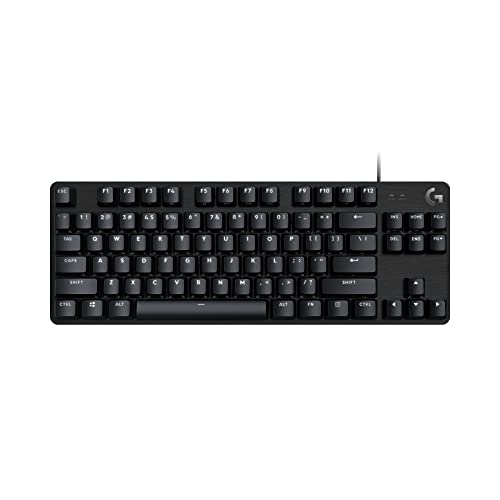
The G413 TKL SE combines tactile mechanical switches with durable PBT keycaps and a brushed aluminum-magnesium alloy top case. White backlighting keeps illumination straightforward, while six-key rollover with anti-ghosting supports simultaneous inputs within that stated limit.
Pros: PBT keycaps, a rigid metal-alloy top case, tactile switches, and FN-key media controls make it a practical wired choice for gaming and everyday use. The 104-key full-size model is available separately for users who need a number pad.
Cons: Lighting is white rather than multicolor RGB, and the listed rollover specification is six keys. Who should skip it: Pass if customizable RGB effects or a higher stated rollover count are priorities.
SteelSeries Apex 3 TKL RGB Gaming Keyboard
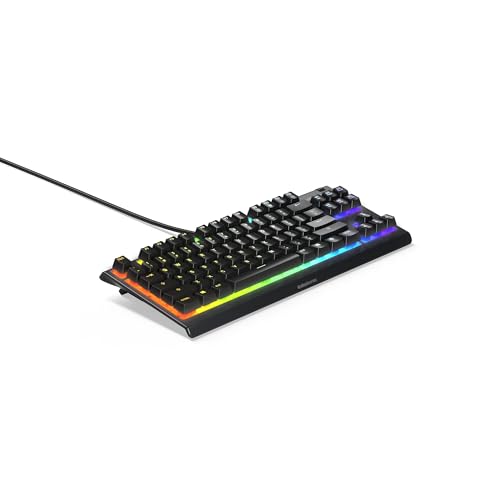
This wired tenkeyless keyboard uses whisper-quiet gaming switches rated for more than 20 million keypresses, with anti-ghosting and IP32 water and dust resistance. Eight-zone RGB lighting and dedicated media controls, including a clickable volume roller, add convenience beyond basic gameplay.
Pros: Quiet switches suit shared rooms, while the listed IP32 protection and media controls address everyday desk use. Compatibility is specified for Windows, Mac OS X, Xbox Series S and X, PS4, and PS5.
Cons: The product data describes its switches as quiet gaming switches, not mechanical switches, so buyers seeking a mechanical feel should compare other picks. Who should skip it: Avoid it if mechanical switches are essential to your choice.
Corsair K55 CORE TKL RGB Gaming Keyboard
The K55 CORE TKL is a wired membrane keyboard with quiet keys, eight-zone RGB, and stated resistance to spills up to 300 milliliters. Four dedicated media buttons handle volume, playback, Windows lock, and brightness, while 12-key rollover and 1,000Hz polling are specified.
Pros: Its membrane design, spill resistance, media controls, and compact layout make it a useful option for mixed gaming and general PC use. The product is listed with a North American layout.
Cons: Membrane keys differ in feel from mechanical switches, and the stated rollover is 12 keys. Who should skip it: Choose a mechanical model if switch feel and mechanical key construction matter more than quiet operation.
CHONCHOW TKL Gaming Keyboard Mouse
This wired bundle pairs an 87-key membrane keyboard with a USB mouse and mouse pad. The keyboard offers two lighting modes, multimedia keys, a Windows-lock function, and 19 anti-collision keys, while the mouse has four selectable DPI settings.
Pros: The bundle provides keyboard, mouse, and pad together, with plug-and-play USB connectivity and listed support for Windows, Mac, and several consoles. Console keyboard support depends on the individual game’s settings, so verify that before buying.
Cons: The keyboard’s backlight is rainbow rather than user-selectable single-color lighting, and its membrane switches are not mechanical. Who should skip it: Look elsewhere if you need mechanical switches, customizable per-key RGB, or a keyboard-only setup.
How to Choose a Wired TKL Gaming Keyboard
Choose the switch type and sound
Mechanical switches provide a different key feel from membrane designs, but the preferred sensation is personal. The Logitech G PRO uses audible clicky GX Blue switches; the G413 TKL SE has tactile mechanical switches, while the Apex 3 and K55 CORE emphasize quieter operation.
Check rollover and intended inputs
Rollover specifications describe how many simultaneous key inputs a keyboard is designed to register. These options list six-key rollover for the G413 TKL SE, 12-key rollover for the K55 CORE, and 19 anti-collision keys for the CHONCHOW bundle; do not treat these figures as interchangeable measurements.
Consider cable, controls, and software
A detachable cable can simplify packing, as on the Logitech G PRO, but its connector is Micro USB. If you want direct media controls, the Apex 3 and K55 CORE include dedicated buttons, while Logitech’s programmable features rely on G HUB software.
Confirm platform and layout needs
The SteelSeries Apex 3 lists Windows, Mac OS X, Xbox Series S and X, PS4, and PS5 compatibility. The CHONCHOW bundle lists broader platform support, but console use can depend on game settings; check your specific game and connection needs before choosing.
TKL layouts omit the number pad, which can free desk space but may be inconvenient for frequent numeric entry. If you need a full-size layout, the Logitech G413 SE is identified as a separate 104-key option.
Frequently Asked Questions
What does TKL mean on a gaming keyboard?
TKL means tenkeyless, a keyboard layout without the dedicated number pad. That smaller footprint can leave more room for mouse movement, but users who regularly enter numbers may prefer a full-size board.
Are all the keyboards in this roundup mechanical?
No. The Logitech G PRO and G413 TKL SE are specified as mechanical, while the SteelSeries Apex 3 and Corsair K55 CORE use quiet or membrane-style designs. The CHONCHOW product is also described as a membrane keyboard.
Which Wired TKL Keyboard Should You Choose?
Choose the Logitech G PRO for clicky mechanical feedback and a detachable travel cable, or the G413 TKL SE for tactile switches and PBT keycaps. The Apex 3 suits buyers prioritizing quiet use, while the K55 CORE adds membrane keys, spill resistance, and dedicated controls.
For a bundled keyboard, mouse, and pad, consider the CHONCHOW option after confirming platform support. Compare the switch type, simultaneous-input specification, and software requirements against your setup rather than choosing by lighting alone.



Write Your Review
No reviews yet. Be the first to share your experience!